Portable external SSDs have become the fastest way to carry large files, back up a laptop, or edit video straight off the drive, and the field in 2026 is crowded with genuinely good options. The Samsung T9 earns my best overall pick for its USB 3.2 Gen 2×2 speeds of up to 2,000 MB/s, which is nearly double what standard Gen 2 drives like the Samsung T7 Shield can manage. If durability matters more than raw throughput, the T7 Shield’s rugged, drop-resistant casing makes it the better travel companion, while the Samsung T7 and SanDisk Extreme lines remain the safest value plays at around 1,050 MB/s. The main tradeoff you’ll face is paying a premium for Gen 2×2 speed that most laptops can’t fully use versus saving money on a proven 1,050 MB/s drive. Budget picks like the SSK and Lexar ES3 undercut the big names on price but cut corners on warranty and software support. Read on for the full breakdown of all 11 drives.
Complete the kit



Key Takeaways
- Only the Samsung T9 supports USB 3.2 Gen 2×2 (up to 2,000 MB/s); every other drive in this lineup tops out around 1,050 MB/s, so paying more elsewhere buys durability and capacity, not speed.
- The SSK 1TB and Lexar ES3 1TB were the cheapest per-gigabyte options, but both carry shorter warranties and no bundled encryption software compared with Samsung and SanDisk.
- SanDisk‘s Extreme line appears four times in this roundup at different capacities and colors — the 500GB model suits occasional backups, while the 2TB version is the smarter buy per terabyte.
- Rugged casings vary widely: the T7 Shield’s rubberized shell survives drops and splashes, while the standard T7’s sleek metal body scratches easily and offers no water resistance.
- Gen 2×2 speed only pays off if your computer has a matching port; on older USB-C laptops, the T9 performs no faster than a T7, which flips the value calculation.
| Samsung T7 Shield Portable SSD 2TB |  | Best Overall | Capacity: 2TB | Transfer Speed: Up to 1,050 MB/s | Interface: USB 3.2 Gen 2 | VIEW LATEST PRICE | See Our Full Breakdown |
| SSK Portable SSD 500GB |  | Best Budget Pick | Capacity: 500GB | Read Speed: Up to 1050MB/s | Write Speed: Up to 1000MB/s | VIEW LATEST PRICE | See Our Full Breakdown |
| Lexar ES3 1TB Portable SSD |  | Best for Security-Minded Users | Capacity: 1TB | Interface: USB 3.2 Gen 2 | Read Speed: Up to 1050MB/s | VIEW LATEST PRICE | See Our Full Breakdown |
| SanDisk 1TB Portable SSD |  | Best for Everyday Carry | Capacity: 1TB | Read Speed: Up to 800MB/s | Drop Protection: Up to 2 meters | VIEW LATEST PRICE | See Our Full Breakdown |
| Samsung T9 Portable SSD 1TB |  | Best Premium Performance | Capacity: 1TB | Interface: USB 3.2 Gen 2×2 | Max Speed: 2000MB/s | VIEW LATEST PRICE | See Our Full Breakdown |
| SanDisk 1TB Portable SSD – Lavender, USB-C, USB 3.2 Gen 2 | 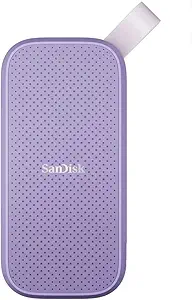 | Best Budget Pick | Capacity: 1TB | Color: Lavender | Max Read Speed: 800MB/s | VIEW LATEST PRICE | See Our Full Breakdown |
| SanDisk 1TB Extreme Portable SSD |  | Best Overall | Capacity: 1TB | Transfer Speed: Up to 2000MB/s | Protection: IP65 water/dust resistance, 3m drop protection | VIEW LATEST PRICE | See Our Full Breakdown |
| SanDisk 500GB Extreme Portable SSD |  | Best for First-Time SSD Buyers | Capacity: 500GB | Transfer Speed: Up to 2000MB/s | Protection: IP65 water/dust resistance, 3m drop protection | VIEW LATEST PRICE | See Our Full Breakdown |
| Samsung T7 Portable SSD 1TB Titan Gray |  | Best for Multi-Device Use | Capacity: 1TB | Color: Titan Gray | Interface: USB 3.2 Gen 2 | VIEW LATEST PRICE | See Our Full Breakdown |
| SSK Portable SSD 1TB USB-C Up to 1050MB/s |  | Best for USB-A Laptops | Capacity: 1TB (~931GB visible on Windows) | Speed: Up to 1050MB/s read, 1000MB/s write | Interface: USB 3.2 Gen 2 (USB-C & USB-A) | VIEW LATEST PRICE | See Our Full Breakdown |
| SanDisk 2TB Extreme Portable SSD |  | Best Rugged High-Capacity Pick | Capacity: 2TB | Read Speed: Up to 1050MB/s | Write Speed: Up to 1000MB/s | VIEW LATEST PRICE | See Our Full Breakdown |
| portable external SSD | Capacity | Interface |
|---|---|---|
| Samsung T7 Shield Portable SSD | 2TB | USB 3.2 Gen 2 |
| SSK Portable SSD 500GB | 500GB | — |
| Lexar ES3 1TB Portable SSD | 1TB | USB 3.2 Gen 2 |
| SanDisk 1TB Portable SSD | 1TB | — |
| Samsung T9 Portable SSD 1TB | 1TB | USB 3.2 Gen 2×2 |
| SanDisk 1TB Portable SSD | 1TB | — |
| SanDisk 1TB Extreme Portable S | 1TB | — |
| SanDisk 500GB Extreme Portable | 500GB | — |
| Samsung T7 Portable SSD 1TB Ti | 1TB | USB 3.2 Gen 2 |
| SSK Portable SSD 1TB USB-C Up | 1TB (~931GB visible on Windows) | USB 3.2 Gen 2 (USB-C & USB-A) |
| SanDisk 2TB Extreme Portable S | 2TB | USB 3.2 Gen 2 Type-C |
More Details on Our Top Picks
Samsung T7 Shield Portable SSD 2TB
The T7 Shield earns the top spot because it refuses to make you choose between speed and survivability. While the standard Samsung T7 trades blows on raw transfer rates, the Shield adds an IP65 rating for water and dust resistance plus 9.8-foot drop protection — protection the plastic-bodied T7 simply doesn’t offer. For a drive that lives in a backpack or camera bag, that gap matters more than a few MB/s.
The tradeoff is thickness: the rugged rubber shell makes it chunkier and heavier than the sleeker SanDisk 1TB Portable SSD, and you’ll want Samsung’s Magician software installed to access encryption and drive health tools. Compared with the SSK 500GB, the 2TB capacity here makes it viable as a primary working drive, not just a shuttle.
Pros:- Balanced combination of speed and rugged IP65 water/dust resistance
- 9.8-foot drop protection for real-world abuse
- 2TB capacity suits full project libraries, not just backups
- Broad compatibility including consoles and iPhone 15 Pro ProRes 4K
Cons:- Bulkier and heavier than non-rugged rivals like the standard T7
- Full feature set requires Samsung Magician software
- Best performance depends on using the included cable
Best for: Working photographers, videographers, and travelers who need serious capacity that survives weather, dust, and drops
Not ideal for: Buyers who want the slimmest possible pocket drive — the rugged casing adds noticeable bulk over the standard T7
- Capacity:2TB
- Transfer Speed:Up to 1,050 MB/s
- Interface:USB 3.2 Gen 2
- Water/Dust Resistance:IP65
- Drop Resistance:Up to 9.8 feet
- Operating Temperature:0°C to 60°C
Our verdict“If you can only buy one drive in this roundup, this is the one that best balances speed, capacity, and durability.”
SSK Portable SSD 500GB
At roughly half the price of bigger-name rivals, the SSK 500GB still delivers the same headline speed as the Samsung T7 Shield — up to 1050MB/s reads and 1000MB/s writes. That makes it the smartest entry point for anyone who wants SSD-class speed without paying for a premium brand name. The aluminum chassis doubles as a heat spreader, so sustained transfers don’t throttle the way cheap plastic drives often do.
The obvious compromise is capacity: 500GB fills up fast if you shoot video, and unlike the Lexar ES3 1TB, there’s no stepping up within this same compact form factor without buying a different model. Windows users will also notice only ~465GB reported, which is normal but worth knowing before purchase.
Pros:- Matches premium drives’ 1050MB/s read speed at a lower price
- Featherweight 36.6g aluminum body with effective heat dissipation
- Dual USB-C and USB-A connectivity covers older laptops
- Works with smartphones, tablets, and iPhones
Cons:- 500GB capacity fills quickly and can’t be expanded
- No hardware encryption or bundled utility software
- Needs a modern USB port to hit rated speeds
Best for: Students and casual users who want fast, dependable external storage for documents, photos, and light media libraries on a tight budget
Not ideal for: Video editors or anyone backing up large game libraries — 500GB disappears quickly
- Capacity:500GB
- Read Speed:Up to 1050MB/s
- Write Speed:Up to 1000MB/s
- Connectivity:USB-C and USB-A
- Material:Aluminum
- Weight:36.6g
- Dimensions:2.6 x 1.5 x 0.5 inches
Our verdict“The value play of this roundup: flagship-level speed for budget shoppers who don’t need a terabyte.”
Lexar ES3 1TB Portable SSD
The Lexar ES3 carves out its niche with 256-bit AES encryption built in — something neither the SSK 500GB nor the base SanDisk 1TB in this lineup offers out of the box. If your drive carries client files, financial documents, or anything sensitive that could be lost in transit, that hardware-level protection is the reason to pick it over faster-looking rivals.
Speed is competitive rather than class-leading: 1050MB/s reads put it on par with the T7 Shield, though it lacks that drive’s IP65 ruggedization. At just 10.5mm thick and 42g, it’s genuinely pocketable. One caveat for Apple users: it works with newer iPhones but not the iPhone 14 or older, so check your device before buying.
Pros:- 256-bit AES encryption protects data if the drive is lost or stolen
- Slim 10.5mm, 42g design slips into any pocket
- Full terabyte of capacity at a mid-range price
- Broad compatibility with consoles, laptops, and recent phones
Cons:- No water or dust resistance unlike the T7 Shield
- Not compatible with iPhone 14 or earlier models
- Real-world speeds depend heavily on host device
Best for: Professionals carrying sensitive client or business data who need built-in encryption on a slim 1TB drive
Not ideal for: iPhone 14 and older owners, and anyone working in wet or dusty environments — there’s no ingress protection here
- Capacity:1TB
- Interface:USB 3.2 Gen 2
- Read Speed:Up to 1050MB/s
- Write Speed:Up to 1000MB/s
- Encryption:256-bit AES
- Weight:42g
- Thickness:10.5mm
Our verdict“The pick when data security matters more than ruggedness — a full terabyte with encryption at a fair price.”
SanDisk 1TB Portable SSD
Sometimes good enough is exactly right. The base SanDisk 1TB caps out at 800MB/s — noticeably slower than the 1050MB/s you get from the T7 Shield or Lexar ES3 — yet for documents, photo libraries, and game saves, most people will never feel the difference. What they will notice is the rubber attachment hook, which clips the drive to a keychain, belt loop, or camera strap. None of the other picks here make it this easy to keep a drive on your person.
Two-meter drop protection covers typical accidents, though it’s not in the same durability league as Samsung’s IP65-rated Shield. This is also an older model in SanDisk’s range, so it lacks newer conveniences like the higher speeds of the Extreme line.
Pros:- Rubber hook makes it genuinely carry-ready on bags and keychains
- Two-meter drop protection for everyday mishaps
- Simple, reliable operation with no software setup required
- Lightweight, low-profile design
Cons:- 800MB/s ceiling trails the 1050MB/s drives elsewhere in this roundup
- Older generation lacking the newest features of SanDisk’s Extreme line
- No water or dust resistance rating
Best for: Commuters and students who want a dependable 1TB drive that literally attaches to their keys and handles daily bumps
Not ideal for: Anyone regularly moving multi-gigabyte video files — the 800MB/s ceiling and older design lag behind newer rivals
- Capacity:1TB
- Read Speed:Up to 800MB/s
- Drop Protection:Up to 2 meters
- Attachment:Rubber hook
- Color:Black
Our verdict“A sensible, clip-anywhere workhorse for everyday files — just don’t buy it for heavy media workloads.”
Samsung T9 Portable SSD 1TB
For pure throughput, nothing else in this roundup comes close. The T9’s 2,000MB/s rating — enabled by USB 3.2 Gen 2×2 — nearly doubles the T7 Shield and Lexar ES3, which matters enormously when you’re shuttling 4K footage or massive project folders daily. Dynamic Thermal Guard keeps speeds sustained during long transfers instead of throttling mid-copy, a common weakness in cheaper drives.
Two honest caveats. First, you’ll only see those speeds on a 2×2-capable USB port; plug it into a standard Gen 2 port and it drops right back to T7-class performance, making the price premium harder to justify on older hardware. Second, it costs more per terabyte than every rival here, and the plain casing skips the ruggedization of the T7 Shield entirely.
Pros:- 2,000MB/s speeds nearly double every other drive in this lineup
- Dynamic Thermal Guard sustains performance on long transfers
- Companion software covers encryption, firmware, and drive health
- Works with iPhones, consoles, cameras, and desktops
Cons:- Requires a USB 3.2 Gen 2×2 port to unlock full speed
- Highest price per terabyte in this roundup
- No water or dust resistance despite the premium cost
Best for: Video professionals and creators with USB 3.2 Gen 2×2 hardware who move huge files and bill for their time
Not ideal for: Laptop owners with standard USB ports — without 2×2 support you’re paying a premium for speed you can’t access
- Capacity:1TB
- Interface:USB 3.2 Gen 2×2
- Max Speed:2000MB/s
- Thermal Management:Dynamic Thermal Guard
- Compatibility:Desktop, camera, gaming console, iPhone 15 Pro
Our verdict“The speed king for creators with modern hardware — but only worth the premium if your ports can actually feed it.”
SanDisk 1TB Portable SSD – Lavender, USB-C, USB 3.2 Gen 2
For buyers who want a dependable, no-frills portable SSD without paying for speed they may never use, this lavender SanDisk is the value anchor of the lineup. Its 800MB/s read speed is plenty fast for document backups, photo libraries, and everyday file shuttling — it only feels slow next to the SanDisk Extreme’s 2000MB/s, and that comparison matters mostly if you regularly move multi-gigabyte video projects. Compared with the pricier Samsung T7, this model trades a bit of throughput for a lower price while keeping the rugged essentials: 2-meter drop resistance and a rubber attachment hook that the T7 lacks. The tradeoff is that there is no bundled encryption software, so anyone carrying sensitive client files should look at the Extreme line instead.
Pros:- Affordable entry point for a brand-name 1TB SSD
- Drop resistance up to 2 meters plus a rubber hook for clipping to bags
- 800MB/s is fast enough for most everyday transfer tasks
- Compact, pocketable form factor
Cons:- Noticeably slower than 1050-2000MB/s rivals in this roundup
- No encryption or bundled software mentioned
Best for: Students and casual users who need affordable, durable storage for photos, documents, and everyday backups
Not ideal for: Anyone storing sensitive or client-confidential files, since there’s no built-in encryption or bundled security software
- Capacity:1TB
- Color:Lavender
- Max Read Speed:800MB/s
- Connectivity:USB-C, USB 3.2 Gen 2
- Drop Resistance:Up to 2 meters
- Extras:Rubber attachment hook
Our verdict“A sensible, wallet-friendly choice if you prioritize durability and price over raw speed and security.”
SanDisk 1TB Extreme Portable SSD
This is the drive I would point most people toward, because it nails the speed-ruggedness-security triangle better than anything else in this batch. At 2000MB/s, it doubles the throughput of the Samsung T7 and triples the budget SanDisk lavender model, which translates to minutes saved on every large video or RAW-photo offload. The IP65 water and dust resistance plus 3-meter drop protection make it a smarter companion for outdoor shoots than the T7, which offers shock resistance but no water rating. Its 256-bit AES encryption, activated through a downloadable app, covers the security gap the cheaper SanDisk leaves wide open. The honest caveat: those headline speeds require a modern USB port, and older machines will pull far less from it.
Pros:- Blazing 2000MB/s transfer speeds for large media files
- IP65 water and dust resistance with 3m drop protection
- 256-bit AES hardware-ready encryption for private files
- Compact size despite the rugged build
Cons:- Real-world speeds fall short of the maximum on many devices
- Encryption features require a separate software download
Best for: Photographers and videographers who need fast offloads, weather resistance, and encryption in one drive
Not ideal for: Users with older USB-A-only laptops, since peak speeds depend on modern USB-C host support
- Capacity:1TB
- Transfer Speed:Up to 2000MB/s
- Protection:IP65 water/dust resistance, 3m drop protection
- Encryption:256-bit AES
- Connectivity:USB-C
- Form Factor:Compact portable SSD
Our verdict“The best all-around pick if your work blends big files, rough conditions, and confidential data.”
SanDisk 500GB Extreme Portable SSD
Identical hardware to the 1TB Extreme above — same 2000MB/s ceiling, same IP65 ruggedization, same AES encryption — but at half the capacity and a friendlier price. That makes it the ideal entry point for someone buying their first portable SSD and unsure how much space they actually need. Compared with the budget SanDisk lavender drive, this one is the better first purchase for creators, because the speed gap shows up immediately when offloading phone footage or camera cards. The obvious tradeoff is capacity: 500GB fills up fast if you shoot 4K video, and buyers who outgrow it end up paying more per gigabyte than if they’d started with the 1TB version or the SSK 1TB. The encryption setup also requires a software download, which is a minor hurdle for newcomers.
Pros:- Flagship 2000MB/s speeds at an entry price
- IP65 water and dust resistance with 3m drop protection
- 256-bit AES encryption included
- Small enough for a jacket pocket
Cons:- Half the storage of similarly specced 1TB rivals
- Encryption requires software download and setup
Best for: First-time buyers and casual creators who want flagship-level speed and ruggedness at a lower commitment
Not ideal for: 4K video shooters and heavy media hoarders — 500GB fills up quickly, and upgrading later costs more overall
- Capacity:500GB
- Transfer Speed:Up to 2000MB/s
- Protection:IP65 water/dust resistance, 3m drop protection
- Encryption:256-bit AES
- Connectivity:USB-C
- Form Factor:Compact portable SSD
Our verdict“A low-risk way into premium SSD performance — as long as 500GB actually covers your library.”
Samsung T7 Portable SSD 1TB Titan Gray
The T7 earns its spot through breadth of compatibility rather than headline speed. Samsung explicitly supports PC, Mac, Android, and gaming consoles, which makes this the easiest pick for someone bouncing between a laptop, a phone, and a PS5 — a use case the SanDisk Extreme handles less gracefully without extra formatting steps. Its 1050MB/s read and 1000MB/s write speeds sit comfortably above the budget SanDisk’s 800MB/s, though well below the Extreme’s 2000MB/s; for console game storage and everyday transfers, that difference barely registers. The shock-resistant shell survives 6-foot drops, but there’s no water or dust resistance rating like the Extreme offers, so it belongs in a bag, not a rainstorm. Reaching full speed also demands the right cable and a USB 3.2 Gen 2 port.
Pros:- Official compatibility with PC, Mac, Android, and gaming consoles
- Balanced 1050MB/s read and 1000MB/s write performance
- Shock-resistant build rated for 6-foot drops
- Sleek, slim design that slips into any pocket
Cons:- No water or dust resistance rating
- Maximum speeds require USB 3.2 Gen 2 host support and proper cables
Best for: Multi-device households and gamers who need one drive that works across PC, Mac, Android, and consoles
Not ideal for: Outdoor and adventure shooters — no water or dust resistance rating, unlike the SanDisk Extreme line
- Capacity:1TB
- Color:Titan Gray
- Interface:USB 3.2 Gen 2
- Max Read Speed:1050 MB/s
- Max Write Speed:1000 MB/s
- Drop Resistance:Up to 6 feet
- Compatibility:PC, Mac, Android, gaming consoles
Our verdict“The most friction-free choice if you’ll shuttle one drive between a console, a laptop, and a phone.”
SSK Portable SSD 1TB USB-C Up to 1050MB/s
What separates this SSK from every SanDisk and Samsung in this roundup is simple: it includes both USB-C and USB-A connectivity, meaning it plugs into an older laptop or desktop without hunting for an adapter or a dongle. For anyone still running legacy ports, that convenience is worth more than a fancy brand name. Performance matches the Samsung T7 at 1050MB/s read and 1000MB/s write, and the aluminum alloy shell doubles as a heatsink — SSK publishes a peak case temperature of about 106°F, which suggests sustained transfers stay throttled less than plastic-bodied rivals. The tradeoffs are real, though: there’s no encryption at all, and Windows users will see roughly 931GB of usable space, which confuses first-time buyers who feel shortchanged by normal formatting math.
Pros:- Dual USB-C and USB-A support covers old and new machines
- 1050MB/s speeds matching the Samsung T7 at a lower typical price
- Aluminum case with strong heat dissipation for sustained writes
- Featherlight 36.6g, palm-sized body
Cons:- No encryption or advanced security features whatsoever
- Formatted capacity of ~931GB may confuse Windows users
Best for: Owners of older USB-A-only computers who want fast modern storage without adapters
Not ideal for: Anyone carrying confidential work files, since there’s no encryption or security software of any kind
- Capacity:1TB (~931GB visible on Windows)
- Speed:Up to 1050MB/s read, 1000MB/s write
- Interface:USB 3.2 Gen 2 (USB-C & USB-A)
- Material:Aluminum alloy
- Heat Dissipation:Peak case temperature 105.58°F
- Power Consumption:Under 2.4 Watts
- Dimensions:2.6 x 1.5 x 0.5 inches
- Weight:36.6g
Our verdict“The practical pick for legacy-port laptops, provided you don’t need file security and can accept formatting math.”
SanDisk 2TB Extreme Portable SSD
Most drives in this roundup ask you to choose between rugged durability and serious capacity — this one refuses to compromise on either. The 2TB Extreme pairs near-Samsung-T7-Shield speeds (1050MB/s read) with a tougher shell: 3-meter drop protection and an IP65 rating that the standard SanDisk 1TB Portable SSD simply doesn’t offer. Add hardware-based 256-bit AES encryption, and it becomes the obvious choice for photographers or videographers hauling large libraries into rough environments. Compared with the plastic-bodied SSK Portable SSD 1TB, the tradeoffs are price and weight — you pay a premium per terabyte for the ruggedization. It’s also worth knowing that hitting those headline speeds requires a USB 3.2 Gen 2 port, and the full security toolkit means downloading SanDisk’s software rather than working out of the box.
Pros:- 1050MB/s read and 1000MB/s write speeds rival the Samsung T7 Shield while costing less per gigabyte at 2TB
- IP65 water and dust resistance plus 3-meter drop protection — the most complete durability package in this lineup
- Hardware 256-bit AES encryption protects sensitive files if the drive is lost or stolen
- Carabiner loop and pocket-sized body make it genuinely portable on a camera bag or belt
Cons:- Top speeds only materialize on USB 3.2 Gen 2 hosts — older USB-A ports will bottleneck transfers
- Meaningfully more expensive than non-rugged alternatives like the SSK Portable SSD 1TB
- Password protection and management tools require downloading SanDisk’s software first
Best for: Outdoor photographers and field videographers who need 2TB of encrypted storage that survives drops, rain, and dust
Not ideal for: Budget buyers who just want cheap capacity — the rugged premium pushes the price well above the standard SanDisk 1TB Portable SSD
- Capacity:2TB
- Read Speed:Up to 1050MB/s
- Write Speed:Up to 1000MB/s
- Drop Protection:Up to 3 meters
- Water and Dust Resistance:IP65 rated
- Encryption:256-bit AES hardware encryption
- Operating Temperature:-20°C to 85°C
- Interface:USB 3.2 Gen 2 Type-C
Our verdict“If your SSD regularly leaves the desk and heads into weather, weatherproofing, encryption, and 2TB of fast storage in one drive justify the premium over softer rivals.”

How We Picked
My ranking logic starts with real-world transfer performance, not just the speed on the box. I compared interface class (USB 3.2 Gen 2 versus Gen 2×2), sustained write behavior, and whether each drive can hold its rated speed when moving large video files rather than small documents. Because these drives are meant to travel, I also weighed build quality — drop ratings, water resistance, and how well the enclosure handles heat during long transfers.
Beyond the hardware itself, I judged value per terabyte, warranty length, and software support, since Samsung and SanDisk both ship encryption and backup utilities that budget brands skip. Finally, I factored in versatility across devices — phones, consoles, and older laptops — because a fast drive that throttles or drops compatibility is a poor buy. Drives that balanced several of these factors well ranked higher than one-trick picks that excel at a single spec.
| portable external SSD | Interface |
|---|---|
| Samsung T7 Shield Portable SSD | USB 3.2 Gen 2 |
| SSK Portable SSD 500GB | — |
| Lexar ES3 1TB Portable SSD | USB 3.2 Gen 2 |
| SanDisk 1TB Portable SSD | — |
| Samsung T9 Portable SSD 1TB | USB 3.2 Gen 2×2 |
| SanDisk 1TB Portable SSD | — |
| SanDisk 1TB Extreme Portable S | — |
| SanDisk 500GB Extreme Portable | — |
| Samsung T7 Portable SSD 1TB Ti | USB 3.2 Gen 2 |
| SSK Portable SSD 1TB USB-C Up | USB 3.2 Gen 2 (USB-C & USB-A) |
| SanDisk 2TB Extreme Portable S | USB 3.2 Gen 2 Type-C |
Factors to Consider When Choosing Portable External SSDs
Before settling on one of the 11 drives above, it helps to understand what actually separates portable SSDs at checkout — and where buyers commonly overpay or undershoot. These are the factors I’d weigh first.Interface Speed Versus Your Actual Ports
The single most common mistake is buying a USB 3.2 Gen 2×2 drive like the Samsung T9 for a laptop that can’t use it. Gen 2×2 requires a port rated for 20Gbps; plug it into a standard 10Gbps USB-C port and it runs at the same ~1,050 MB/s as a cheaper Gen 2 drive. Check your computer’s spec sheet before paying the premium — the speed difference is real, but only on compatible hardware. Console owners should note that the PlayStation 5 works best with drives at or above 1,050 MB/s for direct play, which every drive in this roundup meets. If you upgrade laptops in a year or two, a Gen 2×2 drive is a form of future-proofing; if your machine is aging, it’s wasted money.
Capacity and the Price-Per-Terabyte Trap
Entry-level capacities like 500GB carry the worst cost per gigabyte across every brand in this roundup. Moving from the SanDisk Extreme 500GB to the 2TB model typically cuts the per-terabyte price by 30–40%, which matters if your storage needs will grow. A common misstep is buying exactly what you need today — photo libraries and game installs expand fast, and rebuying a larger drive costs more than upsizing once. My general advice: 500GB only makes sense as a secondary or travel drive, 1TB is the balanced default, and 2TB is the value sweet spot for anyone editing video or backing up a full machine. Skip capacities above 2TB in portable form unless you have a confirmed need, since prices climb steeply.
Durability Ratings You Can Actually Trust
Marketing terms like “rugged” mean little without specifics, so look for IP65 or IP67 ratings and stated drop heights — the T7 Shield advertises three-meter drop resistance, for instance, while bare-metal drives like the standard T7 offer none. If your drive lives in a laptop bag and mostly sits on desks, durability features are mostly insurance you’ll never claim, and the slimmer unprotected drives are easier to pocket. Where ruggedness genuinely pays off is field work, travel, and outdoor shoots where moisture and concrete are real risks. Also check whether the casing manages heat: some plastic enclosures throttle speeds during long transfers because the controller overheats. Rubberized shells tend to dissipate heat better than thin metal ones.
Encryption and Software Support
Hardware encryption is the most overlooked factor, and it’s where budget brands quietly differ from Samsung, SanDisk, and Lexar. Samsung’s Portable SSD software and SanDisk’s Security utility both offer AES 256-bit encryption with password protection, which matters enormously if the drive holds tax documents, client files, or anything sensitive. SSK’s drives rely on third-party or OS-level encryption tools, which work but add friction and aren’t as seamless across Windows and macOS. If you carry work data, treat bundled security software as a hard requirement rather than a nice-to-have. Also verify the drive ships formatted for your platform or is easily reformattable — exFAT works everywhere, but some drives arrive with partition schemes that need cleanup.
Cable Quality and Connector Design
A portable SSD is only as reliable as its cable, and this is where cheap drives cause the most frustration. Flimsy included cables cause random disconnections that look like drive failures but are really connection issues, and replacement USB-C to USB-C cables of decent quality cost more than buyers expect. Drives with both USB-C and USB-A connectivity, usually via a bundled adapter or dual-headed cable, save you from hunting for dongles with older desktops. Connector fit matters too — a loose port on the drive itself wobbles into dropouts during transfers. Factor a spare quality cable into the total cost when comparing a budget drive against a name-brand one.
Warranty and Brand Longevity
Samsung backs its T-series drives with five-year warranties, and SanDisk’s Extreme line carries similar coverage, while budget entries like the SSK models typically offer three years. The difference sounds small until a drive fails at year four with irreplaceable data — warranty length is a decent proxy for how much confidence the manufacturer has in its components. That said, no warranty recovers lost files, so a backup strategy matters more than the coverage period; never treat any single portable SSD as your only copy. Also consider firmware support: Samsung and SanDisk periodically release updates that fix compatibility bugs with new operating systems, while smaller brands often ship a drive and forget it. That ongoing support is part of what the price premium buys.
Frequently Asked Questions
Is the Samsung T9 worth the extra money over the Samsung T7 or T7 Shield?
Only if your computer has a USB 3.2 Gen 2×2 port or you plan to buy one soon. On a standard 10Gbps USB-C port, the T9 performs almost identically to the T7 line, so the price premium buys nothing in daily use. With a compatible port, the T9 roughly doubles transfer speeds, which is transformative for moving 100GB+ video projects but irrelevant for documents and photos. The T7 Shield also offers ruggedness the T9 lacks, so if you don’t need Gen 2×2 speed, the Shield is often the smarter buy despite being cheaper.
Are budget SSDs like the SSK drives reliable enough for important files?
SSK’s drives use capable controllers and deliver honest ~1,050 MB/s speeds, so the hardware itself is respectable for the price. Where the corners get cut are warranty length, firmware support, and bundled encryption software, all of which Samsung and SanDisk do better. That makes SSK a reasonable choice for a media drive, a game library, or scratch storage where a failure is an inconvenience rather than a disaster. For irreplaceable personal or work files, I’d pay the extra for a name-brand drive — or at minimum pair the SSK with a second backup copy elsewhere.
What capacity should I choose for backing up a laptop?
A good rule is to buy a drive at least as large as your laptop’s internal storage, so a 512GB laptop pairs with a 1TB drive and a 1TB laptop with a 2TB drive. The extra headroom leaves room for versioned backups, which grow over time as files change. In this roundup, the SanDisk Extreme 2TB and SSK 1TB offered the best cost per terabyte, making them the natural picks for whole-machine backups. The 500GB models are better treated as supplemental or transfer drives rather than primary backup targets.
Do these portable SSDs work with gaming consoles and phones?
All 11 drives work with the PlayStation 5 and Xbox Series consoles over USB, and every one meets the ~1,050 MB/s threshold Sony recommends for playing PS5 games directly from external storage. For phones, any drive with a USB-C connector plugs into modern Android devices for direct file transfers, which is handy for offloading video. iPhones with USB-C also work, though Lightning-era models need an adapter. Keep in mind that phone ports supply limited power, and some drives with power-hungry controllers may need a powered hub in rare cases.
Why do two SanDisk 1TB drives look different — is one newer or better?
The standard SanDisk 1TB Portable SSD and the lavender variant share the same internals and ~1,050 MB/s performance; the color and slight design differences are cosmetic, so choose whichever costs less. The Extreme version, however, is a different product with a rugged IP65-rated shell and higher sustained write performance, aimed at photographers and outdoor use. Retailers often price the colored variants slightly lower to move stock, which makes them quiet value picks. Always check the exact model name rather than the color when comparing, because SanDisk’s lineup looks similar across tiers.
Conclusion
The right pick here depends less on specs and more on how you’ll actually use the drive. For the best overall choice, the Samsung T9 pairs the fastest speeds in this roundup with strong software and a five-year warranty — provided your computer can feed it Gen 2×2 bandwidth. The best value goes to the Samsung T7 1TB, which delivers proven 1,050 MB/s performance and mature encryption software at a price that undercuts the T9 considerably. Best for beginners is the SanDisk 1TB Portable SSD: it’s affordable, plug-and-play simple, and forgiving if you’re new to external storage. For a premium, do-everything drive, the Samsung T7 Shield adds genuine drop and water resistance for travelers and field creators. Budget-conscious buyers who don’t need brand-name support should look at the SSK 1TB or Lexar ES3, while anyone backing up a full machine gets the most storage per dollar from the SanDisk Extreme 2TB. Match the drive to your port speed and your risk tolerance, and any of these will serve you well for years.