
TL;DR

Get the latest gadgets delivered free — and shop member deals
- Fast, free delivery on millions of items
- Access to Prime Big Deal Days deals on October 6–7
- Prime Video, Amazon Music and more included
Smart home security cameras connect video monitoring with an app, alerts, and local or cloud recording, so you can check on home remotely and receive alerts when the camera detects activity. Compare what each model actually records, how it behaves offline, and which features require a subscription; then weigh placement, privacy, Wi-Fi, and long-term costs alongside image quality.
A camera can send a crisp notification to your phone and still fail to capture the one detail you need: a clear view of the face at your front door. That gap between impressive specifications and useful footage is why choosing a camera takes more than comparing megapixels.
Smart home security cameras let people check on a home remotely and receive alerts when they detect activity. A typical setup pairs a camera with an app and either local storage, cloud storage, or both. This guide explains how to judge the features that matter, what privacy and internet access change, and how to compare the full cost before you buy.
Think about your own routine. If you want to know whether a delivery arrived, package detection and a view of the doorstep may matter more than continuous recording. If you need coverage during a long trip, power, Wi-Fi, and off-site backups deserve closer attention.
Match the camera to a specific job, such as checking packages or covering a driveway, before comparing specifications.
Judge footage by lens view, lighting, motion, and recording behavior—not resolution alone.
Check whether motion clips, continuous recording, cloud history, and advanced detection require a subscription.
Test Wi-Fi at the installation spot and learn what the camera saves during an internet or power outage.
Use a unique password, multi-factor authentication, timely updates, and privacy-conscious camera placement.
What smart home security cameras actually do for you
Smart home security cameras combine a camera, an app, and a way to save or view footage, giving you a remote window into selected areas of your home. Depending on the model, the camera can send motion alerts, identify people or packages, record clips, or stream live video. The exact features depend on its hardware, settings, internet connection, and service plan.
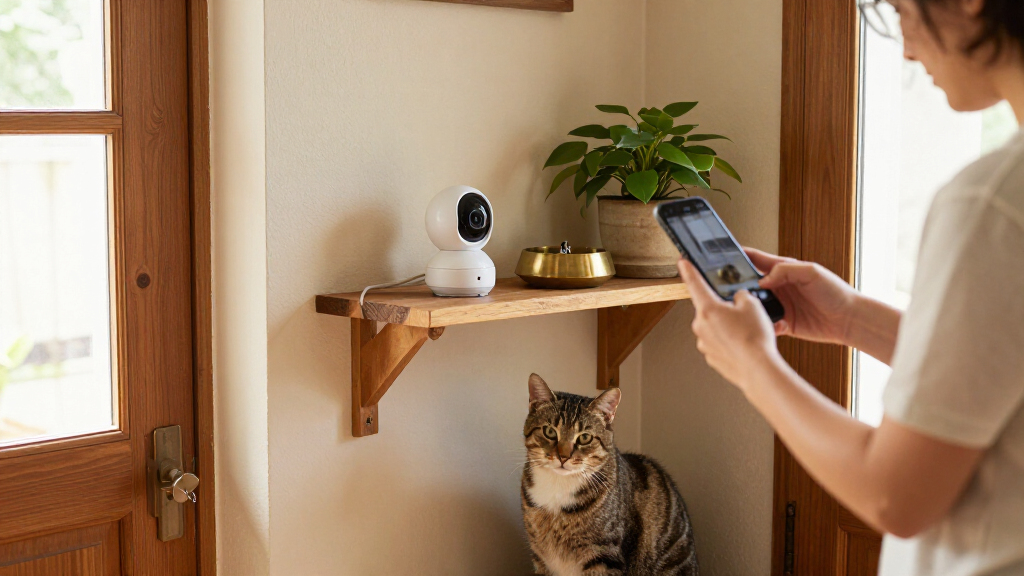
For example, a camera over your porch might send an alert when a delivery arrives, letting you check the video while you are at work. A camera in a living room might help you see whether your dog is resting or chewing the sofa. These are different jobs, so the best camera for one may be a poor fit for the other.
Most systems use Wi-Fi to connect to an app, while saving video to a memory card, a hub, an online account, or a combination. Cloud recording can keep footage accessible even if someone steals the camera, but often comes with a subscription. Local storage may avoid recurring fees, though the camera or storage device could be damaged or taken.
Before choosing a model, write down what you want to see, where the camera will go, and how long you may need to keep recordings. That short list turns a crowded feature menu into a practical shopping guide.
smart home security camera with motion alerts
As an affiliate, we earn on qualifying purchases.
As an affiliate, we earn on qualifying purchases.
Compare the features that change what you can see and save
Smart home security cameras differ most in recording quality, detection, power, storage, and total cost, so compare those features before you compare brand names. The headline resolution is only one part of the picture: a wide lens, poor night lighting, or fast movement can make a high-resolution clip hard to use. The table below shows the tradeoffs to check.
| Feature | What to check | Example tradeoff |
|---|---|---|
| Video and view | Resolution, field of view, low-light performance | A wide view covers more porch, but a distant face may look smaller. |
| Detection | Motion, people, pets, vehicles, packages | Person detection can reduce alerts from swaying branches, but accuracy varies. |
| Power | Wired, battery, or solar-assisted options | Wired power can support steady recording; a battery model is easier to place. |
| Storage | Cloud, local, retention period, continuous recording | Cloud can preserve off-site clips; local storage can lower recurring fees. |
| Ongoing cost | Subscription, hub, accessories, installation | A low-priced camera may need a paid plan for saved clips or advanced alerts. |
Imagine two cameras aimed at the same driveway. One records continuously but needs wiring; the other runs on a battery and saves short clips when it detects motion. The first may give you more context if a car passes slowly, while the second may be simpler to install and maintain.
Detection features can make alerts more useful, but do not treat an AI label as a guarantee. Rain, shadows, distance, and lighting affect what the camera recognizes, and some features may require a subscription or cloud processing. Check current manufacturer details before buying: capabilities, prices, and support policies change.
wireless security camera with cloud storage
As an affiliate, we earn on qualifying purchases.
As an affiliate, we earn on qualifying purchases.
How to choose a camera setup that fits your home
To choose a smart home security camera setup, start with the area you want to monitor, then match the camera’s power, connection, recording, and alert features to that job. A front entrance, a long driveway, and a pet’s favorite corner have different lighting, distance, and privacy needs. Follow these steps before you order.
- Pick one clear purpose. Decide whether you want to check deliveries, watch an entrance, or monitor a shared room. A single well-placed camera can be more useful than several aimed at the wrong spots.
- Check the view and light. Look for the actual field of view and night performance. Stand where the camera will go and notice glare from a porch light or reflections from a window.
- Choose power and recording. Decide whether you can run a cable, recharge a battery, and whether you need continuous recording or motion-triggered clips.
- Test your Wi-Fi. Check the signal at the proposed location, not just beside the router. A weak connection can delay alerts or interrupt live video.
- Price the whole setup. Add any hub, subscription, memory card, installation, and replacement batteries to the camera price.
For instance, a renter who wants to check packages may favor a battery camera that mounts without major installation and sends person or package alerts. A homeowner recording a detached garage may prefer a wired camera and local or cloud backup, especially if the Wi-Fi signal needs an extender.
Before you commit, check whether the app shows saved clips without a paid plan and whether the camera supports your preferred smart-home platform. Those details can decide whether daily use feels effortless or turns into a string of workarounds.
outdoor security camera with night vision
As an affiliate, we earn on qualifying purchases.
As an affiliate, we earn on qualifying purchases.
Set up alerts and storage so important footage is still there
Smart home security cameras are only useful when they capture the right moments and let you retrieve the footage afterward. Set alert zones and detection types to match the view, then confirm how clips are stored and how long they remain available. A flood of irrelevant notifications can make you ignore the one alert that matters.
Suppose your porch camera faces a busy sidewalk. If every passing pedestrian triggers an alert, a delivery notification can disappear among dozens of pings. Where supported, narrow the activity zone to the steps and select package or person detection, then test the settings during a normal day.
Storage rules matter as much as alerts. Check whether the camera records continuously or saves short motion-triggered clips, how many days of history you get, and whether playback needs a subscription. Some battery cameras conserve power by recording clips rather than running continuously. If continuous footage matters, verify that the model supports it with the chosen storage plan.
Think about outages, too. Some cameras can save video locally when the internet fails, but remote viewing and many notifications generally need connectivity. An off-site cloud copy can remain accessible if the camera is stolen, while local-only footage may be lost with the device. Choose the tradeoff that fits what you need to preserve.
Useful test: Before relying on a camera for a trip, trigger a test alert, play back a saved clip, and check that the recording includes the area you meant to cover.
indoor security camera with two-way audio
As an affiliate, we earn on qualifying purchases.
As an affiliate, we earn on qualifying purchases.
Protect your privacy without giving up useful coverage
Smart home security cameras collect sensitive video and account data, so good placement and account security matter as much as the lens. Aim cameras at entrances and shared outdoor areas rather than windows or private spaces where neighbors or household members reasonably expect privacy. Check local rules if you are unsure about recording audio or views beyond your property.
A practical example: a driveway camera can cover the car and the path to the garage without pointing into the neighbor’s kitchen window. Indoors, let household members know when a camera is active and review whether it records sound. A camera intended to check on a pet does not automatically need to record a whole room around the clock.
Protect the account with a unique, strong password and turn on multi-factor authentication when the service offers it. Install software updates, remove access for people who no longer need it, and review account-sharing settings. No internet-connected device is risk-free, but these steps reduce common ways an account can be exposed.
Also ask where video is processed and stored, who can access it, and what happens when you cancel a plan. Manufacturers do not all handle footage in the same way. If privacy is a high priority, compare local-processing and local-storage options, then read the current privacy and support policies rather than relying on a short product-page claim.
Know what can go wrong before you depend on remote access
Remote camera access usually depends on power, a working network, and a functioning app or service, so it is not guaranteed during an outage. A camera may keep recording locally without internet, but remote live view and many alerts will stop until connectivity returns. Check each model’s offline behavior instead of assuming every feature works everywhere.
For example, you leave home during a storm and the router loses power. A battery-powered camera may still be on, yet it cannot send a phone alert without a connection. If the model has local storage, it may save footage for you to review later; if it relies solely on cloud upload, the gap may remain unrecorded.
Wi-Fi strength and upload capacity also affect day-to-day reliability. A camera at the far end of a long garden may show a weak signal even when the router works well in the kitchen. Multiple cameras streaming high-resolution video or uploading frequent clips can add to network use, especially when you check live feeds often.
Test the setup where you plan to install it. Check live video, trigger an alert, and play a recording on your phone over both home Wi-Fi and mobile data. If the signal drops at the garage, try a better placement or a suitable network upgrade before blaming the camera.
Make a buying decision you will still like next year
The right camera is the one that fits your real routine and remains affordable after the first purchase. Add the camera, hub, subscription, installation, accessories, and battery changes together before comparing prices. A model that costs less at checkout can cost more over time if saved clips or useful detection require a monthly plan.
Picture a household that wants to monitor a front door and a side gate. The first camera has a low upfront price but charges for cloud history; the second costs more but records to a local hub. Neither is automatically better. The better fit depends on whether the household values off-site access, avoiding recurring fees, or keeping footage available if one device is removed.
Check practical support details before you settle on a brand: whether the app is easy to use, how quickly alerts arrive, what the warranty covers, and whether the manufacturer still provides software updates. These points matter on a rainy Tuesday when you need to review a clip, not just in a polished product demonstration.
Before publishing or purchasing, verify current prices, plan terms, integrations, and feature availability directly with the manufacturer. Camera capabilities change quickly, and a feature listed for one model or subscription may not apply to another. Keep a simple note of the exact model and plan you compared, so you can spot the tradeoff later.
Frequently Asked Questions
Do smart home security cameras work without Wi-Fi?
Some cameras can save footage to local storage without internet, but remote viewing and many alerts generally require a connection. Offline behavior varies by model, so check whether recordings continue during an outage.
Do I have to pay a monthly fee?
Not always. Some models offer local recording or basic alerts without a subscription, while cloud history, longer storage, or advanced detection may require a paid plan. Check the current plan terms before buying.
Can a smart security camera record continuously?
Some wired cameras support continuous recording, while many battery-powered models save short clips after detecting activity. Confirm that the camera, storage option, and plan all support the recording style you want.
How much internet bandwidth does a camera use?
Usage depends on video quality, recording settings, live viewing, and whether clips upload continuously or only after motion. Several high-resolution cameras can add noticeable network use, so test your connection at the camera locations.
Are smart security cameras safe from hackers?
No internet-connected camera is risk-free. Use a unique password, enable multi-factor authentication where available, install software updates, and review who can access the account and saved video.
Where should I place a home security camera?
Entrances, driveways, and shared outdoor spaces are common choices. Aim the camera at useful approaches while avoiding private areas and unnecessary views into neighbors’ homes; check local rules about audio and recording.
Conclusion
Choose a camera by asking one simple question: Will it capture and save the moments you actually need? Check the view, alerts, storage, connection, privacy controls, and full recurring cost before trusting a product-page headline.
Set it up, test it, and play back a clip before you leave home. A good camera should turn a distant doorstep into a useful view—not another blinking notification you learn to ignore.
Fall Picks
fall essentials
As an affiliate, we earn on qualifying purchases.