
The Amazon Fire TV Stick 4K Max (2nd Gen) is my best overall pick for its combination of 4K support, Wi-Fi 6, and a broad app selection. For a simpler interface, the Roku Streaming Stick 4K stands out, while the Xiaomi TV Stick 4K (2nd Gen) offers another 4K option outside the Fire TV and Roku lineups. The biggest tradeoffs are HD versus 4K, platform preferences, wireless conditions, and whether a renewed device suits your needs. Some models prioritize a low-friction experience; others offer faster connections or more advanced features. Read on for the full breakdown and guidance on choosing among these 15 streaming sticks.

Get the latest gadgets delivered free with Prime
- Fast, free delivery on millions of items
- Prime Video, Amazon Music and more included
- Member-only deals all year
Complete the kit



Key Takeaways
- The Fire TV Stick 4K Max (2nd Gen) leads the lineup for a feature-rich 4K setup: Wi-Fi 6 and its higher-end positioning make it a stronger fit for demanding households than the basic HD sticks.
- Roku and Fire TV offer different interface priorities: Roku models suit viewers who want a straightforward streaming-focused experience, while Fire TV sticks fit households comfortable with Amazon’s ecosystem.
- Resolution should match the TV, not just the device: The HD Fire TV Stick and Roku sticks are sensible for 1080p sets, while 4K models make more sense when the display and viewing habits justify them.
- Renewed Roku options call for extra care: The Roku Streaming Stick Plus 4K and Roku Streaming Stick 4K Renewed may fit buyers open to renewed hardware, but new alternatives avoid that condition tradeoff.
- The lineup includes meaningful alternatives beyond the main brands: Xiaomi’s 4K stick and onn’s Android TV HD and 4K devices give buyers different platform and resolution options, though compatibility and app preferences matter.
| Amazon Fire TV Stick 4K Select Streaming Device |  | Best Overall | Resolution: Up to 2160p at 60 fps | HDR: HDR10, HDR10+, and HLG | Processor: Quad-core 1.7 GHz | VIEW LATEST PRICE | See Our Full Breakdown |
| Roku Streaming Stick Plus 4K HDR10+ Streaming Device with Voice Remote (Renewed) |  | Best for Simple, Cord-Free Setup | Model: 3830XB | Resolution: 4K | HDR: HDR10+ | VIEW LATEST PRICE | See Our Full Breakdown |
| Amazon Fire TV Stick 4K with Alexa+ and Wi-Fi 6 |  | Best for Wi-Fi 6 and Private Listening | Resolution: 4K | HDR: HDR10+ | Wi-Fi: Wi-Fi 6 | VIEW LATEST PRICE | See Our Full Breakdown |
| onn Android TV 2K FHD Streaming Stick with Remote |  | Best for 1080p TVs and Casting | Resolution: Up to 1080p | Connectivity: HDMI and Wi-Fi | Apps: Google Play Store access | VIEW LATEST PRICE | See Our Full Breakdown |
| Roku Streaming Stick 4K with Voice Remote (Renewed) | 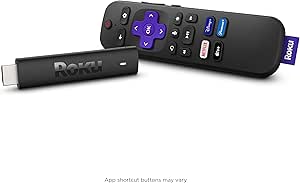 | Best for Dolby Vision | Model: 3820R | Resolution: 4K | Supported formats: Dolby Vision and HDR10+ | VIEW LATEST PRICE | See Our Full Breakdown |
| Amazon Fire TV Stick 4K Max (2nd Gen) Streaming Device |  | Best for Premium Features | Processor: Quad-core 2.0 GHz | Storage: 16 GB | Wi-Fi: Wi-Fi 6E tri-band (2.4, 5, and 6 GHz) | VIEW LATEST PRICE | See Our Full Breakdown |
| Roku Streaming Stick (2025), HD Streaming Device with Voice Remote |  | Best for Simple HD Streaming | Model: 3840EU | Resolution: 1080p (1920 × 1080), with upscaling from 720p | Connectivity: Wi-Fi | VIEW LATEST PRICE | See Our Full Breakdown |
| Roku Streaming Stick (3600R) HD Streaming Player |  | Best for Mobile-App Listening | Model: 3600R | Connectivity: Dual-band Wi-Fi | Connector: HDMI | VIEW LATEST PRICE | See Our Full Breakdown |
| Xiaomi TV Stick 4K (2nd Gen) Streaming Device |  | Best for Google TV Features in a Compact Stick | Resolution: 4K (3840 × 2160) | Operating system: Android TV 11 | RAM: 2 GB | VIEW LATEST PRICE | See Our Full Breakdown |
| Roku Streaming Stick+ 4K HDR Streaming Device with Long-Range Wi-Fi and Voice Remote |  | Best for Challenging Wi-Fi Placement | Resolution: 4K, HD, HDR | Connectivity: Wi-Fi | Wireless range: Up to 4× the range | VIEW LATEST PRICE | See Our Full Breakdown |
| Xiaomi TV Stick 4K (2nd Gen) Streaming Device |  | Best for Google TV and Format Support | Resolution: 4K (3840 x 2160 pixels) | Operating platform: Google TV | Processor: 6nm 2.5GHz quad-core CPU | VIEW LATEST PRICE | See Our Full Breakdown |
| Amazon Fire TV Stick HD with Alexa Voice Remote |  | Best for Full HD TVs | Resolution: Full HD | Wi-Fi: Wi-Fi 6 | Power: Powered by TV via included USB-C cable | VIEW LATEST PRICE | See Our Full Breakdown |
| Amazon Fire TV Stick 4K Plus with Alexa Voice Remote |  | Best for 4K Fire TV Streaming | Output resolutions: 2160p, 1080p, and 720p up to 60 fps | Video formats: Dolby Vision, HDR 10, HDR10+, HLG, H.265, H.264, VP9, AV1 | Audio support: Dolby Atmos, 7.1 surround sound, 2-channel stereo, HDMI audio pass-through up to 5.1 | VIEW LATEST PRICE | See Our Full Breakdown |
| onn Android TV 4K UHD Streaming Device with Voice Remote and HDMI Cable |  | Best for Google Assistant and Casting | Resolution: 3840 × 2160 pixels (4K UHD) | Operating system: Android TV | Connectivity: HDMI, Wi-Fi | VIEW LATEST PRICE | See Our Full Breakdown |
| Roku Streaming Stick 4K with Voice Remote |  | Best for Simple 4K Streaming | Video resolution: 3840 × 2160 | Video formats: H.265/HEVC, Dolby Vision, HDR10+ | Connectivity: Wi-Fi | VIEW LATEST PRICE | See Our Full Breakdown |
| streaming stick | Resolution | Connectivity |
|---|---|---|
| Amazon Fire TV Stick 4K Select | Up to 2160p at 60 fps | — |
| Roku Streaming Stick Plus 4K H | 4K | HDMI and Wi-Fi |
| Amazon Fire TV Stick 4K with A | 4K | HDMI and Bluetooth |
| onn Android TV 2K FHD Streamin | Up to 1080p | HDMI and Wi-Fi |
| Roku Streaming Stick 4K with V | 4K | Wi-Fi and HDMI |
| Amazon Fire TV Stick 4K Max | — | — |
| Roku Streaming Stick | 1080p (1920 × 1080), with upscaling from 720p | Wi-Fi |
| Roku Streaming Stick | — | Dual-band Wi-Fi |
| Xiaomi TV Stick 4K | 4K (3840 × 2160) | — |
| Roku Streaming Stick+ 4K HDR S | 4K, HD, HDR | Wi-Fi |
| Xiaomi TV Stick 4K | 4K (3840 x 2160 pixels) | Wi-Fi 6, Bluetooth, HDMI, USB |
| Amazon Fire TV Stick HD with A | Full HD | HDMI, Bluetooth |
| Amazon Fire TV Stick 4K Plus w | — | — |
| onn Android TV 4K UHD Streamin | 3840 × 2160 pixels (4K UHD) | HDMI, Wi-Fi |
| Roku Streaming Stick 4K with V | — | Wi-Fi |
More Details on Our Top Picks
Amazon Fire TV Stick 4K Select Streaming Device
The Fire TV Stick 4K Select is my strongest all-around pick here because it combines 4K playback, HDR10+, broad format support, and Alexa search in a small HDMI device. Its dual-band MIMO Wi-Fi can help keep streams steady, while the remote can also control compatible TVs and audio equipment. Compared with the Roku Streaming Stick 4K, this model offers AV1 decoding and Fire TV’s cross-app Alexa search, while Roku adds Dolby Vision. The tradeoff is that this Select model has 8 GB of storage and no listed Wi-Fi 6 support, so it is not the best fit for buyers prioritizing newer wireless hardware or Dolby Vision. Subscriptions, compatible equipment, and a separate power connection may also be needed.
Pros:- 4K output with HDR10+, HLG, and a wide range of listed video formats
- Alexa search can find and launch content across apps
- Dual-band, dual-antenna MIMO Wi-Fi supports stable streaming
- Remote controls compatible TVs and audio devices
Cons:- Does not list Dolby Vision or Wi-Fi 6 support
- Requires HDMI, Wi-Fi, and a power connection
- Some apps and content require subscriptions or compatible equipment
Best for: Viewers seeking a flexible 4K stick with Alexa voice search, HDR10+, and a remote that can manage compatible TV and audio controls.
Not ideal for: Dolby Vision-focused viewers or buyers who want Wi-Fi 6; the Roku Streaming Stick 4K supports Dolby Vision, while this model does not list it or Wi-Fi 6.
- Resolution:Up to 2160p at 60 fps
- HDR:HDR10, HDR10+, and HLG
- Processor:Quad-core 1.7 GHz
- Storage:8 GB
- Wi-Fi:Dual-band, dual-antenna MIMO; 802.11a/b/g/n/ac
- Bluetooth:Bluetooth 5.0 and Bluetooth Low Energy
- Ports:HDMI output; micro-USB for power
- Size and weight:3.9 × 1.2 × 0.6 in; 1.5 oz
Our verdict“Choose the Fire TV Stick 4K Select for a capable, Alexa-centered 4K setup, but pick the Roku Streaming Stick 4K if Dolby Vision matters more.”
Roku Streaming Stick Plus 4K HDR10+ Streaming Device with Voice Remote (Renewed)
The Roku Streaming Stick Plus suits viewers who want a straightforward 4K player that can draw power from the TV, avoiding an extra power cord and wall outlet. Its compact body is designed to stay out of sight without crowding nearby HDMI ports, and the voice remote handles basic TV power and volume controls. Compared with the Amazon Fire TV Stick 4K Select, Roku’s appeal is a simpler setup and access to free live TV alongside popular apps; the Fire TV model offers more detailed format and hardware specifications, including AV1 support. This is a renewed device, so buyers should weigh its condition against a new stick. It also lacks listed Dolby Vision support, making the Roku Streaming Stick 4K a better match for viewers who want that format.
Pros:- 4K streaming with HDR10+ support
- Powered from the TV, with no separate wall power connection specified
- Compact shape is designed to avoid blocking neighboring HDMI ports
- Voice remote controls streaming, TV power, and volume
Cons:- Renewed condition may not suit buyers seeking a new device
- Dolby Vision support is not listed
- Requires an HDMI-equipped TV and Wi-Fi
Best for: Viewers who want a discreet 4K Roku device, TV-powered setup, and voice control for everyday streaming.
Not ideal for: Buyers who want a new device or Dolby Vision support; this listing is renewed and specifies HDR10+ rather than Dolby Vision.
- Model:3830XB
- Resolution:4K
- HDR:HDR10+
- Connectivity:HDMI and Wi-Fi
- Power:Powered from TV
- Supported services:Apple TV+, Disney+, Hulu, Netflix, Prime Video, and YouTube
- Remote:Voice remote; controls device, TV power, and volume
- Size and weight:3.7 × 0.8 × 0.5 in; 80 g
Our verdict“Pick this Roku for a tidy, TV-powered 4K setup, but choose the Roku Streaming Stick 4K if Dolby Vision is a priority.”
Amazon Fire TV Stick 4K with Alexa+ and Wi-Fi 6
This Fire TV Stick is the clearest choice in this group for buyers who want Wi-Fi 6 and Bluetooth headphone support alongside 4K HDR10+ streaming. Those features can make it a better fit for a newer home network or late-night viewing than the Fire TV Stick 4K Select, whose listing specifies Wi-Fi 5-class 802.11ac and does not mention headphone support. The included remote also has TV power and volume controls, plus dedicated Live TV and shortcut buttons. The tradeoff is that the product details give less information about storage, processor, and supported video formats than the Select listing, so spec-focused buyers have fewer details to compare. Dolby Vision is not listed, and some apps or content may require subscriptions.
Pros:- Wi-Fi 6 support for compatible home networks
- Bluetooth headphone support for private listening
- 4K resolution with HDR10+
- Remote includes TV power and volume controls
Cons:- Dolby Vision support is not listed
- Storage and processor specifications are not provided
- Some apps and content may require separate subscriptions
Best for: Households with a Wi-Fi 6 router and viewers who want Bluetooth headphones for private listening without giving up 4K HDR10+.
Not ideal for: Buyers who need Dolby Vision or want extensive published hardware details; those looking for a more fully specified option can compare the Fire TV Stick 4K Select.
- Resolution:4K
- HDR:HDR10+
- Wi-Fi:Wi-Fi 6
- Connectivity:HDMI and Bluetooth
- Power:Direct power from TV
- Voice assistant:Alexa+
- Remote features:Voice control, TV power and volume, navigation ring, shortcut and Live TV buttons
- Audio:Bluetooth headphone support
Our verdict“Choose this Fire TV stick for Wi-Fi 6 and headphone listening, but favor the Fire TV Stick 4K Select if detailed format support matters more.”
onn Android TV 2K FHD Streaming Stick with Remote
The onn Android TV 2K FHD Streaming Stick is the sensible fit for a 1080p television or a viewer who values casting more than 4K playback. It supports apps through the Google Play Store, includes a remote microphone for voice control, and has Chromecast built in for sending compatible photos, videos, and music from another device. That makes it a different proposition from the 4K Fire TV and Roku sticks in this roundup: it gives up sharper output and HDR support, but its casting tools and included power adapter suit a basic TV setup. The main compromises are the 1080p ceiling and a three-month warranty. Buyers with a 4K screen should step up to a 4K model such as the Roku Streaming Stick Plus instead.
Pros:- Up to 1080p streaming suits Full HD televisions
- Chromecast built in supports casting from compatible devices
- Remote microphone enables voice control
- Includes an HDMI cable, power adapter, and remote
Cons:- Limited to 1080p, with no HDR formats listed
- Three-month warranty is short compared with the Roku Streaming Stick Plus listing
- Requires Wi-Fi and a power adapter
Best for: Owners of 1080p TVs who want Google Play apps, voice search, and easy casting from compatible phones or tablets.
Not ideal for: 4K TV owners or buyers who want HDR playback; this stick tops out at 1080p and has a shorter listed warranty than the Roku Streaming Stick Plus.
- Resolution:Up to 1080p
- Connectivity:HDMI and Wi-Fi
- Apps:Google Play Store access
- Casting and mirroring:Chromecast built in and Miracast
- Audio:Dolby Audio
- Included accessories:HDMI cable, remote, power adapter, and user manual
- Remote batteries:Two AAA batteries included
- Warranty:Three months
Our verdict“Choose the onn stick for a 1080p TV and Google-style casting, but select a 4K Roku or Fire TV model for a 4K screen.”
Roku Streaming Stick 4K with Voice Remote (Renewed)
Among these five options, the Roku Streaming Stick 4K has the strongest listed video-format combination: 4K, Dolby Vision, and HDR10+. That makes it the more compelling Roku choice for a compatible TV than the Streaming Stick Plus, which lists HDR10+ but not Dolby Vision. Its voice remote controls the stick as well as TV power and volume, while Roku’s channel lineup includes free, live, and premium options. The stated long-range Wi-Fi can help when the TV is farther from a router, but it still depends on a usable wireless connection. This is a renewed model with a 90-day limited warranty, a meaningful drawback for buyers who prefer a new device. Its listed dimensions also seem unusually large for a stick, so check the listing details if exact fit matters.
Pros:- Supports 4K, Dolby Vision, and HDR10+
- Voice remote controls the device, TV power, and volume
- Long-range Wi-Fi is specified
- Access to free, live, and premium streaming channels
Cons:- Renewed condition and a 90-day limited warranty may not suit buyers seeking stronger purchase protection
- Requires a strong Wi-Fi connection for streaming
- Power method is not specified in the provided details
Best for: Viewers with a Dolby Vision-compatible 4K TV who want Roku’s streaming channels and a voice remote with TV controls.
Not ideal for: Buyers who want a new device, a longer listed warranty, or an explicitly TV-powered stick; this renewed model includes a 90-day warranty and lists no power method.
- Model:3820R
- Resolution:4K
- Supported formats:Dolby Vision and HDR10+
- Connectivity:Wi-Fi and HDMI
- Storage:4 GB
- Remote:Voice remote
- Voice assistant compatibility:Siri, Alexa, and Google Assistant
- Warranty:90-day limited warranty
Our verdict“Pick this Roku for Dolby Vision on a compatible TV, but choose the Streaming Stick Plus if you prefer a TV-powered setup and do not need Dolby Vision.”
Amazon Fire TV Stick 4K Max (2nd Gen) Streaming Device
The Fire TV Stick 4K Max (2nd Gen) is the most feature-rich pick in this group for a viewer building around a capable 4K TV and a modern home network. Wi-Fi 6E, a quad-core 2.0 GHz processor, and 16 GB of storage give it more headroom for app use and navigation than the HD-only Roku Streaming Stick (2025). Dolby Vision, HDR10+, and Dolby Atmos also make it a stronger fit for compatible TVs and sound systems than the older Roku Streaming Stick+ 4K HDR. The tradeoff is that these advantages depend on compatible equipment and services, and Wi-Fi 6E only helps with a suitable router. I’d skip it if HD streaming is all you need; its broader format support and extra storage matter less in that setup.
Pros:- Supports 4K output, Dolby Vision, HDR10+, and Dolby Atmos for compatible equipment.
- 16 GB of storage leaves more room for apps and games than the Xiaomi TV Stick 4K (2nd Gen)’s 8 GB.
- Wi-Fi 6E and a quad-core 2.0 GHz processor support fast wireless streaming and responsive navigation.
- Included Alexa Voice Remote Enhanced can control compatible TVs and audio devices.
Cons:- Wi-Fi 6E benefits require a compatible router.
- 4K and HDR formats depend on the display, streaming service, region, and subscription.
- Some remote functions may not work with every compatible TV or audio device.
Best for: Viewers with a 4K Dolby Vision or HDR10+ TV, a compatible audio setup, and a Wi-Fi 6E router who want ample app storage.
Not ideal for: HD-only viewers or households without compatible HDR equipment or a Wi-Fi 6E router, since several headline features may go unused.
- Processor:Quad-core 2.0 GHz
- Storage:16 GB
- Wi-Fi:Wi-Fi 6E tri-band (2.4, 5, and 6 GHz)
- Bluetooth:Bluetooth 5.2 + BLE
- Maximum resolution:2160p at up to 60 fps
- Video formats:Dolby Vision, HDR 10, HDR10+, HLG, H.265, H.264, VP9, AV1
- Audio:Dolby Atmos, 7.1 surround, stereo, and HDMI audio passthrough up to 5.1
- Dimensions:99 × 30 × 14 mm (housing); 108 × 30 × 14 mm (including connector)
Our verdict“Choose the Fire TV Stick 4K Max if your setup can use its advanced HDR, audio, storage, and Wi-Fi features; otherwise, a simpler HD stick may be a better fit.”
Roku Streaming Stick (2025), HD Streaming Device with Voice Remote
The Roku Streaming Stick (2025) is a straightforward choice for a television that tops out at 1080p. Its compact HDMI design is powered by the TV, so it can keep both the device and its power cable out of view—a tidier setup than the Roku Streaming Stick+ 4K HDR, which is aimed at buyers seeking 4K and HDR. The included voice remote handles streaming, TV power, and volume, while the portable form is useful for taking between rooms or on trips. The main compromise is firm: output is limited to 1080p, with upscaling from 720p rather than native 4K. I’d choose it over a more elaborate stick for an HD spare TV, but not for a 4K screen where the Xiaomi TV Stick 4K (2nd Gen) can deliver higher-resolution output.
Pros:- Compact HDMI stick leaves neighboring ports unobstructed.
- Powered directly by the TV, avoiding the need for a separate plug socket.
- Voice remote controls streaming, TV power, and volume.
- Portable design suits travel and use across multiple HD televisions.
Cons:- Maximum output is 1080p, unlike the Roku Streaming Stick+ 4K HDR and Xiaomi TV Stick 4K (2nd Gen).
- HDMI connection and an internet connection are needed for streaming.
- Wi-Fi is listed without a specific generation or range detail.
Best for: People with an HD television who want a compact, portable streamer with basic voice search and TV power and volume controls.
Not ideal for: Owners of 4K TVs who want native 4K or HDR output, since this model is limited to 1080p.
- Model:3840EU
- Resolution:1080p (1920 × 1080), with upscaling from 720p
- Connectivity:Wi-Fi
- Connector:HDMI
- Video codecs:H.264, H.265/HEVC
- Remote:Voice remote control
- Dimensions:5.51 × 1.65 × 0.79 in
- Included accessories:Two pre-installed batteries, USB-C to USB-A power cable, user guide, voice remote control
Our verdict“Pick this Roku for uncomplicated HD streaming and travel, but choose a 4K-capable stick if your TV supports higher resolution.”
Roku Streaming Stick (3600R) HD Streaming Player
The Roku Streaming Stick (3600R) earns a place for buyers who value the Roku mobile app’s private listening and media-sharing options more than newer hardware features. Dual-band Wi-Fi and a quad-core processor are listed, and the included voice remote adds another way to search and control playback. Compared with the Roku Streaming Stick (2025), this older model puts particular emphasis on app-based listening, but its listing does not clearly state a maximum output resolution; I wouldn’t choose it on the assumption that it provides 4K. Private listening also needs a smartphone or tablet and compatible headphones, making it less self-contained than a remote-only setup. Choose it for its app features and portability, not as a future-facing alternative to the 4K Fire TV Stick 4K Max.
Pros:- Dual-band Wi-Fi is listed for wireless connectivity.
- Quad-core processor supports the device’s streaming functions.
- Voice remote and Roku mobile app provide multiple search and control options.
- Mobile app supports private listening and media sharing.
Cons:- The provided product data does not clearly state a maximum video output resolution.
- Private listening requires a smartphone or tablet and compatible headphones.
- Requires an HDTV with an HDMI connection.
Best for: Roku users who want a portable HDMI streamer and plan to use a phone or tablet for private listening and media sharing.
Not ideal for: Buyers who need a clearly specified 4K or HDR streamer, or anyone who wants private listening without relying on a mobile device and compatible headphones.
- Model:3600R
- Connectivity:Dual-band Wi-Fi
- Connector:HDMI
- Video codecs:H.265/HEVC, H.264
- Weight:8 ounces
- Remote:Point Anywhere Remote
- Included components:Roku Streaming Stick, Point Anywhere Remote, 2 AAA batteries
- Supported services:Amazon Instant Video, Google Play, Hulu, Vudu, Netflix
Our verdict“Choose the 3600R if Roku app features such as private listening are your priority, but select a model with clearly stated 4K support for a high-resolution TV.”
Xiaomi TV Stick 4K (2nd Gen) Streaming Device
The Xiaomi TV Stick 4K (2nd Gen) pairs 4K output with Android TV 11, built-in Chromecast, and Google Assistant in a compact stick. That makes it the more natural fit for buyers who cast from phones or prefer Google’s voice assistant, while the Fire TV Stick 4K Max (2nd Gen) is the stronger hardware-led option with Wi-Fi 6E and twice the listed storage. Xiaomi’s 8 GB of storage is the main limit: app-heavy households have less room to work with than on the Fire TV Stick 4K Max. Its Bluetooth and IR remote can control a TV or soundbar, though the supplied data doesn’t specify HDR formats or a maximum frame rate. I’d favor it for Google ecosystem convenience, not for the fullest documented picture-format support.
Pros:- Supports 4K output at 3840 × 2160.
- Android TV 11, Chromecast built-in, and Google Assistant suit Google-focused households.
- Compact stick form is easy to place behind a television or carry between rooms.
- Bluetooth and IR remote can control a TV or soundbar.
Cons:- 8 GB of storage is half the listed capacity of the Fire TV Stick 4K Max (2nd Gen).
- The provided product data does not identify supported HDR formats or maximum frame rate.
- Requires a TV with an HDMI connection.
Best for: People who want a compact 4K streamer with Android TV, Google Assistant, and Chromecast built in for casting from mobile devices.
Not ideal for: App-heavy users who need more storage, or buyers who want clearly specified Dolby Vision, HDR10+, or other HDR-format support.
- Resolution:4K (3840 × 2160)
- Operating system:Android TV 11
- RAM:2 GB
- Storage:8 GB
- Bluetooth:Bluetooth 5.2
- Video codecs:AV1, VP9, H.265, H.264, MPEG-2, MPEG-1
- Remote control:Bluetooth and IR
- Form factor:TV stick
Our verdict“Choose the Xiaomi for compact 4K streaming with Google casting and assistant features, but prefer the Fire TV Stick 4K Max if storage and documented HDR support matter more.”
Roku Streaming Stick+ 4K HDR Streaming Device with Long-Range Wi-Fi and Voice Remote
The Roku Streaming Stick+ 4K HDR is aimed at viewers who want 4K and HDR streaming but place more value on wireless reach than on the newer connectivity in the Fire TV Stick 4K Max (2nd Gen). Its stated long-range Wi-Fi design may suit a TV set far from a router, and the voice remote handles TV power and volume. The Roku mobile app adds private listening, a feature also available with the older Roku Streaming Stick (3600R). The tradeoff is that the listing gives no Wi-Fi generation or detail behind its range claim, while the Fire TV Stick 4K Max specifies Wi-Fi 6E and named HDR formats including Dolby Vision and HDR10+. Choose this Roku for its reach-oriented design, but compare network needs against your actual home setup.
Pros:- Supports 4K, HD, and HDR streaming.
- Long-range wireless receiver is designed to extend signal reach.
- Voice remote controls TV power and volume and supports voice search.
- Roku mobile app supports private listening.
Cons:- The supplied data does not identify the Wi-Fi generation or provide details behind the range claim.
- The listed HDR support does not specify formats such as Dolby Vision or HDR10+.
- Streaming requires an internet connection, and some channels or services require separate subscriptions.
Best for: Viewers with a 4K HDR television in a room where Wi-Fi reach is a concern, who also want voice control and app-based private listening.
Not ideal for: Buyers seeking specified Wi-Fi 6E support or clearly listed Dolby Vision and HDR10+ compatibility, since those details are not provided here.
- Resolution:4K, HD, HDR
- Connectivity:Wi-Fi
- Wireless range:Up to 4× the range
- Storage capacity:16 GB
- Controller:Remote control with voice control
- Dimensions:3.7 × 0.8 × 0.47 in
- Weight:0.27 g
- Internet services listed:Apple TV, HBO, Hulu with Live TV, Netflix, Prime Video, Showtime, Google Play, The Roku Channel
Our verdict“Pick the Roku Streaming Stick+ if wireless reach and Roku app features matter most, but choose the Fire TV Stick 4K Max for more detailed Wi-Fi and HDR specifications.”
Xiaomi TV Stick 4K (2nd Gen) Streaming Device
The Xiaomi TV Stick 4K (2nd Gen) is a strong match for viewers who want Google TV in a compact HDMI stick, along with broad support for Dolby Vision, HDR10+, Dolby Atmos, and DTS:X. Wi-Fi 6 and Google Cast add useful flexibility: you can search by voice or send supported content from a phone. Compared with the onn Android TV 4K UHD Streaming Device, Xiaomi lists newer video and audio formats, while retaining a similarly modest 2 GB of RAM and 8 GB of storage. That means its format range is more compelling than its stated capacity, so people who install many apps may need to be selective. It also needs an HDMI port and an internet connection, and its 4K benefits depend on having compatible content and a 4K television.
Pros:- Supports 4K output with Dolby Vision and HDR10+
- Includes Dolby Atmos and DTS:X audio support
- Wi-Fi 6, Google Cast, and Bluetooth voice search
- Compact 28 g stick is easy to carry
Cons:- Only 2 GB of RAM and 8 GB of storage
- Requires an HDMI port and an internet connection
- HDR and 4K playback depend on compatible TV and content
Best for: Viewers who prefer Google TV, want Dolby Vision and DTS:X support, and value a small device for travel or a crowded TV setup.
Not ideal for: People who want abundant app storage, or viewers with a Full HD television who will not benefit from its 4K and HDR formats.
- Resolution:4K (3840 x 2160 pixels)
- Operating platform:Google TV
- Processor:6nm 2.5GHz quad-core CPU
- Memory and storage:2 GB RAM; 8 GB storage
- Connectivity:Wi-Fi 6, Bluetooth, HDMI, USB
- Supported formats:Dolby Vision, HDR10+, Dolby Atmos, DTS:X, H.265
- Weight:28 g
- Dimensions:10.68 x 2.94 x 1.68 in
Our verdict“Choose the Xiaomi if Google TV and broad HDR and audio format support matter more than extra app storage.”
Amazon Fire TV Stick HD with Alexa Voice Remote
The Amazon Fire TV Stick HD keeps the choice straightforward: it streams in Full HD rather than adding 4K capability many older or secondary TVs cannot use. Wi-Fi 6 and the Alexa Voice Remote make finding shows and controlling compatible TV or audio equipment convenient, while the included USB-C cable allows TV-powered setup without a wall adapter. Unlike the Amazon Fire TV Stick 4K Plus, this model does not offer 4K, Dolby Vision, or Dolby Atmos support, so it is a better fit for a bedroom or spare television than a home-theater screen. Bluetooth headphone support is useful for quiet viewing, though subscriptions may be needed for some content. It still requires an HDMI port and internet access.
Pros:- Full HD streaming suits TVs without 4K resolution
- Wi-Fi 6 support
- Alexa remote has TV power and volume buttons
- Supports Bluetooth headphones for private listening
Cons:- Does not support 4K playback
- Some shows and services require subscriptions
- Requires an HDMI port and internet connection
Best for: Households with a Full HD bedroom, dorm, or secondary TV that want Alexa search and private listening without needing 4K playback.
Not ideal for: Owners of 4K televisions who want Ultra HD, Dolby Vision, or Dolby Atmos features available on the Fire TV Stick 4K Plus.
- Resolution:Full HD
- Wi-Fi:Wi-Fi 6
- Power:Powered by TV via included USB-C cable
- Connectivity:HDMI, Bluetooth
- Remote:Alexa Voice Remote with power and volume buttons
- Voice features:Alexa voice search and compatible smart home controls
- Listening feature:Private listening through Bluetooth headphones
Our verdict“Pick this Fire TV Stick for a Full HD screen and Alexa convenience, but choose the 4K Plus for a compatible 4K television.”
Amazon Fire TV Stick 4K Plus with Alexa Voice Remote
For a compatible 4K television, the Amazon Fire TV Stick 4K Plus combines Dolby Vision, HDR10+, and Dolby Atmos with Wi-Fi 6 and an Alexa remote that can control compatible TVs and smart-home devices. That makes it a more capable living-room pick than the Full HD Amazon Fire TV Stick HD, especially when the screen and audio setup can use its advanced formats. Its support for cloud gaming through eligible services also adds an option beyond video, but a separate subscription and compatible controller are required. The tradeoff is that some of its headline features depend on other equipment: a 4K TV for Ultra HD, a Wi-Fi 6 router for Wi-Fi 6, and subscriptions for paid content or gaming. Its 8 GB of storage also leaves limited room for app collections.
Pros:- 4K output with Dolby Vision and HDR10+
- Dolby Atmos and HDMI audio pass-through support
- Dual-band Wi-Fi 6 and Bluetooth 5.2
- Alexa remote controls compatible TV power and volume
Cons:- A compatible 4K TV is required to use 4K output
- Cloud gaming needs a separate subscription and compatible controller
- Some video content requires separate subscriptions
Best for: Fire TV households with a 4K television, compatible HDR and audio equipment, and interest in Alexa control or supported cloud gaming.
Not ideal for: Buyers using a Full HD television, or anyone seeking cloud gaming without paying for a separate service and controller.
- Output resolutions:2160p, 1080p, and 720p up to 60 fps
- Video formats:Dolby Vision, HDR 10, HDR10+, HLG, H.265, H.264, VP9, AV1
- Audio support:Dolby Atmos, 7.1 surround sound, 2-channel stereo, HDMI audio pass-through up to 5.1
- Wi-Fi:Dual-band Wi-Fi 6 (2.4 GHz and 5 GHz)
- Bluetooth:Bluetooth 5.2 + BLE
- Storage:8 GB
- Ports:HDMI 2.1 output with ARC input support; micro USB
- Dimensions and weight:99 × 30 × 14 mm housing; 108 × 30 × 14 mm including connector; 43.5 g
Our verdict“Choose the 4K Plus over the Fire TV Stick HD when your TV supports 4K and you want Fire TV with advanced HDR and audio formats.”
onn Android TV 4K UHD Streaming Device with Voice Remote and HDMI Cable
The onn Android TV 4K UHD Streaming Device is aimed at viewers who want a Google-based app environment, Google Assistant voice control, and built-in Chromecast casting in one setup. Its included HDMI cable can help when a direct-plug stick would be awkward behind a television. Compared with the Xiaomi TV Stick 4K (2nd Gen), it offers the same stated 2 GB RAM and 8 GB storage, but Xiaomi lists Wi-Fi 6 and support for Dolby Vision, HDR10+, and more advanced audio formats; those seeking richer format support should favor Xiaomi. The onn device still supplies 4K UHD and common H.264 and H.265 codecs, but the listing specifies U.S. regional use only. It also needs Wi-Fi and an HDMI connection, and its 4K output is useful only with compatible TV and content.
Pros:- 4K UHD output
- Google Assistant voice control through the remote
- Built-in Chromecast supports casting from Android and iOS
- Includes an HDMI cable
Cons:- Designed for use in the United States
- Requires an HDMI port and Wi-Fi connection
- 2 GB RAM and 8 GB storage may limit larger app collections
Best for: U.S. viewers who use Google Assistant or cast from Android and iOS devices and want an included HDMI cable for setup flexibility.
Not ideal for: Buyers outside the United States, or viewers prioritizing Wi-Fi 6 and the broader HDR and audio format support listed for the Xiaomi TV Stick 4K (2nd Gen).
- Resolution:3840 × 2160 pixels (4K UHD)
- Operating system:Android TV
- Connectivity:HDMI, Wi-Fi
- Remote:Voice control with Google Assistant
- Memory and storage:2 GB RAM; 8 GB storage
- Video codecs:H.264, H.265/HEVC
- Regional compatibility:United States
- Included connection accessory:HDMI cable
Our verdict“Choose the onn device if you are in the U.S. and value Assistant and Chromecast, but favor Xiaomi for its stated Wi-Fi 6 and wider format support.”
Roku Streaming Stick 4K with Voice Remote
The Roku Streaming Stick 4K suits viewers who want a compact device focused on 4K streaming, with Dolby Vision and HDR10+ support and a voice remote for playback and compatible TV power and volume. Its long-range Wi-Fi receiver is designed to help in setups where the television is farther from the router, giving it a different appeal from the Amazon Fire TV Stick 4K Plus, which calls out Wi-Fi 6 and cloud gaming. Roku’s stated strengths center on straightforward video access rather than gaming features. The tradeoffs are a lack of specified Wi-Fi generation and audio format support in the supplied details, and no promise that every channel is free: availability varies by region, and some channels require payment. A compatible 4K TV and content are also needed to see 4K output.
Pros:- Supports 4K resolution, Dolby Vision, and HDR10+
- Long-range Wi-Fi receiver is designed for improved streaming reception
- Voice remote controls the device and compatible TV power and volume
- Compact HDMI stick design
Cons:- 4K playback depends on compatible TV and content
- Channel availability varies by region and some channels require payment
- Supplied specifications do not identify a Wi-Fi generation or audio format support
Best for: Viewers who want a small Roku device for a 4K television, particularly when long-range Wi-Fi reception is a priority.
Not ideal for: Buyers who want stated Wi-Fi 6, cloud gaming options, or detailed Dolby Atmos support like the Fire TV Stick 4K Plus.
- Video resolution:3840 × 2160
- Video formats:H.265/HEVC, Dolby Vision, HDR10+
- Connectivity:Wi-Fi
- Connector:HDMI
- Remote control:Voice control with TV power and volume controls
- Dimensions:0.45 × 0.83 × 3.72 inches
- Weight:9.12 ounces
- Model:3820CA2
Our verdict“Pick the Roku Streaming Stick 4K for compact Roku streaming and long-range reception, or choose the Fire TV Stick 4K Plus if Wi-Fi 6 and cloud gaming matter more.”
How We Picked
I compared these 15 streaming sticks around the decisions that affect daily use: supported resolution and HDR formats, wireless capabilities, remote usability, platform and app access, and how well each model fits a particular TV and household. I gave more weight to features with a clear viewer benefit than to specifications that matter only in a narrow setup. A 4K stick ranks higher for a 4K household only when its other features add value; for a 1080p television, a simpler HD model may be the more sensible match.
The ranking favors balanced performance and broad usefulness, which puts the Fire TV Stick 4K Max (2nd Gen) first, followed by capable 4K alternatives with distinct platform advantages. More specialized choices, older hardware, and renewed models rank lower because they involve a narrower fit or added uncertainty. I also account for the duplicate Xiaomi TV Stick 4K (2nd Gen) listing as one distinct model, rather than treating the same device as two separate recommendations.
Factors to Consider When Choosing Best Streaming Sticks
Before choosing a stick, I would match the device to the TV, the home network, and the people who will use it. A higher resolution or faster wireless standard can help in the right setup, but neither fixes every streaming problem. These broader checks can prevent paying for features that go unused or choosing a platform that frustrates the household.
Match Resolution to the TV You Own
A 4K stick can make sense even if you do not plan to replace your TV soon, but its picture benefits depend on a 4K display and suitable content. On a 1080p television, an HD model may handle everyday streaming without paying for output the screen cannot show. Check your TV’s actual resolution rather than relying on its age or marketing name. HDR support is also not a guarantee of a visible improvement: the television must support compatible formats, and the content must offer them. If you have more than one TV, decide whether the stick will move between them or stay in one room. That simple check can steer you toward either an HD device for an older set or a 4K model for a main viewing screen.
Treat Wi-Fi as a Home Setup Question
A stick with Wi-Fi 6 can be useful on a compatible network, but it will not upgrade an older router or remove every weak-signal spot. Before blaming a streaming device for buffering, check where the TV sits relative to the router and whether other devices compete for bandwidth. A compact stick is often tucked behind the screen, where placement and nearby equipment can affect wireless reception. If the TV is far from the router, improving network coverage may help more than replacing a working stick with a faster model. Also check your internet plan and household streaming habits, since multiple simultaneous streams raise bandwidth demands. Choose wireless features to suit the network you actually have, not a future upgrade you may never make.
Choose the Interface Your Household Will Use
The streaming platform shapes the everyday experience more than a spec sheet suggests. Consider which services you watch, how the home screen presents them, and whether voice search is useful to the people who will use the remote. Households already centered on Amazon devices may find Fire TV’s ecosystem familiar, while Roku offers a distinct, streaming-focused alternative. Android TV models provide another route, but app availability and the exact software experience should be checked for the region and services you need. If several people share the TV, a simple remote and easy-to-find apps can matter more than extra processing or wireless features. I would pick the platform first, then compare device capabilities within that group.
Check HDMI Fit and Power Before Ordering
Streaming sticks connect directly to an HDMI port, but physical space around that port can vary widely. A crowded TV cabinet, wall mount, or neighboring cable may make a short HDMI extension useful, so check what the package includes rather than assuming every box is alike. Confirm how the device receives power and whether your setup has a convenient outlet near the TV. Powering a stick from a TV USB port can be convenient, but the port may not supply the power the device needs for stable operation. If you plan to move the stick between screens, think about both HDMI access and power at each location. These small setup details can decide whether installation is tidy or awkward.
Decide Whether Renewed Hardware Fits Your Risk Tolerance
A renewed streaming stick can be a reasonable choice for someone who accepts a device that is not sold as new, but condition and included accessories deserve attention. Read the specific listing details for the remote, power accessories, packaging, and return terms before choosing. A renewed model is less appealing when you need predictable condition, are buying a gift, or want the latest version of a platform’s hardware. Compare it with a current new alternative based on the features you will actually use, not on the assumption that the renewed label makes it the better deal. Also check that the model still supports the apps and services you rely on. If a small condition uncertainty would bother you, a new stick is the clearer choice.
Pay More Only for Features That Change Your Routine
Advanced wireless support, 4K output, and a more capable model can improve a setup, but only when the rest of the system can take advantage of them. A premium stick is easier to justify for a 4K television, a busy home network, or a viewer who values smoother navigation and broader capabilities. For a spare bedroom TV used occasionally, a basic HD option may be a better fit. Avoid choosing by the highest resolution alone: app access, remote usability, and platform preference can have more daily impact. Think about how often you watch, who shares the screen, and whether the device will serve as the main or secondary streamer. That use-based approach keeps extra features from becoming unused complexity.
Frequently Asked Questions
Should I choose a Fire TV stick or a Roku stick?
I would base the choice on the interface and ecosystem you prefer, rather than assuming one platform is better for every household. Fire TV is a natural fit if you already use Amazon services or devices and want that ecosystem on the TV. Roku offers a different, streaming-focused interface that may suit viewers who want an uncomplicated way to reach apps. Check that your essential streaming services are available on the exact device and in your region. If possible, try each platform’s interface on another household device before buying, since the home screen is part of everyday use.
Is a 4K streaming stick worth choosing for a 1080p TV?
A 4K stick can connect to a 1080p TV, but the television cannot display a 4K picture. That makes its resolution advantage less useful until you upgrade the screen. A 4K model may still suit you if you plan to move it to a 4K TV later or prefer its other features, but do not expect sharper-than-screen-limit video. For a secondary 1080p set, an HD stick may be the more sensible match. Check the TV’s input and resolution details before paying for capabilities it cannot use.
Will Wi-Fi 6 stop buffering on my streaming stick?
Not by itself. Wi-Fi 6 can help when the stick, router, and network conditions support it, but buffering can also come from a weak signal, a congested connection, or limited internet bandwidth. First check the TV’s distance from the router and whether other household devices are streaming or downloading at the same time. A better router position or improved home coverage may do more than a new stick. If your current router does not support Wi-Fi 6, that feature alone is not a reason to expect a change.
Is a renewed Roku streaming stick a safe choice?
It can suit buyers who are comfortable with renewed electronics and have checked the listing’s condition and return terms. Confirm which remote and accessories are included, since missing items can complicate setup or add hassle. A renewed device may be a poor fit for a gift or for someone who wants predictable, new condition. Compare its capabilities with a new Roku alternative before deciding, especially if you care about a current model or a particular feature. If the condition uncertainty outweighs the appeal, choose a new device instead.
Which streaming stick should I buy for a spare bedroom or older TV?
For an older 1080p television or an occasional-use spare room, I would start with a straightforward HD option such as the Roku Streaming Stick (2025) or Amazon Fire TV Stick HD. The better fit depends on which platform you prefer and which apps the household uses. Check that the TV has an available HDMI port and a convenient way to power the stick. If the spare-room screen is actually 4K, a 4K model may be more useful, particularly if the stick will later move to a main TV. Avoid paying for advanced features just because the device will sit on a rarely used screen.
Conclusion
For the best overall balance in this lineup, I recommend the Amazon Fire TV Stick 4K Max (2nd Gen), particularly for a 4K household with a compatible Wi-Fi 6 network. My best value-style fit is an HD model when the TV is 1080p and the household does not need 4K; choose between the Roku Streaming Stick (2025) and Fire TV Stick HD based on platform preference. For best premium, the 4K Max is again the clearest feature-led choice, while the Roku Streaming Stick 4K suits buyers who prefer Roku’s interface. For beginners, I would favor a current Roku or Fire TV stick with the platform the household already recognizes, rather than a renewed or older model. For a specific alternative platform, consider the Xiaomi TV Stick 4K (2nd Gen) or an onn Android TV stick after confirming app compatibility. Match resolution and platform to your screen and viewing habits, and the right choice should be clear without paying for features you will not use.