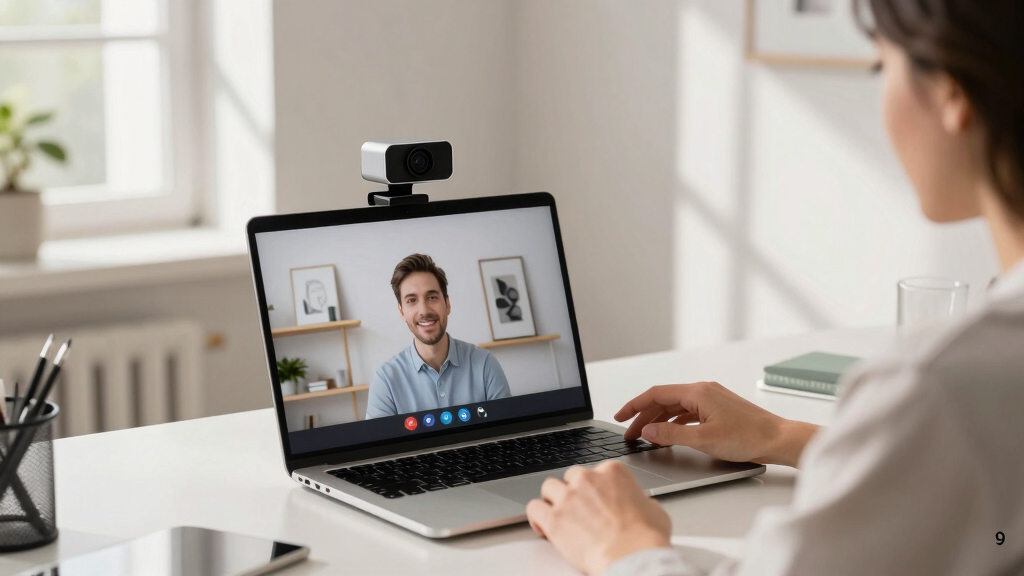
Finding the right conference webcam can significantly improve your virtual meetings, whether for remote work, team collaborations, or client calls. The best options balance video quality, ease of use, and features like auto-tracking or noise reduction. The Logitech MX Brio stands out as the overall top pick thanks to its 4K resolution and versatile compatibility. For those on a budget, the EMEET C960 offers solid HD quality at a lower price, while the Wyrestorm 4K AI-Powered Conference Webcam caters to professional conference rooms. Keep reading to see how these models compare and find the best fit for your needs.

Get the latest gadgets delivered free with Prime
- Fast, free delivery on millions of items
- Prime Video, Amazon Music and more included
- Member-only deals all year
Complete the kit



Key Takeaways
- Higher resolutions like 4K provide sharper images but often come at a higher cost and require better bandwidth.
- Auto-tracking and AI features are game-changers for dynamic presentations or large rooms but can add complexity and expense.
- Built-in microphones with noise reduction significantly improve audio clarity, especially in noisy environments.
- Compatibility with popular conferencing platforms like Zoom and Teams is essential for seamless integration.
- Budget options can deliver decent video quality but may lack advanced features and durability found in premium models.
| j5create 360 Degree All Around Meeting Webcam |  | Best for Versatile, Immersive Meetings | Video Resolution: Full HD 1080p @ 30Hz | Video Modes: Six display modes | Microphone: Omnidirectional built-in microphone | VIEW LATEST PRICE | See Our Full Breakdown |
| TOUCAN 360-Degree Video Conference Camera, 1080p HD Webcam with Noise Reduction Mics, AI Tracking, Compatible with Zoom and Teams |  | Best for Broad Room Coverage with AI Features | Resolution: 1080p HD | Microphone: Noise Reduction Mics | Field of View: 360 degrees | VIEW LATEST PRICE | See Our Full Breakdown |
| Wyrestorm 4K AI-Powered Conference Webcam – Zoom Certified |  | Best for High-Quality, AI-Driven Small Room Meetings | Sensor Type: CMOS | Resolution: 4K | Field of View: 120° | VIEW LATEST PRICE | See Our Full Breakdown |
| Logitech MX Brio Ultra HD 4K Webcam – Graphite |  | Best for Professional Streaming and High-End Collaboration | Resolution: 4K at 30fps, 1080p at 60fps | Sensor: Large pixels for sharp image | Microphones: Dual beamforming noise-reducing | VIEW LATEST PRICE | See Our Full Breakdown |
| EMEET C960 1080P Webcam with Microphone, 2 Mics, 90° FOV, Computer Camera |  | Best for Budget-Conscious, High-Quality Video Calls | Resolution: 1920 x 1080p | Field of View: 90° | Microphones: 2 omnidirectional | VIEW LATEST PRICE | See Our Full Breakdown |
| NUROUM C10 1080P Conference Webcam with Microphone and Speaker | 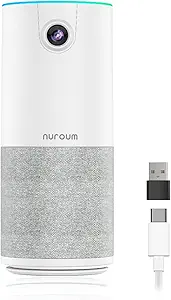 | Best All-in-One Compact Conference Solution | Sensor Type: CMOS | Viewing Angle: 90 degrees | Display Resolution: Maximum FHD | VIEW LATEST PRICE | See Our Full Breakdown |
| Logitech Brio 101 Full HD 1080p Webcam for Streaming and Meetings – Black |  | Best for Versatile HD Video with Privacy Features | Resolution: Full HD 1080p | Connection: USB A | Built-in Microphone: Yes | VIEW LATEST PRICE | See Our Full Breakdown |
| Logitech C920x HD Pro PC Webcam Full 1080p/30fps Video |  | Best for Streaming and Content Creation with Autofocus | Video Resolution: Full 1080p at 30 fps | Autofocus: Yes | Lighting Adjustment: Yes | VIEW LATEST PRICE | See Our Full Breakdown |
| j5create 4K 360° AI Conference Camera, Auto Framing, People Detection |  | Best for Professional 4K 360° Room Views | Resolution: 4K | Video Capture Format: MPEG | Effective Still Resolution: 12 mp | VIEW LATEST PRICE | See Our Full Breakdown |
| TONGVEO 3-in-1 4K Webcam with Microphones and Speaker, AI Auto-Tracking, 5X Digital Zoom, Adjustable FOV, Remote Control |  | Best for Dynamic Auto-Tracking and Versatile Angles | Video Resolution: 4K | Special Features: AI Auto Framing, Voice Tracking | Lens Type: Zoom | VIEW LATEST PRICE | See Our Full Breakdown |
| Logitech BCC950 Desktop Video Conferencing Webcam & Speakerphone – Black |  | Best Overall for Small Conference Rooms | Video Resolution: 1080p HD at 30 fps | Lens: Carl Zeiss | Microphone: Noise-cancelling, full duplex | VIEW LATEST PRICE | See Our Full Breakdown |
| Logitech MeetUp Video Conferencing System 4K 3 Microphones – Black |  | Best for Small and Huddle Rooms | Resolution: 4K Ultra HD | Field of View: 120° | Zoom: 5x HD zoom | VIEW LATEST PRICE | See Our Full Breakdown |
| 1080P HD Webcam with Microphone, Privacy Cover, Wide-Angle Lens, Auto Light Correction, Plug & Play USB Webcam for Laptop, Desktop, PC, Mac, Zoom, Skype, Streaming |  | Best Budget-Friendly 1080p Webcam for General Use | Video Resolution: 1080p | Lens Type: Wide Angle | Focus Type: Fixed Focus | VIEW LATEST PRICE | See Our Full Breakdown |
| Logitech Brio Ultra 4K HD Webcam for Streaming and Meetings – Black |  | Best Premium Webcam for High-Quality Streaming | Resolution: 4K at 30 fps | Field of View: 65°, 78°, 90° presets | Microphones: Dual omnidirectional, noise-canceling | VIEW LATEST PRICE | See Our Full Breakdown |
| conference webcam | Resolution |
|---|---|
| j5create 360 Degree All Around | — |
| TOUCAN 360-Degree Video Confer | 1080p HD |
| Wyrestorm 4K AI-Powered Confer | 4K |
| Logitech MX Brio Ultra HD 4K W | 4K at 30fps, 1080p at 60fps |
| EMEET C960 1080P Webcam with M | 1920 x 1080p |
| NUROUM C10 1080P Conference We | — |
| Logitech Brio 101 Full HD 1080 | Full HD 1080p |
| Logitech C920x HD Pro PC Webca | — |
| j5create 4K 360° AI Conference | 4K |
| TONGVEO 3-in-1 4K Webcam with | — |
| Logitech BCC950 Desktop Video | — |
| Logitech MeetUp Video Conferen | 4K Ultra HD |
| 1080P HD Webcam with Microphon | — |
| Logitech Brio Ultra 4K HD Webc | 4K at 30 fps |
More Details on Our Top Picks
j5create 360 Degree All Around Meeting Webcam
This webcam stands out for its 360° viewing angles and six display modes, making it ideal for dynamic, immersive video meetings. Unlike the Wyrestorm 4K model, which focuses on high-quality image capture for small rooms, the j5create offers a broader field of view that suits collaborative environments where multiple participants are present. Its full HD 1080p resolution ensures clear visuals, while plug-and-play USB connectivity simplifies setup. However, it doesn’t support built-in recording or advanced AI features, which might be limiting for those needing more automation. The main tradeoff is that users may need to authorize app permissions and update firmware for best performance. Overall, this is best suited for users prioritizing flexible viewing angles over premium AI features or ultra-high resolution.
Pros:- 360° viewing angles for versatile video conferencing
- High-quality 1080p resolution for clear image quality
- Plug-and-play USB connectivity for quick setup
Cons:- App permissions may need to be authorized, adding setup steps
- Firmware upgrades might be necessary to optimize performance
Best for: Teams that need flexible, multi-angle video coverage for collaborative or large group meetings
Not ideal for: Solo professionals or individuals requiring high-end resolution or recording features
- Video Resolution:Full HD 1080p @ 30Hz
- Video Modes:Six display modes
- Microphone:Omnidirectional built-in microphone
- Connectivity:USB UVC/UAC plug-and-play
- Compatibility:Skype, Microsoft Teams, Google Meet, Cisco, Zoom, BlueJeans, Amazon Chime, GoToMeeting, Slack
Our verdict“This webcam is ideal for collaborative environments where flexible viewing angles are more important than ultra-high resolution or AI features.”
TOUCAN 360-Degree Video Conference Camera, 1080p HD Webcam with Noise Reduction Mics, AI Tracking, Compatible with Zoom and Teams
The TOUCAN camera offers full 360-degree coverage and sharp 1080p image quality, making it suitable for medium-sized conference rooms. Compared with the Wyrestorm 4K model, which is tailored for small rooms and high-end AI tracking, the TOUCAN provides broader coverage with a simpler setup. Its plug-and-play design is straightforward, and broad compatibility with platforms like Zoom and Teams makes it flexible. Still, it lacks built-in recording or storage options, which could limit functionality for users needing local recordings. Its AI tracking feature is a plus, but without specific accuracy details, some may find it less reliable for precise auto-framing. This pick makes the most sense for organizations wanting a reliable, wide-angle camera without the expense of 4K or advanced AI automation.
Pros:- Provides 360-degree video coverage for comprehensive views
- 1080p HD clarity enhances visual quality
- Easy plug-and-play setup compatible with popular platforms
- Broad device compatibility including PCs and tablets
Cons:- No built-in storage or recording features
- Limited info on AI tracking precision
- Functionality may be limited without extra software
Best for: Medium-sized conference rooms needing broad coverage and easy setup
Not ideal for: Large conference spaces or users requiring detailed AI tracking accuracy or built-in storage
- Resolution:1080p HD
- Microphone:Noise Reduction Mics
- Field of View:360 degrees
- Compatibility:Zoom, Google Voice, Microsoft Teams, PC, Mac, Tablet
Our verdict“This camera is best for organizations seeking simple, wide-angle coverage with AI tracking in medium-sized rooms.”
Wyrestorm 4K AI-Powered Conference Webcam – Zoom Certified
The Wyrestorm 4K webcam excels with its ultra-high-definition 4K video and advanced AI features like auto framing and presenter tracking, making it perfect for small meeting rooms where clarity and engagement matter. Unlike the TOUCAN’s broad coverage, this model’s 120° wide-angle lens and AI automation provide a more focused, professional setup with intelligent framing. Its dual noise-canceling microphones ensure clear audio, but it’s limited to small spaces, unlike the j5create’s all-around angles or the larger coverage of the TOUCAN. The device’s plug-and-play USB connection simplifies deployment, but it requires a compatible system and might be overkill for casual or larger room setups. This makes it ideal for executives or presenters requiring high-res video with automated framing features.
Pros:- High-quality 4K video with sharp detail
- AI auto framing and presenter tracking for professional engagement
- Dual noise-canceling microphones improve audio clarity
- Easy plug-and-play setup
Cons:- Limited to small rooms, unsuitable for larger spaces
- No water resistance or rugged design
- Requires USB connection, possibly needing extra accessories
Best for: Small conference rooms where high-resolution video and AI automation enhance engagement
Not ideal for: Large conference spaces or users seeking budget-friendly, simple webcams without AI features
- Sensor Type:CMOS
- Resolution:4K
- Field of View:120°
- Special Features:AI auto framing, presenter tracking
- Microphone:Dual AI Noise-Canceling Mics
- Connectivity:USB
Our verdict“This webcam is best for small, professional settings demanding high-res video and intelligent automation.”
Logitech MX Brio Ultra HD 4K Webcam – Graphite
The Logitech MX Brio stands out for its 4K resolution and AI-enhanced image processing, making it suitable for professional streaming or remote work requiring top-tier video quality. Compared with the Wyrestorm, which is tailored for small rooms with AI auto framing, the Brio offers more control over image settings like white balance and exposure, appealing to users who prefer customization. Its privacy shutter adds security, but the device’s premium price might deter budget-conscious buyers. The need for a USB-C port can also be a hurdle for some systems, and its complex settings could overwhelm casual users seeking a straightforward webcam. This pick is best for professionals who prioritize image quality and advanced controls over affordability.
Pros:- Stunning 4K streaming and recording quality
- AI-enhanced image processing for optimal visibility
- Adjustable controls for lighting, white balance, and exposure
- Built-in privacy shutter for security
Cons:- Expensive compared to basic webcams
- Requires USB-C port for optimal performance
- Complex settings may be daunting for casual users
Best for: High-end professionals and streamers needing top-quality 4K video with customizable features
Not ideal for: Casual users or those on a tight budget who do not require advanced controls or 4K resolution
- Resolution:4K at 30fps, 1080p at 60fps
- Sensor:Large pixels for sharp image
- Microphones:Dual beamforming noise-reducing
- Features:Auto white balance, auto exposure, privacy shutter
- Compatibility:Windows, macOS, Chrome OS, Linux
Our verdict“This webcam is ideal for demanding professionals seeking premium image quality and advanced customization options.”
EMEET C960 1080P Webcam with Microphone, 2 Mics, 90° FOV, Computer Camera
The EMEET C960 offers a solid balance of 1080p resolution and a wide 90° field of view, making it a versatile choice for professional video calls and streaming. Its dual omnidirectional microphones ensure clear audio, comparable to more expensive models like the Logitech C920x, but at a more affordable price point. Unlike higher-end options, it doesn’t include built-in speakers or advanced AI features, which might limit engagement for some users. The automatic light adjustment improves image quality in variable lighting, but the device’s performance heavily depends on good lighting conditions. This webcam is best suited for users who want reliable video quality without the need for complex controls or premium features.
Pros:- 1080p HD video with a 90° wide-angle view
- Dual omnidirectional microphones for clear audio
- Automatic light adjustment for variable lighting conditions
Cons:- No built-in speakers or AI automation
- Requires good lighting for optimal video quality
- Limited compatibility with Windows Hello and some tablets
Best for: Remote workers and educators seeking a reliable, budget-friendly webcam with wide-angle coverage
Not ideal for: Content creators or professionals needing advanced AI features or integrated speakers
- Resolution:1920 x 1080p
- Field of View:90°
- Microphones:2 omnidirectional
- Focus:Fixed, 11.8–118.1 inches
- Connectivity:USB Type-A & A-to-C adapter
Our verdict“This webcam is well-suited for budget-conscious users who need dependable video quality and wide coverage for everyday meetings.”
NUROUM C10 1080P Conference Webcam with Microphone and Speaker
The NUROUM C10 stands out for integrating a camera, microphone, and speaker into a single, easy-to-use device, making it ideal for small team meetings or personal workspaces. Compared with the Logitech Brio 101, it offers a wider 90° field of view and built-in audio, reducing the need for multiple peripherals. However, its microphone range is limited, making it less suitable for larger rooms. The plug-and-play USB connectivity simplifies setup across Windows, Mac, and Linux, and its automatic low-light adjustment enhances visual clarity in varying conditions. Still, it isn’t designed for outdoor or rugged environments due to lack of water resistance. This pick makes the most sense for remote workers or small teams seeking a hassle-free, all-in-one conferencing device without extra software complexities.
Pros:- All-in-one design with integrated camera, microphone, and speaker
- 1080P video with a wide 90° field of view for small spaces
- Easy setup with plug-and-play USB compatibility
Cons:- Limited microphone range restricts use to small rooms
- No water resistance, unsuitable for outdoor use
Best for: Small teams or remote workers needing a compact, all-in-one video and audio device
Not ideal for: Large conference rooms or outdoor environments where ruggedness or extended microphone range is required
- Sensor Type:CMOS
- Viewing Angle:90 degrees
- Display Resolution:Maximum FHD
- Connectivity Technology:USB
- Number of Speakers:1
- Compatibility:Windows/MacOS/Linux
Our verdict“This device is perfect for small teams or personal use where simplicity and integrated audio-visual are priorities.”
Logitech Brio 101 Full HD 1080p Webcam for Streaming and Meetings – Black
The Logitech Brio 101 is a solid choice for those who prioritize high-quality 1080p video with adjustable settings, especially with its auto-light balance and privacy slide. It compares favorably to the Logitech C920x by offering a more modern design and greater color options, but it lacks advanced features like autofocus or zoom, which some professionals might prefer for more dynamic framing. Its plug-and-play USB A connection makes setup straightforward, though it doesn’t support USB-C, which could be a limitation for newer laptops. The privacy cover enhances security, making it suitable for offices or shared environments. This webcam is ideal for users who want reliable HD quality without complex features or extra software needs.
Pros:- High-quality 1080p video with auto-light adjustment
- Built-in privacy slide for security
- Simple plug-and-play setup
Cons:- Limited to USB A connection; no USB-C support
- No advanced features like autofocus or zoom
Best for: Professionals and streamers needing reliable 1080p quality with privacy controls
Not ideal for: Users requiring autofocus, zoom, or higher frame rates for more dynamic content
- Resolution:Full HD 1080p
- Connection:USB A
- Built-in Microphone:Yes
- Privacy Cover:Yes
- Color Options:Multiple
Our verdict“This webcam suits professionals seeking dependable HD video with simple security features and minimal fuss.”
Logitech C920x HD Pro PC Webcam Full 1080p/30fps Video
The Logitech C920x HD Pro excels for users who need crisp, detailed 1080p video at 30 fps, with the added benefit of autofocus and automatic lighting correction. It surpasses basic webcams like the EMEET C960 by offering dual stereo microphones for clearer audio and includes a software license for background effects, making it appealing to streamers and content creators. Nevertheless, it does not include a privacy shutter, which could be a drawback for security-conscious users. Its 30 fps limit at 1080p may not satisfy those seeking ultra-smooth motion, but for most video calls and streaming, it’s more than adequate. This model makes sense for users who want high-quality video and decent audio in a versatile package.
Pros:- 1080p video at 30 fps with autofocus and light correction
- Dual stereo microphones for clearer audio
- Includes background removal software (XSplit VCam license)
Cons:- No privacy shutter included
- Limited to 30 fps at 1080p
Best for: Streamers, content creators, and professionals needing high-quality video and autofocus
Not ideal for: Those who require higher frame rates or built-in privacy shutters
- Video Resolution:Full 1080p at 30 fps
- Autofocus:Yes
- Lighting Adjustment:Yes
- Microphones:Dual stereo
- Included Software:3-month XSplit VCam license
Our verdict“This webcam offers strong video quality and useful audio enhancements, perfect for streaming or professional video calls where autofocus matters.”
j5create 4K 360° AI Conference Camera, Auto Framing, People Detection
The j5create 4K 360° AI Conference Camera is designed for larger or more dynamic meeting environments, offering 4K resolution and a full 360° view. Its AI-powered auto framing and people detection help keep everyone in frame, providing a professional experience. Compared with the TONGVEO 4K Webcam, it emphasizes room coverage and intelligent framing over close-up detail. However, its AI functions are not active in 4K 360° mode, which can limit its smart features during full-room views. It requires compatible operating systems and is more expensive, making it better suited for conference rooms rather than casual setups. This camera fits best where capturing the entire room and automatic framing for remote attendees is a priority.
Pros:- Provides 4K 360° room coverage for comprehensive views
- AI auto framing and people detection for professional presentation
- Enhanced omnidirectional audio with noise reduction
Cons:- AI functions are limited in 4K 360° mode
- Requires compatible OS and higher investment
Best for: Medium to large conference rooms needing 4K panoramic views with auto-framing
Not ideal for: Small offices or users seeking simple plug-and-play webcams without AI features
- Resolution:4K
- Video Capture Format:MPEG
- Effective Still Resolution:12 mp
- Connectivity Technology:USB
- Weight:0.25 kg
- Lens Type:Fixed
Our verdict“This camera is ideal for conference rooms where full-room coverage and smart framing enhance remote collaboration.”
TONGVEO 3-in-1 4K Webcam with Microphones and Speaker, AI Auto-Tracking, 5X Digital Zoom, Adjustable FOV, Remote Control
The TONGVEO 4K Webcam excels for professional presentations and online teaching, thanks to its AI auto-tracking, voice tracking, and adjustable FOV. Its 4K resolution provides sharp visuals, comparable to the j5create model, but with added features that allow for dynamic framing during live movements. The 5x digital zoom and remote control give users flexible viewing options, setting it apart from simpler webcams like the Logitech C920x. Nevertheless, its lack of water resistance limits outdoor use, and some might find the remote control unnecessary for basic tasks. It’s best suited for scenarios requiring active camera movements, such as live streaming, online classes, or presentations involving movement.
Pros:- High-quality 4K video with AI auto-tracking and voice tracking
- Adjustable FOV and 5X digital zoom for flexible framing
- Includes remote control for easy operation
Cons:- No water resistance; unsuitable for outdoor use
- Some users may find remote control unnecessary
Best for: Educators, presenters, and streamers needing active auto-tracking and versatile framing
Not ideal for: Outdoor setups or users seeking a simple plug-and-play webcam without remote control
- Video Resolution:4K
- Special Features:AI Auto Framing, Voice Tracking
- Lens Type:Zoom
- Digital Zoom:5X
- Connectivity Technology:USB
- Includes:Remote Control
Our verdict“This webcam is best for dynamic presentations and live streaming where active tracking and flexible angles enhance the experience.”
Logitech BCC950 Desktop Video Conferencing Webcam & Speakerphone – Black
The Logitech BCC950 stands out as a comprehensive solution for small, professional meetings, combining a 1080p HD camera with a Carl Zeiss lens and a full duplex speakerphone. Its remote control makes it easy to adjust camera angles and audio on the fly, which is a step above simpler webcams like the Logitech C920x. However, it’s designed primarily for Windows and specific conferencing platforms, limiting its versatility for mixed device environments. The integrated microphone and speakerphone deliver clear, natural sound, making it ideal for remote team meetings. The tradeoff comes in its higher price point and potential setup complexity, particularly if you need to integrate with non-supported platforms. This pick makes the most sense for small offices or dedicated conference rooms where high-quality audio and video are priorities.
Pros:- High-quality 1080p HD video with Zeiss lens for sharp image clarity
- Built-in noise-cancelling microphone and speakerphone for clear audio
- Remote control for seamless camera and audio adjustments
- Plug-and-play USB connectivity for quick setup
Cons:- Limited compatibility with non-Windows platforms and some conferencing apps
- Price can be high compared to basic webcams
- May require additional configuration for optimal performance
Best for: Small teams or remote professionals who need a unified audio-visual conferencing solution with easy control.
Not ideal for: Users seeking wireless or mobile solutions, or those with Mac-only setups, as the device is optimized for Windows and specific conferencing software.
- Video Resolution:1080p HD at 30 fps
- Lens:Carl Zeiss
- Microphone:Noise-cancelling, full duplex
- Speakerphone:Built-in, full duplex
- Connectivity:Plug-and-play USB
- Compatibility:Microsoft Lync 2013, Skype for Business, Cisco Jabber, WebEx
Our verdict“This webcam is ideal for small conference rooms where professional-grade audio and video are essential, and users prioritize integrated controls.”
Logitech MeetUp Video Conferencing System 4K 3 Microphones – Black
The Logitech MeetUp is designed specifically for small and huddle rooms, delivering 4K Ultra HD video and a 120° field of view that covers more area than many traditional webcams, such as the Brio. Its motorized pan/tilt and beamforming microphones allow flexible coverage and clear audio, making it a versatile choice for dynamic room layouts. Compared with the Brio, which excels at individual streaming and desktop use, the MeetUp offers a more comprehensive room-focused setup. Its USB connection and multiple mounting options simplify installation, but the motorized pan/tilt may require calibration, and its focus on small rooms limits its use in larger spaces. It’s an excellent pick for organizations needing a dedicated, flexible room system rather than a portable webcam.
Pros:- 4K Ultra HD resolution with a 120° wide field of view
- Motorized pan/tilt for versatile coverage
- Beamforming microphones for clear audio capture
- Multiple mounting options for flexible installation
Cons:- Expansion microphone sold separately, increasing overall cost
- Motorized pan/tilt can require calibration, adding setup complexity
- Designed mainly for small rooms, limiting larger space coverage
Best for: Small conference rooms or huddle spaces needing a fixed, high-quality video and audio setup with room coverage features.
Not ideal for: Larger conference rooms or users seeking a portable, plug-and-play webcam for personal or mobile use, as it’s optimized for dedicated room installations.
- Resolution:4K Ultra HD
- Field of View:120°
- Zoom:5x HD zoom
- Microphones:3 built-in microphones (expandable)
- Mounting Options:Wall, credenza, TV mount
- Connectivity:USB
Our verdict“This system is best suited for small rooms needing a stable, high-quality video with flexible room coverage and clear audio.”
1080P HD Webcam with Microphone, Privacy Cover, Wide-Angle Lens, Auto Light Correction, Plug & Play USB Webcam for Laptop, Desktop, PC, Mac, Zoom, Skype, Streaming
This 1080p HD webcam offers a straightforward, reliable option for everyday video calls, streaming, and online teaching. Its wide-angle lens and auto light correction help produce vibrant images even in less-than-ideal lighting, making it a capable alternative to more expensive models like the Brio. While the fixed focus isn’t ideal for close-up shots—limiting versatility compared to adjustable-focus webcams—its plug-and-play USB setup makes it accessible for most users. It’s less suited for professional conference rooms or high-end streaming where finer control over image quality matters, but it provides excellent value for casual users or small teams on a budget. The absence of wireless features and water resistance are minor considerations, given its target use.
Pros:- 1080p resolution with vibrant, clear images
- Wide-angle lens captures more of the scene
- Auto light correction for variable lighting conditions
- Privacy cover for added security
Cons:- Fixed focus limits close-up flexibility
- Lacks wireless or advanced connectivity options
- Not water-resistant, so requires careful handling
Best for: Small teams, educators, or streamers seeking an affordable, easy-to-use webcam for regular video calls and content creation.
Not ideal for: Professionals needing adjustable focus or wireless connectivity, or those working in poorly lit environments without additional lighting setup.
- Video Resolution:1080p
- Lens Type:Wide Angle
- Focus Type:Fixed Focus
- Special Feature:Auto Light Correction
- Connectivity Technology:USB
- Privacy Cover:Yes
Our verdict“This webcam delivers good quality and ease of use for casual and small team applications at an affordable price point.”
Logitech Brio Ultra 4K HD Webcam for Streaming and Meetings – Black
The Logitech Brio is designed for users who need exceptional detail and color accuracy, making it ideal for streaming professionals and high-stakes virtual meetings. Its 4K resolution surpasses the other options, including the MeetUp and the 1080p models, offering crisp images with rich color and fine detail. The adjustable field of view (65°, 78°, 90°) provides versatile framing, while the dual noise-canceling microphones ensure clear audio. Unlike the other webcams, the Brio supports Windows Hello for secure facial login, adding a layer of convenience. However, this premium performance comes with a higher price and hardware requirements, making it less accessible for casual users or those with limited budgets. It’s a top-tier choice for those valuing professional-grade quality and security features in their setup.
Pros:- Stunning 4K resolution with excellent color accuracy
- Multiple adjustable field of view presets
- Effective noise-canceling dual microphones
- Supports Windows Hello for secure login
Cons:- High cost, potentially prohibitive for casual users
- Requires compatible hardware and software for full feature set
- Overkill for basic video conferencing needs
Best for: Content creators, professionals, and streamers who demand 4K resolution, precise color, and flexible framing for high-quality video.
Not ideal for: Budget-conscious users or those requiring a simple plug-and-play webcam without the need for ultra-high resolution or advanced features.
- Resolution:4K at 30 fps
- Field of View:65°, 78°, 90° presets
- Microphones:Dual omnidirectional, noise-canceling
- Lighting Adjustment:RightLight 3 and HDR
- Compatibility:Windows, Mac, ChromeOS
- Privacy Shutter:Yes
Our verdict“This webcam is best suited for users who require the highest quality video for professional streaming, content creation, or secure meetings.”
How We Picked
These webcams were selected based on a combination of performance, usability, build quality, and value. We prioritized models that excel in video clarity, audio quality, and ease of setup, as these directly impact meeting productivity. Features like AI auto-tracking, resolution options, and platform compatibility were key factors. Price was also considered to ensure options are available across different budgets. The ranking reflects a balance between advanced features and practical usability, aiming to guide both casual users and professionals seeking reliable conference solutions.Factors to Consider When Choosing Conference Webcam
Choosing the right conference webcam involves more than just resolution. Buyers should consider room size, lighting conditions, and whether they need features like auto-tracking or integrated microphones. Understanding these factors helps avoid common pitfalls like underpowered devices or overpaying for unnecessary features. A good webcam should match your specific use case—whether casual meetings or professional presentations—without complicating your workflow.Video Resolution and Image Quality
The clarity of your video depends heavily on resolution and sensor quality. While 1080p is generally sufficient for most meetings, 4K webcams deliver sharper images and better detail, especially on larger screens. However, higher resolution models often demand more processing power and bandwidth. Consider your internet speed and hardware capabilities before choosing 4K to avoid lag or dropped frames. For casual use, 1080p provides good quality at a more affordable price point.
Field of View (FOV) and Framing
The FOV determines how much of your surroundings the camera captures. A wider FOV (e.g., 90° or more) is useful for group meetings or showing more of your workspace, while narrower angles focus on you specifically. Auto-framing features can help keep you centered, but they can sometimes be distracting or imperfect in complex environments. Think about your room size and whether you prefer a fixed or flexible view when selecting a model.
Audio Quality and Microphones
Clear audio is just as important as video. Many webcams include built-in microphones with noise reduction, but quality varies. Dual microphones or those with AI noise cancellation offer much better sound, especially in noisy settings. Check whether the microphone position suits your setup—front-facing mics tend to pick up your voice more directly, reducing background noise. For larger rooms, consider models with multiple mics or external audio solutions.
Connectivity and Compatibility
Most webcams connect via USB, but it’s worth verifying compatibility with your operating system and conferencing platforms. Some models are optimized for specific apps like Zoom, Teams, or Skype, ensuring smoother integration. Plug-and-play setups reduce frustration, but some higher-end models may require driver installations or software updates. Consider your existing hardware and software ecosystem when making a choice.
Additional Features and Future-Proofing
Features like AI auto-tracking, digital zoom, and adjustable FOV can enhance your meeting experience but may increase cost. Auto-tracking is particularly useful for mobile presenters or dynamic environments. However, these features can sometimes be buggy or add complexity. Think about your typical meeting style and whether these extras justify the investment. Also, consider future compatibility with evolving conferencing needs.
Frequently Asked Questions
Is 4K resolution necessary for a conference webcam?
While 4K resolution offers sharper images, it isn’t always essential for effective communication. 1080p webcams can deliver clear, professional video quality suitable for most meetings. 4K webcams are beneficial if you need detailed visuals, such as for product demos or large presentations, but they require more bandwidth and a powerful computer. For everyday use, 1080p strikes a good balance between quality and performance.
Should I prioritize auto-tracking features?
Auto-tracking can be a major convenience if your meetings involve movement or multiple speakers. It allows the camera to follow you or participants automatically, reducing the need for manual adjustments. However, auto-tracking systems may sometimes have difficulty in cluttered environments or with complex movements, which can be distracting. If your setup is static or simple, a traditional fixed camera may suffice, saving money and complexity.
Are built-in microphones enough for professional meetings?
Many webcams include decent microphones, but their quality varies. For clear audio, especially in noisy or larger rooms, investing in external microphones or using models with multiple, noise-cancelling mics is advisable. Built-in mics are convenient but often pick up background noise and may not provide the clarity needed for professional settings. Assess your environment and choose accordingly.
What is the most important feature for small office setups?
For small office environments, a webcam with good resolution, a narrow to moderate FOV, and reliable connectivity is key. Features like automatic framing or noise reduction can enhance the experience without adding unnecessary complexity. Budget-friendly models that deliver solid 1080p video and decent audio are often sufficient, but investing in a model with better low-light performance can improve image quality in dim rooms.
Do I need a specialized conference webcam or will a regular webcam suffice?
Regular webcams work fine for casual or infrequent meetings, but dedicated conference webcams often include features like wider FOV, multiple microphones, and auto-tracking, which improve the experience in professional settings. If your meetings are frequent and involve multiple participants or large rooms, a specialized conference webcam can deliver more consistent results. For occasional use, a high-quality regular webcam may be enough, saving cost and complexity.
Conclusion
For most users, the Logitech MX Brio offers an excellent blend of 4K quality, versatility, and compatibility, making it the best overall choice. Budget-conscious buyers will find the EMEET C960 provides reliable HD video without breaking the bank. Professionals seeking premium features and future-proofing should consider the Wyrestorm 4K AI-Powered Conference Webcam. Beginners or those with simple needs can opt for straightforward models like the 1080P HD Webcam with Microphone. Meanwhile, those with large or dynamic rooms should look at auto-tracking options like the TOUCAN 360-Degree Video Conference Camera for a more seamless experience.Fall Picks
fall essentials
As an affiliate, we earn on qualifying purchases.