
Switching to an SSD from an HDD makes your daily tasks feel much faster and smoother. You’ll notice quicker boot times, faster application launches, and smoother file transfers. SSDs operate silently and are more reliable, especially when you’re on the go. They also produce less heat and use less power, which can extend your device’s battery life. If you want to understand how these differences can improve your experience, keep exploring the details below.

Get the latest gadgets delivered free with Prime
- Fast, free delivery on millions of items
- Prime Video, Amazon Music and more included
- Member-only deals all year
Key Takeaways
- SSDs offer instant application launches and faster file transfers, reducing waiting times in daily tasks.
- Operating silently, SSDs create a quieter workspace compared to the noise from HDDs.
- Greater durability of SSDs means less worry about damage from drops or bumps during regular use.
- Lower heat and power use in SSDs help prolong battery life and keep devices cooler.
- Overall, SSDs provide a smoother, more responsive experience that enhances everyday computing.

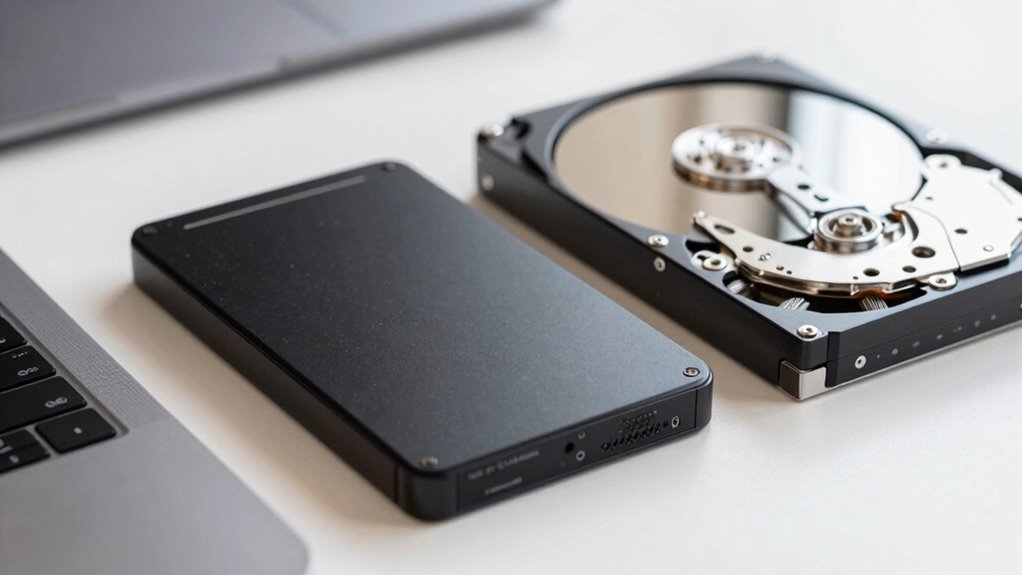
When choosing between an SSD and an HDD for everyday use, understanding their differences can greatly impact your experience with your computer. One of the most noticeable differences is data transfer speed. An SSD (Solid State Drive) uses flash memory to store data, which allows it to access information almost instantly. When you open applications, boot up your system, or transfer files, an SSD delivers rapid data transfer, making everything feel snappier and more responsive. On the other hand, an HDD (Hard Disk Drive) relies on spinning disks and mechanical parts, which slow down data access. This means loading programs or copying large files takes longer, and you might experience delays or lag. If speed is a priority for your daily tasks, an SSD significantly improves your overall workflow. Additionally, storage technology continues to advance, making SSDs increasingly affordable and accessible for everyday users.
SSDs offer lightning-fast data access, making your computer more responsive and efficient for everyday tasks.
Another major difference you’ll notice is noise levels. HDDs have moving parts, including spinning disks and read/write heads that hover just above the surface. When the drive is active, especially during large file transfers or system startup, you can often hear a faint spinning or clicking sound. Over time, these sounds can become more noticeable. In contrast, SSDs operate silently because they lack mechanical components. This quiet operation is especially beneficial if you work in a noise-sensitive environment or prefer a more peaceful workspace. The absence of noise from an SSD means your computer remains silent even during heavy use, creating a more pleasant user experience. Moreover, SSDs tend to have faster access times, which can be particularly advantageous for tasks like gaming or video editing that demand quick data retrieval. As technology evolves, SSDs are also becoming more cost-effective, making them a practical choice for many users.
Furthermore, the reliability of SSDs is often higher, especially in portable devices, making them a preferred option for users who need durability. Beyond speed and noise, you’ll also find that SSDs are more durable and reliable. With no moving parts, they’re less vulnerable to physical shocks or drops, which can cause mechanical failure in HDDs. This makes SSDs ideal for laptops or portable devices you take on the go. Additionally, SSDs tend to generate less heat and consume less power, which can extend your device’s battery life and reduce cooling needs. Considering these factors, many users find that SSDs provide a more reliable computing experience, especially in active daily environments. The improved resilience of SSDs adds to their appeal in various applications, from everyday computing to demanding professional tasks.
In daily life, these differences translate to a smoother, quieter, and more reliable computing experience. You won’t have to wait as long for your files to load, and your workspace will be less cluttered with noise. While SSDs may come at a higher price point per gigabyte, the benefits of faster data transfer, quieter operation, and increased durability often justify the investment. Choosing an SSD over an HDD ensures your computer feels quicker, quieter, and more responsive day-to-day, making your digital experience much more enjoyable.
Products Worth Considering

LG 34GX90SA-W 34-inch Ultragear WQHD OLED Curved Gaming Monitor

Bose SoundLink Flex (2nd Gen) Portable Bluetooth Speaker

EcoFlow DELTA 3 Classic Portable Power Station, 1024Wh, 1800W
As an affiliate, we earn on qualifying purchases.
Frequently Asked Questions
How Do SSDS Impact Battery Life in Laptops?
SSDs improve your laptop’s battery life because they use less power than HDDs, thanks to lower power consumption during operation. This means your device runs longer on a single charge, enhancing battery longevity. When you choose an SSD, you’re not only speeding up your system but also reducing energy use, which helps your battery last longer throughout the day. This makes your portable experience more efficient and reliable.
Are SSDS More Resistant to Physical Shock Than HDDS?
You might wonder if SSDs are more resistant to physical shock than HDDs. The truth is, they are. Due to their lack of moving parts, SSDs excel in shock resistance and durability concerns. This means your data stays safer during accidental drops or bumps. So, if you’re concerned about durability in everyday life, SSDs provide a more reliable option, especially in portable devices like laptops or external drives.
Can Switching to an SSD Improve Gaming Performance?
Switching to an SSD can definitely improve your gaming performance. You’ll notice faster load times, so you spend less time waiting for games to start or levels to load. Plus, some SSDs offer graphics improvements by reducing lag during gameplay, resulting in smoother visuals. Overall, an SSD enhances your gaming experience by making everything feel snappier and more responsive, giving you a competitive edge and increased enjoyment.
Do SSDS Generate More Heat Than HDDS?
Yes, SSDs generally generate more heat than HDDs due to higher performance and faster data transfer speeds. This increased heat affects thermal management, so you might need better cooling solutions. Additionally, SSDs tend to consume less power, which reduces overall heat output and prolongs device lifespan. Keep an eye on your system’s temperature and guarantee proper airflow to prevent overheating and maintain ideal performance.
Is Data Recovery Easier With HDDS Than SSDS?
Surprisingly, data recovery is often easier with HDDs than SSDs. While you might think SSDs are more fragile, they present greater data recovery challenges because of their complex architecture. Plus, the cost comparison favors HDDs for recovery, with fewer specialized tools needed. Irony strikes—your sleek SSD might be faster, but when disaster hits, retrieving data from it becomes a costly, complicated ordeal compared to an HDD.
Conclusion
While SSDs offer faster speeds that improve your daily computing, some might worry about the cost. But consider this: the time you save with quicker boot-ups and file transfers often outweighs the initial expense. Plus, SSDs are more durable, reducing worries about damage from drops. Ultimately, investing in an SSD can make your daily tasks smoother and more efficient, making it a smart upgrade—especially if you value speed and reliability in your tech.