TL;DR

Get the latest gadgets delivered free with Prime
- Fast, free delivery on millions of items
- Prime Video, Amazon Music and more included
- Member-only deals all year
A wired PoE video doorbell uses one Ethernet cable to carry both network data and electrical power, supplied by a compatible PoE switch or injector. It can avoid a weak front-door Wi-Fi signal, but it does not guarantee better video, eliminate the need for internet, or automatically work with existing chimes. Before choosing a replacement, check the cable path, power standard, storage method, smart home support, and exact camera features.
A doorbell camera can show you a sharp, bright porch and still miss the delivery driver because the Wi-Fi signal fades at the front door. A wired PoE video doorbell tackles that weak link with a single Ethernet cable that carries both network data and power. The result can be a steadier connection and fewer worries about charging batteries, provided the cable and network gear fit the job.
This guide explains what power over Ethernet means in a doorbell, how it differs from ordinary wired models, and what you need to check before buying. You’ll also see why camera resolution, recording choices, chimes, and smart-home compatibility deserve their own checks. If you’re replacing a particular model that seems difficult to find, the goal is to match what mattered about it instead of relying on its name alone.
Think of PoE like a garden hose with two jobs: it brings water to the sprinkler, while Ethernet carries power and data down one cable. The analogy has limits, though. Your camera’s picture still depends on its sensor, lens, lighting, and software, and the whole setup relies on compatible equipment at both ends of the cable.
A PoE doorbell uses Ethernet for both power and network data, with power supplied by a compatible switch or injector.
“Wired” can refer to low-voltage doorbell wiring or PoE Ethernet; verify the actual power method before treating models as interchangeable.
Video quality depends on the camera, lens, lighting, and settings, not the cable type or resolution label alone.
Check whether recording is local, cloud-based, or both, and find out what works during an internet outage.
Before replacing a model, match specific needs such as gate access, chime support, zoom, night vision, and smart-home integration.
What a PoE Doorbell Gives You in One Cable
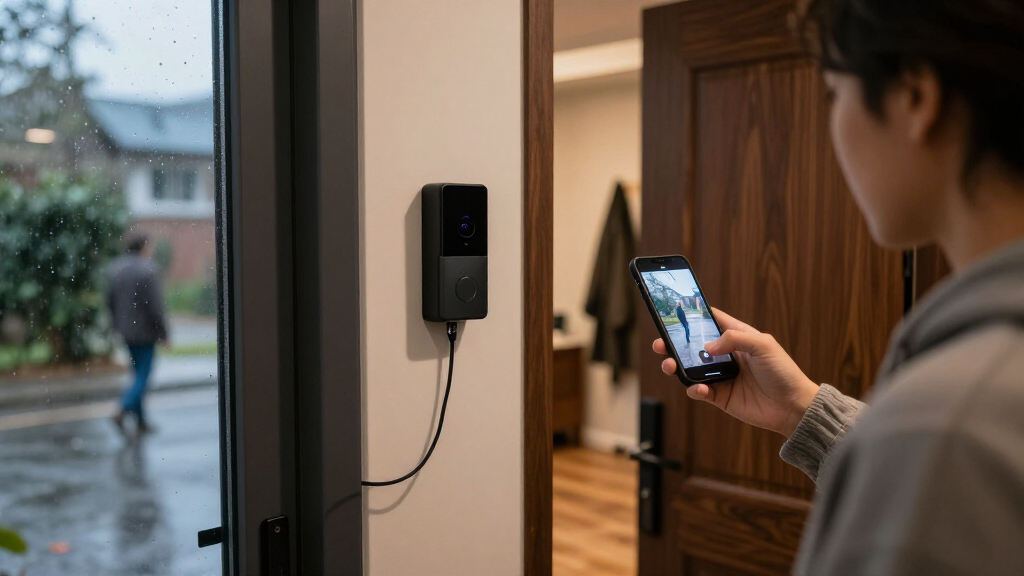
A wired PoE video doorbell uses one Ethernet cable to carry both network data and electrical power from compatible equipment to the door. A PoE switch or injector supplies the power; the cable connects that source to the doorbell. This can make the front door less dependent on a strong Wi-Fi signal and avoid routine battery charging.
Imagine a camera mounted beside a deep stone entryway. The router sits in a study at the back of the house, and a phone shows the porch feed freezing whenever someone walks up. A properly installed Ethernet run can give the camera a wired network path through that awkward spot. It won’t fix every possible network or service problem, but it removes one common source of trouble: a weak wireless link between camera and router.
The phrase “wired” can mean two different things. Many doorbells use existing low-voltage doorbell wires for power and connect to the network over Wi-Fi. A PoE model uses Ethernet for power and data. Those connections are not automatically interchangeable, so don’t assume that a pair of wires behind your old chime can power a PoE camera.
For example, a homeowner may see “wired” on two product pages and expect either camera to connect to the same doorbell wiring. One may require a 16–24 VAC transformer while the other needs a compatible PoE source and Ethernet cable. Check the manufacturer’s specification sheet for the actual power method and required network equipment before you plan the installation.
PoE tells you how power and data reach the camera. It does not, by itself, tell you what the camera records, how good the picture looks, or whether your existing chime will ring.
As an affiliate, we earn on qualifying purchases.
Check These Five Details Before Choosing a Replacement
To replace a PoE doorbell successfully, match the parts of the setup you rely on: power, camera coverage, recording, alerts, and integrations. A familiar product name or a high resolution number won’t prove that a new model supports your cable, storage plan, gate, or chime. Start with the feature you would notice missing on day one.
Suppose you want a replacement for a door station associated with 4K video, 10x zoom, night vision, motion detection, and remote gate access. A lower-resolution camera could still be a suitable fit if opening the gate matters most. A camera with impressive zoom could disappoint if it won’t connect to your existing recorder. Treat the specification list as a matching exercise, not a contest to collect the largest numbers.
- Confirm the power path. Check whether the model accepts PoE directly, requires a particular PoE source, or instead uses low-voltage wiring. Confirm the cable run can reach the mounting point.
- Compare what the camera can see. Look at field of view, night vision, motion detection, and performance in backlight, not only the resolution label.
- Choose how recordings are stored. Check local recorder or card support, cloud features, retention limits, and any subscription requirements.
- Verify the parts you interact with. Check two-way audio, chime behavior, gate or lock control, and support for your smart-home system.
- Read the privacy and update details. Look for account protections, footage-sharing controls, encryption information, and the manufacturer’s software update policy.
For a concrete comparison, use a small table of needs and evidence as you browse. Put “remote gate access” in one column and the exact manual or product specification that confirms it in another. This keeps a vague label like “smart features” from standing in for the function your household actually uses.
As an affiliate, we earn on qualifying purchases.
Compare Camera Features Without Getting Distracted by Resolution
When you compare wired PoE video doorbells, match the features you’ll use rather than treating resolution as a complete quality score. A camera’s image depends on its sensor, lens, lighting, encoding, and settings as well as its stated resolution. A sharp 4K image can still be poorly framed, washed out by a porch light, or hard to interpret at night.
Picture a package placed on the floor directly below a wide-angle camera. The camera may record a broad view of the porch, but the box could appear small or stretched near the edge. In that case, camera position and field of view might matter more than a jump from 2K to 4K. If you need to read a label or see a face farther from the button, zoom and image detail deserve closer attention.
| What to compare | Why it matters at your door | Example question to ask |
|---|---|---|
| Resolution and lens | They shape how much detail appears in the recorded view, but don’t tell the whole story. | Can you make out a visitor’s face at the usual standing distance? |
| Field of view | A wide view can cover a porch while stretching objects near the frame’s edges. | Does the camera show the step where packages are usually left? |
| Night vision and low-light color | Night scenes can lose detail, especially under glare or uneven lighting. | Can you identify a visitor beneath the porch light after dark? |
| Zoom and motion detection | Zoom can help inspect an area; detection settings affect which events generate alerts. | Does the camera distinguish a person at the gate from moving tree shadows? |
| Audio and access controls | Two-way conversations, gates, and lock strikes depend on device support and wiring. | Can you speak to a courier or open your gate from the same system? |
Feature names also need context. “Remote gate access” sounds useful, but the doorbell may need a compatible gate controller or relay. Likewise, an advertised zoom figure doesn’t say how clear a zoomed image will look. Read the installation and compatibility documents, then compare the functions with a real scene at your own entrance.
As an affiliate, we earn on qualifying purchases.
Plan the Cable Run Before You Buy the Camera
A PoE doorbell needs an Ethernet cable from a compatible power source to the mounting location, so the cable path often determines whether installation feels simple or becomes a major project. If a cable already reaches the door, the job may involve mounting and network setup. If it must cross finished walls, brick, or a long route through an attic, the labor and mess can outweigh the apparent simplicity of a one-cable design.
For example, a house with a utility room directly behind the front entry may have an easy cable route through an unfinished basement ceiling. A flat above a concrete stairwell could need a much longer path, wall penetrations, and building approval. Sketch the route from the switch or injector to the door before ordering. Check where the cable enters, how it will be protected outdoors, and whether the manufacturer specifies a maximum run or cable type.
You will also need a compatible PoE power source. A PoE switch can power several devices, such as an access point and camera, while an injector can add power to one Ethernet connection. The right choice depends on the switch you already own, the doorbell’s power requirements, and whether you expect to add more PoE equipment later. Don’t assume that every Ethernet port supplies power just because it looks the same.
Installation costs include more than the camera. Cable, a switch or injector, weather-suitable fittings, storage equipment, and professional labor may all contribute. If you can’t run Ethernet without opening a wall, compare that complete plan with a conventional wired or Wi-Fi model before committing. The tradeoff is concrete: one tidy cable at the device can still require real work to get there.
smart home compatible wired doorbell
As an affiliate, we earn on qualifying purchases.
As an affiliate, we earn on qualifying purchases.
Choose Recording That Still Makes Sense When the Internet Drops
A PoE connection does not mean a doorbell needs no internet, and it does not guarantee that footage stays available during an outage. Local recording may continue if the camera and recorder remain powered and your network supports it, while remote viewing, cloud recording, and phone notifications commonly depend on internet access. Check the exact model and recording system to see which functions work locally.
Consider a brief evening outage during a parcel delivery. A camera that records to a local network video recorder may still capture the event on your home network, depending on how it is set up. A cloud-only setup may miss remote access or cloud uploads until the connection returns. If a clip matters for insurance or security, ask how long recordings stay available and what happens when storage fills.
Storage options vary: some systems use a recorder or card, some rely on cloud service, and some offer a combination. Subscription-free recording can appeal to households that want to avoid recurring charges, but local storage still needs capacity, retention settings, and a way to protect or retrieve footage. Cloud storage can make remote access convenient, but you should check service terms and whether the features you need require an account or ongoing plan.
Bandwidth and storage depend on resolution, frame rate, compression, motion activity, and retention settings. A quiet front stoop may generate far less footage than a busy apartment hallway where people pass every few minutes. Instead of guessing at a universal data figure, use the manufacturer’s storage guidance and your recorder’s capacity calculator. Test a typical week of activity, then adjust recording quality and retention to fit your actual needs.
Check Chimes, Smart Homes, and Gate Controls for Compatibility
Before you replace a doorbell, confirm that it works with the chime, smart-home system, and access hardware you plan to keep. PoE power alone does not establish compatibility with a traditional chime or low-voltage transformer. The device may use its own app or chime accessory, or it may integrate with a home platform, recorder, gate relay, or lock system only under specific conditions.
Imagine a household where a visitor presses the button while someone is working in the garden and another person is upstairs. The old chime can be more useful than a phone notification that nobody hears. A replacement that connects to an app but cannot activate the existing chime may change the daily experience in a way the feature list never made obvious.
Make a list of the systems that matter: indoor chime, phone alerts, smart displays, voice assistant, network video recorder, gate, and any electric strike. For each, check the manufacturer’s compatibility list and installation guide. “Supports smart home integration” is broad language; it doesn’t promise support for your exact platform or every control you want.
Gate access deserves special care in the planning stage. A doorbell may support a control output, but the gate operator, wiring, and safety setup still need to match. If you currently use a remote gate button, compare the replacement’s documented control method with the equipment installed at the gate. A compatibility check can prevent the awkward result of getting a clear view of a visitor but losing the ability to let them in.
Treat a Wired Connection as One Part of Security
A wired network connection can reduce dependence on Wi-Fi, but it does not automatically make a camera secure or private. Security also depends on account protections, encryption, software updates, who can view shared clips, and how the recorder or cloud account is configured. A cable is one part of the system, not a privacy guarantee.
For instance, a family may install a PoE camera and share access with a neighbor who collects parcels. If that access remains active after the neighbor moves, the household has a footage-sharing problem even though the network connection works perfectly. Review account members and shared links whenever someone no longer needs access, and use unique passwords with any additional sign-in protection the service supports.
Check the maker’s published update policy and how it delivers security fixes. Look for clear controls over recording zones, audio, notifications, and clip sharing. A camera pointed at a public walkway may capture passersby; privacy zones can help limit what gets recorded, depending on the model. The physical angle matters too: mounting the lens a few degrees toward your own threshold can preserve useful package coverage while reducing the view into a neighbor’s window.
Also decide what should happen to footage if the internet is disconnected or an account is inaccessible. Local recording can give you more direct control, but the recorder itself needs strong credentials and sensible network access. A camera connected by Ethernet can still expose footage through poorly managed accounts or outdated software, so include maintenance and access review in the ownership routine.
Build a Replacement Shortlist Around the Features You’ll Miss
If a particular wired model seems hard to find, treat its status as uncertain and verify current manufacturer specifications before you buy. Product names and lineups change, and the same model family can have distinct versions. A useful replacement shortlist starts with the functions you need—such as PoE, night vision, zoom, remote gate control, or a specific smart-home link—then checks each candidate against those needs.
Suppose your old setup gave you a close view of the porch, color in dim light, and a way to release a gate. A newer PoE model may match several of those features, while a wired 2K camera may preserve the connection and night vision but not the same zoom or access control. A wired model that uses a transformer may be easier to install if low-voltage wiring already exists, but it is not a direct PoE substitute simply because it is also labeled “wired.”
Compare the alternatives in terms of the actual requirement. For the Ring Wired Doorbell 4K Elite, the supplied product context lists native PoE, 4K video, night vision, 10x zoom, motion detection, and remote gate access. Another product page may list a 2K camera and 6x zoom, or a different power method. Those differences describe possible tradeoffs; they do not establish a universal ranking or guarantee that any particular listing is currently sold.
Before ordering, open the current manual and product page, confirm the exact model identifier, and check regional compatibility. Then verify installation requirements, recording costs, and whether the feature that matters most is included in that version. A one-page checklist can save a return trip: write down your cable type, power source, recorder, chime, smart-home platform, and must-have camera functions.
Frequently Asked Questions
What does PoE mean on a video doorbell?
PoE means Power over Ethernet. A compatible switch or injector supplies power through the Ethernet cable, which also carries network data to the doorbell. The camera must support the power standard required by the source.
Do I need a PoE switch, or can I use an injector?
Either can work if it meets the doorbell’s power requirements. A switch may suit a home with several PoE devices, while an injector can add power to a single connection. Check the manufacturer’s specification and your existing network equipment before choosing.
Can I use existing doorbell wires for a PoE camera?
Usually, not as a direct substitute: traditional doorbell wires and PoE Ethernet carry power in different ways. Some products support multiple power methods, but you need to verify that in the model’s documentation. Don’t assume that a device labeled “wired” supports both.
Will a PoE doorbell record if my internet goes down?
It depends on the camera and recording setup. Local recording may continue on a powered home network or recorder, while cloud uploads, remote viewing, and phone alerts commonly need internet access. Check which features work offline for the exact model.
Can a PoE doorbell use my existing chime?
Compatibility varies by model. A PoE camera may use an app or a separate chime accessory, and its Ethernet power connection does not automatically make it compatible with a traditional chime. Read the installation guide before removing or replacing your current chime.
Does a PoE connection guarantee a better picture than Wi-Fi?
No. Ethernet can provide a wired network path, but image quality depends on the camera sensor, lens, lighting, encoding, and settings. A well-positioned Wi-Fi camera can produce a better image than a poorly framed PoE camera.
Conclusion
Before choosing a wired PoE video doorbell, confirm the Ethernet path, compatible power source, recording plan, and the features your household actually uses. Then check the current manual for chime, gate, and smart-home compatibility. That short checklist matters more than a familiar product name or a single impressive spec.
A good doorbell setup should leave you with a clear view of your own doorstep and a connection that suits your home. Start with the cable route, and let the rest of the system follow.
Fall Picks
fall essentials
As an affiliate, we earn on qualifying purchases.