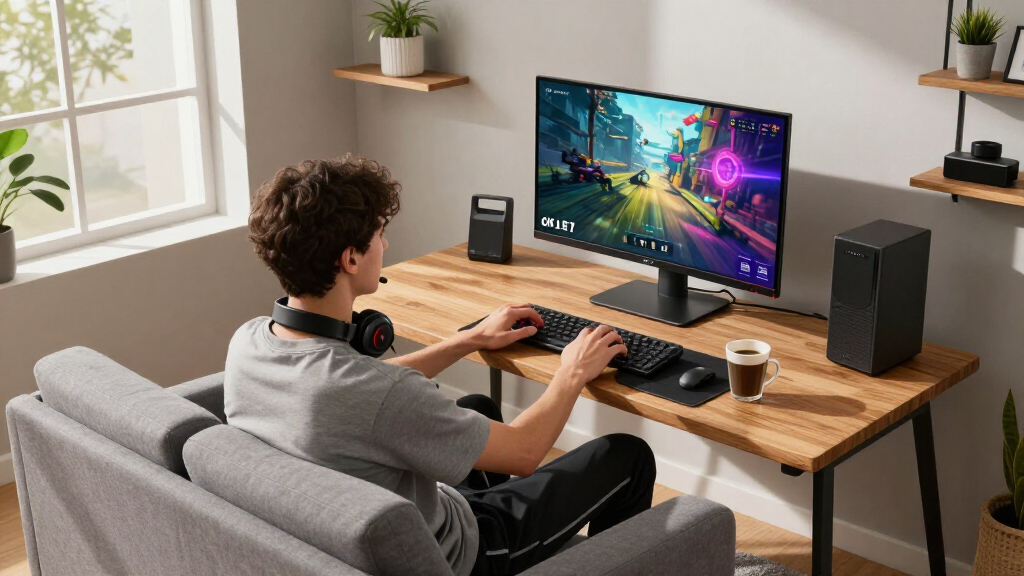

For gamers seeking stunning visuals and smooth performance, 4K OLED monitors are the pinnacle of display technology. The best options deliver vibrant colors, deep blacks, and high refresh rates, all essential for modern gaming. The ASUS ROG XG27UCDMG stands out as the top overall pick thanks to its balance of ultra-fast speed and superb image quality, while the LG 32GX870A-B offers a compelling mix of size and features at a competitive price. However, tradeoffs include higher cost and potential over-specification for casual players. Continue reading for a detailed breakdown of each model to help you find the perfect fit for your gaming setup.

Get the latest gadgets delivered free with Prime
- Fast, free delivery on millions of items
- Prime Video, Amazon Music and more included
- Member-only deals all year
Complete the kit



Key Takeaways
- High refresh rates (up to 240Hz) are common in top-tier models, ensuring smooth gameplay even in fast-paced titles.
- Size varies from 27 to 45 inches, with larger screens providing more immersion but potentially requiring more desk space.
- Vivid color reproduction and deep blacks are consistent strengths across all OLED options, but color accuracy can vary based on calibration.
- Many monitors incorporate adaptive sync technology like G-SYNC and FreeSync, reducing screen tearing and stuttering.
- Premium features such as USB-C, HDR support, and high contrast ratios often come with a higher price tag, influencing overall value.
| ASUS ROG XG27UCDMG 27-Inch 4K 240Hz QD-OLED Gaming Monitor |  | Best Overall for Professional-Grade Gaming and Content Creation | Size: 27 inches | Resolution: 3840 x 2160 (4K) | Refresh Rate: 240Hz | VIEW LATEST PRICE | See Our Full Breakdown |
| MSI MAG 272UP QD-OLED X24 27-Inch 4K UHD Gaming Monitor |  | Best Value for Versatile 4K OLED Gaming | Size: 27 inches | Resolution: 3840 x 2160 (4K UHD) | Refresh Rate: 240Hz / 480Hz (Dual Mode) | VIEW LATEST PRICE | See Our Full Breakdown |
| LG 32GX870A-B 32-inch Ultragear 4K UHD OLED Gaming Monitor |  | Best for Dual-Mode Gaming and Immersive Visuals | Size: 32 inches | Resolution: 3840 x 2160 (4K UHD) | Refresh Rate: 240Hz / 480Hz (Dual Mode) | VIEW LATEST PRICE | See Our Full Breakdown |
| ASUS ROG PG32UCDMR 32-Inch 4K OLED Gaming Monitor |  | Best for Premium Gaming and Creative Work | Size: 32 inches | Resolution: 3840 x 2160 (4K) | Refresh Rate: 240Hz | VIEW LATEST PRICE | See Our Full Breakdown |
| Acer Predator 31.5-inch Curved 4K UHD QD-OLED Gaming Monitor X32 |  | Best Overall for High-End Visuals and Fast Performance | Display Size: 31.5 inches | Resolution: 3840×2160 (4K UHD) | Panel Type: QD-OLED | VIEW LATEST PRICE | See Our Full Breakdown |
| LG 45 inch UltraGear OLED WQHD Curved Gaming Monitor with webOS (45GX90SA-B) Bundle |  | Best for Immersive Cinematic Gaming and Smart Features | Screen Size: 45 inches | Resolution: WQHD | Refresh Rate: 240Hz | VIEW LATEST PRICE | See Our Full Breakdown |
| MSI MAG 321CUP QD-OLED 32-Inch 4K UHD Gaming Monitor |  | Best for Color Precision and Versatility in a Compact Size | Display Size: 32 inches | Resolution: 3840×2160 (4K UHD) | Panel Type: QD-OLED | VIEW LATEST PRICE | See Our Full Breakdown |
| BenQ MA270U 27” 4K Monitor for MacBook, USB-C, 90W Power, P3 Color Gamut, Adjustable Stand | 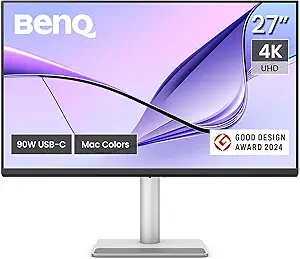 | Best for Creative Professionals and Mac Users | Display Size: 27 inches | Resolution: 3840×2160 (4K) | Color Gamut: P3 | VIEW LATEST PRICE | See Our Full Breakdown |
| MSI MPG 321URX QD-OLED 32-Inch 4K UHD Gaming Monitor |  | Best for Versatile Gaming and Connectivity Options | Size: 32 inches | Resolution: 3840 x 2160 (4K UHD) | Panel Type: QD-OLED | VIEW LATEST PRICE | See Our Full Breakdown |
| LG 32GX850A-B 32″ UltraGear 4K UHD OLED Gaming Monitor with G-SYNC and FreeSync Premium Pro |  | Best Overall | Display Size: 32 inches | Resolution: 3840 x 2160 (4K UHD) | Display Type: OLED | VIEW LATEST PRICE | See Our Full Breakdown |
| ASUS ROG PG32UCDM 32-Inch 4K QD-OLED Gaming Monitor |  | Best Premium | Display Size: 32 inches | Resolution: 3840 x 2160 (4K) | Display Type: QD-OLED | VIEW LATEST PRICE | See Our Full Breakdown |
| 4K OLED gaming monitor | Resolution | Refresh Rate | Response Time | HDR |
|---|---|---|---|---|
| ASUS ROG XG27UCDMG 27-Inch 4K | 3840 x 2160 (4K) | 240Hz | 0.03ms | VESA DisplayHDR 400 True Black |
| MSI MAG 272UP QD-OLED X24 27-I | 3840 x 2160 (4K UHD) | 240Hz / 480Hz (Dual Mode) | 0.03ms | VESA DisplayHDR True Black 400 |
| LG 32GX870A-B 32-inch Ultragea | 3840 x 2160 (4K UHD) | 240Hz / 480Hz (Dual Mode) | 0.03ms | VESA DisplayHDR True Black 400 |
| ASUS ROG PG32UCDMR 32-Inch 4K | 3840 x 2160 (4K) | 240Hz | 0.03ms | VESA DisplayHDR 400 True Black |
| Acer Predator 31.5-inch Curved | 3840×2160 (4K UHD) | 240Hz | 0.03ms | VESA DisplayHDR True Black 400 |
| LG 45 inch UltraGear OLED WQHD | WQHD | 240Hz | 0.03ms | HDR True Black 400 |
| MSI MAG 321CUP QD-OLED 32-Inch | 3840×2160 (4K UHD) | 165Hz | 0.03ms | — |
| BenQ MA270U 27” 4K Monitor for | 3840×2160 (4K) | — | — | — |
| MSI MPG 321URX QD-OLED 32-Inch | 3840 x 2160 (4K UHD) | 240Hz | 0.03ms | — |
| LG 32GX850A-B 32" UltraGear 4K | 3840 x 2160 (4K UHD) | 165Hz (4K UHD), 330Hz (Full HD) | 0.03ms (GtG) | VESA DisplayHDR True Black 400 |
| ASUS ROG PG32UCDM 32-Inch 4K Q | 3840 x 2160 (4K) | 240Hz | 0.03 ms (GTG) | VESA DisplayHDR 400 |
More Details on Our Top Picks
ASUS ROG XG27UCDMG 27-Inch 4K 240Hz QD-OLED Gaming Monitor
This 27-inch model stands out for combining a stunning 4K resolution with a lightning-fast 240Hz refresh rate and a 0.03ms response time, making it ideal for competitive gamers who demand ultra-smooth visuals. Its professional-grade color accuracy and HDR support rival some content creation monitors, adding versatility. Compared with larger options like the LG 32GX870A-B, this monitor’s smaller size offers better pixel density and sharper details, though its high price and limited size might be a barrier for some. The advanced flicker reduction and burn-in prevention features help mitigate OLED risks, but the premium cost and compact form factor limit its appeal for users seeking larger screens or more flexible setups. This pick makes the most sense for enthusiasts who prioritize speed, accuracy, and compact efficiency in a premium package.Pros:- Exceptional 4K resolution with vibrant, accurate colors
- Extremely fast 0.03ms response time and 240Hz refresh rate
- Advanced flicker reduction and burn-in prevention technology
- Professional-grade color accuracy suitable for editing
Cons:- High price point may be a barrier for some users
- Limited size may not suit those seeking larger displays
Best for: Professional gamers and content creators who want top-tier performance in a 27-inch form factor
Not ideal for: Users needing a larger screen or a budget-friendly OLED option, as the price may be prohibitive
- Size:27 inches
- Resolution:3840 x 2160 (4K)
- Refresh Rate:240Hz
- Response Time:0.03ms
- Technology:QD-OLED
- HDR:VESA DisplayHDR 400 True Black
Our verdict“This monitor is perfect for high-end users who need a compact, fast, and color-accurate display for gaming and content creation.”
MSI MAG 272UP QD-OLED X24 27-Inch 4K UHD Gaming Monitor
The MSI MAG 272UP combines a 27-inch 4K UHD OLED panel with a 240Hz refresh rate and 0.03ms response time, offering excellent performance for competitive gaming and multimedia consumption. Its versatile connectivity, including USB-C with Power Delivery, adds convenience for modern setups. Unlike the ASUS XG27UCDMG, this model emphasizes adaptability with dual-mode refresh rates, catering to both immersive and fast-paced gaming. However, its premium price still reflects its high-end specs, and OLED burn-in risks require careful management. It’s a compelling choice for gamers who want a balance of speed, color accuracy, and connectivity without sacrificing versatility. It’s less suitable for users who prioritize larger screens or are concerned about OLED longevity.Pros:- Vivid 4K UHD display with excellent color coverage
- Dual-mode refresh rates for flexible gaming experiences
- Fast response time and high contrast ratio
- Multiple connectivity options including USB-C with Power Delivery
Cons:- Premium price may be high for some buyers
- OLED panels can be susceptible to burn-in if not managed properly
Best for: Gamers seeking a compact, versatile OLED monitor with excellent connectivity options
Not ideal for: Users who prefer larger screens or are on a tight budget, given the premium price
- Size:27 inches
- Resolution:3840 x 2160 (4K UHD)
- Refresh Rate:240Hz / 480Hz (Dual Mode)
- Response Time:0.03ms
- Panel Type:Quantum Dot OLED
- HDR:VESA DisplayHDR True Black 400
Our verdict“This monitor offers a versatile, high-performance OLED experience suitable for gamers who value connectivity and color accuracy in a compact size.”
LG 32GX870A-B 32-inch Ultragear 4K UHD OLED Gaming Monitor
This 32-inch OLED offers dual-mode refresh rates, switching between 4K@240Hz and FHD@480Hz, making it highly adaptable for both immersive gaming and competitive play. Its near-instant response time and deep HDR support with VESA DisplayHDR 400 ensure vivid visuals with excellent contrast. Compared to the ASUS XG32UCWG’s smaller size, the LG provides a larger viewing area, ideal for those who prefer a more expansive display. The adjustable stand and anti-glare coating improve usability, but its size demands a spacious setup, and OLED burn-in risks still apply. This monitor is best suited for gamers who want a flexible, large-format OLED experience with high refresh rates and HDR quality.Pros:- Large 32-inch OLED with excellent contrast and sharp visuals
- Dual-mode refresh rate for versatile gaming scenarios
- Rapid 0.03ms response time with HDR support
- Adjustable stand and anti-glare coating
Cons:- Requires a spacious desk setup
- Potential burn-in risk despite protective features
- Higher price point due to size and features
Best for: Enthusiasts who want a large, dual-mode OLED display for both casual and competitive gaming
Not ideal for: Users with limited desk space or those concerned about burn-in, given the larger size and OLED risks
- Size:32 inches
- Resolution:3840 x 2160 (4K UHD)
- Refresh Rate:240Hz / 480Hz (Dual Mode)
- Response Time:0.03ms
- Panel Type:OLED
- HDR:VESA DisplayHDR True Black 400
Our verdict“This monitor is best for gamers who want a large, flexible OLED screen with high refresh rates suitable for both immersive and competitive play.”
ASUS ROG PG32UCDMR 32-Inch 4K OLED Gaming Monitor
The ASUS ROG PG32UCDMR pairs a 32-inch 4K OLED panel with a 240Hz refresh rate and a rapid 0.03ms response time, delivering both high-end gaming performance and accurate color reproduction for creative tasks. Its extensive connectivity options, including USB-C with 90W Power Delivery, make it highly adaptable for various setups, rivaling the LG 32GX870A-B in size and features. The advanced OLED care technology reduces burn-in risks, though the high price remains a concern for budget-conscious buyers. This model is ideal for those who want a large, professional-grade OLED display capable of handling demanding gaming and editing workloads. It’s less suited for users seeking smaller or more affordable monitors.Pros:- Large 32-inch 4K OLED with superb color accuracy
- High refresh rate and quick response time for smooth gameplay
- Advanced OLED care technology minimizes burn-in risks
- Multiple connectivity options including USB-C with 90W PD
Cons:- High cost may deter some buyers
- OLED screens can still be vulnerable to burn-in if not used carefully
Best for: High-end gamers and creative professionals needing a large, accurate OLED display with extensive connectivity
Not ideal for: Budget-conscious buyers or those who prefer smaller screens, due to its premium price and size
- Size:32 inches
- Resolution:3840 x 2160 (4K)
- Refresh Rate:240Hz
- Response Time:0.03ms
- Color Gamut:99% DCI-P3
- HDR:VESA DisplayHDR 400 True Black
Our verdict“This monitor offers a premium blend of size, performance, and professional features for serious gamers and creators willing to invest in top-tier OLED technology.”
Acer Predator 31.5-inch Curved 4K UHD QD-OLED Gaming Monitor X32
This monitor stands out for its large 31.5-inch curved QD-OLED display, offering a combination of vivid color and deep contrast that surpasses many competitors like the MSI MAG 321CUP. Its 240Hz refresh rate and 0.03ms response time ensure silky-smooth gameplay, making it ideal for fast-paced titles. However, the premium price tag makes it less accessible for budget-conscious gamers, and the inherent risks of OLED—such as image retention—should be considered. Compared to smaller or less feature-rich options, this pick excels in delivering immersive visuals but demands a higher investment and care in usage.
Pros:- Stunning 4K UHD OLED display with vibrant, true-to-life colors
- Fast 240Hz refresh rate for ultra-smooth gameplay
- Fully adjustable ergonomic stand for personalized comfort
- Deep contrast with HDR support for cinematic visuals
Cons:- High price may be prohibitive for some buyers
- Potential risk of image retention with OLED technology
Best for: Gamers seeking a large, immersive OLED experience with top-tier performance and are willing to pay a premium.
Not ideal for: Casual gamers or those with limited space who prefer more affordable, less demanding monitors.
- Display Size:31.5 inches
- Resolution:3840×2160 (4K UHD)
- Panel Type:QD-OLED
- Refresh Rate:240Hz
- Response Time:0.03ms
- HDR:VESA DisplayHDR True Black 400
Our verdict“This monitor is best suited for high-end gamers who prioritize top-notch visuals and performance and can manage the cost and OLED care requirements.”
LG 45 inch UltraGear OLED WQHD Curved Gaming Monitor with webOS (45GX90SA-B) Bundle
Compared with the smaller MSI MAG 321CUP, the LG 45-inch UltraGear offers a much larger curved OLED panel, creating a truly immersive experience. Its 800R curvature and 240Hz refresh rate enhance the feeling of being inside the game, while support for AMD FreeSync Premium and NVIDIA G-SYNC ensures tear-free gameplay. The inclusion of webOS and a bundle of smart features makes it a compelling choice for entertainment beyond gaming. However, its vast size demands significant desk space and may be overkill for users with limited room. The large panel’s susceptibility to OLED burn-in remains a consideration, especially with static UI elements.
Pros:- Immersive 800R curved OLED display for wide field of view
- High response rate and 240Hz refresh rate for smooth gameplay
- Supports both AMD FreeSync and NVIDIA G-SYNC for tear-free visuals
- Built-in smart features with webOS and included remote
Cons:- Requires a large desk setup due to its size
- Premium price and potential OLED burn-in risk
Best for: Gamers who want an expansive, curved OLED experience combined with smart entertainment features and have ample space.
Not ideal for: Small-space setups or budget-conscious buyers who won’t utilize the additional smart features or large size.
- Screen Size:45 inches
- Resolution:WQHD
- Refresh Rate:240Hz
- Response Time:0.03ms
- Curvature:800R
- HDR:HDR True Black 400
Our verdict“Ideal for enthusiasts seeking an ultra-immersive, large OLED display with smart features, provided ample space is available.”
MSI MAG 321CUP QD-OLED 32-Inch 4K UHD Gaming Monitor
This 32-inch QD-OLED monitor offers a compelling balance of size, performance, and affordability, making it a strong alternative to larger models like the LG 45-inch. Its 165Hz refresh rate and 0.03ms response time ensure smooth gameplay, while its 99% DCI-P3 coverage guarantees vibrant, accurate colors suitable for gaming and multimedia. The high contrast ratio and HDR support elevate visual quality, but the premium price and OLED burn-in risks mean it isn’t the best choice for static UI-heavy use. Compared to larger models, it’s less immersive but easier to fit into a typical gaming setup, providing excellent value for high-end visuals.
Pros:- Vivid 10-bit color with 99% DCI-P3 coverage
- Fast 165Hz refresh rate and 0.03ms response time for gaming
- High contrast ratio with HDR support for rich visuals
- Versatile connectivity including USB-C and HDMI 2.1
Cons:- Premium price may be a barrier
- OLED burn-in risk if static images are used extensively
Best for: Players who want a high-quality OLED experience in a manageable size, with excellent color accuracy for gaming and creative work.
Not ideal for: Users seeking the largest possible display or those worried about OLED burn-in with static images over time.
- Display Size:32 inches
- Resolution:3840×2160 (4K UHD)
- Panel Type:QD-OLED
- Color Coverage:99% DCI-P3
- Refresh Rate:165Hz
- Response Time:0.03ms
Our verdict“This monitor delivers excellent color and smooth gameplay in a size suitable for most setups, best for those focused on visual fidelity without the need for ultra-large screens.”
BenQ MA270U 27” 4K Monitor for MacBook, USB-C, 90W Power, P3 Color Gamut, Adjustable Stand
Compared with the gaming-focused OLEDs, the BenQ MA270U is tailored for creative work and MacBook users, featuring a 27-inch 4K display with P3 color calibration. Its single USB-C connection simplifies setup, providing 90W power delivery, which is ideal for MacBook users who value simplicity over size. While it offers excellent color accuracy and ergonomic adjustments, it lacks the high refresh rates and gaming-specific features that make OLED monitors in this roundup exciting for gamers. It’s best suited for creative professionals or Mac users who need a high-quality, color-accurate display for work and light gaming without the need for ultra-fast response times.
Pros:- Vibrant P3 wide color gamut calibrated for professional use
- Single USB-C connection with 90W power delivery simplifies setup
- Fully adjustable stand for ergonomic comfort
- Integrated Mac controls for brightness and volume
Cons:- Limited to MacBook compatibility and light use
- No built-in speakers or gaming features
Best for: Creative professionals and MacBook owners seeking a high-quality, color-accurate display with simple connectivity.
Not ideal for: Competitive gamers or users seeking the fastest response times and gaming-specific features.
- Display Size:27 inches
- Resolution:3840×2160 (4K)
- Color Gamut:P3
- Connectivity:2 HDMI, 2 USB-C
- Power Delivery:90W
- Stand Adjustments:Height, tilt, swivel, pivot
Our verdict“This monitor is ideal for creative work and MacBook users who prioritize color accuracy and simplicity over gaming performance.”
MSI MPG 321URX QD-OLED 32-Inch 4K UHD Gaming Monitor
Compared to the smaller MSI MAG 321CUP, the MPG 321URX offers a larger 32-inch display with a similar high-performance QD-OLED panel. Its 240Hz refresh rate and 0.03ms response time make it a strong contender for competitive gaming, while the versatile connectivity options, including USB-C with Power Delivery, HDMI 2.1, and a fully adjustable stand, enhance usability. The high contrast and HDR support ensure vibrant visuals, but at a premium cost, it may be out of reach for some. The OLED panel’s burn-in risk persists, but MSI’s OLED Care 2.0 system mitigates this somewhat. This monitor balances size, speed, and feature set for gamers seeking flexibility.
Pros:- Vivid 4K UHD display with high color accuracy
- Fast 240Hz refresh rate and 0.03ms response time
- Multiple connectivity options including USB-C, HDMI 2.1, and DisplayPort
- Adjustable stand with ergonomic controls
Cons:- Premium price point
- OLED burn-in risk if static images are displayed long-term
Best for: Serious gamers wanting a large, fast OLED monitor with multiple connectivity options and adjustable ergonomics.
Not ideal for: Budget buyers or those with static UI needs that might risk OLED burn-in over time.
- Size:32 inches
- Resolution:3840 x 2160 (4K UHD)
- Panel Type:QD-OLED
- Refresh Rate:240Hz
- Response Time:0.03ms
- Connectivity:USB Type-C, HDMI 2.1, DisplayPort
Our verdict“Best for gamers who want a large, high-speed OLED with flexible connectivity and adjustable comfort, accepting the OLED burn-in considerations.”
LG 32GX850A-B 32″ UltraGear 4K UHD OLED Gaming Monitor with G-SYNC and FreeSync Premium Pro
This LG UltraGear model earns its place as the best overall choice for serious gamers seeking a 4K OLED experience. Its vibrant, deeply contrasted display makes it stand out against the ASUS ROG PG32UCDM, which offers higher HDR brightness but lacks the dual-mode refresh rates and extensive ergonomic adjustments. The 0.03ms response time ensures ultra-smooth gameplay, while the 165Hz in 4K offers excellent performance for most competitive titles. However, its glossy finish can cause reflections in bright rooms, and the premium price might deter budget-conscious buyers. Compared to the ASUS, it provides more ergonomic flexibility but slightly less HDR brightness. This monitor is ideal for gamers who want high-end visuals and versatility without sacrificing comfort.
Pros:- Vivid 4K UHD OLED display with exceptional contrast and color depth
- Fast 0.03ms response time for ultra-smooth gameplay
- Dual-mode refresh rates (165Hz in 4K, 330Hz in Full HD) for versatile gaming
Cons:- High cost may be prohibitive for budget users
- Glossy finish can cause reflections in bright rooms
- Requires a powerful graphics card for maximum refresh rate support
Best for: High-end gamers who prioritize color accuracy, deep blacks, and ergonomic comfort for long sessions.
Not ideal for: Players who mostly game in bright environments or are sensitive to reflections, due to its glossy surface.
- Display Size:32 inches
- Resolution:3840 x 2160 (4K UHD)
- Display Type:OLED
- Brightness:275 nits
- HDR:VESA DisplayHDR True Black 400
- Contrast Ratio:1.5M:1
- Response Time:0.03ms (GtG)
- Refresh Rate:165Hz (4K UHD), 330Hz (Full HD)
- Connectivity:HDMI, DisplayPort
Our verdict“This monitor is best suited for gamers seeking a premium, versatile 4K OLED experience with excellent ergonomics and deep blacks.”
ASUS ROG PG32UCDM 32-Inch 4K QD-OLED Gaming Monitor
The ASUS ROG PG32UCDM offers a compelling combination of high refresh rate and cutting-edge QD-OLED technology, making it the top choice for those willing to invest in premium features. Its 240Hz refresh rate and 0.03ms response time surpass the LG 32GX850A-B’s 165Hz, appealing to competitive gamers seeking ultra-smooth motion. The wider 99% DCI-P3 color gamut and True 10-bit color depth promise richer, more accurate visuals, especially for creative work. The inclusion of advanced heat management tackles burn-in concerns typical with OLED screens, which could be a concern for long gaming sessions. Its higher price point and complex setup might be a barrier for some. Compared to the LG, it excels in HDR brightness and color range but requires more careful handling due to its complex features.
Pros:- Vivid 4K QD-OLED display with 99% DCI-P3 coverage and true 10-bit color
- High 240Hz refresh rate with ultra-fast 0.03ms response time
- Enhanced heat management and burn-in protection for longevity
Cons:- Premium price may be out of reach for many users
- OLED screens still carry a risk of burn-in with prolonged static images
- Complex features require some technical setup and understanding
Best for: Enthusiast gamers and creative professionals who want the latest OLED tech with high refresh rates and superior color performance.
Not ideal for: Budget-conscious or casual gamers who prefer simpler setups or are concerned about OLED burn-in over long-term use.
- Display Size:32 inches
- Resolution:3840 x 2160 (4K)
- Display Type:QD-OLED
- HDR:VESA DisplayHDR 400
- Color Gamut:99% DCI-P3
- Color Depth:True 10-bit
- Response Time:0.03 ms (GTG)
- Refresh Rate:240Hz
- Connectivity:USB-C with 90W power delivery
Our verdict“This monitor is ideal for gamers and creators seeking top-tier OLED visuals with ultra-fast performance and advanced burn-in mitigation.”

How We Picked
In selecting these monitors, I prioritized models that combine 4K resolution with OLED technology, focusing on features that enhance gaming performance and visual quality. Key criteria included high refresh rates (at least 165Hz), low response times, and compatibility with adaptive sync technologies. Build quality, ergonomic adjustability, and additional features like HDR and connectivity options also played vital roles. The rankings reflect a balance between performance, value, and user versatility, ensuring each pick serves a specific type of gamer or setup. Models were compared based on available specifications, reviews from trusted sources, and overall reputation within the gaming community.| 4K OLED gaming monitor | HDR |
|---|---|
| ASUS ROG XG27UCDMG 27-Inch 4K | VESA DisplayHDR 400 True Black |
| MSI MAG 272UP QD-OLED X24 27-I | VESA DisplayHDR True Black 400 |
| LG 32GX870A-B 32-inch Ultragea | VESA DisplayHDR True Black 400 |
| ASUS ROG PG32UCDMR 32-Inch 4K | VESA DisplayHDR 400 True Black |
| Acer Predator 31.5-inch Curved | VESA DisplayHDR True Black 400 |
| LG 45 inch UltraGear OLED WQHD | HDR True Black 400 |
| MSI MAG 321CUP QD-OLED 32-Inch | — |
| BenQ MA270U 27” 4K Monitor for | — |
| MSI MPG 321URX QD-OLED 32-Inch | — |
| LG 32GX850A-B 32" UltraGear 4K | VESA DisplayHDR True Black 400 |
| ASUS ROG PG32UCDM 32-Inch 4K Q | VESA DisplayHDR 400 |
Factors to Consider When Choosing Best 4K OLED Gaming Monitors
Choosing the best 4K OLED gaming monitor involves understanding several key factors that influence both visual quality and gameplay experience. While specs like refresh rate and response time are critical for smooth gaming, other aspects like size, HDR capabilities, and connectivity options can significantly impact usability. Being aware of common tradeoffs—such as cost versus features—helps in making a decision that aligns with your gaming style and setup. This guide highlights the main considerations to keep in mind before making your purchase.Performance and Refresh Rates
For competitive gaming, high refresh rates (165Hz and above) are vital to reduce motion blur and provide fluid gameplay. OLED monitors excel here, offering quick response times that eliminate ghosting effects. However, higher refresh rates often come with increased costs and may require more powerful graphics hardware to fully leverage their potential. Balancing your gaming demands with your budget will help you select a monitor that performs smoothly without overspending on unnecessary features.
Size and Ergonomics
Size impacts immersion and workspace requirements. Larger screens, like 32 or 45 inches, enhance visual engagement but demand more desk space and can induce eye strain if not properly calibrated. Adjustable stands and ergonomic features are also important for long gaming sessions, helping to reduce fatigue. Consider your room size and viewing distance to find a monitor that offers both comfort and an immersive experience.
HDR and Color Accuracy
HDR support and color precision contribute to lifelike visuals, making games pop with vibrant hues and deep blacks. Not all OLEDs support the same HDR standards, so check for compatibility with Dolby Vision or VESA DisplayHDR certifications. Keep in mind that HDR performance can vary based on panel calibration and processing, so a monitor with factory calibration or calibration tools can deliver more consistent results. If color correctness is crucial, look for models with wider color gamuts like P3.
Connectivity and Additional Features
Modern gaming monitors benefit from versatile ports such as USB-C, HDMI 2.1, and DisplayPort 1.4, allowing easy connection to multiple devices. USB-C with power delivery can streamline desk setups, especially for MacBooks or laptops. Features like built-in speakers, KVM switches, and integrated hub functions add convenience but may increase the price. Prioritize the ports and features that match your existing setup to avoid future compatibility frustrations.
Price and Value
While premium OLED monitors deliver exceptional image quality, they often come at a high cost. Balance the features you need against your budget, and watch for models that offer the best value—such as those with high refresh rates, HDR support, and good build quality at a more accessible price. Sometimes, investing in a slightly smaller or less feature-rich model can provide a better overall experience without overspending. Carefully compare features to ensure you’re getting the most for your money.
Frequently Asked Questions
Is OLED technology better than LED for gaming monitors?
Yes, OLED technology generally offers superior contrast, deeper blacks, and more vibrant colors compared to traditional LED panels. This results in more immersive visuals, especially in dark scenes. However, OLEDs can be more expensive and may have issues like burn-in if static images are displayed for extended periods. For gaming, the quick response times and excellent image quality of OLEDs make them a compelling choice, provided you manage their limitations properly.
Do I need a high-end GPU to use a 4K 240Hz monitor effectively?
Achieving smooth gameplay at 4K resolution with 240Hz refresh rates demands a very powerful graphics card, such as an RTX 4090 or equivalent. Many gamers may not have hardware capable of running demanding titles at these settings consistently. If your GPU isn’t top-tier, opting for a 144Hz or 165Hz monitor might provide a more balanced experience without requiring the latest hardware investments.
Are larger OLED monitors worth the extra cost?
Larger OLED screens offer more immersive visuals, which can be especially appealing for single-player adventures and simulation games. However, they come with higher prices and require more space, making them less practical for smaller desks or shared environments. Consider your gaming habits and space constraints before choosing a larger display, as smaller models can still deliver fantastic quality at a lower cost.
How important is HDR support on a gaming monitor?
HDR enhances visual detail in bright and dark areas simultaneously, adding depth and realism to games. While many OLED monitors support HDR, the quality varies based on peak brightness and processing. A monitor with high HDR certification and good local dimming will deliver a more impactful experience. If you primarily play visually demanding titles or enjoy cinematic visuals, HDR support is a valuable feature to prioritize.
Should I prioritize refresh rate or response time for gaming?
Both are critical, but the importance depends on your gaming style. High refresh rates (165Hz and above) are essential for competitive, fast-paced games, providing smoother motion. Response time impacts ghosting and motion clarity, which is also vital. For most gamers, a balance—such as a 165Hz refresh rate with a response time under 1ms—offers the best overall experience. Prioritize based on whether you play fast shooters or more casual titles.
Conclusion
The best overall pick for most gamers is the ASUS ROG XG27UCDMG, thanks to its combination of high refresh rate, excellent image quality, and versatile features. If you’re looking for the best value, the LG 32GX870A-B offers impressive performance at a more accessible price point. For those with a bigger budget and seeking the ultimate in visual fidelity, the ASUS ROG PG32UCDMR delivers premium features and size. Beginners or casual players might prefer a smaller or more budget-friendly model, while enthusiasts focusing on competitive gaming should prioritize models with the highest refresh rates and lowest response times. This guide aims to help you match the right monitor to your needs, ensuring a satisfying gaming upgrade.
As an affiliate, we earn on qualifying purchases.Halloween Picks
halloween