
Choosing the best external hard drives depends largely on whether you prioritize raw capacity or transfer speed. For most users, the WD My Passport 2TB offers the ideal balance of portability, reliability, and price, making it the best overall pick. If speed is your priority, the Samsung T7 Portable SSD dominates the market with its flash-based architecture, while the Seagate Expansion 24TB serves those needing massive desktop storage. The main tradeoff lies in choosing between mechanical durability and cost per gigabyte versus the fragility and high cost of solid-state solutions. Continue reading for a detailed breakdown of these models and how to match them to your specific workflow.

Get the latest gadgets delivered free with Prime
- Fast, free delivery on millions of items
- Prime Video, Amazon Music and more included
- Member-only deals all year
Complete the kit



Key Takeaways
- Mechanical drives still offer the best cost-per-terabyte for bulk archival, but SSDs are now affordable enough for daily active workflows.
- The WD My Passport series stands out for integrated security features like password protection and ransomware defense, which are often missing in budget models.
- Desktop drives like the WD My Book provide higher capacities but lack the portability and bus-powered convenience of their 2.5-inch counterparts.
- SSD options like the Samsung T7 and SanDisk Extreme deliver transfer speeds up to 10x faster than traditional HDDs, critical for video editors and photographers.
- Budget models such as the WD Elements and Toshiba Canvio Basics strip away software and security features to offer the lowest entry point for basic backups.
| WD My Passport 2TB Portable External Hard Drive, Black |  | Best for Secure Everyday Backups | Capacity: 2 TB | Drive type: Mechanical hard disk | Form factor: 2.5 inches | VIEW LATEST PRICE | See Our Full Breakdown |
| Seagate 2TB Portable Hard Drive | USB 3.0 (STGX2000400) |  | Best for Plug-and-Play Simplicity | Capacity: 2 TB | Interface: USB 3.0 | Compatibility: Windows and Mac | VIEW LATEST PRICE | See Our Full Breakdown |
| WD_BLACK P10 Game Drive 6TB Portable External Hard Drive |  | Best for Console Game Libraries | Capacity: 6 TB | Drive type: Mechanical hard drive | Form factor: 2.5 inches | VIEW LATEST PRICE | See Our Full Breakdown |
| WD My Passport 4TB Portable External Hard Drive, Black |  | Best for Secure Higher-Capacity Backups | Capacity: 4 TB | Drive type: Mechanical hard drive | Form factor: 2.5 inches | VIEW LATEST PRICE | See Our Full Breakdown |
| WD 2TB Elements Portable External Hard Drive for Windows, USB 3.2 Gen 1/USB 3.0 for PC & Mac, Plug and Play Ready – WDBU6Y0020BBK-WESN | 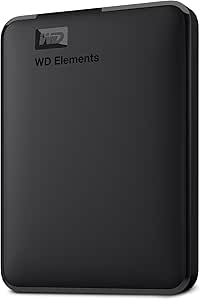 | Best for No-Frills Portable Storage | Capacity: 2 TB | Drive type: Mechanical hard disk | Interface: USB 2.0/3.0 | VIEW LATEST PRICE | See Our Full Breakdown |
| WD 16TB My Book Desktop External Hard Drive |  | Best for Large Desktop Archives | Capacity: 16 TB | Interface: USB 3.0 (SuperSpeed 5 Gbps), USB 2.0 compatible | Form factor: 3.5 inches | VIEW LATEST PRICE | See Our Full Breakdown |
| WD 5TB My Passport Portable External Hard Drive |  | Best Portable Drive for Protected Backups | Capacity: 5 TB | Form factor: 2.5 inches | Interface: USB 2.0/3.0; SuperSpeed USB-A cable rated at 5 Gbps | VIEW LATEST PRICE | See Our Full Breakdown |
| Seagate Expansion Desktop 4TB External Hard Drive (STKP4000400) |  | Best for Simple Desktop Expansion | Capacity: 4 TB | Interface: USB 3.0 | Form factor: 3.5 inches | VIEW LATEST PRICE | See Our Full Breakdown |
| Samsung T7 Portable SSD, 1TB, Titan Gray, USB 3.2 Gen 2 | 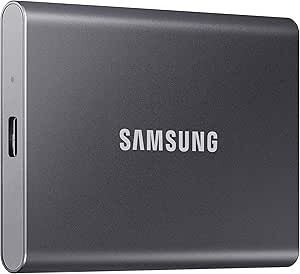 | Best for Speed and Portability | Capacity: 1 TB | Interface: USB 3.2 Gen 2 | Read speed: Up to 1,050 MB/s | VIEW LATEST PRICE | See Our Full Breakdown |
| Seagate Expansion 24TB External Hard Drive (STKP24000400) |  | Best for Maximum Desktop Capacity | Capacity: 24 TB | Interface: USB 3.0 | Form factor: 3.5 inches | VIEW LATEST PRICE | See Our Full Breakdown |
| Western Digital WD 5TB Elements Portable External Hard Drive |  | Best High-Capacity Value | Capacity: 5 TB | Interface: USB 3.2 Gen 1 / USB 3.0 | Form Factor: 2.5-inch | VIEW LATEST PRICE | See Our Full Breakdown |
| WD My Passport 6TB Portable External Hard Drive |  | Best for Security-Conscious Users | Capacity: 6 TB | Interface: USB 3.0 / USB 2.0 | Read Speed: Up to 110 MB/s | VIEW LATEST PRICE | See Our Full Breakdown |
| Toshiba Canvio Basics 2TB Portable External Hard Drive |  | Best for Simple Windows Backups | Capacity: 2 TB | Interface: USB 3.0 / USB 2.0 | Weight: 5.28 ounces | VIEW LATEST PRICE | See Our Full Breakdown |
| Seagate One Touch 2TB External Hard Drive |  | Best Design and Software Bundle | Capacity: 2 TB | Interface: USB 3.0 | Read Speed: Up to 120 MB/s | VIEW LATEST PRICE | See Our Full Breakdown |
| SanDisk 2TB Extreme Portable SSD |  | Best for Speed and Durability | Capacity: 2 TB | Interface: USB 3.2 Gen 2 | Read Speed: Up to 1050 MB/s | VIEW LATEST PRICE | See Our Full Breakdown |
| external hard drife | Capacity | Interface | Compatibility | Form factor |
|---|---|---|---|---|
| WD My Passport 2TB Portable Ex | 2 TB | USB 2.0/3.0 | — | 2.5 inches |
| Seagate 2TB Portable Hard Driv | 2 TB | USB 3.0 | Windows and Mac | — |
| WD_BLACK P10 Game Drive 6TB Po | 6 TB | USB 3.2 Gen 1 (USB 3.0) | Xbox Series X|S, PlayStation 5, PC, and Mac | 2.5 inches |
| WD My Passport 4TB Portable Ex | 4 TB | — | — | 2.5 inches |
| WD 2TB Elements Portable Exter | 2 TB | USB 2.0/3.0 | PC and Mac | — |
| WD 16TB My Book Desktop Extern | 16 TB | USB 3.0 (SuperSpeed 5 Gbps), USB 2.0 compatible | PC, Mac, Nintendo Switch, PlayStation 5 | 3.5 inches |
| WD 5TB My Passport Portable Ex | 5 TB | USB 2.0/3.0; SuperSpeed USB-A cable rated at 5 Gbps | PC; Mac with reformatting; Linux | 2.5 inches |
| Seagate Expansion Desktop 4TB | 4 TB | USB 3.0 | Windows, Mac, PlayStation 4 | 3.5 inches |
| Samsung T7 Portable SSD | 1 TB | USB 3.2 Gen 2 | — | — |
| Seagate Expansion 24TB Externa | 24 TB | USB 3.0 | — | 3.5 inches |
| Western Digital WD 5TB Element | 5 TB | USB 3.2 Gen 1 / USB 3.0 | Windows, Mac (requires reformatting) | 2.5-inch |
| WD My Passport 6TB Portable Ex | 6 TB | USB 3.0 / USB 2.0 | Windows, Mac (requires reformatting) | 2.5-inch |
| Toshiba Canvio Basics 2TB Port | 2 TB | USB 3.0 / USB 2.0 | Windows PC (Mac requires reformatting) | — |
| Seagate One Touch 2TB External | 2 TB | USB 3.0 | Windows, Mac | 2.5-inch |
| SanDisk 2TB Extreme Portable S | 2 TB | USB 3.2 Gen 2 | Windows, macOS, Xbox, PlayStation | — |
More Details on Our Top Picks
WD My Passport 2TB Portable External Hard Drive, Black
I’d choose the WD My Passport 2TB for portable everyday storage when file protection matters as much as carrying convenience. It pairs password protection and hardware encryption with downloadable backup and device-management software, giving it a more security-focused feature set than the straightforward Seagate Portable 2TB, which is designed around plug-and-play simplicity. Its compact 2.5-inch mechanical drive can hold a useful library of documents, photos, and media without needing a separate power supply.
The tradeoff is setup: WD’s software must be downloaded and installed, while the Seagate can be used without installing software. Like other mechanical drives here, this Passport is less suited to frequent work directly from the drive than the Samsung T7 SSD. I’d pick it for protected backups and skip it if you want the simplest possible setup or SSD-class responsiveness.
Pros:- Hardware encryption and password protection add a security layer for stored files.
- Compact 2.5-inch design suits travel and laptop bags.
- Downloadable backup and device-management software is included.
- Three-year limited warranty.
Cons:- Backup and management software requires download and installation.
- Mechanical storage is less responsive than the Samsung T7 SSD.
- Warranty terms may require checking the product warranty information.
Best for: Laptop owners who carry personal or work files and want password protection and hardware encryption for portable backups.
Not ideal for: Buyers who want immediate plug-and-play use without software setup, or who need an SSD for frequent, responsive work with large files.
- Capacity:2 TB
- Drive type:Mechanical hard disk
- Form factor:2.5 inches
- Interface:USB 2.0/3.0
- Security:Hardware encryption and password protection
- Included software:Device management and backup software
- Color:Black
- Warranty:3-year limited warranty
Our verdict“Choose this My Passport for portable 2TB backups with encryption; pick the Seagate Portable 2TB if you prefer setup without additional software.”
Seagate 2TB Portable Hard Drive | USB 3.0 (STGX2000400)
The Seagate Portable 2TB is the uncomplicated pick for buyers who want extra storage without installing a backup app: connect it and the computer recognizes it, then use drag-and-drop file copying. That makes it simpler to get started than the WD My Passport 2TB, whose backup and management tools need to be downloaded. The included 18-inch USB 3.0 cable and stated Windows and Mac compatibility also suit basic file transfers between common computers.
This simplicity comes with fewer listed safeguards and less bundled backup functionality than the My Passport. The listing also gives conflicting form-factor details, so I wouldn’t rely on its stated dimensions or rotational speed when comparing physical fit or performance. Its 2TB capacity works for everyday documents and media, but the WD_BLACK P10’s 6TB is a much better fit for a large game collection. Choose Seagate for easy general-purpose storage, not advanced protection or high capacity.
Pros:- Plug-and-play setup requires no additional software.
- Drag-and-drop copying keeps basic backups straightforward.
- Includes an 18-inch USB 3.0 cable.
- Designed for use with Windows and Mac computers.
Cons:- No hardware encryption or password protection is listed.
- No dedicated backup software is listed.
- Product information gives inconsistent form-factor details.
Best for: Windows or Mac laptop users who want a basic 2TB drive for manual file copies without installing backup software.
Not ideal for: Buyers who need hardware encryption, bundled backup tools, a clearly documented physical form factor, or room for a large game library.
- Capacity:2 TB
- Interface:USB 3.0
- Compatibility:Windows and Mac
- Setup:Plug and play; no software required
- Included cable:18-inch USB 3.0 cable
- Listed read speed:120 MB/s
- Warranty:1 year
Our verdict“Pick the Seagate for straightforward 2TB file storage with minimal setup, but choose the WD My Passport if you want built-in encryption and backup software.”
WD_BLACK P10 Game Drive 6TB Portable External Hard Drive
For gamers trying to keep a large library installed or archived, the WD_BLACK P10’s 6TB capacity is its clearest advantage: the product description estimates room for up to 150 games. It connects over USB 3.0 and supports Xbox Series X|S, PlayStation 5, PC, and Mac, so it can serve more than one gaming setup. Compared with the 2TB WD My Passport models, the P10 gives a game library far more breathing room, and its metal top cover sets it apart from more ordinary portable-drive designs.
Capacity does not make it an SSD. The listed read speed is up to 130 MB/s, so it is better for storing and moving games than for buyers seeking SSD responsiveness; the Samsung T7 is the more suitable SSD-style option, though it offers less capacity in the listed model. Disc-installed console games may still require the original disc for verification, and the USB Micro-B connector is less common on newer devices than USB-C. I’d choose it for space, not speed.
Pros:- 6TB capacity is suited to large game libraries.
- Compatible with Xbox Series X|S, PlayStation 5, PC, and Mac.
- Metal top covering distinguishes its enclosure from basic portable drives.
- Portable 2.5-inch form factor and included USB Type-A to Micro-B cable.
Cons:- Mechanical drive is slower than an SSD such as the Samsung T7.
- Disc-installed games may require the original disc for verification.
- USB Micro-B is less convenient for devices that use USB-C.
Best for: Console and PC gamers who need portable space to store or archive a large collection across supported systems.
Not ideal for: Gamers who prioritize SSD responsiveness, need a USB-C connection, or expect disc-installed games to run without the original disc.
- Capacity:6 TB
- Drive type:Mechanical hard drive
- Form factor:2.5 inches
- Interface:USB 3.2 Gen 1 (USB 3.0)
- Read speed:Up to 130 MB/s
- Enclosure material:Metal top covering
- Compatibility:Xbox Series X|S, PlayStation 5, PC, and Mac
- Included accessories:USB Type-A to Micro-B cable and quick-start guide
Our verdict“Choose the P10 if you need a portable 6TB game library; choose an SSD instead if speed matters more than capacity.”
WD My Passport 4TB Portable External Hard Drive, Black
The WD My Passport 4TB suits buyers who want more room than a 2TB portable drive without giving up the My Passport line’s security and backup features. Its password protection and hardware encryption help protect stored files, while the backup software includes ransomware protection. Compared with the WD My Passport 2TB, this model doubles the listed capacity; compared with the basic Seagate Portable 2TB, it offers a more developed security and backup feature set.
The larger capacity is still in a portable 2.5-inch mechanical drive, but it does not make this a fast working drive: the listing’s transfer-speed information is inconsistent, so I wouldn’t use it to compare performance precisely. The WD_BLACK P10 offers more capacity for game collections, while this Passport makes more sense for mixed personal files and protected backups. I’d skip it if you need a clearly specified speed profile or the simplest software-free setup.
Pros:- 4TB capacity provides twice the space of the 2TB My Passport model.
- Password protection and hardware encryption help secure stored files.
- Backup software includes ransomware protection.
- Portable 2.5-inch design with a three-year limited warranty.
Cons:- Listing provides inconsistent transfer-speed and data-rate information.
- Mechanical storage is less responsive than the Samsung T7 SSD.
- Backup software features require using the included software rather than a purely manual workflow.
Best for: Traveling professionals and home users who need 4TB for files and want encryption plus backup software with ransomware protection.
Not ideal for: Buyers who need dependable published transfer-speed figures, SSD performance, or a drive that works without setting up backup software.
- Capacity:4 TB
- Drive type:Mechanical hard drive
- Form factor:2.5 inches
- Connectivity:USB 2.0, USB 3.0, USB 3.2 Gen 2
- Security:Hardware encryption and password protection
- Backup features:Backup software with ransomware protection
- Compatible devices:Desktop, laptop, and tablet
- Warranty:3-year limited warranty
Our verdict“Choose this model for 4TB of portable, security-focused backup space; look to the WD_BLACK P10 for game-library capacity or an SSD for faster access.”
WD 2TB Elements Portable External Hard Drive for Windows, USB 3.2 Gen 1/USB 3.0 for PC & Mac, Plug and Play Ready – WDBU6Y0020BBK-WESN
The WD Elements Portable 2TB is the pared-back choice for people who want a familiar-brand drive for extra files without prioritizing bundled backup tools or security features. It offers USB 3.2 Gen 1/USB 3.0 connectivity and plug-and-play expandability, making it a straightforward companion for storing photos, videos, music, and documents. Compared with the WD My Passport 2TB, it gives up the listed hardware encryption and downloadable backup software in favor of a simpler feature set; compared with the Seagate Portable 2TB, it serves a similar basic-storage role.
The product data contains conflicting form-factor and speed details, so I would not use those figures to predict its physical size or transfer performance. Its 2TB capacity is also modest next to the 6TB WD_BLACK P10 for gamers or larger portable options in this roundup. I’d choose Elements for everyday file storage, but skip it if you want password protection, a dedicated backup suite, or clearly documented specifications.
Pros:- Plug-and-play design supports uncomplicated file storage.
- USB 3.2 Gen 1/USB 3.0 connectivity is listed.
- Portable product line is designed for on-the-go file storage.
- Works with USB 3.0 and USB 2.0 devices according to the product description.
Cons:- No hardware encryption or password protection is listed.
- No dedicated backup software is listed.
- Product information conflicts on form factor and speed details.
Best for: PC and Mac users who need a simple portable drive for personal files and prefer basic plug-and-play storage over bundled security tools.
Not ideal for: Buyers who want hardware encryption, backup software, a large game-library drive, or consistent published form-factor and speed specifications.
- Capacity:2 TB
- Drive type:Mechanical hard disk
- Interface:USB 2.0/3.0
- USB standard:USB 3.2 Gen 1/USB 3.0
- Compatibility:PC and Mac
- Listed rotational speed:5400 RPM
- Model number:WDBU6Y0020BBK-WESN
- Color:Black
Our verdict“Choose Elements for basic portable 2TB storage, but select the My Passport if you need encryption and backup software.”
WD 16TB My Book Desktop External Hard Drive
The WD My Book 16TB is the capacity-first choice here: it holds far more than the portable drives in this roundup, including the WD 5TB My Passport, making it a better fit for a large photo, video, or document archive that stays at home. Its 256-bit AES hardware encryption and password protection add a layer of control for private files, while included backup software supports scheduled data copies. USB 3.0 is suitable for routine transfers, but the listed 150 MB/s read speed is well below the Samsung T7’s SSD speeds. This is a desktop mechanical drive, not a pocketable option, and full functionality requires downloading and installing software. Choose it for capacity and backup features; skip it if portability or fast working-file access matters more.
Pros:- 16TB capacity accommodates a substantial archive in one drive
- 256-bit AES hardware encryption and password protection
- Includes WD Backup software
- Works with PC and Mac systems
Cons:- Desktop form factor is less convenient to move than the My Passport or Samsung T7
- Full software features require a download and installation
- Mechanical-drive performance is far slower than the Samsung T7 SSD
Best for: Home-office users and media creators who need a high-capacity drive for a large archive and want hardware encryption.
Not ideal for: Travelers and people editing large files directly from a drive; its desktop form factor and mechanical-drive speeds are poor fits.
- Capacity:16 TB
- Interface:USB 3.0 (SuperSpeed 5 Gbps), USB 2.0 compatible
- Form factor:3.5 inches
- Encryption:256-bit AES hardware encryption
- Compatibility:PC, Mac, Nintendo Switch, PlayStation 5
- Read speed:150 MB/s
- Color:Black
- Model number:WDBBGB0160HBK-NESN
Our verdict“Choose the WD My Book if you want a large, security-minded desktop archive rather than a portable or high-speed working drive.”
WD 5TB My Passport Portable External Hard Drive
The WD 5TB My Passport balances a travel-friendly 2.5-inch design with more space than most compact drives in this roundup. It is a stronger pick for carrying a large photo or work-file library than the Samsung T7 1TB, though it cannot match that SSD’s transfer speeds or drop protection. WD’s bundled device-management and backup software includes ransomware defense, while password protection and hardware encryption help safeguard files if the drive is misplaced. Its USB connection is broadly useful, and the listed weight is just 7.4 ounces. The tradeoff is that this remains a mechanical hard drive: it is less suited to frequent heavy transfers, and software-backed features may take setup. Choose it for portable capacity and backup tools, not maximum speed.
Pros:- 5TB capacity in a compact 2.5-inch portable design
- Includes backup and device-management software with ransomware defense
- Password protection and hardware encryption
- Lightweight at 7.4 ounces
Cons:- Mechanical-drive transfers are much slower than the Samsung T7 SSD
- Included software features require setup
- No drop-protection rating is provided in the supplied product details
Best for: Students, mobile professionals, and photographers who want several terabytes of portable storage with backup and file-protection software.
Not ideal for: People who routinely move large video projects or need stronger shock resistance; the Samsung T7 is faster and has stated drop protection.
- Capacity:5 TB
- Form factor:2.5 inches
- Interface:USB 2.0/3.0; SuperSpeed USB-A cable rated at 5 Gbps
- Encryption:Hardware encryption with password protection
- Weight:7.4 ounces
- Dimensions:4.22 x 2.95 x 0.75 inches
- Compatibility:PC; Mac with reformatting; Linux
- Warranty:3-year limited warranty
Our verdict“Pick the My Passport when portable capacity and backup protections matter more than SSD speed or ruggedness.”
Seagate Expansion Desktop 4TB External Hard Drive (STKP4000400)
The Seagate Expansion Desktop 4TB is the straightforward pick for adding a dedicated storage pool to a Windows or Mac computer. Plug-and-play setup and drag-and-drop file handling make it less software-dependent than the WD My Book 16TB, though the Seagate offers much less room and lacks the WD’s listed hardware encryption. Its 4TB capacity suits a growing media collection or routine backups without the footprint of a much larger archive drive. Seagate also includes Rescue Data Recovery Services, a useful extra, but that service is not a substitute for keeping a second backup. The 3.5-inch drive needs its own power adapter, so it belongs on a desk rather than in a travel bag. Mac users planning to use Time Machine should expect to reformat it.
Pros:- Simple plug-and-play setup with drag-and-drop file management
- 4TB capacity for common desktop storage needs
- USB 3.0 connection
- Includes Rescue Data Recovery Services
Cons:- Requires a separate power adapter and a permanent desk setup
- Must be reformatted for Apple Time Machine
- Mechanical-drive speeds lag well behind the Samsung T7 SSD
Best for: Windows and Mac desktop users who want simple extra space for a moderate media library or backup set.
Not ideal for: Travelers, Time Machine users seeking an out-of-box setup, and buyers who need encryption or very high capacity.
- Capacity:4 TB
- Interface:USB 3.0
- Form factor:3.5 inches
- Rotational speed:5400 RPM
- Read speed:120 MB/s
- Compatibility:Windows, Mac, PlayStation 4
- Color:Black
- Enclosure material:Aluminum/glass
Our verdict“Choose this Seagate when uncomplicated desktop storage matters more than portability, encryption, or archive-scale capacity.”
Samsung T7 Portable SSD, 1TB, Titan Gray, USB 3.2 Gen 2
The Samsung T7 is the speed-first option in this group. Its SSD storage and rated reads up to 1,050 MB/s make it far better suited to moving large projects or working directly from an external drive than the mechanical WD 5TB My Passport. The compact aluminum body is rated for drops up to six feet, adding practical reassurance for a bag or mobile workstation. Its main compromise is capacity: 1TB is modest beside the My Passport or the desktop drives, so large archives may need a second device. Maximum performance also depends on a compatible USB 3.2 Gen 2 host, cable, and UASP support; older connections can limit speed. This is a premium performance pick, not the economical route to bulk storage.
Pros:- Rated read and write speeds up to 1,050 MB/s and 1,000 MB/s
- Compact aluminum body with drop protection up to six feet
- Includes USB Type-C-to-C and Type-C-to-A cables
- 256-bit AES hardware encryption
Cons:- 1TB capacity is limited beside the mechanical drives in this roundup
- Maximum speeds require a compatible USB 3.2 Gen 2 host and supporting setup
- Compatibility and performance can vary by device
Best for: Video editors, photographers, and mobile professionals who prioritize fast transfers, compact size, and a stated drop-protection rating.
Not ideal for: People building a large, low-cost media archive; the 1TB capacity is far below the WD My Passport and desktop options.
- Capacity:1 TB
- Interface:USB 3.2 Gen 2
- Read speed:Up to 1,050 MB/s
- Write speed:Up to 1,000 MB/s
- Encryption:256-bit AES hardware encryption
- Construction:Aluminum unibody
- Drop protection:Up to 6 feet
- Color:Titan Gray
Our verdict“Choose the T7 if fast, portable file access matters more than the capacity offered by the My Passport or desktop drives.”
Seagate Expansion 24TB External Hard Drive (STKP24000400)
With 24TB of capacity, this Seagate Expansion is the largest single-drive archive in the group, surpassing the WD My Book’s 16TB. It makes the most sense for users consolidating extensive video, photo, or media collections who prefer one desktop unit over several smaller portable drives. Setup is simple and does not require extra software, and Rescue Data Recovery Services is included. The 7,200-rpm mechanism and USB 3.0 connection serve routine transfers, but this is still a mechanical drive; the Samsung T7 is a much better fit for active editing and frequent high-speed file moves. The Seagate also needs an external power adapter and a desk location. Mac users planning Time Machine use should account for reformatting, and the listed limited warranty is one year.
Pros:- 24TB capacity exceeds the WD My Book’s 16TB
- Plug-and-play setup without required software installation
- Includes Rescue Data Recovery Services
- 7,200-rpm mechanism and USB 3.0 interface
Cons:- External power adapter and desktop placement limit portability
- Mechanical storage is much slower than the Samsung T7 SSD
- Requires reformatting for Apple Time Machine and has a listed one-year limited warranty
Best for: Video libraries, archival collections, and home media servers that need very high capacity in a single desktop drive.
Not ideal for: Travelers, people who need SSD-like performance, and Mac users who want an unformatted Time Machine drive.
- Capacity:24 TB
- Interface:USB 3.0
- Form factor:3.5 inches
- Rotational speed:7200 rpm
- Read speed:140 MB/s
- Data transfer rate:5 Gbps
- Weight:3 pounds
- Dimensions:7.04 x 1.65 x 4.92 inches
- Warranty:1-year limited
Our verdict“Choose the 24TB Expansion when fitting a large archive on one desktop drive matters more than portability or SSD-level speed.”
Western Digital WD 5TB Elements Portable External Hard Drive
This drive stands out for offering 5TB of storage in a compact portable form factor, a capacity usually reserved for bulkier desktop units. Compared to the Toshiba Canvio Basics, which maxes out at 2TB in its standard portable line, the Elements provides significantly more room for media libraries without requiring a separate power adapter. However, this high density comes with a tradeoff: the mechanical nature of the drive means slower transfer speeds, capped at around 50 MB/s. While this is adequate for archiving photos or documents, it lags behind the Seagate One Touch in sustained performance. It is a no-frills solution that prioritizes raw volume over speed or security features, making it ideal for users who need to move large datasets but do not require encryption or rapid access.
Pros:- Offers 5TB capacity in a portable 2.5-inch chassis
- Plug-and-play compatibility with Windows and Mac (after reformatting)
- No external power adapter required for operation
- Lower cost per terabyte compared to smaller portable drives
Cons:- Slower read speeds (approx. 50 MB/s) compared to newer models
- Lacks built-in hardware encryption or password protection
- Plastic enclosure feels less durable than metal alternatives
Best for: Photographers or video editors who need massive offline storage for archives and do not prioritize transfer speed or hardware encryption.
Not ideal for: Users who need to edit video directly from the drive or require password protection for sensitive data.
- Capacity:5 TB
- Interface:USB 3.2 Gen 1 / USB 3.0
- Form Factor:2.5-inch
- Read Speed:Up to 50 MB/s
- Compatibility:Windows, Mac (requires reformatting)
- Power:Bus-powered via USB
- Enclosure Material:Plastic
Our verdict“This is the go-to choice for budget-conscious users who need the highest possible portable storage density without paying for extra security features.”
WD My Passport 6TB Portable External Hard Drive
The WD My Passport 6TB differentiates itself by bundling robust security features that the WD Elements completely lacks. It includes 256-bit AES hardware encryption and password protection, ensuring that your data remains inaccessible if the drive is lost or stolen. This model also ships with Acronis True Image software, offering ransomware defense and automated backups. While it offers a massive 6TB capacity, it is physically larger and heavier than the 2TB options like the Seagate One Touch. The mechanical drive technology limits its speed to around 110 MB/s, which is faster than the Elements but still far behind SSDs. This is the premium pick for travelers and professionals who handle sensitive client data and need a large, secure vault in their bag.
Pros:- Includes 256-bit AES hardware encryption and password protection
- Ships with Acronis True Image for ransomware defense and backups
- High 6TB capacity in a slim, portable design
- Durable aluminum-look enclosure offers better protection than plastic
Cons:- Mechanical drive speed (110 MB/s) lags behind SSDs
- Software features require registration and may expire
- Heavier and bulkier than smaller 2TB portable drives
Best for: Freelancers and professionals who store sensitive client data and require hardware-level encryption and backup software.
Not ideal for: Users who prioritize raw speed for gaming or video editing, as the mechanical drive is slower than SSD options.
- Capacity:6 TB
- Interface:USB 3.0 / USB 2.0
- Read Speed:Up to 110 MB/s
- Security:256-bit AES Hardware Encryption
- Included Software:Acronis True Image for Western Digital
- Form Factor:2.5-inch
- Compatibility:Windows, Mac (requires reformatting)
Our verdict“Choose this drive if you need maximum portable capacity combined with built-in security to protect sensitive files from unauthorized access.”
Toshiba Canvio Basics 2TB Portable External Hard Drive
For Windows users seeking a straightforward, no-nonsense backup solution, the Toshiba Canvio Basics is hard to beat. Unlike the WD My Passport, it comes with zero bloatware or pre-installed software, relying entirely on Windows’ native backup tools. Its plug-and-play functionality works immediately upon connection, and the matte black finish resists fingerprints well. However, this simplicity comes at a cost for Mac users, who must reformat the drive before use. It also lacks the hardware encryption found in the WD Passport or the ruggedness of the SanDisk Extreme SSD. This drive is strictly a data container, making it perfect for those who want a reliable, quiet, and lightweight drive for daily backups without any extra features getting in the way.
Pros:- Extremely lightweight at just 5.28 ounces
- No pre-installed software or bloatware to uninstall
- Silent operation with no moving parts noise beyond the spindle
- Affordable entry point for 2TB of portable storage
Cons:- Requires reformatting for use with macOS Time Machine
- Lacks hardware encryption or password protection
- Plastic casing offers minimal shock protection
Best for: Windows users who want a lightweight, silent drive for simple file storage and backups without extra software.
Not ideal for: Mac users who do not want to reformat the drive, or travelers who need water/dust resistance.
- Capacity:2 TB
- Interface:USB 3.0 / USB 2.0
- Weight:5.28 ounces
- Dimensions:4.3 x 3.1 x 0.55 inches
- Compatibility:Windows PC (Mac requires reformatting)
- Power:Bus-powered via USB
- Rotational Speed:5400 RPM
Our verdict“This is the ideal choice for Windows-centric users who value simplicity and portability over advanced security or ruggedness.”
Seagate One Touch 2TB External Hard Drive
The Seagate One Touch appeals to style-conscious users with its brushed metal enclosure, which feels significantly more premium than the plastic shells of the Toshiba Canvio or WD Elements. Beyond aesthetics, it includes a one-touch backup button and a free year of Adobe Creative Cloud Photography plans, adding tangible value for creatives. While its read speeds of 120 MB/s are competitive for a mechanical drive, they still trail behind the SanDisk Extreme SSD. The drive is designed to look good on a desk, but users should note that the included software subscriptions are time-limited. It strikes a balance between form and function, offering a sleek look and useful software perks, though it lacks the rugged durability of more expensive portable drives.
Pros:- Sleek brushed metal design that resists scratches
- Includes one-click backup software for easy scheduling
- Complimentary Adobe Creative Cloud Photography plan (1 year)
- Fast 120 MB/s read speeds for a mechanical drive
Cons:- Software subscriptions are temporary and require redemption
- Not ruggedized; susceptible to damage from drops
- Mac users may need to reformat for Time Machine
Best for: Creative professionals and students who want a stylish drive with bundled photo editing software and easy backup features.
Not ideal for: Users who need long-term software access, as the included Adobe and Mylio subscriptions expire after one year.
- Capacity:2 TB
- Interface:USB 3.0
- Read Speed:Up to 120 MB/s
- Enclosure Material:Brushed Metal
- Included Software:Seagate Toolkit, Mylio Create, Adobe CC Photo
- Form Factor:2.5-inch
- Compatibility:Windows, Mac
Our verdict“This drive is the best pick for designers and photographers who appreciate premium aesthetics and want a temporary boost to their creative software suite.”
SanDisk 2TB Extreme Portable SSD
This is the only solid-state drive in this lineup, and it dominates in performance and resilience. With read speeds up to 1050 MB/s, it is nearly ten times faster than the Seagate One Touch or WD My Passport. The IP65 water and dust resistance and drop protection make it suitable for fieldwork, where a mechanical drive like the Toshiba Canvio would likely fail. The carabiner loop allows it to be attached to a bag, a practical touch for travelers. The tradeoff is the price per gigabyte and the fact that it is a solid-state drive, which can degrade slightly differently over time than HDDs. It is the definitive choice for creators who edit 4K video directly from the drive or work in harsh environments where data integrity is paramount.
Pros:- Blazing fast NVMe speeds (up to 1050 MB/s)
- IP65 rated for water and dust resistance
- Drop protection up to 2 meters
- 256-bit AES hardware encryption for security
Cons:- Higher cost per terabyte compared to mechanical drives
- Requires USB-C connection for full speed potential
- Mac users need to download SanDisk software for encryption
Best for: Videographers, photographers, and field workers who need rapid transfer speeds and rugged, weather-resistant storage.
Not ideal for: Users on a strict budget who only need to store cold data and do not need fast access or durability.
- Capacity:2 TB
- Interface:USB 3.2 Gen 2
- Read Speed:Up to 1050 MB/s
- Write Speed:Up to 1000 MB/s
- Durability:IP65 Water/Dust, 2m Drop Protection
- Security:256-bit AES Hardware Encryption
- Compatibility:Windows, macOS, Xbox, PlayStation
Our verdict“This is the premium choice for professionals who cannot afford to lose data to drops or moisture and require SSD-level speed for creative workflows.”
How We Picked
I evaluated these storage solutions based on three primary pillars: performance metrics, build quality and durability, and value proposition. Performance was assessed not just by theoretical interface speeds (USB 3.0 vs 3.2) but by real-world applicability for different user types, such as gamers versus archivists. I prioritized drives with consistent data integrity records and robust casing designs, recognizing that an external drive is only as good as its ability to survive being carried in a bag.
The ranking logic reflects a hierarchy of utility. Drives that offer a balance of speed and capacity without requiring external power sources took the top spots for general consumers. Desktop units were ranked lower for portability but higher for raw capacity needs. I also weighed the importance of included software; drives with built-in backup automation and encryption were favored over bare-bones models, provided the software did not bloat the user experience.
Factors to Consider When Choosing Best External Hard Drives
Selecting the right external drive requires looking beyond the headline capacity number. Here are the key factors that dictate which model will serve you best.HDD vs. SSD: Understanding the Speed and Cost Tradeoff
The fundamental decision is between a Hard Disk Drive (HDD) and a Solid State Drive (SSD). HDDs use spinning platters, making them cheaper for large capacities but slower and more susceptible to physical shock. SSDs use flash memory, offering significantly faster read/write speeds and greater durability against drops. If you frequently access large files like video projects or game libraries, an SSD saves time. If you are archiving photos you rarely open, an HDD offers better value per terabyte. My recommendation is to assess your access frequency: high-frequency access demands SSD performance, while low-frequency storage favors HDD economics.
Portability and Power Requirements
2.5-inch portable drives usually draw power directly from the USB port, meaning you need only one cable. Larger 3.5-inch desktop drives require an external power adapter, making them less ideal for travel. Bus-powered drives are convenient for working on the go, but they may throttle performance if the host device cannot supply enough power. Desktop drives often offer better sustained transfer speeds due to larger motors and cooling capabilities. Consider where you will use the drive most often; if it stays on a desk, a desktop model is fine, but if it travels in a backpack, stick to bus-powered portables.
Interface Standards and Compatibility
Not all USB ports are created equal. While USB 3.0 is the baseline, newer drives utilize USB 3.2 Gen 2 or USB-C interfaces for higher bandwidth. Using a USB 3.2 drive on a USB 2.0 port will bottleneck the speed drastically. Check your computer’s ports before buying; if your laptop only has USB-A, a drive with a native USB-C cable might require an adapter, which adds bulk. For Mac users, ensure the drive is formatted for APFS or exFAT, or be prepared to reformat it, which erases existing data. Compatibility is not just about physical connection but also data format readability.
Data Security and Backup Software
Some drives come with proprietary software for automatic backups and encryption, while others are ‘dumb’ storage devices. Hardware encryption is preferable to software encryption because it does not slow down transfer speeds. If you handle sensitive client data, choose a drive with built-in password protection, such as the WD My Passport series. For personal backups, simple drag-and-drop might suffice, but automated backup software reduces the risk of human error. I advise against relying solely on manual copies; automated solutions provide peace of mind that you might not get with basic plug-and-play drives.
Durability and Physical Protection
External drives are prone to physical damage. Look for models with rubberized casings or shock-resistant designs if you plan to use the drive in the field. Standard plastic shells, common in budget models, offer little protection against drops. Some SSDs feature IP-rated water and dust resistance, a feature absent in most mechanical drives. If your workflow involves outdoor shoots or travel, the extra cost for a ruggedized drive is a worthwhile investment to prevent data loss. Always treat external storage as fragile, regardless of marketing claims about durability.
Frequently Asked Questions
Do I need to format a new external hard drive before using it?
It depends on your operating system and the drive’s pre-formatted state. Most modern drives come formatted as exFAT or NTFS, which works well with Windows. Mac users may find NTFS drives read-only unless they install third-party drivers. If you plan to use the drive between Windows and Mac, formatting to exFAT is the most practical solution. However, remember that formatting erases all existing data, so back up anything currently on the drive before proceeding. Always check the manufacturer’s documentation for recommended file systems to avoid compatibility issues.
Is it safe to leave an external hard drive plugged in all the time?
For desktop drives, leaving them plugged in is generally fine as they are designed for continuous operation. Portable 2.5-inch drives, however, may generate more heat and consume power from your laptop even when idle. Continuous spinning can slightly reduce the lifespan of mechanical drives, though modern drives are built for long-term use. I recommend safely ejecting portable drives when not in use to prevent accidental data corruption during removal. For desktop backups, keeping the drive connected allows for automated nightly backups, which is a significant security advantage.
Can I use an external SSD for gaming?
Yes, and it is highly recommended for modern games. Traditional HDDs often cause long loading screens and stuttering in open-world titles due to slower seek times. An external SSD like the Samsung T7 reduces load times significantly and improves texture streaming. However, ensure the drive supports high transfer rates via USB 3.2 Gen 2 or higher; older USB 3.0 SSDs may still bottleneck some high-end games. Always format the drive to the native file system of your console or PC for the best performance.
How do I know if my external drive is failing?
Warning signs include unusual clicking or grinding noises, files disappearing or becoming corrupted, and frequent disconnections. Slow transfer speeds that were once fast can also indicate mechanical wear. If you notice these symptoms, stop using the drive immediately and attempt to back up your data while it is still accessible. Running diagnostic tools provided by the manufacturer, such as SeaTools for Seagate or WD Drive Utilities, can help confirm health status. Never ignore these signs, as mechanical failure can occur suddenly and without warning.
What is the difference between portable and desktop external drives?
Portable drives are typically 2.5-inch models that are bus-powered, meaning they run off the USB connection and are small enough to fit in a bag. Desktop drives are 3.5-inch models that require an external power adapter and offer larger capacities, often exceeding 10TB. Desktop drives generally have faster sustained transfer speeds and better cooling due to their size and active ventilation. Choose portable for travel and laptop use, and desktop for stationary home or office backups where maximum capacity and speed are priorities over mobility.
Conclusion
Selecting the best external hard drives requires matching the technology to your specific usage patterns. For the average user seeking reliability and ease of use, the WD My Passport 2TB remains the Best Overall choice due to its compact size and integrated security features. If you are on a strict budget and just need raw storage space, the WD 2TB Elements is the clear Best Value winner, offering straightforward plug-and-play functionality without extra software bloat. For creative professionals and gamers who cannot tolerate slow load times, the Samsung T7 Portable SSD is the Best Premium option, delivering speed that mechanical drives simply cannot match. Beginners and students will find the Toshiba Canvio Basics to be the Best for Beginners because of its simplicity and low entry cost. Finally, for those with massive media libraries, the Seagate Expansion 24TB stands out as the Best for High-Capacity Needs, providing a massive archive in a single desktop unit.