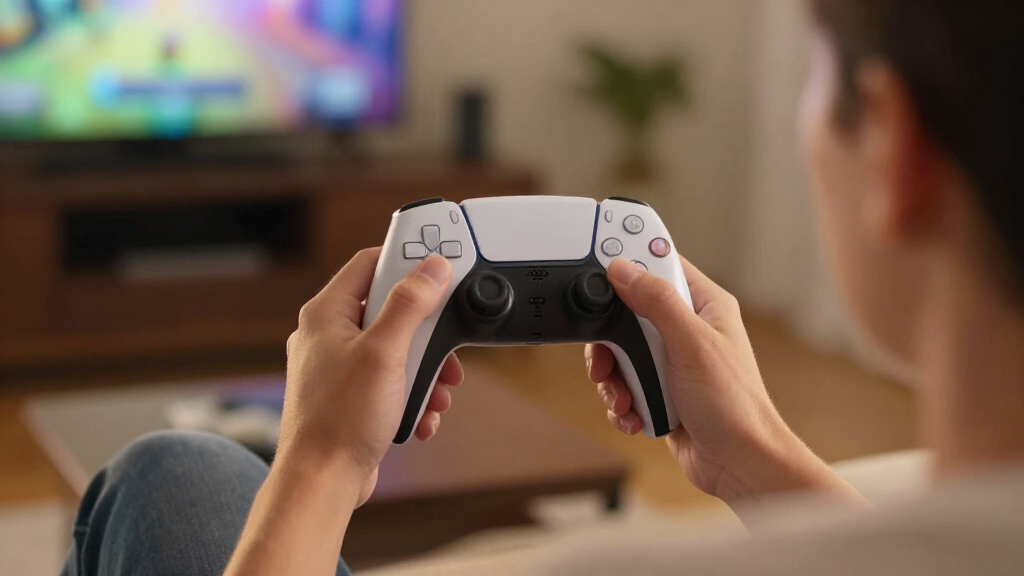
The best PS5 controller for most players is the PlayStation DualSense Edge, thanks to its adjustable controls and familiar PS5 features. For competitive play, the Razer Raiju V3 Pro brings a more specialized esports setup, while the standard DualSense remains the straightforward pick for players who want the official controller experience. The main tradeoffs are price, customization, stick-drift protection, and how much you value features such as adaptive triggers. I compare official, pro-focused, and alternative controllers so you can match one to your games and priorities. Read on for the full breakdown of all 15 options.

Get the latest gadgets delivered free with Prime
- Fast, free delivery on millions of items
- Prime Video, Amazon Music and more included
- Member-only deals all year
Complete the kit



Key Takeaways
- The lineup splits into three clear groups: official DualSense models prioritize familiar PS5 features, pro controllers focus on customization and competitive input, and third-party alternatives offer different feature combinations.
- The DualSense Edge is the most balanced premium pick for players who want adjustable controls without leaving the official PlayStation ecosystem.
- Razer’s Raiju V3 Pro and Wolverine V2 Pro target competitive play, but their specialized layouts and feature sets make them less natural choices for players seeking a standard DualSense feel.
- Hall Effect sticks distinguish several third-party options, including models from AceGamer and BETMI; buyers should still check each model’s exact PS5 compatibility and feature support.
- Limited-edition DualSense controllers change the look, not the basic choice: GTA VI, 007 First Light, Gray Camouflage, and Midnight Black variants suit design preferences more than a need for extra controls.
| AceGamer Wireless Controller for PS5 with Hall Effect Joysticks and Galaxy Design |  | Best for Drift-Resistant Features on a Budget | Compatibility: PS5, PS5 Pro, PS5 Slim; not compatible with PS4 | Connectivity: Bluetooth, USB-C | Joystick type: Hall Effect | VIEW LATEST PRICE | See Our Full Breakdown |
| Razer Raiju V3 Pro Wireless Esports Controller for PlayStation 5 and PC, White |  | Best for Competitive Play | Compatibility: PlayStation 5, PC | Connectivity: 2.4 GHz wireless USB dongle, wired USB-C | Weight: 258 g (9.12 oz) | VIEW LATEST PRICE | See Our Full Breakdown |
| PlayStation DualSense Edge Wireless Controller | 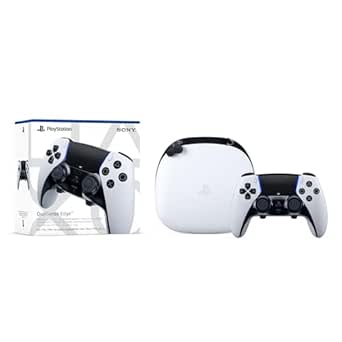 | Best for PlayStation Profile Customization | Compatibility: PlayStation 5 | Connectivity: USB, wireless | Weight: 2.6 pounds | VIEW LATEST PRICE | See Our Full Breakdown |
| BETMI Wireless Game Controller for PS5, PS5 Pro, PS5 Slim, and PC |  | Best for Built-In Voice Chat | Compatibility: PS5, PS5 Pro, PS5 Slim, PC, Windows | Connectivity: Bluetooth, USB | Joystick type: Hall Effect, rated for up to 5 million cycles | VIEW LATEST PRICE | See Our Full Breakdown |
| Victrix Pro BFG Wireless Gaming Controller – Tekken 8 Rage Art Edition |  | Best for Modular Fighting-Game Setups | Compatibility: PS5, PS4, PC (Windows) | Connectivity: Bluetooth, wired | Weight: 298 g | VIEW LATEST PRICE | See Our Full Breakdown |
| DualSense Wireless Controller – Grand Theft Auto VI White Limited Edition |  | Best for GTA VI Fans | Color: White | Connectivity: USB Type-C, Bluetooth | Compatible devices: PlayStation 5, Windows PC, Mac, Android, iOS | VIEW LATEST PRICE | See Our Full Breakdown |
| BETMI Wireless Controller for PS5, PS5 Pro, PS5 Slim, and PC with Hall Effect Joysticks | 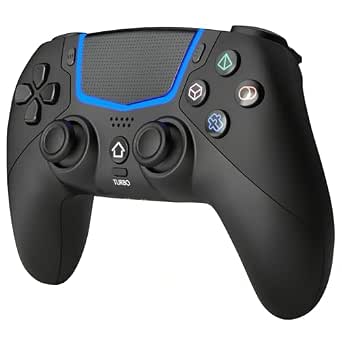 | Best for Hall Effect Sticks | Compatibility: PS5, PS5 Pro, PS5 Slim, PC | PC operating systems: Windows 8, 10, 11 | Connectivity: Bluetooth 5.3, wired USB-C | VIEW LATEST PRICE | See Our Full Breakdown |
| Pogriko Wireless Controller for PS5, PS5 Slim, and PS5 Pro |  | Best for Programmable Rear Buttons | Compatibility: PS5, PS5 Slim, PS5 Pro | Connectivity: Wireless | Programmable buttons: Two rear buttons; mapping and macros up to 16 key values | VIEW LATEST PRICE | See Our Full Breakdown |
| PlayStation DualSense Wireless Controller – 007 First Light Limited Edition | 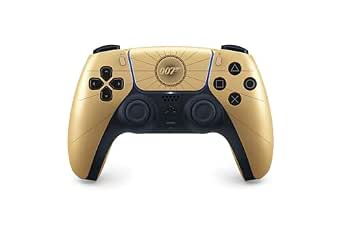 | Best for 007 Collectors | Brand and model: PlayStation DualSense | Compatible devices: PC, PlayStation 5 | Connectivity: Wireless | VIEW LATEST PRICE | See Our Full Breakdown |
| Razer Raiju V3 Pro Wireless Controller for PlayStation 5 and PC (Renewed) |  | Best for Competitive Customization | Compatibility: PC, PlayStation 5 | Connectivity: 2.4 GHz wireless, USB-C | Remappable buttons: 6 | VIEW LATEST PRICE | See Our Full Breakdown |
| Razer Wolverine V2 Pro Wireless PlayStation Gaming Controller | 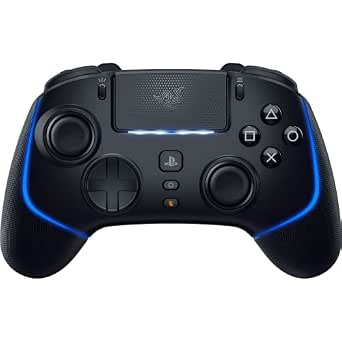 | Best for Competitive Play | Connectivity: 2.4GHz wireless via USB dongle; USB-C | Compatibility: PlayStation 5, PC | Button count: 23 | VIEW LATEST PRICE | See Our Full Breakdown |
| PlayStation DualSense Wireless Controller – Midnight Black with USB Cable for PC |  | Best for PC and PS5 Cross-Play | Model: DualSense CFI-ZCT2W | Color: Midnight Black | Connectivity: Bluetooth, USB-C | VIEW LATEST PRICE | See Our Full Breakdown |
| PlayStation DualSense Edge Wireless Controller – Midnight Black |  | Best for Custom PS5 Controls | Model: CFI-ZCP1 | Color: Midnight Black | Connectivity: Bluetooth | VIEW LATEST PRICE | See Our Full Breakdown |
| PlayStation DualSense Wireless Controller – Gray Camouflage |  | Best for the Standard PS5 Experience | Model number: CFI-ZCT2W | Color: Gray Camouflage | Connectivity: Bluetooth, USB Type-C, wireless | VIEW LATEST PRICE | See Our Full Breakdown |
| NBCP Wireless Controller for PS5 and PC |  | Best for Programmable Features | Connectivity: Bluetooth wireless | Compatibility: PS5, PS5 Pro, PS5 Slim, Windows PC | Button count: 21 | VIEW LATEST PRICE | See Our Full Breakdown |
| PS5 controller | Connectivity | Compatibility | Weight |
|---|---|---|---|
| AceGamer Wireless Controller f | Bluetooth, USB-C | PS5, PS5 Pro, PS5 Slim; not compatible with PS4 | — |
| Razer Raiju V3 Pro Wireless Es | 2.4 GHz wireless USB dongle, wired USB-C | PlayStation 5, PC | 258 g (9.12 oz) |
| PlayStation DualSense Edge Wir | USB, wireless | PlayStation 5 | 2.6 pounds |
| BETMI Wireless Game Controller | Bluetooth, USB | PS5, PS5 Pro, PS5 Slim, PC, Windows | 270 g |
| Victrix Pro BFG Wireless Gamin | Bluetooth, wired | PS5, PS4, PC (Windows) | 298 g |
| DualSense Wireless Controller | USB Type-C, Bluetooth | — | — |
| BETMI Wireless Controller for | Bluetooth 5.3, wired USB-C | PS5, PS5 Pro, PS5 Slim, PC | — |
| Pogriko Wireless Controller fo | Wireless | PS5, PS5 Slim, PS5 Pro | — |
| PlayStation DualSense Wireless | Wireless | — | — |
| Razer Raiju V3 Pro Wireless Co | 2.4 GHz wireless, USB-C | PC, PlayStation 5 | 9.12 ounces |
| Razer Wolverine V2 Pro Wireles | 2.4GHz wireless via USB dongle; USB-C | PlayStation 5, PC | 15.2 ounces |
| PlayStation DualSense Wireless | Bluetooth, USB-C | — | 16 ounces |
| PlayStation DualSense Edge Wir | Bluetooth | — | 2.6 pounds |
| PlayStation DualSense Wireless | Bluetooth, USB Type-C, wireless | — | 14.4 ounces |
| NBCP Wireless Controller for P | Bluetooth wireless | PS5, PS5 Pro, PS5 Slim, Windows PC | — |
More Details on Our Top Picks
AceGamer Wireless Controller for PS5 with Hall Effect Joysticks and Galaxy Design
The AceGamer combines Hall Effect joysticks with programmable back buttons, giving PS5 players drift-resistant stick technology and extra inputs without the more involved modular setup of the Victrix Pro BFG. Its macro and turbo functions add flexibility for games where repeated inputs matter, while the textured, sweat-resistant finish and non-slip grips are aimed at longer sessions. The galaxy shell also makes it a more visually distinctive pick than the standard white PlayStation DualSense Edge. The tradeoff is less certainty around setup and communication: first pairing requires a specific data cable, and the built-in speaker does not replace a microphone or headset. I’d choose it for its feature mix, not for a fully documented setup or audio experience.
Pros:- Hall Effect joysticks are designed to resist stick drift and maintain precise input.
- Programmable back buttons and macro/turbo functions add control options.
- Non-slip grips and a sweat-resistant finish suit extended play.
- Includes a touchpad, 6-axis gyro, vibration, and a 3.5 mm audio jack.
Cons:- Initial pairing and activation require a specific data cable.
- The built-in speaker has no microphone, so voice chat requires an external headset.
- The 3.5 mm jack is not compatible with Apple headphones.
Best for: PS5 players who want Hall Effect sticks, programmable rear buttons, and a distinctive design without a complex modular controller.
Not ideal for: PS4 owners or players who expect to use the built-in speaker for voice chat; it is not PS4-compatible and has no microphone.
- Compatibility:PS5, PS5 Pro, PS5 Slim; not compatible with PS4
- Connectivity:Bluetooth, USB-C
- Joystick type:Hall Effect
- Programmable controls:Back buttons; macro and turbo functions
- Motion and feedback:6-axis gyro, dual vibration
- Audio:Built-in speaker, 3.5 mm audio jack
- Button lifespan:Rated for 500,000 presses
- Power:Battery powered
Our verdict“Choose the AceGamer if drift-resistant sticks and extra programmable inputs matter more to you than straightforward setup and built-in voice chat.”
Razer Raiju V3 Pro Wireless Esports Controller for PlayStation 5 and PC, White
The Raiju V3 Pro is the most competition-focused pick here, pairing six remappable controls with magnetic TMR thumbsticks and triggers that switch between rapid clicks and analog travel. That gives players more ways to execute actions without lifting their thumbs from the sticks, a more esports-oriented approach than the PlayStation DualSense Edge’s emphasis on saved profiles, adjustable settings, and familiar DualSense features. The 2.4 GHz wireless dongle and wired USB-C connection offer connection choices, and the included case and replacement stick caps help make it a travel-ready kit. Its main qualification is that polling rates vary by platform and connection: the listed PS5 rates are lower than the PC wired rate. Buyers should choose it for its controls and customization, not assume PC figures carry over to PS5.
Pros:- Six remappable controls support extra inputs without moving thumbs from the sticks.
- Magnetic TMR thumbsticks are designed for precise, drift-resistant control.
- Dual-mode triggers switch between click response and analog input.
- Includes a carrying case, USB-C cable, replacement stick caps, and a removal tool.
Cons:- Polling rates differ by platform and wired or wireless connection.
- The listed PC wired polling rate is higher than the PS5 polling rate.
- Its esports-oriented feature set may be unnecessary for players who want a familiar standard layout.
Best for: Competitive PS5 and PC players who want multiple remappable inputs, trigger modes, and magnetic thumbsticks.
Not ideal for: Players seeking the standard DualSense feature set or those who want the listed PC polling rates on PS5.
- Compatibility:PlayStation 5, PC
- Connectivity:2.4 GHz wireless USB dongle, wired USB-C
- Weight:258 g (9.12 oz)
- Battery life:Approximately 36 hours
- Remappable controls:6
- Polling rate:Wired: 2000 Hz PC, 250 Hz PS5; wireless: 500 Hz PC, 250 Hz PS5
- Audio:3.5 mm headphone jack
- Included accessories:Carrying case, USB-C cable, replacement thumbstick caps, back-button removal tool
Our verdict“Pick the Raiju V3 Pro for competitive control options across PS5 and PC, but check its platform-specific polling details before buying.”
PlayStation DualSense Edge Wireless Controller
The DualSense Edge makes the most sense for PS5 players who want to tune controls while keeping the PlayStation DualSense experience, including haptic feedback and adaptive triggers in supported games. Remappable inputs, saved control profiles, adjustable trigger travel, and interchangeable caps and back buttons let players tailor the controller to different games rather than commit to one fixed setup. Compared with the Razer Raiju V3 Pro, the Edge is more closely tied to Sony’s familiar PS5 feature set, while the Razer puts greater emphasis on esports-style remappable controls and its own connection options. The Edge’s most meaningful ownership tradeoff is that replacement stick modules are sold separately. Its haptics and adaptive triggers also depend on game support, so the feature advantage varies by title.
Pros:- Remappable inputs and saved profiles make it easier to switch control layouts between games.
- Adjustable trigger travel and stick sensitivity allow tailored control.
- Swappable stick caps and back buttons offer physical customization.
- Supports haptic feedback and adaptive triggers in compatible games.
Cons:- Replacement stick modules are sold separately.
- Haptic feedback and adaptive triggers depend on support in each game.
- The listed weight and dimensions make it a substantial controller compared with lighter options such as the Razer Raiju V3 Pro.
Best for: PS5 players who want saved control profiles and adjustable inputs alongside Sony’s haptics and adaptive triggers.
Not ideal for: Buyers who want replacement stick modules included or who primarily play games that do not support the controller’s adaptive features.
- Compatibility:PlayStation 5
- Connectivity:USB, wireless
- Weight:2.6 pounds
- Dimensions:8 x 8 x 4.5 inches
- Power:Battery powered
- Control customization:Remappable inputs, saved profiles, adjustable trigger travel and stick sensitivity
- Swappable components:Stick caps and back buttons
- Feedback:Haptic feedback and adaptive triggers in supported games
Our verdict“Choose the DualSense Edge if you want adjustable profiles and Sony’s supported haptic features in one PS5-focused controller.”
BETMI Wireless Game Controller for PS5, PS5 Pro, PS5 Slim, and PC
The BETMI stands apart from the AceGamer by including a built-in microphone and mute button alongside its speaker and 3.5 mm TRRS jack. That makes it a more self-contained choice for players who want a quick voice-chat option without relying on a separate headset, while its Hall Effect sticks, turbo, and macro programming cover useful customization basics. The feature list is broad for a PS5-and-PC controller, including 6-axis gyro and RGB lighting, but the product data leaves an important practical gap: it does not state battery life or charging details. First-time PS5 Bluetooth pairing also requires a USB-C cable. I’d rank it for its integrated audio and cross-platform compatibility rather than for predictable endurance or cable-free setup.
Pros:- Hall Effect joysticks are rated for up to 5 million cycles.
- Built-in microphone, speaker, mute button, and TRRS audio jack provide several chat options.
- Macro programming, turbo, vibration, 6-axis gyro, and RGB lighting add flexibility.
- Supports PS5, PS5 Pro, PS5 Slim, and PC.
Cons:- First-time Bluetooth pairing with a PS5 requires a USB-C cable.
- Battery life and charging details are not provided.
- Its 270 g weight is heavier than the Razer Raiju V3 Pro’s listed 258 g.
Best for: PS5 or PC players who want Hall Effect sticks and built-in microphone and mute controls for casual voice chat.
Not ideal for: Players who need a clearly stated battery runtime or expect to pair over Bluetooth without a cable for first setup.
- Compatibility:PS5, PS5 Pro, PS5 Slim, PC, Windows
- Connectivity:Bluetooth, USB
- Joystick type:Hall Effect, rated for up to 5 million cycles
- Audio:3.5 mm TRRS jack, built-in speaker and microphone, mute button
- Additional features:Vibration, macro programming, turbo, 6-axis gyro, RGB light
- Weight:270 g
- Dimensions:5.91 x 3.94 x 2.17 inches
- Model:SP-53
Our verdict“Choose the BETMI if integrated voice chat and broad PS5-and-PC compatibility matter more than documented battery details.”
Victrix Pro BFG Wireless Gaming Controller – Tekken 8 Rage Art Edition
The Victrix Pro BFG is the lineup’s most adaptable choice for players who switch between genres or want a controller tailored to fighting games. Its swappable modules include a fight pad, reversible left stick, and interchangeable D-pads, while four mappable back buttons and five-stop Clutch Triggers support a more competitive setup. Compared with the PlayStation DualSense Edge, the Victrix offers a broader modular layout and supports PS4 as well as PS5 and PC; the Edge instead keeps Sony’s haptics and adaptive triggers at the center. That flexibility comes with a learning curve, and advanced settings require the separate Victrix Control Hub app. The Tekken 8 design will appeal to fans, but the strongest reason to choose this model is its configurable hardware, not the themed shell alone.
Pros:- Swappable modules include a fight pad, reversible left stick, and interchangeable D-pads.
- Four mappable back buttons and three profile settings support customized layouts.
- Five-stop Clutch Triggers include a hair-trigger mode.
- Officially licensed compatibility covers PS5, PS4, and Windows PC.
Cons:- The modular system can take time to configure.
- Advanced settings require the separate Victrix Control Hub app.
- The listed feature set does not include DualSense haptic feedback or adaptive triggers.
Best for: Fighting-game players and multi-genre competitors who want to swap control modules and configure rear buttons and trigger stops.
Not ideal for: Players who prefer a simple plug-and-play layout or want Sony’s adaptive triggers and haptic feedback.
- Compatibility:PS5, PS4, PC (Windows)
- Connectivity:Bluetooth, wired
- Weight:298 g
- Dimensions:3.58 x 7.87 x 7.87 inches
- Button count:17
- Customizable controls:Swappable modules, four mappable back buttons, three profile settings
- Triggers:Clutch Triggers with five stops and hair-trigger mode
- Audio:Sony 3D Audio, low-latency audio, EQ profiles
Our verdict“Pick the Victrix Pro BFG if you want configurable modules for fighting games and competitive play, and are willing to manage a more involved setup.”
DualSense Wireless Controller – Grand Theft Auto VI White Limited Edition
I’d choose this edition for its Vice City-inspired finish, not for a different control layout: it retains the familiar DualSense features, including haptic feedback and adaptive triggers that add physical cues in supported games. Compared with the 007 First Light DualSense, this white model leans on an iridescent look and textured palm-leaf details rather than a gold barrel motif, so the choice is mainly about which design suits your collection. Its USB-C and Bluetooth connectivity also extend use to PC, Mac, and mobile devices. The tradeoff is that the listing gives no detail about the finish’s durability, and this themed controller offers no stated competitive-control upgrades over a standard DualSense.
Pros:- Distinctive iridescent white finish with GTA VI branding and textured palm-leaf details
- Haptic feedback and adaptive triggers provide supported games with tactile effects
- USB-C and Bluetooth connectivity
- Listed compatibility includes PS5, Windows PC, Mac, Android, and iOS
Cons:- The description does not specify how well the iridescent finish resists wear
- No remappable buttons or stick upgrades are listed
- Limited-edition design may be less appealing to buyers who prefer a plain controller
Best for: PS5 players who want the standard DualSense experience in a GTA VI-themed design and also value compatibility with personal computers or mobile devices
Not ideal for: Players seeking remappable controls, Hall Effect sticks, or a competitive feature set; the product description does not list those upgrades
- Color:White
- Connectivity:USB Type-C, Bluetooth
- Compatible devices:PlayStation 5, Windows PC, Mac, Android, iOS
- Controller type:Gamepad
- Key features:Haptic feedback, adaptive triggers, built-in microphone
- Package quantity:1
Our verdict“Choose this if GTA VI-inspired styling matters more to you than extra competitive controls or a neutral finish.”
BETMI Wireless Controller for PS5, PS5 Pro, PS5 Slim, and PC with Hall Effect Joysticks
The BETMI’s clearest reason to make this list is its Hall Effect joysticks, rated for up to five million cycles. That gives stick longevity a more prominent role than on the themed DualSense editions, whose descriptions focus on design and standard immersive features. It also covers useful extras—motion sensing, vibration, a touchpad, turbo, and a 3.5 mm audio jack—while supporting PS5 models and Windows PCs. The compromises are practical: its battery is rated for up to eight hours, and the first Bluetooth connection to PS5 requires a USB-C cable. Unlike the Pogriko, it does not list rear programmable buttons or a built-in microphone, so I’d favor it for stick durability rather than custom controls or chat convenience.
Pros:- Hall Effect joysticks are rated for up to five million cycles
- Works with PS5, PS5 Pro, PS5 Slim, and Windows 8, 10, and 11 PCs
- Includes motion sensing, vibration, touchpad, turbo button, and 3.5 mm audio
- Supports Bluetooth 5.3 and wired USB-C connections
Cons:- First Bluetooth pairing with a PS5 requires a USB-C cable
- No built-in microphone
- Battery life is rated for up to eight hours
Best for: PS5 or Windows PC players who prioritize Hall Effect sticks and want one controller with motion sensing and a wired audio jack
Not ideal for: Players who need a built-in microphone, programmable rear buttons, or longer stated playtime than its up-to-eight-hour battery rating
- Compatibility:PS5, PS5 Pro, PS5 Slim, PC
- PC operating systems:Windows 8, 10, 11
- Connectivity:Bluetooth 5.3, wired USB-C
- Motion sensing:6-axis gyroscope
- Audio:3.5 mm TRRS jack and built-in speaker; no built-in microphone
- Battery:800 mAh; up to 8 hours
- Weight and dimensions:220 g; 6.1 x 4.13 x 2.17 inches
Our verdict“Pick the BETMI if Hall Effect sticks matter more than rear-button programming, a built-in microphone, or extended battery life.”
Pogriko Wireless Controller for PS5, PS5 Slim, and PS5 Pro
For players who want extra inputs without stepping up to the Razer Raiju V3 Pro, the Pogriko offers two programmable rear buttons with mapping and macros of up to 16 key values. That makes it the lineup’s more approachable pick for assigning repeated actions or keeping a finger on a useful command. It also includes a built-in microphone, a headphone jack, motion sensing, dual vibration, and adjustable RGB lighting. The stated eight-to-twelve-hour playtime exceeds the BETMI’s up-to-eight-hour rating, though actual wireless latency is not specified. The product claims anti-drift capability, but the supplied details do not substantiate it; buyers focused on documented stick technology may prefer the BETMI’s stated Hall Effect design.
Pros:- Two rear buttons support mapping and macros of up to 16 key values
- Built-in microphone with noise cancellation and a 3.5 mm headphone jack
- Six-axis motion sensing and dual vibration motors
- Stated playtime is approximately 8–12 hours, with charging taking about 1–2 hours
Cons:- Wireless connection latency is not specified
- The anti-drift claim is not supported by details about the joystick technology
- Compatibility is listed for PS5 models, not PC
Best for: PS5 players who want rear-button mapping or macros, onboard chat, and a rechargeable controller with adjustable lighting
Not ideal for: Competitive players who need documented wireless latency or verified stick-drift prevention, or PC players since PC compatibility is not listed
- Compatibility:PS5, PS5 Slim, PS5 Pro
- Connectivity:Wireless
- Programmable buttons:Two rear buttons; mapping and macros up to 16 key values
- Microphone and audio:Built-in microphone with noise cancellation; 3.5 mm jack
- Motion sensing:Six-axis gyroscope and accelerometer
- Vibration and lighting:Dual vibration motors; seven color tones and three adjustable modes
- Battery:1200 mAh; approximately 8–12 hours of playtime
- Charging time:Approximately 1–2 hours
Our verdict“Choose the Pogriko for programmable rear inputs and built-in chat, but look elsewhere if documented stick technology or latency is your priority.”
PlayStation DualSense Wireless Controller – 007 First Light Limited Edition
This limited-edition DualSense is the straightforward choice for players who want 007 First Light styling on a familiar PS5 controller. Its radiant gold barrel design gives it a distinct look beside the white, Vice City-inspired GTA VI edition, while adaptive triggers add tactile feedback in supported games. It also works wirelessly with PS5 and PC, though the supplied details do not specify broader device compatibility or list the haptic feedback found on the GTA VI model. Unlike the BETMI or Pogriko, it has no stated Hall Effect sticks or programmable rear buttons. I’d rank it as a fan-focused design pick rather than a feature-led upgrade; the limited-edition appearance is the main differentiator, and may not suit buyers after a subtle everyday controller.
Pros:- Gold design inspired by 007 First Light
- Adaptive triggers provide tactile feedback
- Supports wireless play on PS5 and PC
- Standard gamepad format with 17 buttons
Cons:- The themed gold appearance may not suit players who prefer understated controllers
- The supplied description does not list haptic feedback
- No remappable buttons or Hall Effect sticks are specified
Best for: 007 fans and PS5 players who want a gold-themed DualSense for wireless play on PS5 or PC
Not ideal for: Players who want remappable rear buttons, Hall Effect sticks, or a neutral design instead of a themed limited edition
- Brand and model:PlayStation DualSense
- Compatible devices:PC, PlayStation 5
- Connectivity:Wireless
- Button quantity:17
- Color:Gold
- Controller type:Gamepad
- Dimensions:7.68 x 7.52 x 2.8 inches
Our verdict“Choose this DualSense for its 007 design and adaptive triggers, not for extra competitive controls.”
Razer Raiju V3 Pro Wireless Controller for PlayStation 5 and PC (Renewed)
The Raiju V3 Pro is the most control-focused option here, with six remappable buttons, customizable TMR thumbsticks, and fast triggers. Those adjustments make it a stronger fit for players tailoring inputs than the Pogriko, which has two programmable rear buttons, or either themed DualSense, whose appeal centers on familiar controls and design. Razer lists 2.4 GHz wireless and USB-C connectivity, plus a 2,000 Hz wired polling rate on PC. That PC-specific figure should not be confused with a stated PS5 polling rate. The main caution is condition: this unit is renewed and comes with a 90-day limited warranty, unlike a new controller purchase. I’d choose it for customization only if that shorter warranty and renewed status are acceptable.
Pros:- Six remappable buttons allow more input customization than the Pogriko’s two rear buttons
- Customizable TMR thumbsticks and fast triggers
- Connects via 2.4 GHz wireless or USB-C
- Listed wired polling rate of 2,000 Hz on PC
Cons:- Renewed condition may not suit buyers seeking a new unit
- Includes a 90-day limited warranty
- The listed 2,000 Hz polling rate applies to wired PC use
Best for: PS5 and PC players who want multiple remappable inputs, adjustable thumbsticks, and fast triggers for a customized control setup
Not ideal for: Buyers who prefer a new controller with a longer warranty, or players who do not need advanced remapping and stick customization
- Compatibility:PC, PlayStation 5
- Connectivity:2.4 GHz wireless, USB-C
- Remappable buttons:6
- Thumbsticks and triggers:Customizable TMR thumbsticks; fast triggers
- Wired PC polling rate:2000 Hz
- Weight:9.12 ounces
- Condition and warranty:Renewed; 90-day limited warranty
- Color:Black
Our verdict“Choose the renewed Raiju V3 Pro for extensive control customization if you accept its condition and shorter warranty.”
Razer Wolverine V2 Pro Wireless PlayStation Gaming Controller
The Razer Wolverine V2 Pro is the pick for PS5 players who want more direct control over button layout and fast, tactile inputs. Its six remappable buttons, microswitch D-pad, and HyperTriggers give competitive players more ways to keep key actions close at hand than the standard DualSense Wireless Controller. Razer’s 2.4GHz dongle connection is aimed at responsive wireless play, though it does mean reserving a USB port rather than connecting over Bluetooth. The tradeoff is a more specialized, feature-heavy setup: players who mainly want Sony’s familiar adaptive-trigger and haptic experience may prefer the standard DualSense. Its battery also needs recharging, unlike a wired-first controller. I’d choose this for customization and tactile speed, not for the simplest everyday setup.
Pros:- Six remappable buttons let players tailor controls to specific games.
- Mecha-Tactile action buttons and an 8-way microswitch D-pad provide distinct tactile feedback.
- 2.4GHz wireless connection is designed for low-latency play.
- Interchangeable thumbstick caps allow some adjustment to stick feel.
Cons:- Wireless play requires the included USB dongle and an available USB port.
- Battery operation means the controller needs charging.
- Its specialized controls may be unnecessary for players who prefer a familiar standard layout.
Best for: PS5 and PC players who compete in action or shooter games and want remappable controls with tactile buttons.
Not ideal for: Players who want a straightforward Bluetooth controller or prioritize the standard DualSense feature set over competitive customization.
- Connectivity:2.4GHz wireless via USB dongle; USB-C
- Compatibility:PlayStation 5, PC
- Button count:23
- Remappable buttons:6
- Weight:15.2 ounces
- Dimensions:6.36 x 4.17 x 2.57 inches
- Power:Battery powered
- Included components:Controller, interchangeable thumbstick caps, USB-C charging cable, USB-C dongle
Our verdict“Choose the Wolverine V2 Pro for customizable, tactile competitive controls; pick the standard DualSense for a simpler route to Sony’s signature features.”
PlayStation DualSense Wireless Controller – Midnight Black with USB Cable for PC
The Midnight Black DualSense is the most natural fit here for players who split time between PS5 and PC but still want Sony’s familiar controller design. Bluetooth and USB-C support give it flexible PC connections, and the listing cites compatibility with more than 10,000 supported Steam games. Select PC games also support adaptive triggers and haptic feedback, adding game-specific effects that a more competition-focused option like the Razer Wolverine V2 Pro does not make its central draw. Those features are not universal, though, so PC players should check support for the games they play. Pairing with up to four Bluetooth devices helps if the controller moves between a console, computer, and mobile devices. Unlike a dedicated wired controller, USB-C is required for wired play.
Pros:- Bluetooth and USB-C connectivity support wireless or wired play.
- Compatible with more than 10,000 supported Steam games.
- Adaptive triggers and haptic feedback work in select PC games.
- Can pair with up to four Bluetooth devices.
Cons:- Adaptive-trigger and haptic support depends on the game.
- Wired play requires a USB-C cable.
- Offers fewer competitive customization features than the Razer Wolverine V2 Pro.
Best for: Players who use a PS5 and Windows PC, Mac, or smartphone and want one familiar controller for supported games across devices.
Not ideal for: Competitive players seeking multiple remappable buttons, or PC players who expect adaptive triggers and haptics in every game.
- Model:DualSense CFI-ZCT2W
- Color:Midnight Black
- Connectivity:Bluetooth, USB-C
- Compatible devices:PC, Mac, PlayStation 5, smartphones
- Supported Steam games:10,000+
- Buttons:19
- Weight:16 ounces
- Included accessory:USB Type-C cable
Our verdict“Choose this DualSense for a familiar PS5 controller that also connects to PCs and other Bluetooth devices, with the caveat that PC feature support varies by game.”
PlayStation DualSense Edge Wireless Controller – Midnight Black
The DualSense Edge is the most direct choice for PS5 players who want to tailor a familiar Sony controller rather than switch to a different control style. Its mappable back buttons put extra inputs within reach, while replaceable stick modules and caps give owners options for changing or refreshing key components. Compared with the standard DualSense in Midnight Black, the Edge is built around customization, not simply cross-device use or the standard controller experience. It also differs from the Razer Wolverine V2 Pro, whose six remappable buttons and microswitch controls lean more toward competitive input changes. The Edge’s stated compatibility is broader than PS5 alone but centered on Sony’s console experience. Its main tradeoff is that the extra customization may be wasted on players who never adjust their controls.
Pros:- Mappable back buttons add customizable inputs within reach.
- Replaceable stick modules and caps allow changes to key control components.
- Retains the DualSense family’s PS5-focused controller format.
- Bluetooth connectivity supports wireless use.
Cons:- Its customization may go unused by players who prefer a standard controller layout.
- The stated compatibility centers on PS5, making it less suited to buyers seeking a broadly cross-platform option.
- It weighs 2.6 pounds according to the supplied specifications.
Best for: PS5 players who regularly tailor button layouts or want replaceable stick modules and caps in a Sony controller.
Not ideal for: Casual players who use a standard layout and do not need mappable back buttons or replaceable stick components.
- Model:CFI-ZCP1
- Color:Midnight Black
- Connectivity:Bluetooth
- Compatible devices:Mac, PC, PlayStation 5
- Buttons:21
- Weight:2.6 pounds
- Dimensions:8.42 x 7.91 x 4.13 inches
- Replaceable components:Stick modules and caps
Our verdict“Pick the DualSense Edge if you will use its back-button mapping and replaceable stick parts; otherwise, the standard DualSense is the simpler fit.”
PlayStation DualSense Wireless Controller – Gray Camouflage
This Gray Camouflage DualSense is the straightforward pick for players who want Sony’s standard PS5 controller features in a distinct finish. Its haptic feedback and adaptive triggers bring game-dependent tactile effects without the extra control customization of the DualSense Edge or the remappable layout of the Razer Wolverine V2 Pro. A built-in microphone and 3.5mm audio jack also make voice chat and wired headset use accessible from the controller. Compatibility extends to PC, Mac, Android, and iOS, though the supplied details do not specify how every feature works on each platform. Battery life may be a drawback for long play sessions, and this model offers less scope for changing controls than the Edge. I’d choose it for familiar, versatile DualSense play—not for competitive remapping.
Pros:- Haptic feedback and adaptive triggers support game-specific tactile effects.
- Built-in microphone and 3.5mm audio jack offer convenient voice-chat options.
- Listed compatibility includes PS5, PC, Mac, Android, and iOS.
- Bluetooth and USB Type-C connectivity provide wireless and wired connection options.
Cons:- Battery life may be shorter than some competing controllers.
- It lacks the customization features of the DualSense Edge.
- Feature support on non-PS5 devices may vary.
Best for: PS5 players who want the standard DualSense haptics and adaptive triggers, plus convenient controller-based voice chat.
Not ideal for: Players who need mappable back buttons, replaceable stick modules, or a controller designed around competitive customization.
- Model number:CFI-ZCT2W
- Color:Gray Camouflage
- Connectivity:Bluetooth, USB Type-C, wireless
- Compatible devices:PS5, PC, Mac, Android, iOS
- Weight:14.4 ounces
- Dimensions:7.95 x 7.48 x 2.87 inches
- Button quantity:14
- Audio:Built-in microphone, 3.5mm audio jack
Our verdict“Choose the Gray Camouflage DualSense for familiar PS5 haptics and built-in chat features, not for advanced button remapping.”
NBCP Wireless Controller for PS5 and PC
The NBCP Wireless Controller offers a different feature mix from Sony’s standard DualSense: its headline extras are macro and turbo functions, alongside dual vibration, 6-axis motion control, LED lighting, and a 3.5mm audio jack. That makes it a candidate for players who specifically want programmable inputs and broad listed compatibility across PS5 models and Windows PC. Compared with the Gray Camouflage DualSense, however, it is a third-party option, and the product data flags possible compatibility limits. It also requires a firmware update to address vibration and audio issues on newer PS5 systems, adding a setup step that the official DualSense does not have in the supplied details. I’d weigh those caveats against the extra programmable features before choosing it for regular PS5 use.
Pros:- Macro and turbo functions add programmable control options.
- Dual vibration motors and 6-axis motion control support immersive input features.
- Listed compatibility includes PS5, PS5 Pro, PS5 Slim, and Windows PC.
- A 3.5mm audio jack supports private listening.
Cons:- A firmware update is required to address vibration and audio issues on newer PS5 systems.
- Third-party status may bring compatibility limits compared with official Sony controllers.
- The supplied specifications do not list a wired connection option.
Best for: PS5 or Windows PC players who want macro and turbo functions and are comfortable checking firmware and compatibility.
Not ideal for: Buyers who want the simplest out-of-box PS5 experience or rely on consistent vibration and audio without firmware troubleshooting.
- Connectivity:Bluetooth wireless
- Compatibility:PS5, PS5 Pro, PS5 Slim, Windows PC
- Button count:21
- Features:Dual vibration, 6-axis motion, macro/turbo, LED lighting, 3.5mm audio jack
- Power:Rechargeable battery
- Color:Black
- Brand:NBCP
Our verdict“Choose the NBCP if programmable macro and turbo features matter more to you than the simpler compatibility of an official DualSense.”

How We Picked
I ranked these PS5 controllers by how well they fit distinct buyer needs, not by treating every extra feature as an advantage. I weighed compatibility with PS5 and PC, control layout, customization, stick technology, connection options, and whether the controller preserves familiar DualSense features such as adaptive triggers and haptic feedback. I also considered practical fit: a specialized competitive layout can help a player who wants extra inputs but may be less comfortable for someone seeking a direct replacement controller.
The DualSense Edge leads for its balance of official PS5 integration and adjustable controls, while Razer’s Raiju V3 Pro earns a strong place for players who prioritize competitive functions. Standard DualSense editions rank well for simplicity and familiar play, with design-only variants grouped by their aesthetic appeal. Third-party and Hall Effect models are judged on their feature promise and potential value, but sit lower where buyers may need to verify compatibility, button behavior, or support details before choosing.
Factors to Consider When Choosing Best PS5 Controllers
Before choosing from this list, decide which differences will affect your games and daily use. A controller with more features is not automatically a better fit: layout, connection, compatibility, and maintenance can matter more than a long spec sheet.
Choose Between Standard and Competitive Controls
Start with the way you play, not the number of buttons listed on the box. Extra rear controls and configurable inputs can help in shooters or action games where moving a thumb off a stick interrupts aim. For story games, sports, and casual multiplayer, a familiar DualSense layout may feel more natural and need less setup. A pro controller can also require time to learn, so avoid paying for controls you are unlikely to assign. If possible, check where the extra buttons sit and whether they can be remapped for your preferred games. The best layout is the one you can use consistently without changing your grip.
Understand Stick Technology and Drift Claims
Hall Effect sticks use magnetic sensing rather than the traditional contact method, which can appeal to buyers concerned about stick wear and drift. That design is not a guarantee that a controller will never develop a problem, and it does not tell you how the sticks feel or how easy the unit is to service. Look for clear product-specific information about calibration, dead-zone settings, replacement parts, and warranty support. A controller with a replaceable module may offer a different kind of long-term flexibility than one relying on stick technology alone. Do not assume every controller from one brand has the same internals; check the exact model listing. Prioritize the feature only if stick longevity matters more to you than official integration or familiar controls.
Check PS5 and PC Compatibility Separately
Compatibility can vary by platform and feature, so a label saying “for PS5 and PC” may not mean every function works the same way on both. Confirm whether wireless play, headset support, vibration, adaptive triggers, and remapping are available on the systems you use. This matters most for third-party controllers and renewed models, where product condition or feature details can differ from a new official controller. If you move between PS5 and PC, make a short list of the functions you actually need on each system before buying. A wired connection may suit a desk setup, while wireless flexibility matters more for couch play. Verify the exact model and included connection options rather than relying on a family name.
Decide Whether DualSense Features Matter to You
Adaptive triggers and haptic feedback can make supported PS5 games feel more tactile, but their effect varies by game and by player preference. If those features are part of why you enjoy the PS5, an official DualSense model is a simple way to keep that familiar experience. Some competitive-focused controllers prioritize fast inputs and configurable controls instead, which may better suit players who turn down trigger effects or vibration. A limited-edition DualSense generally appeals through its design rather than a different control feature set. Avoid buying an alternate controller solely for a feature that a game you play rarely supports. Think about whether immersion, speed, or customization actually shapes your play.
Account for Fit, Weight, and Learning Curve
Controller comfort depends on hand size, grip style, button reach, and how long you play, not just the shape in a product photo. Asymmetric or configurable layouts can feel unfamiliar even when they offer useful options, while a standard DualSense has the advantage of a recognizable arrangement for many PS5 owners. Added controls may also increase setup time because you need to map them and build muscle memory. If you share a console, a familiar layout can make handoffs easier than a highly personalized configuration. Check the controller’s shape and layout against the one you already like before prioritizing extra features. Comfort is difficult to fix with settings if the basic grip does not suit you.
Compare Long-Term Support, Not Just the Feature List
Replacement parts, warranty terms, firmware support, and access to customer service affect how practical a controller is after the first setup. This is especially relevant for modular pro controllers and third-party options, since replaceable components can help only when the parts are available and supported. Renewed products deserve a separate check: confirm what condition standards, included accessories, and return terms apply to that specific listing. Limited editions may be appealing, but their special finish does not necessarily add a functional benefit. Before choosing, compare the cost of maintaining a controller with the value of its extra controls or design. A simpler model can be the more sensible choice if you do not need customization.
Frequently Asked Questions
Is the DualSense Edge a better choice than a standard DualSense for most PS5 players?
Not for everyone. The DualSense Edge makes more sense if adjustable controls, extra inputs, or a more configurable setup will improve the games you play. A standard DualSense is easier to choose when you want the familiar PS5 layout and core features without a pro-style learning curve. Players who rarely remap buttons may not gain much from the Edge’s added options. Decide based on the controls you will use, rather than assuming the more customizable controller is automatically better.
Do Hall Effect sticks make third-party PS5 controllers a safer purchase?
They can be a useful reason to shortlist a controller if stick wear is a major concern, but they do not remove every durability risk. The stick feel, calibration options, warranty, and availability of support still matter. Confirm that the exact controller model works with your PS5 and the games or features you care about. A Hall Effect design should be weighed alongside layout and compatibility, not treated as a substitute for checking them. If official DualSense functions matter most, compare those tradeoffs directly before choosing an alternative.
Will a PS5 controller also work well on my PC?
That depends on the controller and the features you expect to use. Some models support both platforms, but wireless behavior, remapping, vibration, and headset functions can differ between PS5 and PC. Check the exact product’s PC connection method and any software or firmware requirements before buying. If you mainly play on PC, confirm that your games recognize the controller layout you prefer. A “PC compatible” label alone may not mean that every PS5 feature carries over.
Should I choose a limited-edition DualSense or a pro controller?
Choose a limited-edition DualSense when you want the standard PlayStation controller experience in a particular design. Choose a pro controller when extra inputs, configurable controls, or a competitive layout solve a real problem for your play. The GTA VI, 007 First Light, Gray Camouflage, and Midnight Black editions are design-led options rather than a substitute for pro customization. If you are unsure, ask whether you would still want the controller if its finish were plain. That answer usually reveals whether appearance or function should guide your choice.
What should I check before buying a renewed Razer Raiju V3 Pro?
Confirm the renewed unit’s condition description, included accessories, warranty coverage, and return terms for the specific listing. Check that the model name matches the Raiju V3 Pro rather than another Razer controller, since layouts and features can differ. Make sure its control scheme suits your games and that the connection options meet your PS5 or PC needs. A renewed unit may appeal if you want this specialized controller, but buyers who prefer a new product or a familiar DualSense layout may be better served by another pick. Read the listing details carefully before treating it as equivalent to a new model.
Conclusion
For most players seeking one controller that balances PS5 integration with extra control options, I recommend the PlayStation DualSense Edge as best overall. The best value direction is a standard DualSense: it keeps the familiar PS5 experience without paying for controls you may not use, while the best premium competitive pick is the Razer Raiju V3 Pro for players who want a more specialized setup. For beginners, I’d start with a standard DualSense, since its layout is straightforward and its features are designed around PS5 play. For a specific need, consider the AceGamer or BETMI Hall Effect models if stick technology is a priority, and choose a limited-edition DualSense if design matters more than extra inputs. Match the controller to your actual games and platform habits; that will narrow this lineup faster than feature count alone.