
Choosing the best PS5 Pro accessories requires balancing thermal management with ergonomic comfort, as the console’s increased power demands stricter cooling solutions. The Kammkonb PS5 Cooling Stand stands out as the best overall pick for its integrated dual-controller charging and robust airflow, making it ideal for extended gaming sessions. For those prioritizing audio flexibility without wires, the UGREEN USB-C Bluetooth Audio Adapter offers a seamless bridge between Bluetooth headphones and the console, solving a common compatibility headache. Meanwhile, the PlayStation DualSense Edge Wireless Controller remains the premium choice for competitive players seeking customizable controls. The main tradeoff you will face is between standalone cooling efficiency and multi-functional stands that save desk space but may offer less direct airflow. Continue reading to see how these fifteen options compare in build quality, functionality, and value.

Get the latest gadgets delivered free — and shop member deals
- Fast, free delivery on millions of items
- Access to Prime Big Deal Days deals on October 6–7
- Prime Video, Amazon Music and more included
Complete the kit



Key Takeaways
- Integrated cooling stands that combine charging and fan systems save desk space but often require more power draw than standalone fans.
- The UGREEN USB-C Adapter uniquely solves the PS5’s lack of native Bluetooth audio support, a critical gap for wireless headset users.
- Premium controllers like the DualSense Edge offer hardware-level customization, but standard controllers remain sufficient for casual gamers.
- Vertical cooling stands generally provide better passive airflow than horizontal setups, though horizontal stands offer superior stability.
- Budget accessories like thumb grips and stickers provide low-risk customization, but they do not address the PS5 Pro’s thermal output.
| Kammkonb PS5 Cooling Stand with Dual Controller Charging, Fan, and 3 USB Ports |  | Best All-in-One Storage Stand | Compatibility: PS5 Standard, Slim, and Pro; disc and digital versions | Cooling fan: Three speeds: high, medium, and low | Controller charging: Two controllers; approximately 3 hours to full charge | VIEW LATEST PRICE | See Our Full Breakdown |
| GRAUGEAR Cooling and Dust Protection Kit for PS5 Pro and PS5 Slim |  | Best for Dust Protection | Compatibility: PS5 Pro and PS5 Slim | Included components: M.2 SSD heatsink cover, 4 fan dust filters, silicone port plugs, brush, screwdriver, and cloth | Material: Metal | VIEW LATEST PRICE | See Our Full Breakdown |
| UGREEN USB-C Bluetooth Audio Adapter for PS5, Switch, and PC |  | Best for Wireless Audio | Connector: USB Type-C | Ports: 1 | Supported codecs: aptX, aptX Adaptive Low Latency, aptX Adaptive High Quality, aptX HD, and SBC | VIEW LATEST PRICE | See Our Full Breakdown |
| Rysker PS5, PS5 Slim, and PS5 Pro Cooling and Charging Stand |  | Best for DualSense Edge Owners | Compatibility: PS5, PS5 Slim, and PS5 Pro | Fan: 1 adjustable fan | Controller charging time: About 3.5 hours for original PS5 controller; about 2.5 hours for PS5 Edge controller | VIEW LATEST PRICE | See Our Full Breakdown |
| AQIDAP 5-Port USB Hub for PS5 Pro |  | Best Compact Port Expansion | Compatibility: PS5 Pro | Port configuration: 3 USB 2.0 ports and 2 Type-C ports | Data transfer rate: Up to 480 Mbps | VIEW LATEST PRICE | See Our Full Breakdown |
| PowerA Twin Charging Station for PlayStation 5 DualSense Controllers |  | Best Simple DualSense Charging Station | Brand: PowerA | Compatibility: PlayStation 5 DualSense wireless controllers | Controller capacity: 2 | VIEW LATEST PRICE | See Our Full Breakdown |
| PlayStation DualSense Edge Wireless Controller | 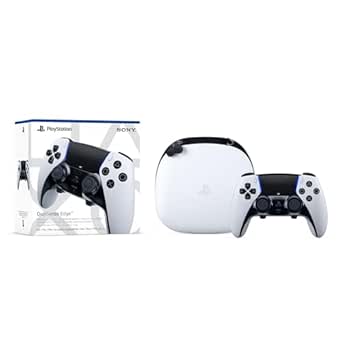 | Best Premium Competitive Controller | Controller type: Gamepad | Compatibility: PlayStation 5 | Connectivity: USB and wireless | VIEW LATEST PRICE | See Our Full Breakdown |
| Tokluck PS5 Wall Mount Kit with Cooling Fans and Dual Controller Charging Station | 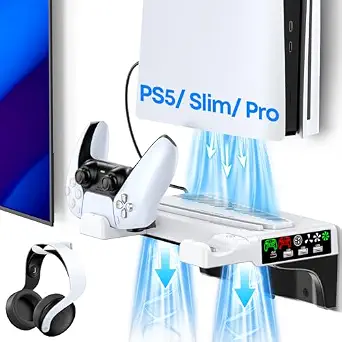 | Best All-in-One Wall-Mount Setup | Compatible consoles: PS5, PS5 Slim, and PS5 Pro, disc and digital | Controller compatibility: PS5 and PS5 Edge controllers | Mounting type: Wall mount | VIEW LATEST PRICE | See Our Full Breakdown |
| KontrolFreek Precision Rings for Gaming Controllers, 6-Pack |  | Best Aim-Tuning Add-On | Brand: KontrolFreek | Quantity: 6 rings | Resistance levels: Soft, medium, and hard | VIEW LATEST PRICE | See Our Full Breakdown |
| JUSPRO Cooling Fan for PS5 Pro |  | Best Dedicated PS5 Pro Cooler | Compatibility: PS5 Pro disc and digital editions | Number of fans: 4 | Speed settings: 2 | VIEW LATEST PRICE | See Our Full Breakdown |
| Tokluck Horizontal Stand for PS5, Slim, and Pro with Cooling Fan and Dual Controller Charger |  | Best All-in-One Desk Hub | Brand: Tokluck | Color: White | Compatible devices: PS5, PS5 Slim, PS5 Pro | VIEW LATEST PRICE | See Our Full Breakdown |
| OIVO Adjustable Horizontal Stand for PS5, PS5 Slim, and PS5 Pro |  | Best Basic Stability | Compatible devices: PS5, PS5 Slim, PS5 Pro | Console editions: Disc and digital | Orientation: Horizontal | VIEW LATEST PRICE | See Our Full Breakdown |
| Tokluck PS5 Cooling Station with Automatic Fan and Dual Controller Charger |  | Best Smart Cooling & Extras | Compatible devices: PS5, PS5 Slim, PS5 Pro, PS5 Edge Controller, PS5 Original Controller | Fan modes: Automatic temperature-based control and five manual settings | Controller charging: Dual controller charging; approximately 2.5 hours | VIEW LATEST PRICE | See Our Full Breakdown |
| KUSTOMAZING PS5 Slim and PS5 Pro Console Underlay Stickers with DualSense Controller Decal |  | Best Aesthetic Customization | Brand: KUSTOMAZING | Compatibility: PS5 Slim Disc and Digital Editions, PS5 Pro, DualSense controller | Set contents: 2 console stickers and 1 controller decal | VIEW LATEST PRICE | See Our Full Breakdown |
| KEPLUG Cooling Fan for PlayStation 5 Pro with Four Fans and USB 3.0 |  | Best Dedicated PS5 Pro Cooling | Brand: KEPLUG | Model: DSP-885 | Compatibility: PS5 Pro Disc and Digital Editions | VIEW LATEST PRICE | See Our Full Breakdown |
| PS5 Pro accessorie | Compatibility |
|---|---|
| Kammkonb PS5 Cooling Stand wit | PS5 Standard, Slim, and Pro; disc and digital versions |
| GRAUGEAR Cooling and Dust Prot | PS5 Pro and PS5 Slim |
| UGREEN USB-C Bluetooth Audio A | — |
| Rysker PS5 | PS5, PS5 Slim, and PS5 Pro |
| AQIDAP 5-Port USB Hub for PS5 | PS5 Pro |
| PowerA Twin Charging Station f | PlayStation 5 DualSense wireless controllers |
| PlayStation DualSense Edge Wir | PlayStation 5 |
| Tokluck PS5 Wall Mount Kit wit | — |
| KontrolFreek Precision Rings f | — |
| JUSPRO Cooling Fan for PS5 Pro | PS5 Pro disc and digital editions |
| Tokluck Horizontal Stand for P | — |
| OIVO Adjustable Horizontal Sta | — |
| Tokluck PS5 Cooling Station wi | — |
| KUSTOMAZING PS5 Slim and PS5 P | PS5 Slim Disc and Digital Editions, PS5 Pro, DualSense controller |
| KEPLUG Cooling Fan for PlaySta | PS5 Pro Disc and Digital Editions |
More Details on Our Top Picks
Kammkonb PS5 Cooling Stand with Dual Controller Charging, Fan, and 3 USB Ports
The Kammkonb is the most storage-focused pick here: it combines a three-speed cooling fan with charging for two controllers, three USB ports, and room for up to 13 game discs. That makes it a better fit than the GRAUGEAR dust-protection kit for players who want a single station to organize everyday gear, rather than add console filters and port plugs. Its headset holder and media-remote slot add useful places for accessories, though those items are not included. The tradeoff is controller compatibility: DualSense Edge is not supported, unlike the Rysker stand, which charges an Edge controller. Slim owners should also check the setup notes, since the digital and disc Slim versions require removing the panel adapter.
Pros:- Combines console cooling with charging for two controllers
- Three fan speeds let users choose between cooling levels
- Three USB ports, a headset holder, and a media-remote slot add storage and connectivity
- Stores up to 13 game discs
Cons:- Does not support the DualSense Edge controller
- Slim disc and digital models require removing the panel adapter
- Console and displayed accessories are not included
Best for: PS5 Pro owners with two standard DualSense controllers, physical game discs, and several accessories to keep together.
Not ideal for: DualSense Edge owners or Slim users who want a simple setup without adjusting the panel adapter.
- Compatibility:PS5 Standard, Slim, and Pro; disc and digital versions
- Cooling fan:Three speeds: high, medium, and low
- Controller charging:Two controllers; approximately 3 hours to full charge
- USB ports:3
- Disc storage:Up to 13 game discs
- Included accessories:Headset holder, console panel adapter, and screw
- Controller limitation:Not compatible with DualSense Edge
Our verdict“Choose the Kammkonb if you want a PS5 Pro stand that organizes discs and accessories while cooling the console and charging two standard controllers.”
GRAUGEAR Cooling and Dust Protection Kit for PS5 Pro and PS5 Slim
Unlike the Kammkonb and Rysker stands, the GRAUGEAR kit does not add controller charging or console support. Its narrower purpose is dust protection: four breathable filters cover fan openings, silicone plugs shield unused ports, and a metal cover fits over the M.2 SSD area. That makes it a practical accessory for PS5 Pro owners who want to limit dust accumulation without changing their setup into a larger charging station. The included brush, cloth, and screwdriver also give buyers tools for fitting and cleaning the pieces. The main tradeoff is that it is only compatible with PS5 Pro and PS5 Slim, so standard PS5 owners should choose another option. Filters also need occasional cleaning, rather than being a fit-and-forget accessory.
Pros:- Four breathable filters are designed to limit dust at fan openings while supporting airflow
- Silicone plugs protect unused console ports
- Metal M.2 SSD heatsink cover is included
- Brush, screwdriver, and cloth help with installation and upkeep
Cons:- Does not add cooling fans, controller charging, or USB ports like the Kammkonb and Rysker stands
- Not compatible with the standard PS5
- Filters require periodic cleaning to remove collected dust
Best for: PS5 Pro or Slim owners in a dusty room who want console-specific filters and port protection without adding a stand.
Not ideal for: Standard PS5 owners, or buyers whose priority is controller charging, extra USB connections, or console storage.
- Compatibility:PS5 Pro and PS5 Slim
- Included components:M.2 SSD heatsink cover, 4 fan dust filters, silicone port plugs, brush, screwdriver, and cloth
- Material:Metal
- Dimensions:3.9 × 0.9 × 0.4 in
- Weight:70 g
- Part number:18146
- Warranty:12 months
Our verdict“Pick the GRAUGEAR kit if dust protection matters more to you than the charging and storage features offered by the Kammkonb or Rysker stands.”
UGREEN USB-C Bluetooth Audio Adapter for PS5, Switch, and PC
The UGREEN adapter serves a different need from the Kammkonb and Rysker stands: it adds Bluetooth audio, not cooling, storage, or controller charging. Its USB-C plug-and-play design makes it a compact choice for PS5 Pro players with compatible wireless headphones, and support for codecs including aptX Low Latency can reduce delay when the headphones support the matching codec. It also works with Switch and Windows or macOS devices, giving it more use beyond the console than the PS5 Pro-only AQIDAP USB hub. That flexibility has a compatibility catch: it does not work with PS5 Portal, Linux, or AirPods Pro 2. Codec support must match on both devices, so the listed latency benefit is not guaranteed with every headset.
Pros:- Adds wireless audio through a compact USB-C connector
- Supports aptX, aptX Adaptive, aptX Low Latency, aptX HD, and SBC
- Requires no drivers or software
- Can work with compatible PS5, Switch, Windows, and macOS devices
Cons:- Headphones must support the selected codec to receive its latency or audio benefits
- Not compatible with PS5 Portal, Linux, or AirPods Pro 2
- Bluetooth calling mode can reduce audio quality
Best for: PS5 Pro players with codec-compatible Bluetooth headphones who also want a small audio adapter for Switch or a computer.
Not ideal for: Players using AirPods Pro 2, PS5 Portal, Linux, or Bluetooth headphones without a codec supported by both devices.
- Connector:USB Type-C
- Ports:1
- Supported codecs:aptX, aptX Adaptive Low Latency, aptX Adaptive High Quality, aptX HD, and SBC
- Latency:Under 100 ms with aptX Adaptive and compatible headphones
- Compatible devices:Gaming consoles, headphones, laptops, and speakers
- Operating systems:Windows and macOS
- Model number:45008
Our verdict“Choose the UGREEN adapter if your headphones support its codecs and wireless audio matters more than the physical charging and cooling features of the stands.”
Rysker PS5, PS5 Slim, and PS5 Pro Cooling and Charging Stand
The Rysker earns its place by supporting the DualSense Edge, a clear difference from the Kammkonb, which does not charge that controller. Its stand pairs an adjustable fan with controller charging, three USB hubs, and a media-remote slot, so it suits players who want a central console-side station without the Kammkonb’s built-in disc storage. The listed charging time is about 2.5 hours for an Edge controller and 3.5 hours for an original PS5 controller. Overcharge, overcurrent, and overheating protections add safeguards during charging. The tradeoffs are a single fan that may produce noise and a setup involving cables and security screws. For a simpler dust-focused add-on, GRAUGEAR avoids stand installation but does not provide charging or hubs.
Pros:- Supports charging for the original PS5 controller and DualSense Edge
- Adjustable fan pairs cooling with the charging stand
- Three USB hubs support charging and data transfer
- Includes overcharge, overcurrent, and overheating protections
Cons:- The fan may add noise during play
- Installation requires cables and security screws
- Does not include the Kammkonb’s stated storage for up to 13 game discs
Best for: PS5 Pro owners who use a DualSense Edge and want a stand with adjustable cooling, controller charging, and extra USB connections.
Not ideal for: Players seeking a disc organizer, a minimal no-cable setup, or an accessory focused only on dust protection.
- Compatibility:PS5, PS5 Slim, and PS5 Pro
- Fan:1 adjustable fan
- Controller charging time:About 3.5 hours for original PS5 controller; about 2.5 hours for PS5 Edge controller
- USB hubs:3
- Power sources:PS5 USB port, computer, USB hub, wall socket, or AC adapter
- Model number:VG-P5328
- Warranty:2 years
Our verdict“Choose the Rysker over the Kammkonb if you own a DualSense Edge and want charging and USB hubs in a cooling stand.”
AQIDAP 5-Port USB Hub for PS5 Pro
The AQIDAP is the simplest way in this group to add connections to a PS5 Pro: it provides five extra ports in a plug-and-play hub and needs no external power. That makes it a better match for players connecting several low-bandwidth accessories than the UGREEN adapter, which focuses on Bluetooth audio through a single USB-C connection. It is also more compact in purpose than the Kammkonb or Rysker stands, but offers none of their cooling or controller-charging features. Its key limitation is speed: data transfer tops out at 480 Mbps, so it is not the right choice for faster data tasks. Compatibility is limited to PS5 Pro, and the listed current varies by port, which buyers should check against the devices they plan to connect.
Pros:- Adds five ports for connecting gaming accessories
- Plug-and-play operation requires no drivers
- Does not require an external power supply
- Offers USB Type-C ports alongside USB 2.0 ports
Cons:- Designed specifically for PS5 Pro
- Data transfer is limited to 480 Mbps
- Does not add cooling or controller charging like the Rysker stand
Best for: PS5 Pro owners who need extra connections for accessories and prefer a small, driver-free hub without a separate power supply.
Not ideal for: PS5, PS5 Slim, or PS4 owners, and anyone who needs faster data transfer or a stand that also cools and charges controllers.
- Compatibility:PS5 Pro
- Port configuration:3 USB 2.0 ports and 2 Type-C ports
- Data transfer rate:Up to 480 Mbps
- USB 2.0 port current:500 mA × 3
- Type-C port current:1000 mA
- Type-C 3.1 port current:1000 mA
- Power:No external power supply required
Our verdict“Choose the AQIDAP if your PS5 Pro needs more accessory ports and its 480 Mbps transfer limit suits your connected devices.”
PowerA Twin Charging Station for PlayStation 5 DualSense Controllers
For a straightforward way to keep two standard DualSense controllers charged and displayed, this officially licensed tabletop dock is a tidier choice than the all-in-one Tokluck PS5 Wall Mount Kit. Its job is narrower: place both controllers on the station, then use their LED indicators to check charging status. That simplicity suits players who want their controllers ready without adding a console mount, cooling fans, or headset storage. The tradeoff is limited compatibility: it is designed for DualSense controllers, while the Tokluck kit also lists PS5 Edge compatibility and adds several setup features. This dock also depends on a corded AC adapter and a tabletop spot, so it is not a space-saving wall-mounted solution. I’d choose it for reliable two-controller organization, not broader console management.
Pros:- Charges two DualSense controllers at the same time
- Keeps controllers displayed and organized on a tabletop
- Officially licensed for PlayStation 5
- Includes a two-year limited warranty
Cons:- Designed specifically for DualSense controllers
- Needs tabletop space and a corded AC power connection
Best for: PS5 Pro households with two standard DualSense controllers that want a compact tabletop charging and display spot.
Not ideal for: Players using a DualSense Edge or looking to combine controller charging with console mounting, cooling, and headset storage.
- Brand:PowerA
- Compatibility:PlayStation 5 DualSense wireless controllers
- Controller capacity:2
- Power source:Corded electric AC adapter
- Output current:1.5 A
- Wattage:10 W
- Mounting type:Tabletop
- Warranty:Two-year limited warranty
Our verdict“Choose this dock if you want a simple, licensed place to charge two standard DualSense controllers, and skip it if you need Edge support or an all-in-one station.”
PlayStation DualSense Edge Wireless Controller
The DualSense Edge is the most direct way in this group to change how a PS5 Pro game feels under your hands. Remappable controls, swappable back buttons, adjustable trigger travel, and saved profiles let players tailor layouts and trigger response to different games; its haptics and adaptive triggers retain the standard DualSense feel. That makes it a more meaningful gameplay upgrade than the PowerA Twin Charging Station, which improves controller upkeep rather than input options. The customization has a cost in upkeep: replacement stick modules are sold separately, so stick wear can mean an additional purchase. It is also a specialized pick rather than a general accessory for everyone. Players happy with the standard controller may get more practical value from a charging dock or a PS5 Pro-specific cooler like the JUSPRO.
Pros:- Remappable inputs and saved profiles support different game layouts
- Swappable back buttons add accessible extra inputs
- Adjustable trigger travel can suit different game styles
- Includes adaptive triggers and haptic feedback
Cons:- Replacement stick modules are sold separately
- Its customization may be unnecessary for players who are comfortable with a standard DualSense
Best for: Competitive PS5 Pro players who want custom button layouts, rear inputs, and separate control profiles for different games.
Not ideal for: Players satisfied with the standard DualSense or anyone who wants a simple charging or cooling accessory rather than a controller upgrade.
- Controller type:Gamepad
- Compatibility:PlayStation 5
- Connectivity:USB and wireless
- Power source:Battery powered
- Custom controls:Remappable inputs, swappable back buttons, adjustable trigger travel, and saved profiles
- Stick options:Replaceable stick modules and interchangeable stick caps
- Features:Haptic feedback and adaptive triggers
- Package quantity:1
Our verdict“Pick the DualSense Edge if you will use its configurable controls and back buttons; otherwise, a standard controller plus a charging station is the simpler setup.”
Tokluck PS5 Wall Mount Kit with Cooling Fans and Dual Controller Charging Station
This kit earns its place by combining console wall mounting, two adjustable-speed fans, dual controller charging, and headset storage in one setup. Unlike the PowerA Twin Charging Station, it can also serve as a broader organization point and lists compatibility with PS5 Edge controllers. Its stated fit spans original PS5, Slim, and Pro disc and digital consoles, making it more flexible across console generations than the PS5 Pro-only JUSPRO cooler. The main compromise is installation: this is a wall-mounted accessory, not a stand you can move onto a desk, and buyers need a suitable wall location. The listed charging time for two controllers is about 2.5 hours, so it may not suit someone expecting a quick top-up. Choose it when consolidating accessories matters more than keeping setup simple.
Pros:- Lists compatibility with original PS5, Slim, and Pro disc and digital consoles
- Combines wall mounting, cooling fans, and dual controller charging
- Supports PS5 and PS5 Edge controllers
- Includes a headset holder and an extra USB charging port
Cons:- Requires wall mounting and a suitable installation location
- Dual-controller charging is listed at approximately 2.5 hours
Best for: PS5 Pro owners with a suitable wall location who want to mount the console and organize controllers and a headset together.
Not ideal for: Renters or players who cannot mount accessories to a wall, and anyone seeking a small standalone charging dock.
- Compatible consoles:PS5, PS5 Slim, and PS5 Pro, disc and digital
- Controller compatibility:PS5 and PS5 Edge controllers
- Mounting type:Wall mount
- Cooling:Two fans with three speed settings
- Charging:Two controllers; approximately 2.5 hours
- Additional features:Headset holder and extra USB charging port
- Material:Stainless steel
- Dimensions:8.86 × 7.28 × 3.35 inches
Our verdict“Choose the Tokluck kit if you want a wall-mounted hub for console, controllers, and headset; skip it if you need portable or tabletop charging.”
KontrolFreek Precision Rings for Gaming Controllers, 6-Pack
Precision Rings offer a low-profile way to change thumbstick feel without replacing the controller. The pack includes soft, medium, and hard resistance levels, so players can compare how much added resistance helps them control aim and avoid overshooting. That makes this a more personal, gameplay-focused accessory than the PowerA dock, which solves charging and storage rather than stick control. The rings are made to recover their shape and resist moisture and hand oils, but they do not add new buttons or change a controller’s layout like the DualSense Edge. Added resistance is also a preference, not a universal improvement: players who rely on quick stick movement may find it slows their inputs. Compatibility can vary by controller, so I’d check the fit before choosing these for a specific PS5 Pro setup.
Pros:- Six rings provide three resistance strengths to try
- Added resistance is designed to help reduce aim overshoot
- Moisture-wicking material resists hand and finger oils
- Flexible rings are designed to return to shape after use
Cons:- Added thumbstick resistance may not suit every play style
- Compatibility can vary by controller and thumbstick
Best for: PS5 Pro players who want to experiment with added thumbstick resistance for steadier aiming, especially in shooters.
Not ideal for: Players who prefer a light, unrestricted stick feel or cannot confirm the rings fit their controller’s thumbsticks.
- Brand:KontrolFreek
- Quantity:6 rings
- Resistance levels:Soft, medium, and hard
- Material:Rubber
- Color:Black, purple, and green
- Compatible devices:Gaming consoles and compatible performance thumbsticks
- Model number:4005-MIX
Our verdict“Try these if you want adjustable resistance for more deliberate aiming, but avoid them if you prefer fast, unrestricted thumbstick movement.”
JUSPRO Cooling Fan for PS5 Pro
Unlike the multi-purpose Tokluck wall kit, the JUSPRO focuses on adding airflow to the PS5 Pro while keeping the console usable in either vertical or horizontal orientation. Its four fans pair with temperature-based automatic speed control and two adjustable speeds, giving buyers a cooling accessory rather than a full mounting and charging setup. An extra USB 3.0 port helps offset the connection used by the cooler, though it still occupies a console USB port and adds a 13.47-inch accessory to the setup. Compatibility is the firm boundary here: it is listed for PS5 Pro disc and digital editions, not the original PS5 or Slim. The blue LED is a visible styling choice rather than a cooling feature, so this makes most sense for Pro owners who value airflow and broad orientation support.
Pros:- Four fans provide additional airflow for PS5 Pro
- Automatic temperature-based speed control adjusts fan operation
- Supports vertical and horizontal console orientations
- Includes an extra USB 3.0 port
Cons:- Compatible only with PS5 Pro disc and digital editions
- Uses a console USB port and adds a sizable accessory to the setup
Best for: PS5 Pro disc or digital owners who want an add-on fan with automatic speed adjustment and support for either console orientation.
Not ideal for: Original PS5 and PS5 Slim owners, or players who do not want an accessory using a console USB port.
- Compatibility:PS5 Pro disc and digital editions
- Number of fans:4
- Speed settings:2
- Power connector:USB
- Voltage:5 V DC
- Wattage:5 W
- Dimensions:13.47 × 3.5 × 1.65 inches
- USB port:USB 3.0
Our verdict“Choose the JUSPRO if you want a dedicated, orientation-flexible cooler for PS5 Pro, but skip it if you own another PS5 model or need a multi-purpose charging station.”
Tokluck Horizontal Stand for PS5, Slim, and Pro with Cooling Fan and Dual Controller Charger
This stand consolidates console support, active cooling, and controller charging into a single unit, making it a strong contender for desk organization. Unlike the OIVO Adjustable Horizontal Stand, which offers only passive stability, this model actively manages heat with a three-speed fan, which is critical for the higher thermal output of the PS5 Pro. The inclusion of EVA foam pads ensures the Digital Edition sits securely without scratching, a detail often overlooked in budget alternatives. However, it relies entirely on the PS5’s USB power, meaning it draws energy from the console itself. If you prefer a setup where the console remains completely unencumbered by cables, this might feel restrictive compared to standalone charging docks.Pros:- Combines cooling and dual charging in one device
- Adjustable fan speeds allow noise management
- Fits PS5, Slim, and Pro models universally
Cons:- Draws power directly from the console
- No independent power source for standby charging
Best for: Gamers who want to declutter their desk by combining charging, cooling, and vertical storage in one compact footprint.
Not ideal for: Users who want to charge controllers while the console is powered off, as this unit requires the PS5 to be on.
- Brand:Tokluck
- Color:White
- Compatible devices:PS5, PS5 Slim, PS5 Pro
- Controller compatibility:Original PS5 and Edge controllers
- Cooling fan:Three adjustable speeds
- Charging capacity:Two controllers
- Charging time:Approximately 3–3.5 hours
- Mounting type:Tabletop
- Form factor:Desk stand
Our verdict“This is the ideal choice for those who value a tidy desk and don’t mind keeping their console powered on for controller top-ups.”
OIVO Adjustable Horizontal Stand for PS5, PS5 Slim, and PS5 Pro
For players who simply need their console to sit flat and stable, this ABS plastic stand performs its primary job without unnecessary complexity. It lacks the electronic features of the Tokluck Horizontal Stand, offering no cooling fans or charging ports, which makes it significantly lighter and less prone to electronic failure. The adjustable side pieces and nonslip pads provide solid grip on various surfaces, and the securing screw adds an extra layer of confidence for households with pets or children. However, the requirement for assembly and the use of a screw can be a minor annoyance for those who prefer tool-free setups. It is strictly a passive support solution, so it won’t help with thermal throttling during long gaming sessions.Pros:- Lightweight and simple ABS construction
- Secure fit with adjustable side pieces
- Includes nonslip pads to protect surfaces
Cons:- Requires assembly with a screw
- No cooling or charging features
Best for: Minimalists who only need physical support and airflow clearance without electronic add-ons.
Not ideal for: Users seeking active cooling or integrated controller charging capabilities.
- Compatible devices:PS5, PS5 Slim, PS5 Pro
- Console editions:Disc and digital
- Orientation:Horizontal
- Material:ABS plastic
- Mounting type:Tabletop
- Fastening type:Screw
- Included:2 stands, 3 support rods, 2 EVA foam pads, 1 screw
Our verdict“A no-nonsense support stand for those who prioritize simplicity and physical stability over electronic features.”
Tokluck PS5 Cooling Station with Automatic Fan and Dual Controller Charger
This station elevates the basic cooling concept by introducing temperature-sensing automation, allowing the fan to adjust its speed based on the console’s thermal output. Compared to the KEPLUG Cooling Fan, which is a clip-on solution, this tabletop model offers more versatility with three USB ports and customizable RGB lighting. The automatic mode is particularly useful for users who forget to adjust fan speeds manually, ensuring the console stays cool without constant intervention. While it charges two controllers, the reliance on a stable connection to the charging port can sometimes be finicky. The added RGB elements are purely aesthetic, so if you prefer a stealthy setup, this visual flair might be unnecessary clutter.Pros:- Automatic fan speed adjusts to console temperature
- Three USB ports for peripheral connectivity
- Customizable RGB lighting with memory effects
Cons:- RGB lighting may not suit minimalist setups
- Charging connection requires precise alignment
Best for: Enthusiasts who want automated thermal management and extra USB connectivity for accessories.
Not ideal for: Users who dislike RGB lighting or prefer a completely silent, passive cooling solution.
- Compatible devices:PS5, PS5 Slim, PS5 Pro, PS5 Edge Controller, PS5 Original Controller
- Fan modes:Automatic temperature-based control and five manual settings
- Controller charging:Dual controller charging; approximately 2.5 hours
- USB ports:3
- RGB lighting:9 effects; adjustable brightness
- Color:Black and white
- Mounting type:Tabletop
- Weight:0.83 kg
Our verdict“This pick is perfect for tech-savvy gamers who appreciate smart automation and extra connectivity options.”
KUSTOMAZING PS5 Slim and PS5 Pro Console Underlay Stickers with DualSense Controller Decal
While functional accessories dominate this list, this sticker pack addresses a different buyer need: visual personalization. Unlike the cooling stands from Tokluck or the stability of the OIVO stand, this product offers no performance benefits but significantly alters the console’s appearance. The resin and vinyl materials provide a raised, domed texture that feels premium compared to standard flat decals. The inclusion of a matching DualSense controller decal ensures a cohesive look across your setup. The tradeoff is obvious: these are single-use items that require careful application to avoid bubbles. If you are prone to changing your setup style frequently, the permanence of these stickers might be a drawback.Pros:- Adds a unique retro aesthetic to the console
- Includes matching controller decal for cohesion
- Resin finish provides a premium tactile feel
Cons:- Single-use application process
- Requires careful installation to avoid bubbles
Best for: Users who want to customize the look of their PS5 Slim or Pro and controller to match their room’s theme.
Not ideal for: Gamers who prefer the original factory finish or change their console aesthetics frequently.
- Brand:KUSTOMAZING
- Compatibility:PS5 Slim Disc and Digital Editions, PS5 Pro, DualSense controller
- Set contents:2 console stickers and 1 controller decal
- Materials:Resin, vinyl
- Surface recommendation:Plastic, metal
- Reusability:Single use
- Finish:Powder coated
- Recommended use:Console, controller
Our verdict“This is the go-to choice for those prioritizing visual uniqueness over functional utility.”
KEPLUG Cooling Fan for PlayStation 5 Pro with Four Fans and USB 3.0
Designed exclusively for the PS5 Pro, this clip-on fan provides targeted thermal relief without occupying desk space. Unlike the Tokluck Cooling Station, which serves as a stand and charger, this unit attaches directly to the console, making it ideal for users who already have a preferred stand. The four-fan design offers robust cooling potential, and the USB 3.0 passthrough ensures you don’t lose a valuable port. The tool-free installation is a major convenience factor. However, its strict incompatibility with the PS5 Slim and original PS5 limits its utility if you plan to switch console models later. The 28 dB noise level is quiet, but four fans at max speed may still be audible in silent rooms.Pros:- Four fans provide aggressive cooling options
- USB 3.0 passthrough preserves connectivity
- Tool-free clip-on installation is quick
Cons:- Only compatible with PS5 Pro models
- No integrated controller charging
Best for: PS5 Pro owners who want maximum cooling without replacing their current stand or desk setup.
Not ideal for: Users who own multiple PS5 models or plan to upgrade from a PS5 Slim.
- Brand:KEPLUG
- Model:DSP-885
- Compatibility:PS5 Pro Disc and Digital Editions
- Number of Fans:4
- Power Connector:USB
- Cooling Method:Forced air
- Noise Level:28 dB
- Maximum Rotational Speed:4500 RPM
- Material:Acrylonitrile Butadiene Styrene (ABS), plastic
Our verdict“This is the best specialized cooling solution for PS5 Pro owners who prioritize thermal performance over multi-functionality.”

How We Picked
I evaluated these accessories based on their ability to enhance the PS5 Pro’s specific hardware capabilities, particularly focusing on thermal efficiency and peripheral compatibility. Since the PS5 Pro generates more heat than its predecessors, cooling solutions were judged on fan placement, dust filtration, and noise levels. I also prioritized items that resolve known console limitations, such as the lack of native Bluetooth audio support or the inconvenience of charging multiple controllers.
Build quality and ecosystem integration played a major role in the ranking. Accessories that use high-grade plastics and offer stable connections ranked higher than generic alternatives. I also considered versatility, favoring products that work across PS5, PS5 Slim, and PS5 Pro models, ensuring the recommendations remain relevant regardless of which console version you own.
Factors to Consider When Choosing Best PS5 Pro Accessories
Selecting the right accessories goes beyond just buying the most expensive item. The PS5 Pro ecosystem has unique requirements that differ from standard PCs or older consoles, requiring a strategic approach to add-ons.
Thermal Management Strategy
The PS5 Pro runs hotter than the original model, making cooling accessories a practical necessity rather than just a cosmetic upgrade. You must decide between active cooling, which uses fans to force air, and passive cooling, which relies on better ventilation. Active cooling stands often integrate with controller charging, saving space but potentially adding noise. Passive solutions like elevated stands are quieter but may not lower temperatures as effectively under heavy load. If you live in a warm climate or play graphics-intensive titles for hours, active cooling is the safer bet.
Audio Connectivity Limitations
One of the most frustrating aspects of the PS5 is its limited Bluetooth audio support, which excludes most standard wireless headphones. This is where audio adapters become essential. You need to choose between USB-C dongles, which plug directly into the controller, and USB-A adapters that connect to the console’s rear ports. USB-C options are generally more convenient for players who use the DualSense controller’s built-in mic, but they occupy a port needed for charging. Evaluate whether you prioritize port availability or immediate audio convenience.
Controller Ergonomics and Customization
Not every gamer needs a high-end controller, but the difference between standard and premium models impacts long-term comfort. Premium controllers offer adjustable sticks and back buttons, which reduce finger strain during competitive play. However, these features add weight and complexity. Beginners might find the added buttons distracting, while veterans may appreciate the tactile customization. Consider your playstyle: if you primarily play narrative-driven games, a standard controller with good thumb grips may suffice. Competitive shooters benefit more from the precision of high-end models.
Space and Setup Configuration
Your physical setup dictates which accessories make sense. Wall mounts and vertical stands save desk real estate but require careful cable management to avoid clutter. Horizontal stands offer stability and often include cooling fans, but they demand more surface area. Measure your entertainment center before purchasing bulky cooling stations. Additionally, consider whether you need to hide the console; wall mounts keep the unit out of sight but can make access to ports difficult. A balanced approach involves choosing a stand that matches your cabinet dimensions and airflow requirements.
Ecosystem Compatibility and Future-Proofing
Sony has introduced multiple console variants, including the PS5 Pro and PS5 Slim, which have slightly different dimensions and port layouts. Always verify that an accessory explicitly lists compatibility with the PS5 Pro to avoid fit issues. Some older PS5 accessories may not align perfectly with the new console’s vents or port locations. Look for adjustable mounts or universal designs that accommodate multiple generations. This ensures your investment remains useful even if you upgrade your console hardware in the future.
Frequently Asked Questions
Do I really need a cooling stand for the PS5 Pro?
While Sony designs the PS5 Pro with robust internal cooling, external cooling stands can still provide benefits. They are particularly useful if you place your console in enclosed cabinets or live in hot climates where ambient temperatures are high. Active cooling stands help lower internal component temperatures, potentially reducing fan noise and extending hardware lifespan. However, if you have good ventilation in your living room, a basic stand for elevation might be sufficient. The decision depends on your specific environment and how long you play graphically intense titles.
Can I use any Bluetooth headphones with the PS5 Pro?
No, the PS5 Pro does not natively support Bluetooth audio for most third-party headphones due to latency concerns. You must use an official PlayStation headset, a licensed audio adapter, or a USB wireless dongle provided by the headset manufacturer. The UGREEN USB-C Bluetooth Audio Adapter is a popular workaround because it allows you to pair standard Bluetooth headphones directly to your controller. Without such an adapter, you will be limited to wired connections or proprietary wireless systems.
Are thumb grips and stickers worth the investment?
Thumb grips like the KontrolFreek Precision Rings are highly recommended for competitive players because they increase the stick height, allowing for finer aim adjustments. They are inexpensive and easy to install, making them a low-risk upgrade. Console stickers, such as those from KUSTOMAZING, are purely aesthetic and do not impact performance. While they protect the console from minor scratches, they can trap heat if applied over ventilation areas. Prioritize functional items like grips and cooling accessories before investing in cosmetic decals.
How do I prevent dust buildup in the PS5 Pro?
Dust is the primary enemy of console longevity, especially for the PS5 Pro which has larger intake vents. Using a cooling kit with dust filters, like the GRAUGEAR Cooling and Dust Protection Kit, can significantly reduce internal debris accumulation. You should also perform regular maintenance by using compressed air to clean the vents every few months. Keeping the console elevated on a stand helps airflow, but it does not stop dust from entering. A combination of filtered accessories and manual cleaning is the most effective strategy.
Is the DualSense Edge controller better than the standard DualSense?
The DualSense Edge Wireless Controller offers tangible benefits for competitive gamers, including replaceable stick modules, adjustable trigger stops, and back buttons. It also allows you to save multiple control profiles directly to the controller. However, it is heavier and lacks the battery life of the standard DualSense. For casual gamers, the standard controller provides the same core haptic feedback and adaptive triggers without the extra cost or weight. Choose the Edge only if you specifically need the customization options for competitive play.
Conclusion
Choosing the best PS5 Pro accessories ultimately depends on whether you prioritize thermal safety, audio convenience, or competitive control. For most users, the Kammkonb PS5 Cooling Stand is the best overall pick because it handles cooling and charging in one unit, keeping your setup tidy. If you struggle with wireless audio limitations, the UGREEN USB-C Bluetooth Audio Adapter is the best value solution for immediate compatibility. Competitive players should consider the PlayStation DualSense Edge Wireless Controller as the best premium option for its hardware customization. Beginners can start with basic accessories like the KontrolFreek Precision Rings to improve comfort without a large financial commitment. By matching these tools to your specific gaming habits, you can enhance your PS5 Pro experience without overspending.
Halloween Picks
halloween
As an affiliate, we earn on qualifying purchases.