Choosing the best USB-C splitter cables requires balancing power delivery limits with data connectivity needs. My top recommendation is the Duttek USB-C Splitter because it supports 140W Power Delivery while maintaining reliable 480Mbps data transfer, making it versatile for most modern devices. For those needing multiple ports without sacrificing charging speed, the Anker 2-in-1 USB C Cable stands out for its build quality and brand reliability. However, buyers must recognize that most splitters split power rather than data bandwidth, meaning simultaneous high-speed data transfer is rare. This guide breaks down which splitters handle high-wattage laptops versus simple phone charging, helping you avoid cables that throttle your devices.

Get the latest gadgets delivered free with Prime
- Fast, free delivery on millions of items
- Prime Video, Amazon Music and more included
- Member-only deals all year
Complete the kit



Key Takeaways
- Most USB-C splitters divide available power between ports, so connecting two high-draw devices often results in slower charging for both.
- Data transfer speeds in splitters are typically limited to USB 2.0 (480Mbps), making them unsuitable for external hard drives or high-res video streaming.
- Right-angle connectors, found on models like the 3-in-1 Right Angle Splitter, prevent cable strain and improve desk aesthetics but may block adjacent ports.
- Nylon braided exteriors are standard on top-tier picks, offering superior durability against fraying compared to standard rubber-jacketed cables.
- Passive splitters cannot increase total power output; they only redistribute the wattage provided by the source adapter.
| Duttek USB-C Splitter (1-in-2-Out), 140W PD Braided Y-Cable |  | Best Overall for High-Wattage Charging | Connector Type: USB Type-C Male to Dual USB Type-C Male | Max Power Output: 140W | Data Transfer Rate: 480Mbps | VIEW LATEST PRICE | See Our Full Breakdown |
| 2-Pack 4ft USB-C Splitter Cable, 4-in-1 QC3.0 Fast Charging Cord |  | Best Multi-Device Value | Connector Type: USB Type C | Cable Length: 4 ft | Pack Count: 2 | VIEW LATEST PRICE | See Our Full Breakdown |
| 5 ft USB-A/USB-C Charging Cable with Four USB-C Connectors, 2-Pack |  | Best for Legacy USB-A Ports | Cable length: 5 ft | Connectors: USB-A and USB-C | USB-C ports: 4 | VIEW LATEST PRICE | See Our Full Breakdown |
| IFlash Dual Port USB-C Splitter Charging Cable (6ft, Black) |  | Best Long-Reach Budget Option | Connector Type: USB-C Female-to-Female | Cable Length: 6 ft | Color: Black | VIEW LATEST PRICE | See Our Full Breakdown |
| LISEN 2-in-1 USB-C Charging Cable, 140W, 6 ft |  | Best Premium Design | Connector Type: USB Type-C | Cable Length: 6 ft | Maximum Power: 140W | VIEW LATEST PRICE | See Our Full Breakdown |
| 3-in-1 Right Angle USB-C Splitter Charging Cable |  | Best for Multi-Device Desk Setup | Connector Configuration: 1 USB-C Male to 3 USB-C Male | Cable Length: 5 ft | Design Feature: 90-Degree Right Angle | VIEW LATEST PRICE | See Our Full Breakdown |
| USB-A/USB-C to 4 USB-C Charging Splitter Cables (2-Pack) |  | Best Value Multi-Port Solution | Configuration: USB-A/USB-C Male to 4x USB-C Female | Quantity: 2 Cables | Length: 4 ft (1.2 m) | VIEW LATEST PRICE | See Our Full Breakdown |
| iFlash 6 ft Dual-Port USB-C Splitter Charging Cable |  | Best Long-Reach Splitter | Cable Length: 6 ft | Connector Type: USB-C Male to 2x USB-C Female | Max Current: 2 A (Shared) | VIEW LATEST PRICE | See Our Full Breakdown |
| 4 ft 140W USB-C Y-Splitter Charging Cable with 90° Connector | 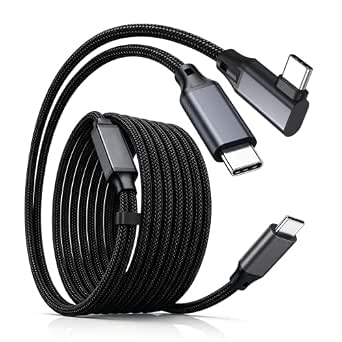 | Best High-Power Performance | Max Power: 140 W | Max Current: 28 A | Max Voltage: 20 V | VIEW LATEST PRICE | See Our Full Breakdown |
| IFlash Dual Port USB-C Splitter Charging Cable (Red) |  | Best Stylish Compact Option | Connector Type: USB-C Male to 2x USB-C Female | Material: Double-Braided Nylon | Color: Red | VIEW LATEST PRICE | See Our Full Breakdown |
| KiwiBird USB-C Splitter, 1 Male to 2 Female Ports |  | Best for Low-Power Accessory Expansion | Connector Type: USB-C Male to 2x USB-C Female | Data Transfer Rate: Up to 480 Mbps (USB 2.0) | Max Power: 7.5 W (5V/1.5A) | VIEW LATEST PRICE | See Our Full Breakdown |
| MOGOOD 60W USB C Splitter Cable, 2-in-1 |  | Best for Gaming Handhelds | Connector Type: USB-C Male to Dual USB-C Female | Max Power: 60W PD | Data Transfer: USB 2.0 (480 Mbps) | VIEW LATEST PRICE | See Our Full Breakdown |
| Anker 2-in-1 USB C to USB C Cable, 140W Max |  | Best High-Wattage Dual Charging Cable | Connector Type: USB-C Male to 2x USB-C Male | Max Power: 140W | Data Transfer: None (Charging only) | VIEW LATEST PRICE | See Our Full Breakdown |
| UGREEN Magnetic USB-C Headphone and Charging Splitter |  | Best Premium Audio & Charge Splitter | Connector Type: USB-C Male to 2x USB-C Female | Max Power: 60W PD | Data Transfer: None | VIEW LATEST PRICE | See Our Full Breakdown |
| KAYQINHO USB-C Charging Splitter, 1 Female to 2 Male Ports |  | Best Value for Basic Dual Charging | Connector Type: USB-C Female to 2x USB-C Male | Max Current: 3A per port | Data Transfer: Not Supported | VIEW LATEST PRICE | See Our Full Breakdown |
| USB-C splitter cable | Connector Type | Cable Length |
|---|---|---|
| Duttek USB-C Splitter | USB Type-C Male to Dual USB Type-C Male | 1.5m (4.92ft) |
| 2-Pack 4ft USB-C Splitter Cabl | USB Type C | 4 ft |
| 5 ft USB-A/USB-C Charging Cabl | — | 5 ft |
| IFlash Dual Port USB-C Splitte | USB-C Female-to-Female | 6 ft |
| LISEN 2-in-1 USB-C Charging Ca | USB Type-C | 6 ft |
| 3-in-1 Right Angle USB-C Split | — | 5 ft |
| USB-A/USB-C to 4 USB-C Chargin | — | — |
| iFlash 6 ft Dual-Port USB-C Sp | USB-C Male to 2x USB-C Female | 6 ft |
| 4 ft 140W USB-C Y-Splitter Cha | — | 4 ft |
| IFlash Dual Port USB-C Splitte | USB-C Male to 2x USB-C Female | — |
| KiwiBird USB-C Splitter | USB-C Male to 2x USB-C Female | — |
| MOGOOD 60W USB C Splitter Cabl | USB-C Male to Dual USB-C Female | — |
| Anker 2-in-1 USB C to USB C Ca | USB-C Male to 2x USB-C Male | — |
| UGREEN Magnetic USB-C Headphon | USB-C Male to 2x USB-C Female | — |
| KAYQINHO USB-C Charging Splitt | USB-C Female to 2x USB-C Male | — |
More Details on Our Top Picks
Duttek USB-C Splitter (1-in-2-Out), 140W PD Braided Y-Cable
This model stands out for its 140W Power Delivery support, making it the strongest contender for users needing to charge power-hungry laptops and tablets simultaneously. Compared to the IFlash Dual Port, which maxes out at 2A per port, the Duttek cable handles significantly higher loads, ensuring that a MacBook Pro and an iPad can charge without severe speed throttling. The braided nylon exterior and reinforced connectors are built to survive daily abuse, resisting fraying better than standard rubber cables. However, this high power comes with a tradeoff: the data transfer rate is capped at 480Mbps, identical to slower competitors. While this is fine for charging, it makes file transfers sluggish. The 1.5-meter length is convenient for desk setups but may feel short if your power brick is far from your devices.
Pros:- Supports up to 140W Power Delivery for fast charging of two devices
- Durable braided nylon construction resists tangles and fraying
- Reinforced connectors withstand over 10,000 bends for extended lifespan
- Compact 1-in-2-out design reduces the need for multiple cables
Cons:- Data transfer speed is limited to USB 2.0 standards (480Mbps)
- Total power output is split between two devices, potentially reducing charging speed for high-demand laptops
Best for: Users who need to fast-charge high-wattage laptops and tablets simultaneously and prioritize charging speed over data transfer.
Not ideal for: Data-heavy users who need to transfer large files between devices quickly, as the 480Mbps limit will bottleneck performance.
- Connector Type:USB Type-C Male to Dual USB Type-C Male
- Max Power Output:140W
- Data Transfer Rate:480Mbps
- Cable Length:1.5m (4.92ft)
- Max Current:5A
- Max Voltage:28V
- Item Weight:12g
Our verdict“Choose this if you need reliable, high-wattage charging for two devices and don’t mind slower data transfers.”
2-Pack 4ft USB-C Splitter Cable, 4-in-1 QC3.0 Fast Charging Cord
This option makes the most sense for households or offices needing to charge multiple low-to-mid-power devices from a single outlet. Unlike the Duttek 140W Splitter, which focuses on high wattage for two devices, this cable splits power to four devices at once, though the total amperage (3.1A) means each device gets less current. The QC3.0 support is a notable feature for Android users, though it may not offer the same universal compatibility as USB-C PD standards. The aluminum housing adds a premium feel and heat resistance compared to the all-plastic connectors found on budget alternatives. However, the 4-foot length can lead to cable clutter on small desks, and the green color might not blend with minimalist setups. It is a practical choice for charging phones and earbuds, but not for laptops.
Pros:- Charges four devices simultaneously with a single connection
- Durable nylon braided exterior resists twisting and abrasion
- Aluminum housing provides heat and corrosion resistance
- Supports QC3.0 fast charging for efficient power delivery
Cons:- Requires a USB-C power source, not compatible with older USB-A ports without an adapter
- Simultaneous charging of four high-power devices may reduce charging speed per device
Best for: Families or office workers who need to charge multiple phones, tablets, and accessories simultaneously from one port.
Not ideal for: Laptop users or those needing fast charging for high-capacity devices, as the power split across four ports limits speed.
- Connector Type:USB Type C
- Cable Length:4 ft
- Pack Count:2
- Color:Green
- Material:Nylon Braided, Aluminum Housing
- Charging Standard:QC3.0 Fast Charging
- Maximum Current:3.1 A
- Item Weight:0.24 kg
Our verdict“Ideal for charging several low-power devices at once, but skip it if you need to charge laptops quickly.”
5 ft USB-A/USB-C Charging Cable with Four USB-C Connectors, 2-Pack
This cable is a pragmatic solution for users who still rely on older USB-A chargers or car ports. Unlike the LISEN 2-in-1 Cable, which strictly requires a USB-C source, this model includes a converter, bridging the gap between old and new tech. The four USB-C connectors allow for charging multiple devices, though data transfer and CarPlay are restricted to just one port. This limitation is a significant tradeoff; if you plug in two phones for data, only one will connect to your computer. The 5-foot length offers more flexibility than the shorter Duttek cable, making it better for car use or reaching across larger desks. However, the lack of specified power output details is a concern, as you cannot verify if it supports fast charging standards like PD or QC.
Pros:- Four USB-C connectors in one cable
- Includes a converter for USB-A ports
- Braided nylon design is described as tangle-resistant and durable
- 5 ft length is suited to home, car, office, and travel use
Cons:- Data transfer and CarPlay work through only one USB-C port
- The listing does not specify charging speed or total power output
Best for: Users with older USB-A chargers or car ports who want to charge multiple USB-C devices without buying new bricks.
Not ideal for: Tech enthusiasts who need simultaneous data transfer or CarPlay across multiple devices, as only one port supports these features.
- Cable length:5 ft
- Connectors:USB-A and USB-C
- USB-C ports:4
- Cable material:Braided nylon
- Package quantity:2
- Data transfer and CarPlay:Supported through one USB-C port only
Our verdict“A versatile bridge for USB-A environments, but verify its charging speeds before relying on it for fast charging.”
IFlash Dual Port USB-C Splitter Charging Cable (6ft, Black)
This cable prioritizes reach and basic functionality over high-wattage performance. With a 6-foot length, it offers more flexibility than the 4-foot 2-Pack 4ft Splitter, allowing you to charge two devices while lying in bed or sitting away from the outlet. The double-braided nylon construction feels sturdy, though the 2A maximum current per port means it struggles with laptops. It is best suited for smartphones and small tablets. Compared to the Duttek 140W model, this is a much slower charger, but it serves well for overnight charging where speed matters less than convenience. The USB-C Female-to-Female design is unusual and requires specific male-to-male cables to connect to your charger, adding a layer of complexity for the average buyer.
Pros:- Allows simultaneous charging of two USB-C devices
- Durable double-braided nylon construction resists bending and fracture
- Wide compatibility with modern USB-C smartphones, tablets, and laptops
- Supports data transfer for one device while charging another
Cons:- Not compatible with traditional USB-A chargers
- Charging speed is split between devices, reducing current per device
- Data transfer is limited to only one connected device at a time
Best for: Budget-conscious users who need to charge two phones or tablets from a distance and don’t require fast charging.
Not ideal for: Users who want a plug-and-play solution, as the Female-to-Female connectors require additional adapter cables.
- Connector Type:USB-C Female-to-Female
- Cable Length:6 ft
- Color:Black
- Data Transfer Rate:480 Mbps
- Maximum Current:2 A
- Material:Double-Braided Nylon
- Warranty:1 Year Manufacturer Replacement
Our verdict“A long, durable cable for slow charging of two devices, but the connector type may confuse some buyers.”
LISEN 2-in-1 USB-C Charging Cable, 140W, 6 ft
This cable stands out for its liquid silicone body and adjustable split slider, offering a tactile experience superior to the braided nylon of the Duttek Splitter. The silicone is softer, more flexible, and resistant to kinks, while the slider allows you to adjust the split point for better cable management. It supports 140W PD 3.1 EPR, matching the top-tier charging speeds of the Duttek model. However, it has a critical usability flaw: the IN and OUT connectors must be connected in the correct direction. If reversed, charging fails, which can be frustrating for casual users. Data transfer is also limited to the first connected device, similar to other splitters. This is a premium choice for design-conscious users, but the directional requirement adds friction to daily use.
Pros:- Charges two USB-C devices from one charger
- Supports up to 140W single-device charging
- Flexible silicone cable with aluminum alloy components
- Includes an adjustable split slider and organizer tie
Cons:- Requires correct connection direction; reversing the IN and OUT connectors prevents charging
- Data transfer is limited to the first connected device
- Dual-port charging does not support PPS or QC
Best for: Design-focused users who appreciate soft-touch materials and adjustable cable management features.
Not ideal for: Users who want a simple, foolproof connection, as the directional IN/OUT requirement can cause confusion and failed charges.
- Connector Type:USB Type-C
- Cable Length:6 ft
- Maximum Power:140W
- Charging Ports:2 USB-C connectors
- Data Transfer Speed:480 Mbps on the first connected device only
- Cable Material:Liquid silicone
- Connector and Junction Material:Aluminum alloy
- Charging Technology:PD 3.1 EPR
- Warranty:12 months
Our verdict“A beautiful, high-performance cable, but only if you don’t mind paying attention to connection direction.”
3-in-1 Right Angle USB-C Splitter Charging Cable
This 3-in-1 Right Angle USB-C Splitter stands out for its unique ability to charge three devices from a single port while minimizing cable clutter. The 90-degree right-angle design is a significant ergonomic advantage, allowing the cable to lie flat against surfaces, which is ideal for gamers or drivers who need to hold their phones comfortably. Compared to the iFlash 6 ft Dual-Port USB-C Splitter, this model offers more connectivity options, though it sacrifices high-wattage performance. It does not support fast charging protocols, meaning it is better suited for topping off devices overnight or during work hours rather than quick power boosts. The nylon braided construction adds durability, but users should note that power is distributed across three devices, potentially slowing down charging speeds if all ports are active.
Pros:- Charges three USB-C devices simultaneously from one port
- Right-angle connector reduces strain and lies flat for ergonomic use
- Durable nylon braided exterior resists tangling and wear
- Low-profile design fits easily in tight spaces like car dashboards
Cons:- Does not support fast charging protocols like PD or QC
- Power distribution may result in slow charging when all three ports are used
- Not suitable for high-power devices like modern laptops
Best for: Users with multiple low-power USB-C devices like tablets, headphones, or older smartphones who want to reduce cable count on their desk or nightstand.
Not ideal for: Gamers or power users needing to fast-charge high-capacity laptops or modern flagships quickly, as it lacks fast charging support.
- Connector Configuration:1 USB-C Male to 3 USB-C Male
- Cable Length:5 ft
- Design Feature:90-Degree Right Angle
- Material:Nylon Braided
- Fast Charging:Not Supported
- Compatibility:iPhone 15/16/17, Samsung Galaxy S24/S25, Tablets, PS5
Our verdict“Choose this if you prioritize cable management and multi-device convenience over charging speed.”
USB-A/USB-C to 4 USB-C Charging Splitter Cables (2-Pack)
This USB-A/USB-C to 4 USB-C Splitter offers exceptional versatility by accepting both USB-A and USB-C inputs, a feature missing in many competitors like the iFlash Dual Port USB-C Splitter. The inclusion of a 2-pack makes it a compelling value proposition for households with multiple charging stations. While it supports QC 3.0 and up to 40W, the maximum current of 3.1 A is shared among four devices, which can significantly reduce charging speeds if all ports are utilized. The nylon braided cable and reinforced strain relief suggest durability, but users must pair this with a high-capacity wall adapter to see meaningful power distribution. It is a practical choice for charging several smaller devices at once, though it lacks the high-wattage headroom of premium splitters.
Pros:- Compatible with both USB-A and USB-C power adapters
- Splits one connection into four USB-C outputs for maximum density
- Includes two cables, offering good value for multi-room setups
- Supports QC 3.0 and data transfer up to 480 Mbps
Cons:- Shared 3.1 A current limits charging speed when multiple devices are connected
- Requires a high-output wall charger to perform effectively
- No high-wattage PD support for laptops
Best for: Families or office workers who need to charge multiple low-to-mid power devices from mixed USB-A and USB-C power sources.
Not ideal for: Users with a single high-power laptop or those who require fast charging for multiple high-capacity smartphones simultaneously.
- Configuration:USB-A/USB-C Male to 4x USB-C Female
- Quantity:2 Cables
- Length:4 ft (1.2 m)
- Max Output:3.1 A / 40 W
- Protocols:QC 3.0, USB 2.0
- Data Speed:Up to 480 Mbps
- Safety:Overcurrent and Overvoltage Protection
Our verdict“A cost-effective way to expand a single power source into four charging points, provided you manage expectations on speed.”
iFlash 6 ft Dual-Port USB-C Splitter Charging Cable
The iFlash 6 ft Dual-Port USB-C Splitter addresses a common frustration: short cables that leave devices tethered too close to the outlet. At six feet, it offers significantly more reach than the 4 ft 140W USB-C Y-Splitter, making it suitable for bedrooms or couches where the outlet is distant. It splits power from one USB-C source to two devices, but like most dual-port splitters, the available charging current is divided, which can slow down fast charging. It supports data transfer up to 480 Mbps, but only for one device at a time, requiring careful management if you need to sync files while charging. The nylon braided jacket provides durability, but the lack of USB-A compatibility limits its use with older chargers.
Pros:- Generous 6-foot length provides flexibility in device placement
- Dual USB-C ports allow charging two devices from one adapter
- Durable nylon braided construction resists bending
- Includes a 1-year manufacturer warranty
Cons:- Requires a USB-C power adapter; incompatible with USB-A
- Charging speed is split between the two devices
- Data transfer is limited to one device at a time
Best for: Users who need to charge two devices from a distant outlet, such as in a bedroom or living room setup.
Not ideal for: Users with older USB-A chargers or those who need to transfer data to two devices simultaneously.
- Cable Length:6 ft
- Connector Type:USB-C Male to 2x USB-C Female
- Max Current:2 A (Shared)
- Data Transfer:480 Mbps (One Device Only)
- Material:Nylon Braided
- Compatibility:iPhone 15-17, Galaxy S20-S25, MacBook, iPad
- Warranty:1 Year
Our verdict“Ideal for users prioritizing reach and dual-device convenience over maximum charging speed.”
4 ft 140W USB-C Y-Splitter Charging Cable with 90° Connector
This 4 ft 140W USB-C Y-Splitter is designed for power users who need to charge demanding devices like high-end laptops or gaming handhelds. With a maximum output of 140W, it vastly outperforms the 3-in-1 Right Angle USB-C Splitter, which lacks fast charging support entirely. The aluminum alloy connectors and braided nylon jacket suggest a premium build quality capable of withstanding high heat and frequent use. However, the right-angle plug, while ergonomic, may interfere with certain case designs or ports located on the sides of devices. Note that to achieve the full 140W, you must use a compatible high-wattage USB-C power adapter, which is sold separately. It is a specialized tool for those who need serious power distribution from a single port.
Pros:- Supports up to 140W power delivery for high-demand devices
- Reinforced aluminum alloy connectors enhance durability
- 90-degree connector design reduces port stress
- Built-in cable management slider for organization
Cons:- Requires a separate 140W USB-C power adapter
- Data transfer is limited to one device at a time
- Right-angle design may conflict with bulky cases
Best for: Professionals and gamers with high-power USB-C devices like MacBook Pros, Steam Decks, or ASUS ROG Ally who need fast charging.
Not ideal for: Users with standard 5W-20W phone chargers, as this cable requires a high-wattage adapter to function at its rated capacity.
- Max Power:140 W
- Max Current:28 A
- Max Voltage:20 V
- Cable Length:4 ft
- Connector Material:Aluminum Alloy
- Design:90-Degree Right Angle
- Data Transfer:480 Mbps (One Device)
Our verdict“The go-to choice for charging power-hungry laptops and handheld consoles from a single high-output adapter.”
IFlash Dual Port USB-C Splitter Charging Cable (Red)
The IFlash Dual Port USB-C Splitter (Red) offers a distinct aesthetic appeal with its double-braided nylon construction and vibrant color, differentiating it from the standard black cables like the 4 ft 140W USB-C Y-Splitter. While it looks premium, its performance is modest, splitting current between two devices without specifying high-wattage PD support. This makes it better suited for casual charging of phones and tablets rather than heavy-duty laptops. The lightweight 14.2 g design makes it easy to carry, but the lack of specific wattage ratings means users should expect standard charging speeds. It is a solid choice for those who want a durable, good-looking cable for everyday use, provided they don’t need the maximum power throughput of more expensive models.
Pros:- Distinctive red double-braided nylon design
- Lightweight and portable at 14.2 g
- Charges two USB-C devices from a single source
- Backed by a 1-year manufacturer warranty
Cons:- Charging speed is split between devices, reducing efficiency
- Data transfer limited to one device at a time
- Not compatible with USB-A power adapters
Best for: Style-conscious users who want a durable, colorful cable for charging two standard USB-C devices like phones or earbuds.
Not ideal for: Users requiring high-speed data transfer to two devices simultaneously or those needing to charge high-wattage laptops.
- Connector Type:USB-C Male to 2x USB-C Female
- Material:Double-Braided Nylon
- Color:Red
- Weight:14.2 g
- Data Transfer:480 Mbps (One Device)
- Warranty:1 Year
Our verdict“A stylish, durable option for casual users who value aesthetics and portability over raw charging power.”
KiwiBird USB-C Splitter, 1 Male to 2 Female Ports
This compact adapter serves a very specific niche: adding two USB-C ports to a single source for low-power peripherals like keyboards or mice. Unlike the KAYQINHO splitter, which focuses purely on charging, the KiwiBird supports data transfer up to 480 Mbps. However, this versatility comes at a cost. Simultaneous charging and data transfer are often inconsistent across different host devices, making it unreliable for users who need to charge a laptop while using a high-bandwidth dongle. The 1.5 A current limit means it is unsuitable for fast charging phones or tablets. It is best viewed as a simple port expander for stationary setups where power demands are minimal, rather than a mobile charging solution.Pros:- Supports USB 2.0 data transfer for peripherals
- Extremely lightweight and compact for travel
- Plug-and-play with no driver installation required
Cons:- Charging limited to 1.5 A, too slow for modern phones
- Simultaneous data and charging may fail on some hosts
- No support for video output or high-speed data
Best for: Desktop users needing to connect two low-power USB-C accessories like mice or flash drives to a single port.
Not ideal for: Mobile users or those needing to charge devices while using data peripherals, as simultaneous functions are unreliable.
- Connector Type:USB-C Male to 2x USB-C Female
- Data Transfer Rate:Up to 480 Mbps (USB 2.0)
- Max Power:7.5 W (5V/1.5A)
- Weight:14.2 g
- Warranty:1 Year
- Model:HBC-045G
Our verdict“A solid choice for expanding ports for low-power accessories, but poor for charging.”
MOGOOD 60W USB C Splitter Cable, 2-in-1
Designed explicitly for devices like the Steam Deck and Nintendo Switch, this splitter separates charging and data into distinct ports. This architecture prevents the power throttling issues seen in generic splitters. While the UGREEN Magnetic Splitter offers a sleeker design for audio, the MOGOOD cable’s dedicated data port ensures stable connections for controllers and DACs while the other port handles up to 60W of power delivery. It is not a true dual-charge cable; you cannot charge two devices at once. The nylon braiding adds durability, which is essential for the frequent plugging and unplugging common in gaming setups. It excels where other splitters fail: maintaining a stable data connection during high-wattage charging.Pros:- Dedicated ports prevent charging and data conflicts
- Supports up to 60W PD charging on the power port
- Braided nylon cable withstands frequent use
- Compatible with major gaming handhelds and VR headsets
Cons:- Does not support video signal transmission
- Data port cannot pass through charging power
- Not compatible with Samsung fast charging protocols
Best for: Gamers using handheld consoles who need to charge and use peripherals simultaneously.
Not ideal for: Users looking to charge two phones at once, as the data port does not support power output.
- Connector Type:USB-C Male to Dual USB-C Female
- Max Power:60W PD
- Data Transfer:USB 2.0 (480 Mbps)
- Cable Material:Nylon Braided
- Video Support:No
- Primary Use:Charge while using peripherals
Our verdict“The go-to choice for handheld gamers who need reliable simultaneous charging and peripheral use.”
Anker 2-in-1 USB C to USB C Cable, 140W Max
While technically a Y-cable rather than a traditional splitter, this Anker model redefines what a multi-port cable can do. It draws power from a single 140W source and intelligently distributes it to two devices. Compared to the UGREEN Magnetic Splitter, which caps out at 60W and lacks data features, the Anker cable can fast-charge high-draw laptops and tablets simultaneously. The smart power management ensures neither device is starved of current. However, it is strictly for charging. If you need to connect a headphone or drive data, this is the wrong tool. It is ideal for travelers with multiple high-capacity devices who want to reduce cable clutter without sacrificing charging speed.Pros:- Supports up to 140W total power delivery
- Smart power distribution for two devices
- Durable braided nylon with bend resistance
- Adjustable length with cable slider
Cons:- No data transfer capabilities
- Requires a 140W-capable charger for full speed
- Bulky compared to simple charging splitters
Best for: Travelers and professionals needing to fast-charge a laptop and a phone from one port.
Not ideal for: Anyone needing data transfer or audio connectivity, as it is strictly a charging cable.
- Connector Type:USB-C Male to 2x USB-C Male
- Max Power:140W
- Data Transfer:None (Charging only)
- Cable Material:Nylon Braided
- Length:4 ft (Adjustable)
- Warranty:18 Months
Our verdict“A premium solution for fast-charging two high-power devices from a single outlet.”
UGREEN Magnetic USB-C Headphone and Charging Splitter
This adapter prioritizes build quality and convenience for audio users. The magnetic connection and aluminum housing give it a premium feel that surpasses the plastic construction of the KiwiBird splitter. It allows for 60W charging while listening to USB-C headphones, a common need for modern smartphones lacking a jack. However, it is strictly an audio and power device; it offers no data transfer capabilities. If you need to connect a USB drive or controller, look elsewhere. The compact size makes it ideal for travel, but the magnetic feature is a double-edged sword—it ensures a secure fit but adds slight bulk to the port area. It is the most refined option for pure audio listeners.Pros:- Premium aluminum and braided nylon construction
- Magnetic connection for easy alignment
- Supports 60W PD charging while listening
- Ultra-compact and travel-friendly
Cons:- No data transfer support
- Incompatible with some external audio dongles
- Cannot charge two devices simultaneously
Best for: Smartphone users who rely on USB-C headphones and want a durable, premium charging combo.
Not ideal for: Users needing data transfer or those using external USB-C to 3.5mm adapters.
- Connector Type:USB-C Male to 2x USB-C Female
- Max Power:60W PD
- Data Transfer:None
- Housing Material:Aluminum Alloy
- Weight:1.76 oz
- Special Feature:Magnetic Connection
Our verdict“The most stylish and durable option for listening to music while charging.”
KAYQINHO USB-C Charging Splitter, 1 Female to 2 Male Ports
This is a straightforward, no-frills solution for splitting power. Unlike the Anker 2-in-1 cable, which requires a high-wattage source to shine, the KAYQINHO works with standard chargers to deliver up to 3A per port. It is designed for low-power devices like older smartphones, power banks, and tablets. The reverse gender configuration (Female to 2 Males) allows you to plug it into a wall adapter or power strip, expanding its utility for desktop setups. It offers zero data transfer capabilities, making it useless for peripherals. However, for the specific task of keeping two small devices topped up, it is efficient and inexpensive. The TPE material is flexible but less durable than braided nylon alternatives.Pros:- Charges two devices simultaneously
- Smart power distribution prevents overloading
- Nickel-plated connectors resist corrosion
- Flexible TPE cable resists tangling
Cons:- No data transfer or video support
- Limited to low-power devices
- TPE material may wear faster than nylon
Best for: Home users needing to charge two small devices like phones or power banks from one outlet.
Not ideal for: Anyone needing data transfer, video output, or fast charging for laptops.
- Connector Type:USB-C Female to 2x USB-C Male
- Max Current:3A per port
- Data Transfer:Not Supported
- Cable Material:TPE
- Connector Finish:Nickel-plated
- Usage:Charging Only
Our verdict“A simple, effective tool for doubling up on charging small gadgets.”
How We Picked
I evaluated these cables based on their ability to maintain stable power delivery and physical durability. Key criteria included maximum wattage support, connector orientation options, and data transfer capabilities. I prioritized models that clearly specify their power splitting logic, as vague marketing claims often hide performance limitations.
Rankings favor cables with 140W support and braided nylon construction for longevity. Products were also assessed for compatibility with common devices like the Steam Deck, iPad Pro, and high-end laptops. Cables lacking clear E-Marker chip specifications or those with poorly defined data protocols were ranked lower due to potential safety and performance risks.
Factors to Consider When Choosing Best USB-C Splitter Cables
Selecting the right splitter involves understanding how power distribution works and what your specific device ecosystem requires.Power Delivery Limitations
Understanding passive power splitting is the most important step in this buying process. A splitter does not generate extra power; it divides the total wattage from a single source. If you plug a 65W laptop and a phone into a splitter, the laptop may only receive 35W, causing it to charge slowly or drain while in use. Always check the total wattage rating and the per-port output limits. If you need to charge two high-power devices simultaneously, you need a powered hub, not a simple cable splitter.
Data Transfer vs. Charging Only
Many USB-C splitters are designed exclusively for charging and data synchronization, not high-bandwidth tasks. Most affordable splitters operate at USB 2.0 speeds, capped at 480Mbps. This is fine for transferring photos or charging accessories but fails for external SSDs or 4K video output. If your use case involves moving large files between devices, look for explicit USB 3.1 or USB 4 labeling. Without this, you risk connection errors or extremely slow transfer times.
Connector Orientation and Ergonomics
The physical design of the cable can impact daily usability more than specs. Right-angle connectors reduce strain on the port and allow devices to lie flat on a desk, which is ideal for gaming handhelds like the Steam Deck. However, these bulky heads may block adjacent ports on laptops or hubs. Straight connectors are more universal but can stick out awkwardly. Consider your device’s port layout and whether you need a low-profile profile for tight spaces.
Cable Length and Signal Integrity
Cable length affects both convenience and performance. While longer cables (6ft+) offer more flexibility, they can introduce voltage drop over time, especially with high-wattage charging. Thicker, braided cables generally handle longer lengths better than thin, unshielded ones. For most desk setups, a 4ft to 6ft cable strikes the best balance between reach and signal stability. Avoid excessively long splitters unless they are specifically rated for maintaining full power delivery at that distance.
Frequently Asked Questions
Can I use a USB-C splitter to connect two external hard drives?
Generally, no. Most consumer USB-C splitters are designed for power distribution and basic data sync, not high-bandwidth peripherals. Connecting two external hard drives often exceeds the data bandwidth limits of USB 2.0 splitters, leading to disconnects or extremely slow speeds. You should use a powered USB hub with individual data lines for multiple storage devices.Will a splitter damage my laptop’s battery?
A high-quality splitter with proper E-Marker chips will not damage your battery. These chips communicate with the power source to regulate voltage safely. However, cheap, uncertified splitters may lack these safeguards, potentially causing overcharging or heat issues. Stick to reputable brands that list specific wattage protections and safety certifications to protect your devices.Why does my phone charge slowly when connected to a splitter?
This happens because the splitter divides the available power between all connected ports. If your wall adapter provides 20W and you split it between two phones, each might only receive 10W. Additionally, some splitters prioritize data connections over fast charging. Check your wall adapter’s total wattage and ensure it exceeds the combined maximum input of your devices.Do USB-C splitters support video output?
Most standard USB-C splitters do not support video output. They are typically wired for USB 2.0 data and power, lacking the DisplayPort Alt Mode required for video signals. If you need to connect a monitor, you must use a dedicated USB-C to HDMI adapter or a dock that explicitly supports video passthrough. Check the product specs for ‘DisplayPort Alt Mode’ support.Is braided nylon cable better than rubber?
Braided nylon offers superior durability and resistance to tangling compared to standard rubber. It withstands repeated bending and pulling without fraying, making it ideal for cables that move frequently. However, braided cables are often stiffer and can be harder to coil. For stationary setups, rubber is fine; for travel or active use, braided nylon is the better long-term investment.Conclusion
For most users, the Duttek USB-C Splitter offers the best balance of 140W power support and reliable data transfer, making it the Best Overall choice. If you need a compact, high-quality option from a trusted brand, the Anker 2-in-1 USB C Cable is the Best Premium pick, offering excellent build quality and safety features. For those on a budget who need multiple ports for basic charging, the 2-Pack 4ft USB-C Splitter serves as the Best Value option, though it lacks high-wattage capabilities. Gamers and handheld users should choose the 3-in-1 Right Angle Splitter for its ergonomic design that prevents cable strain. Avoid splitters if you need high-speed data transfer for external drives; instead, invest in a powered hub.