

When choosing a wireless access point, the goal is to find a device that offers reliable coverage, fast speeds, and easy management. The Omada BE5000 stands out as the best overall for its high-speed 2.5G port and robust features. The Ubiquiti U6+ excels with its dual-band support and future-proof Wi-Fi 6 technology, making it a top contender for those seeking longevity. However, tradeoffs often surface around price, ease of setup, and compatibility with existing networks. Continue reading for a detailed breakdown of these options and how to pick the best fit for your network needs.

Get the latest gadgets delivered free with Prime
- Fast, free delivery on millions of items
- Prime Video, Amazon Music and more included
- Member-only deals all year
Complete the kit



Key Takeaways
- Wi-Fi 6 models generally provide better future-proofing and higher speeds compared to older standards.
- Managed solutions like Omada and Ubiquiti offer advanced control but may be more complex to set up for beginners.
- Outdoor models like the EAP225-Outdoor are essential for covering large or harsh environments but tend to be more expensive.
- Price often correlates with features: higher-end access points include multi-Gig ports and enterprise-grade security.
- Most top performers balance ease of management with high performance, but tradeoffs exist around cost and complexity.
| Omada BE5000 Wireless Access Point with 2.5G Port (EAP720) |  | Best Overall for High-Performance Business Networks | Wireless Technology: Wi-Fi 7 | Speed: Up to 5.0 Gbps | Frequency Bands: Dual-band 5 GHz and 2.4 GHz | VIEW LATEST PRICE | See Our Full Breakdown |
| Omada AX1800 Wireless Access Point (EAP610) with Cloud Management and 5-Year Warranty |  | Best for Cloud-Managed Wi-Fi with Fast Wi-Fi 6 Speeds | Wireless Technology: Wi-Fi 6 | Max Speed: 1800 Mbps | Bands: Dual-band | VIEW LATEST PRICE | See Our Full Breakdown |
| Omada AC1200 Outdoor Wireless Access Point with PoE Injector (EAP225-Outdoor) |  | Best Outdoor Mesh Wi-Fi for Harsh Environments | Wireless Speed: up to 1200 Mbps | Bands: Dual-band 2.4GHz and 5GHz | Weatherproof Rating: IP65 | VIEW LATEST PRICE | See Our Full Breakdown |
| NETGEAR WiFi 6 Wireless Access Point with Power Adapter |  | Best for Small Business Wi-Fi Extension | WiFi Standard: Wi-Fi 6 (AX1800) | Bands: Dual-band | Max Speed: 1800 Mbps | VIEW LATEST PRICE | See Our Full Breakdown |
| Ubiquiti U6+ Dual Band IEEE 802.11 a/b/g/n/ac/ax Wireless Access Point |  | Best for Demanding Business Networks with High-Speed Data Transfer | Wireless Standard: IEEE 802.11 a/b/g/n/ac/ax | Max Data Rate: 3 Gbit/s | Frequency Bands: 2.4 GHz, 5 GHz | VIEW LATEST PRICE | See Our Full Breakdown |
| TP-Link TL-WA1201 AC1200 Dual Band Wireless Gigabit Access Point |  | Best Overall Wireless Access Point | Speed: 1200 Mbps | Frequency Bands: 2.4GHz and 5GHz | Wireless Standards: 802.11ac, 802.11b, 802.11g, 802.11n, 802.11a | VIEW LATEST PRICE | See Our Full Breakdown |
| Omada AX3000 Wireless Access Point with 5-Year Warranty |  | Best for Cloud-Managed Wi-Fi with Future-Proof Speed | Wireless Speed: 2976 Mbps | Technology: Wi-Fi 6 | Standards Supported: 802.3at PoE+, Passive PoE, 12V DC | VIEW LATEST PRICE | See Our Full Breakdown |
| Ubiquiti UniFi nanoHD Compact 802.11ac Wave2 MU-MIMO Enterprise Access Point | 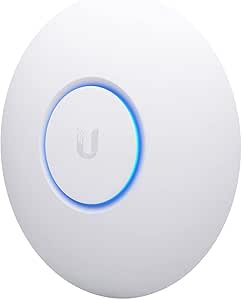 | Best for High-Density Environments | Frequency Band: Dual-Band | Wireless Compatibility: 802.11ac | Data Transfer Rate: 1733 Mbps | VIEW LATEST PRICE | See Our Full Breakdown |
| TP-Link TL-WA1801 AX1800 Dual Band WiFi 6 Gigabit Access Point |  | Best for Versatile Wi-Fi 6 Deployment | WiFi Standard: WiFi 6 (802.11ax) | Speed: Up to 1.8 Gbps | Bands: Dual Band (2.4 GHz and 5 GHz) | VIEW LATEST PRICE | See Our Full Breakdown |
| Omada 7 Pro BE11000 Wireless Access Point, 2.5G Port, with DC Adapter |  | Best for Cutting-Edge Wi-Fi 7 in Enterprise Networks | Wi-Fi Technology: Wi-Fi 7 | Wi-Fi Speed: Up to 5.0 Gbps | Bands: Dual-band | VIEW LATEST PRICE | See Our Full Breakdown |
| Omada AC1350 Wireless Access Point with PoE Injector and 5-Year Warranty |  | Best for Business-Centric High-Speed Networks | Wireless Standard: IEEE 802.11ac | Max Wireless Speed: 1350 Mbps | Power Supply: PoE (802.3af and passive PoE) | VIEW LATEST PRICE | See Our Full Breakdown |
More Details on Our Top Picks
Omada BE5000 Wireless Access Point with 2.5G Port (EAP720)
The Omada BE5000 EAP720 stands out for its cutting-edge Wi-Fi 7 technology, offering speeds up to 5.0 Gbps, making it ideal for demanding business environments. Compared with the Ubiquiti U6+, it provides higher throughput and supports over 250 devices simultaneously, ensuring scalability for growing networks. The inclusion of a 2.5G Ethernet port and PoE support offers flexible deployment options. However, its advanced features and high speed come with a higher price tag and require compatible network infrastructure, which could be a barrier for smaller setups. This access point is best suited for enterprises needing reliable, fast, and scalable Wi-Fi with centralized management.
Pros:- Supports Wi-Fi 7 with speeds up to 5.0 Gbps
- Handles over 250 concurrent devices
- Flexible PoE and DC power options
- Seamless integration with Omada SDN
Cons:- Requires compatible network infrastructure for optimal performance
- Higher cost compared to basic access points
- Advanced setup may need technical expertise
Best for: Large businesses or data centers requiring high-speed, scalable Wi-Fi 7 coverage
Not ideal for: Small offices or home users without existing high-speed network infrastructure
- Wireless Technology:Wi-Fi 7
- Speed:Up to 5.0 Gbps
- Frequency Bands:Dual-band 5 GHz and 2.4 GHz
- Ethernet Port:2.5G Gigabit Ethernet
- Power Supply:PoE (802.3at) or DC
- Concurrent Clients:250+
Our verdict“This pick makes the most sense for organizations that need top-tier, scalable Wi-Fi performance and are prepared for the investment.”
Omada AX1800 Wireless Access Point (EAP610) with Cloud Management and 5-Year Warranty
The Omada AX1800 EAP610 offers Wi-Fi 6 speeds up to 1800 Mbps, making it a solid choice for small to medium-sized businesses seeking cloud-managed solutions. Its sleek, compact design allows discreet installation, and cloud management via Omada SDN simplifies control—this is especially appealing compared to the bulkier, enterprise-focused options like the Omada BE5000. While it supports seamless mesh and roaming, some advanced features require specific firmware or controllers, which could limit flexibility for non-Omada network setups. This device is ideal for businesses that want reliable Wi-Fi 6 with easy remote management without the complexity of high-end enterprise hardware.
Pros:- Wi-Fi 6 speeds up to 1800 Mbps
- Cloud management simplifies network control
- Compact, unobtrusive design
- Supports mesh WiFi and seamless roaming
Cons:- Requires Omada controllers for full mesh features
- Limited to Omada ecosystem for advanced features
- Some features may need firmware updates
Best for: Small to medium-sized offices seeking simple, cloud-managed Wi-Fi 6 coverage
Not ideal for: Large enterprises with high device density or those needing Wi-Fi 7 speeds
- Wireless Technology:Wi-Fi 6
- Max Speed:1800 Mbps
- Bands:Dual-band
- Power Options:802.3at PoE+, Passive PoE, DC
- Warranty:5 years
- Management:Cloud-based, Omada SDN
Our verdict“This is a smart choice for small businesses seeking reliable Wi-Fi 6 with simple cloud management and flexible installation.”
Omada AC1200 Outdoor Wireless Access Point with PoE Injector (EAP225-Outdoor)
The Omada EAP225-Outdoor provides dual-band Wi-Fi speeds up to 1200 Mbps with weatherproof IP65 protection, making it ideal for outdoor environments like parks, campuses, or large premises. Its weather-resistant design ensures durability, and MU-MIMO technology supports multiple devices simultaneously. Compared to indoor models like the Omada AX1800, it excels outdoors but isn’t suitable for indoor use due to its rugged build. Its complex setup and reliance on Omada SDN controllers may pose challenges for users unfamiliar with enterprise-grade networking. This access point suits outdoor deployments where durability and wide coverage are priorities.
Pros:- Weatherproof IP65 enclosure
- Supports dual-band Wi-Fi speeds up to 1200 Mbps
- MU-MIMO for multiple device handling
- Supports Mesh WiFi and seamless roaming
Cons:- Setup complexity may intimidate beginners
- Limited to outdoor use—ineffective indoors
- Requires compatible SDN controllers for full features
Best for: Outdoor venues or large outdoor spaces needing weatherproof Wi-Fi coverage
Not ideal for: Indoor-only environments or users unfamiliar with network management
- Wireless Speed:up to 1200 Mbps
- Bands:Dual-band 2.4GHz and 5GHz
- Weatherproof Rating:IP65
- Range:200m+ at 2.4GHz, 300m+ at 5GHz
- PoE Support:802.3af/at and Passive PoE
- Operating Temperature:-30°C to 70°C
Our verdict“This outdoor access point is best for reliable, weatherproof Wi-Fi coverage in harsh environments, with some setup complexity.”
NETGEAR WiFi 6 Wireless Access Point with Power Adapter
The NETGEAR WiFi 6 AX1800 offers up to 1,800 Mbps, supporting up to 30 active devices, making it suitable for small offices or retail spaces. Its straightforward installation with wall or ceiling mounting, along with dual-band Wi-Fi 6 technology, makes it an accessible upgrade from older Wi-Fi standards. Unlike enterprise models like the Omada AX1800, its limited device capacity and coverage area—up to 1,500 sq. ft.—are better suited for smaller spaces. It lacks built-in routing features, so it must connect to an existing network. This device is ideal for small businesses or home offices wanting to boost Wi-Fi speed without over-investing in complex infrastructure.
Pros:- Supports Wi-Fi 6 speeds up to 1800 Mbps
- Easy to install with mounting hardware
- Supports MU-MIMO for multiple devices
- Dual-band coverage for better performance
Cons:- Limited coverage area for larger spaces
- Requires existing network infrastructure
- No integrated router functionality
Best for: Small offices or retail spaces needing easy Wi-Fi 6 extension
Not ideal for: Large offices or enterprise environments with high device density
- WiFi Standard:Wi-Fi 6 (AX1800)
- Bands:Dual-band
- Max Speed:1800 Mbps
- Supported Devices:Up to 128
- Coverage Area:Up to 1,500 sq ft
- Power Options:Power adapter or PoE
Our verdict“This is an excellent upgrade for small spaces seeking fast Wi-Fi 6 with straightforward setup.”
Ubiquiti U6+ Dual Band IEEE 802.11 a/b/g/n/ac/ax Wireless Access Point
The Ubiquiti U6+ supports Wi-Fi 6 with data transfer rates up to 3 Gbit/s, making it suitable for high-demand, enterprise-grade networks. Its support for multiple standards ensures compatibility across a wide range of devices, while PoE+ support simplifies deployment. Compared with the Omada BE5000, it offers similar high speeds but lacks some enterprise management features integrated into Omada’s platform. Its relatively low power draw at 9 W limits some advanced functionalities, and the absence of built-in antennas could affect range depending on environment. This access point is best for organizations requiring ultra-fast Wi-Fi in a flexible, robust form factor.
Pros:- Supports Wi-Fi 6 with up to 3 Gbit/s
- PoE+ support for flexible installation
- Compatible with multiple Wi-Fi standards
- Wall or ceiling mountable for versatile deployment
Cons:- Requires compatible network infrastructure for best performance
- Power consumption may limit some features
- No built-in antennas—range depends on environment
Best for: High-performance offices or venues demanding maximum throughput and flexibility
Not ideal for: Small offices or users seeking a plug-and-play experience
- Wireless Standard:IEEE 802.11 a/b/g/n/ac/ax
- Max Data Rate:3 Gbit/s
- Frequency Bands:2.4 GHz, 5 GHz
- Ethernet Ports:1 Gigabit Ethernet
- Power:9 W
- PoE Support:Yes, up to 25.5W
Our verdict“This high-speed, versatile access point excels in demanding settings where maximum throughput is a priority.”
TP-Link TL-WA1201 AC1200 Dual Band Wireless Gigabit Access Point
The TP-Link TL-WA1201 stands out for its versatile dual-band speeds up to 1200 Mbps and multiple operation modes, making it a solid choice for those needing flexible deployment options. Its four external antennas with Beamforming technology extend coverage effectively, and the Gigabit Ethernet port supports high-speed wired connections. Compared with the Ubiquiti nanoHD, this model offers easier setup but sacrifices the ultra-high capacity for dense environments. It’s best suited for small to medium businesses or home offices that want reliable Wi-Fi without complex management. However, it is limited by a single Ethernet port and lacks advanced security features beyond WPA/WPA2. The device requires an external PoE adapter, which could complicate installation. Overall, this pick is ideal for users seeking straightforward, reliable Wi-Fi coverage and decent performance without high complexity.Pros:- Supports dual-band Wi-Fi speeds up to 1200 Mbps with MU-MIMO technology
- Flexible operation modes including client, extender, and access point
- Extended coverage thanks to four external Beamforming antennas
- Easy PoE installation allows flexible placement
Cons:- Limited to a single Ethernet port, restricting wired device connections
- No advanced security features beyond WPA/WPA2
Best for: Small to medium-sized offices or tech-savvy home users seeking reliable dual-band Wi-Fi with flexible deployment.
Not ideal for: Large enterprises or environments requiring extensive high-density coverage, as it lacks multiple Ethernet ports and advanced mesh features.
- Speed:1200 Mbps
- Frequency Bands:2.4GHz and 5GHz
- Wireless Standards:802.11ac, 802.11b, 802.11g, 802.11n, 802.11a
- Antenna Count:4
- Ports:1 Gigabit Ethernet port
- Security Protocols:WPA, WPA2, WPA-PSK, WPA-PSK2
Our verdict“This access point is best for users who need straightforward, reliable dual-band Wi-Fi coverage with flexible deployment options in small to medium settings.”
Omada AX3000 Wireless Access Point with 5-Year Warranty
The Omada AX3000 excels with Wi-Fi 6 speeds reaching up to 2976 Mbps, making it ideal for environments with many connected devices. Its cloud management via Omada’s platform provides centralized control, which surpasses the setup complexity of the Ubiquiti nanoHD, especially for larger networks. This model is better suited for small to mid-sized businesses needing scalable, future-proof wireless solutions. However, it requires Omada SDN controllers for full mesh and roaming features, which can be daunting for users unfamiliar with enterprise networks. Its sleek design allows flexible installation, and support for multiple power options adds convenience. Nonetheless, some advanced features demand technical expertise, and compatibility details with non-Omada devices are limited. This pick makes the most sense for organizations prioritizing high-speed Wi-Fi 6 and central management for growing networks.Pros:- Wi-Fi 6 speeds up to 2976 Mbps support high-bandwidth activities
- Cloud management with centralized control simplifies network oversight
- Compact, modern design fits various environments
- Supports multiple power options including PoE+
Cons:- Requires Omada SDN controllers for full features, adding setup complexity
- Advanced setup may be challenging for non-technical users
- Limited info on compatibility with non-Omada network hardware
Best for: Small to medium businesses wanting scalable, cloud-managed Wi-Fi with high throughput.
Not ideal for: Home users or small offices seeking plug-and-play simplicity, as setup can be complex and management requires familiarity with Omada SDN.
- Wireless Speed:2976 Mbps
- Technology:Wi-Fi 6
- Standards Supported:802.3at PoE+, Passive PoE, 12V DC
- Warranty:5 years
- Power Supply:DC Adapter, PoE+
- Supported Modes:Access Point, Client, Range Extender
Our verdict“This access point is best for organizations seeking high-speed, centrally managed Wi-Fi 6 in scalable network environments.”
Ubiquiti UniFi nanoHD Compact 802.11ac Wave2 MU-MIMO Enterprise Access Point
The Ubiquiti UniFi nanoHD is tailored for environments with many users, supporting over 200 concurrent connections thanks to its dual-band 802.11ac Wave2 MU-MIMO technology. Its compact design makes it suitable for deployment in dense settings like cafes, offices, or classrooms, positioning it as a more enterprise-focused choice compared to budget options like the TP-Link TL-WA1201. It supports PoE for flexible installation but requires a separate PoE switch or injector, which adds to setup complexity and cost. While its coverage is extensive, large areas may need multiple units for seamless coverage. This device is less ideal for small-scale setups or home environments where simplicity is preferred. Its high-density capacity makes it a smart pick for busy environments, but it demands some network expertise to optimize.Pros:- Supports over 200 concurrent users with MU-MIMO technology
- Compact design minimizes visual impact in dense environments
- Supports dual-band Wi-Fi for balanced performance
- PoE support facilitates flexible placement
Cons:- Requires separate PoE switch or power supply, increasing cost and complexity
- Coverage may need multiple units for large areas
- Advanced network knowledge needed for optimal setup
Best for: High-traffic venues and enterprises requiring reliable, high-density Wi-Fi with minimal footprint.
Not ideal for: Home or small office users seeking simple, all-in-one solutions, as it demands more advanced network setup and additional hardware.
- Frequency Band:Dual-Band
- Wireless Compatibility:802.11ac
- Data Transfer Rate:1733 Mbps
- Number of Ports:2
- Voltage:48V
- Wi-Fi Generation:WiFi 5
Our verdict“This access point excels in high-density, professional settings where capacity and minimal footprint are priorities, but it’s less suitable for small-scale or simple deployments.”
TP-Link TL-WA1801 AX1800 Dual Band WiFi 6 Gigabit Access Point
The TP-Link TL-WA1801 delivers Wi-Fi 6 speeds up to 1.8 Gbps, combining modern technology with manageable setup for tech-savvy users. Its four external antennas with Beamforming enhance coverage, somewhat comparable to Omada AX3000 but at a more accessible price point. It supports multiple operation modes like Access Point, Client, and Range Extender, offering flexibility for various network needs—yet, it lacks integrated mesh support, which the Omada AX3000 provides via cloud management. Its security with WPA3 keeps networks safer, but external antennas require adjustment for optimal coverage. It’s a good fit for small businesses or advanced home setups but less ideal for large-scale enterprise environments that demand centralized management. This model balances speed, flexibility, and security in a straightforward package.Pros:- Wi-Fi 6 speeds up to 1.8 Gbps for fast connectivity
- Supports multiple operation modes including Extender and Client
- External antennas for coverage customization
- Enhanced WPA3 security ensures network safety
Cons:- External antennas may require manual adjustment for optimal coverage
- No built-in mesh support, limiting seamless roaming
- Requires compatible PoE switch or injector for power
Best for: Tech-savvy small business owners or advanced home users seeking Wi-Fi 6 with flexible modes and robust security.
Not ideal for: Users unfamiliar with network configuration or those needing plug-and-play solutions, as setup involves antenna adjustments and manual configuration.
- WiFi Standard:WiFi 6 (802.11ax)
- Speed:Up to 1.8 Gbps
- Bands:Dual Band (2.4 GHz and 5 GHz)
- Antennas:4 external
- Power:Passive PoE
- Security:WPA3
Our verdict“This access point offers flexible, high-speed Wi-Fi 6 performance for users comfortable with setup and manual configuration, ideal for small businesses and tech enthusiasts.”
Omada 7 Pro BE11000 Wireless Access Point, 2.5G Port, with DC Adapter
The Omada 7 Pro BE11000 pushes the boundaries with Wi-Fi 7 speeds up to 5 Gbps and a 2.5G Ethernet port, making it a future-proof option for demanding business environments. Its support for dual-band 4-stream Wi-Fi and extensive coverage up to 1500 sq.ft. sets it apart from the Wi-Fi 6 options like the Omada AX3000, particularly for large offices or campuses. The device’s advanced cybersecurity features and support for up to 380+ devices make it suitable for high-demand networks. However, its setup can be complex, requiring technical expertise to fully leverage Wi-Fi 7 capabilities. The high price point reflects its enterprise focus, so it’s less suitable for small businesses or home users. This pick is best for organizations aiming for the latest Wi-Fi technology with maximum throughput and device capacity.Pros:- Wi-Fi 7 speeds up to 5 Gbps with multi-link operation
- 2.5G Ethernet port supports future internet speeds
- Supports over 380 devices simultaneously
- Advanced cybersecurity and management features
Cons:- Setup complexity requires technical expertise
- High cost may be prohibitive for smaller setups
- Requires compatible PoE+ or power supply
Best for: Large enterprises or high-demand organizations seeking cutting-edge Wi-Fi 7 performance with extensive device support.
Not ideal for: Small offices or home environments where budget and simplicity matter more than cutting-edge speeds and complex setup.
- Wi-Fi Technology:Wi-Fi 7
- Wi-Fi Speed:Up to 5.0 Gbps
- Bands:Dual-band
- Tri-Band Speed:Up to 11.0 Gbps
- Port:2.5G Ethernet
- Coverage:Up to 1500 sq.ft
Our verdict“This access point is best for enterprise networks demanding the latest in Wi-Fi technology and maximum device capacity, with a willingness to handle complex setup.”
Omada AC1350 Wireless Access Point with PoE Injector and 5-Year Warranty
The Omada AC1350 stands out for its robust dual-band WiFi performance, supporting up to 1350 Mbps, which makes it a strong choice for environments demanding reliable, high-speed wireless coverage. Compared with the Omada AX1800, this model emphasizes stability with proven IEEE 802.11ac standards rather than WiFi 6, making it suitable for existing setups. Its support for PoE simplifies installation, especially in hard-to-reach locations, and the inclusion of advanced features like MU-MIMO and mesh support ensures good scalability. However, the setup can be complex for users unfamiliar with network management, and full MU-MIMO benefits depend on compatible client devices. This device is ideal for small to medium-sized business environments needing centralized control and high reliability, but less suited for casual or home users who prioritize simplicity over enterprise features.
Pros:- High-speed dual-band wireless performance supporting up to 1350 Mbps
- Flexible PoE power supply for easy deployment in various locations
- Supports advanced features like MU-MIMO, seamless roaming, and mesh networking
- Centralized management via Omada SDN platform for scalable control
Cons:- Requires compatible client devices to fully utilize MU-MIMO speeds
- Setup and configuration can be daunting for non-technical users
- Primarily designed for business environments, limiting appeal for casual use
Best for: IT managers or business owners seeking a reliable, centrally managed WiFi that supports mesh and MU-MIMO in a professional setting.
Not ideal for: Home users or casual users who prefer plug-and-play simplicity and don’t need advanced network management features.
- Wireless Standard:IEEE 802.11ac
- Max Wireless Speed:1350 Mbps
- Power Supply:PoE (802.3af and passive PoE)
- Ethernet Ports:Gigabit Ethernet
- Warranty:5 years
- Features:MU-MIMO, Seamless Roaming, Mesh Support, Omada SDN Integration
Our verdict“This pick makes the most sense for business environments where reliable, managed WiFi with advanced features justifies a more technical setup.”

How We Picked
These products were evaluated based on performance metrics such as throughput, coverage, and compatibility with current Wi-Fi standards, especially Wi-Fi 6. Usability factors like setup complexity, management features, and firmware stability were also key. Build quality and longevity, including warranties, played a role, along with value for the price. The ranking reflects a combination of these criteria, favoring devices that deliver reliable, scalable, and user-friendly network solutions suitable for both enterprise and home use.Factors to Consider When Choosing Wireless Access Point
Choosing the right wireless access point involves considering several factors that impact your network’s performance, security, and scalability. Beyond just features, understanding your environment and future needs can help avoid costly mistakes. Here are the main considerations to guide your decision:Coverage and Environment
Assess the size and layout of your space. Larger or outdoor areas require access points with higher power and better antennas. Consider outdoor-rated models if your network spans open spaces or harsh conditions. For smaller homes or offices, a single high-quality device may suffice, while larger complexes benefit from multiple access points configured for seamless coverage.
Speed and Standards
Prioritize Wi-Fi 6 (802.11ax) devices if you want faster speeds and better performance in dense environments. Older Wi-Fi standards like 802.11ac still work well but may limit future scalability. Check your existing devices’ compatibility to ensure you’re choosing an access point that complements your current setup without bottlenecks.
Management and Usability
Decide whether you prefer a simple, plug-and-play device or a managed access point with advanced controls. Managed models like Ubiquiti or Omada offer detailed configuration options, ideal for tech-savvy users or enterprise environments. For basic home use, ease of setup and app-based management often outweigh advanced features, reducing the risk of misconfiguration.
Security and Features
Look for features like WPA3 support, VLAN capabilities, and automatic firmware updates. These enhance your network security and simplify maintenance. Some models also include features like guest networks or bandwidth controls, which are valuable in shared environments or small businesses.
Price and Warranty
Balance your budget with the feature set you need. Higher-priced models often include multi-Gig ports, enterprise security, and longer warranties, translating to better long-term value. Conversely, budget options may lack advanced management or outdoor durability but can still meet basic needs, especially in small or simple setups.
Frequently Asked Questions
Do I need a Wi-Fi 6 access point for my home network?
While a Wi-Fi 6 access point isn’t strictly necessary for most home networks, it offers significant benefits if you have multiple devices, smart home gadgets, or plan to upgrade your devices soon. Wi-Fi 6 can improve speed, reduce latency, and handle more devices simultaneously, providing a smoother experience in crowded environments. For smaller households with fewer devices, Wi-Fi 5 (802.11ac) options may still be perfectly adequate and more budget-friendly.
Can I use a consumer-grade access point for business purposes?
Consumer-grade access points may suffice for small offices or home businesses with limited devices and simple requirements. However, for larger or more complex networks, managed enterprise-grade models offer better security, scalability, and control over network traffic. Relying solely on consumer options can lead to performance issues, security vulnerabilities, and difficulty managing multiple access points.
How many access points do I need for my large home or office?
The number depends on your space size and layout. As a rule of thumb, one access point can cover roughly 2,000 to 2,500 square feet in open areas, but walls, furniture, and interference can reduce this. For larger or multi-floor buildings, multiple access points should be strategically placed to ensure seamless coverage. Using a mesh or centralized management system simplifies maintaining consistent performance across all units.
What features should I prioritize if I want easy setup?
If ease of setup is your priority, look for models with intuitive mobile apps, quick installation wizards, and minimal configuration requirements. Devices like NETGEAR or TP-Link often excel here. Avoid overly complex management features unless you’re comfortable with networking, as they can slow down or complicate the initial setup process.
Is outdoor-rated equipment worth the extra cost?
Investing in outdoor-rated access points is worthwhile if your network needs to operate outside or in environments exposed to weather. These models are built to withstand moisture, dust, and temperature extremes, extending their lifespan and maintaining reliable coverage. Skipping outdoor-rated devices in such settings risks equipment failure and network interruptions, leading to higher long-term costs.
Conclusion
For most home users, a Wi-Fi 6 model like the Ubiquiti U6+ provides future-proofing and high performance with manageable setup. Small businesses benefit from managed solutions like the Omada BE5000 for its speed and enterprise features. Budget-conscious buyers may find the TP-Link TL-WA1201 a solid choice that balances cost and functionality. Those with large outdoor spaces or complex environments should consider outdoor-rated models like the Omada AC1200 Outdoor. Ultimately, your choice depends on your network size, management needs, and budget—matching the right device to your specific situation ensures a reliable, scalable wireless network.