Smart locks generate strong opinions because they offer the convenience of keyless entry and remote control, but also raise security and reliability concerns. You might worry about hacking, power outages, or device failures locking you out or exposing your home to cyber threats. While many see smart locks as a modern upgrade, others prefer traditional keys for safety. To understand how these mixed feelings develop and what’s at stake, keep exploring the different perspectives involved.

Get the latest gadgets delivered free — and shop member deals
- Fast, free delivery on millions of items
- Access to Prime Big Deal Days deals on October 6–7
- Prime Video, Amazon Music and more included
Key Takeaways
- Smart locks raise security concerns due to potential hacking and cybersecurity vulnerabilities.
- They challenge traditional notions of safety, creating debate over reliance on digital versus physical security.
- Technical reliability issues, like power outages or internet failures, influence user trust and opinions.
- Features like remote access and activity logs enhance control but also raise privacy and security debates.
- Personal priorities vary between valuing convenience and preferring established, fail-safe physical locking methods.
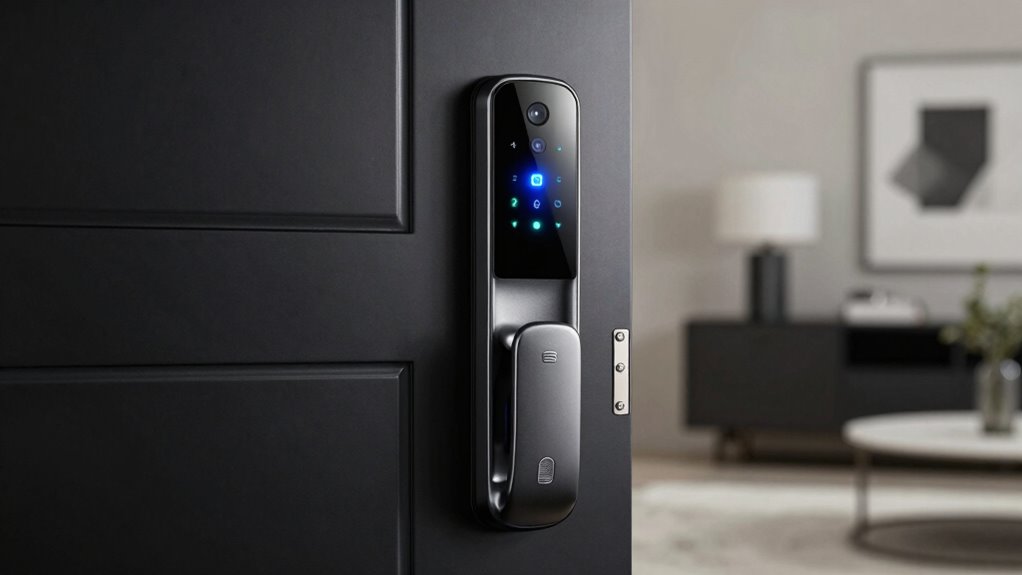
Smart locks have become a hot topic in home security, sparking passionate debates among homeowners and tech enthusiasts alike. You might find yourself excited about the idea of keyless entry and remote control, but others worry about potential security concerns that come with digital solutions. It’s natural to feel torn—on one hand, smart locks promise user convenience, making it easier to manage access without physical keys. On the other hand, skeptics question whether these devices truly enhance security or introduce new vulnerabilities.
Smart locks spark debate: convenience versus security risks in modern home protection.
When you think about the security concerns, it’s easy to see why some people hesitate. Unlike traditional locks, which rely on physical keys that can be lost or copied, smart locks depend on digital credentials—codes, apps, or biometric data. If a hacker gains access to your Wi-Fi network or exploits a software vulnerability, they could potentially release your door remotely. This possibility raises fears about unauthorized entry and the safety of your home. You might also worry about the lock’s response to power outages or internet disruptions. Will your smart lock still function, or will you be locked out? These questions highlight genuine security concerns that many feel need addressing before fully trusting these devices. Additionally, some users worry about the potential for cybersecurity vulnerabilities, which could compromise their entire home network. Incorporating robust security protocols can help mitigate these risks, but not everyone may fully understand or implement them effectively. It’s also worth noting that ongoing advancements in home cybersecurity are working to strengthen these systems against emerging threats.
However, the user convenience offered by smart locks is undeniable. Imagine arriving home with your hands full and not having to fumble for keys. Instead, you can disengage your door with a tap on your smartphone or a simple voice command. You can grant temporary access to friends, family, or service providers without making copies of keys or risking unauthorized duplication. For busy households, this level of control simplifies daily routines and enhances convenience, often making smart locks seem like a no-brainer upgrade. Plus, many models offer activity logs, so you can monitor who enters and when, giving you peace of mind and an extra layer of control.
Despite the convenience, the debate persists because of the conflicting priorities: security versus ease of use. Some feel that the convenience of remote access and keyless entry outweighs the potential risks, especially when manufacturer security measures are robust. Others remain cautious, emphasizing the importance of traditional locks and physical keys as a fail-safe. Ultimately, your opinion on smart locks hinges on your comfort level with technology, your understanding of the security features, and your personal priorities for home safety and convenience. These opposing views fuel the ongoing controversy, making smart locks a topic that continues to inspire strong opinions from all sides.
As an affiliate, we earn on qualifying purchases.
Frequently Asked Questions
Are Smart Locks More Secure Than Traditional Locks?
Smart locks can be more secure than traditional locks because they often include advanced features like encryption and remote access, enhancing physical security. They also offer user convenience with keyless entry and customizable access codes. However, you should remember that they’re vulnerable to hacking if not properly secured, so maintaining software updates and strong passwords is essential. Overall, smart locks can boost your security and convenience when used correctly.
How Do Smart Locks Impact Home Insurance Policies?
Smart locks can influence your home insurance policies, often leading to discounts if they boost security. However, with about 20% of smart lock users concerned about security loopholes and user privacy, insurers might worry about vulnerabilities that could increase claims. If your smart lock gets hacked or fails, it could impact coverage or premiums. Stay informed about your policy details to guarantee your smart lock benefits outweigh potential risks.
Can Smart Locks Be Hacked or Remotely Accessed?
Yes, smart locks can be hacked or remotely accessed if there are encryption vulnerabilities. Hackers exploit these weaknesses to gain control over your lock, risking your home’s security. To prevent hacking, guarantee your smart lock uses strong encryption and keep its firmware updated regularly. Use secure passwords and enable two-factor authentication if available. Taking these steps helps improve hacking prevention and keeps your smart lock, and your home, safer.
Do Smart Locks Require Professional Installation?
Installing a smart lock is so simple, you might think you’re a professional locksmith! You don’t need to hire someone for DIY installation, making it incredibly convenient for you. Most smart locks come with clear instructions, allowing you to set it up quickly and easily. This user convenience means you can upgrade your home security without waiting or spending extra money—empowering you to take control of your safety effortlessly.
What Are the Long-Term Maintenance Costs of Smart Locks?
The long-term maintenance costs of smart locks are typically low, mainly involving replacing batteries every 6 to 12 months, depending on usage. The battery lifespan impacts your expenses, but most models offer keyless convenience without extra costs. You’ll enjoy the benefits of a secure, tech-savvy lock without frequent repairs or service fees. Just keep an eye on battery levels to guarantee your smart lock stays operational.
As an affiliate, we earn on qualifying purchases.
Conclusion
So, next time you’re debating whether to install a smart lock, remember: you’re not just securing your home—you’re inviting a lively debate about privacy, convenience, and the potential for hacking. Whether you love the high-tech life or prefer old-fashioned keys, one thing’s certain: smart locks make sure you’ll never have a dull moment, even if that moment involves frantically searching for your phone to release your front door. Welcome to the future—brace yourself!
As an affiliate, we earn on qualifying purchases.
As an affiliate, we earn on qualifying purchases.
Fall Picks
fall essentials
As an affiliate, we earn on qualifying purchases.