
If you’re searching for a 49 inch ultrawide monitor, you’re looking for an expansive screen that enhances multitasking, gaming, or creative work. The top pick, the Samsung Odyssey G9, offers a superb blend of high refresh rates and deep curvature, ideal for immersive experiences. The INNOCN OLED Ultrawide stands out for its stunning display quality, perfect for color-critical tasks. Each of these options balances size, performance, and price differently, with tradeoffs in resolution, refresh rate, or build quality. Continue reading for a detailed breakdown of these options to find the best fit for your needs.
Key Takeaways
- High refresh rates (240Hz) dominate the top-tier options, providing smoother gameplay and responsiveness.
- Curvature (up to 1500R) enhances immersion but can be a matter of personal preference for comfort and usability.
- OLED panels deliver superior contrast and color but come at a premium price, with some tradeoffs in longevity.
- Connectivity varies widely, with USB-C and HDMI 2.1 becoming common in premium models for versatile device compatibility.
- Price range among these monitors is broad, with premium options offering advanced features and more affordable choices targeting casual users.



More Details on Our Top Picks
Samsung 49” Business Curved Ultrawide Dual QHD Computer Monitor, USB-C, DisplayPort, HDMI, 120Hz, VESA DisplayHDR 400, Built-in Speakers, Height Adjustable Stand, Eye Care, LS49C954UANXZA, 2024
This monitor excels at delivering a panoramic workspace, perfect for professionals who need to run multiple apps or documents side-by-side. Its 49-inch 32:9 aspect ratio and Dual QHD resolution enable a seamless, expansive view that reduces the need for multiple screens—making it ideal for complex workflows. Compared to the Samsung Odyssey G9, this model emphasizes a more ergonomic, height-adjustable stand and advanced eye care features, though it offers a slightly lower refresh rate of 120Hz, which may matter for gaming. The VESA DisplayHDR 400 enhances dark and bright scenes, beneficial for media editing or detailed data visualization. Connectivity options include USB-C with 90W charging, HDMI, and DisplayPort, simplifying desk setup. However, its bulk and weight (over 32 pounds) could be a drawback for users with limited space or who need portability. This monitor suits corporate environments, creative professionals, and serious multitaskers who prioritize comfort and connectivity over ultra-high refresh rates.
Pros:- Wide 49-inch dual QHD curved display offers extensive workspace
- Height-adjustable stand improves ergonomic comfort
- Supports multiple input sources with rich connectivity options
Cons:- Relatively low 120Hz refresh rate limits gaming smoothness
- Heavy and large, may require dedicated desk space
Best for: Designers, data analysts, and multi-application multitaskers in professional settings
Not ideal for: Gamers seeking ultra-smooth 144Hz+ gameplay or users with limited desk space
- Display Size:49 inches
- Aspect Ratio:32:9
- Resolution:5120×1440 (Dual QHD)
- Refresh Rate:120Hz
- HDR:DisplayHDR 400
- Connectivity:USB-C, HDMI, DisplayPort
- Stand:Height adjustable
- Weight:32.19 pounds
Bottom line: This monitor is tailored for professionals who need maximum screen real estate and versatile connectivity, not fast-paced gaming.
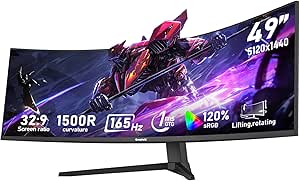
Gawfolk 49 inch Ultra-Wide Curved 1500R Gaming Computer Monitor, DQHD(5120×1440), 165Hz, 1MS, FreeSync, 120% sRGB, Height Adjustable PC Screen, HDMI2.1 & DP1.4, Compatible Wall Mount 75 * 75mm- Black
This monitor is designed for gamers who want immersive visuals combined with fast response times. Its 1500R curvature enhances the feeling of being surrounded by the action, and the 5120×1440 resolution ensures sharp, detailed images. The 165Hz refresh rate and 1ms response time make it ideal for fast-paced games, surpassing the Samsung Odyssey G9’s 144Hz in responsiveness. The 120% sRGB color gamut delivers vivid, accurate color reproduction, great for both gaming and creative tasks. Connectivity includes HDMI 2.1 and DisplayPort 1.4, supporting high bandwidth for smooth gameplay. The height-adjustable stand offers ergonomic positioning, but its bulk (~33 pounds) might be cumbersome for portable setups. While it excels in responsiveness and color, its focus on gaming features makes it less suited for professional multitasking or media editing requiring high HDR standards. This monitor is perfect for gamers who prioritize speed and vibrant visuals over office productivity.
Pros:- 165Hz refresh rate with 1ms response time for ultra-smooth gaming
- 120% sRGB color gamut for vibrant, accurate colors
- 1500R curvature creates immersive viewing experience
Cons:- Heavy weight and large size may limit desk compatibility
- Primarily focused on gaming, less optimized for professional color grading
Best for: Competitive gamers and tech enthusiasts who demand high refresh rates and vivid color
Not ideal for: Content creators needing true HDR color accuracy or users with space constraints
- Display Size:49 inches
- Aspect Ratio:32:9
- Resolution:5120×1440
- Refresh Rate:165Hz
- Response Time:1ms
- HDR:VESA DisplayHDR 400
- Connectivity:HDMI 2.1, DP1.4
- Stand:Height adjustable
Bottom line: This monitor is ideal for gamers who want speed and color vibrancy, less suited for professional content creation.
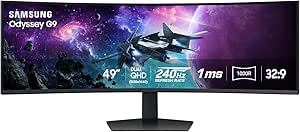
This model stands out as the flagship for gamers who want top-tier performance combined with stunning visuals. Its 1000R curvature wraps around your peripheral vision, creating an immersive experience similar to the Samsung Odyssey G9 but with a focus on ultra-fast responsiveness. The 240Hz refresh rate and 1ms(GtG) response time ensure virtually lag-free gameplay, surpassing the Gawfolk model’s 165Hz for competitive edge. With VESA DisplayHDR 1000, it delivers deeper blacks and brighter highlights, making dark scenes and explosions pop with realism. The AMD FreeSync Premium Pro minimizes tearing during intense action. The ergonomic stand and auto source switching add convenience, though the high brightness and contrast may be overkill for casual users. Its premium build and performance make it the best choice for serious gamers and enthusiasts seeking cutting-edge tech, but it’s also the most expensive in this lineup.
Pros:- 240Hz refresh rate with 1ms(GtG) response for ultra-responsive gaming
- DisplayHDR 1000 for exceptional contrast and luminance
- 1000R curvature for full peripheral immersion
Cons:- Premium price point may be prohibitive for casual gamers
- Large footprint and high power consumption
Best for: Hardcore gamers and esports competitors seeking ultimate responsiveness and visuals
Not ideal for: Casual users or professionals who prioritize color accuracy over response speed
- Display Size:49 inches
- Aspect Ratio:32:9
- Resolution:5120×1440
- Refresh Rate:240Hz
- Response Time:1ms(GtG)
- HDR:DisplayHDR 1000
- Connectivity:HDMI, DisplayPort
- Stand:Ergonomic, VESA compatible
Bottom line: This monitor is the best choice for gamers who need the fastest response and most vivid HDR images, not for budget-conscious buyers.
Gawfolk 49 inch Ultra-Wide Curved 1500R Gaming Computer Monitor, DQHD(5120×1440), 165Hz, 1MS, FreeSync, 120% sRGB, Height Adjustable PC Screen, HDMI2.1 & DP1.4, Compatible Wall Mount 75 * 75mm- Black
This budget-friendly option offers impressive specs for gamers who want speed and vibrant colors without the high cost. Its 1500R curvature enhances immersion, and the 5120×1440 resolution provides sharp visuals. The 165Hz refresh rate and 1ms response time rival higher-end models like the Samsung Odyssey G9, making fast-paced gameplay smooth. The 120% sRGB coverage ensures rich, accurate colors, ideal for casual content creation or media consumption. Its height-adjustable stand and wall-mount compatibility add ergonomic flexibility, but it does not feature an HDR certification, limiting its performance in high-contrast scenes. The monitor’s build quality and responsiveness make it a strong contender for gamers who want excellent performance at a lower price, though it lacks some premium features like HDR 1000 or 240Hz refresh rates of top-tier models.
Pros:- 165Hz refresh rate with 1ms response time for smooth gaming
- 120% sRGB for vivid, accurate colors
- Affordable price point with good build quality
Cons:- Lacks high-end HDR (HDR 400 or above)
- No 240Hz refresh rate, limiting competitive edge
Best for: Budget-conscious gamers and casual users seeking responsive gameplay and vibrant visuals
Not ideal for: Professional content creators requiring high HDR performance or extensive color accuracy
- Display Size:49 inches
- Aspect Ratio:32:9
- Resolution:5120×1440
- Refresh Rate:165Hz
- Response Time:1ms
- HDR:Not supported
- Connectivity:HDMI 2.1, DP1.4
- Stand:Height adjustable
Bottom line: This monitor offers excellent speed and color at a more affordable price, ideal for casual gamers but not for HDR professionals.
Samsung 49” Business Curved Ultrawide Dual QHD Computer Monitor, USB-C, DisplayPort, HDMI, 120Hz, VESA DisplayHDR 400, Built-in Speakers, Height Adjustable Stand, Eye Care, LS49C954UANXZA, 2024
This monitor excels at delivering a panoramic workspace, perfect for professionals who need to run multiple apps or documents side-by-side. Its 49-inch 32:9 aspect ratio and Dual QHD resolution enable a seamless, expansive view that reduces the need for multiple screens—making it ideal for complex workflows. Compared to the Samsung Odyssey OLED G9, this model emphasizes a more ergonomic, height-adjustable stand and advanced eye care features, though it offers a slightly lower refresh rate of 120Hz, which may matter for gaming. The VESA DisplayHDR 400 enhances dark and bright scenes, beneficial for media editing or detailed data visualization. Connectivity options include USB-C with 90W charging, HDMI, and DisplayPort, simplifying desk setup. However, its bulk and weight (over 32 pounds) could be a drawback for users with limited space or who need portability. This monitor suits corporate environments, creative professionals, and serious multitaskers who prioritize comfort and connectivity over ultra-high refresh rates.
Pros:- Wide 49-inch dual QHD curved display offers extensive workspace
- Height-adjustable stand improves ergonomic comfort
- Supports multiple input sources with rich connectivity options
Cons:- Relatively low 120Hz refresh rate limits gaming smoothness
- Heavy and large, may require dedicated desk space
Best for: Designers, data analysts, and multi-application multitaskers in professional settings
Not ideal for: Gamers seeking ultra-smooth 144Hz+ gameplay or users with limited desk space
- Display Size:49 inches
- Aspect Ratio:32:9
- Resolution:5120×1440 (Dual QHD)
- Refresh Rate:120Hz
- HDR:DisplayHDR 400
- Connectivity:USB-C, HDMI, DisplayPort
- Stand:Height adjustable
- Weight:23.4 pounds
Bottom line: This monitor is tailored for professionals who need maximum screen real estate and versatile connectivity, not fast-paced gaming.
Samsung 49″ Odyssey OLED G9 (G91SD) Dual QHD QD-OLED G-Sync Compatible Curved Gaming Monitor, 144Hz, 0.03ms, AMD FreeSync Premium Pro, Ergonomic Stand, 3 Year Warranty, LS49DG910SNXZA
This model stands out for its QD-OLED technology that delivers a wider color spectrum and true blacks, making it ideal for gamers and multimedia creators alike. Compared with the Acer Nitro 49”, it offers superior contrast and vibrant visuals, though it comes with a higher price tag and more premium build quality. The 144Hz refresh rate and 0.03ms response time ensure silky-smooth gameplay, while features like G-Sync and FreeSync Premium Pro reduce tearing and lag. Its dual QHD resolution and 32:9 aspect ratio provide an immersive experience, perfect for multitasking or extended gaming sessions. The ergonomic stand allows easy adjustment, and the sleek metallic finish adds style. However, this monitor is quite large and heavy, demanding ample desk space, and its premium OLED panel can risk burn-in if static images are prolonged. Overall, this pick makes the most sense for serious gamers and content creators wanting top-tier visuals without compromise.
Pros:- Exceptional color accuracy and contrast with QD-OLED technology
- Near-instant response time at 0.03ms for competitive gaming
- Versatile multitasking with Dual QHD resolution and Picture-in-Picture
Cons:- High price point compared to other 49″ ultrawides
- Risk of burn-in if static images are displayed for long periods
- Large footprint may not fit smaller desks
Best for: High-end gamers and professional content creators seeking top-tier visuals and smooth gameplay
Not ideal for: Budget-conscious users or those with limited desk space, due to its size and premium cost
- Display Technology:QD-OLED
- Screen Size:49 Inches
- Resolution:5120×1440 (Dual QHD)
- Refresh Rate:144Hz
- Response Time:0.03ms
- Contrast Ratio:Infinite (True Blacks)
- Connectivity:HDMI, DisplayPort, USB-C
- Warranty:3 Years
Bottom line: This monitor is best suited for enthusiasts who prioritize ultimate image quality and gaming responsiveness over budget.
This pick makes the most sense for gamers who want extreme immersion with its 1000R curvature that mimics the human eye’s natural shape, unlike the flatter CRUA 49” White. Its 240Hz refresh rate and 1ms(GtG) response time set a new standard for ultra-smooth, lag-free gameplay, especially in fast-paced titles. The VESA DisplayHDR 1000 offers stunning brightness and contrast, rivaling OLEDs but with less risk of burn-in, making it a solid choice for both gaming and media editing. The height-adjustable stand and ergonomic design provide comfort during long sessions, and the 49″ ultra-wide display with DQHD resolution ensures no detail is missed. It also supports PBP/PIP multitasking, great for streamers or productivity. Downsides include its substantial size which may be cumbersome for smaller desks, and the high cost reflecting its premium features. Overall, this monitor is perfect for enthusiasts who demand high-performance and vivid visuals in a large, curved format.
Pros:- Ultra-wide 1000R curvature for natural viewing comfort
- High 240Hz refresh rate with 1ms(GtG) response for competitive gaming
- VESA HDR 1000 for vivid contrast and brightness
Cons:- Large size requires significant desk space
- Premium price may be prohibitive for casual users
- Heavier weight limits portability
Best for: Serious gamers and multimedia professionals seeking maximum immersion and high refresh rates
Not ideal for: Users with tight workspace or budget constraints, due to its size and premium price
- Display Technology:VA
- Screen Size:49 Inches
- Resolution:5120×1440 (DQHD)
- Refresh Rate:240Hz
- Response Time:1ms(GtG)
- HDR:VESA DisplayHDR 1000
- Connectivity:HDMI, DisplayPort
- Warranty:1 Year
Bottom line: This monitor is best for gamers and professionals who need a large, curved display with top-tier performance and vivid visuals.
CRUA 49″ White Curved Monitor | DQHD(5120 * 1440), 120Hz, 1500R, 32:9, AMD FreeSync, 120% sRGB, Height Adjustable Ultra-Wide Screen Computer Monitors, HDMI 2.1 & DP 1.4, Wall Mount Install
This model is an excellent choice for users who want large screen real estate without breaking the bank. Its 1500R curvature offers a comfortable viewing experience, similar to the more expensive Samsung G9. The 120Hz refresh rate and AMD FreeSync provide smooth visuals for gaming and multimedia, though it falls short of the high-end 240Hz in the Samsung G9. The 32:9 aspect ratio maximizes productivity and immersion, perfect for multitasking or cinematic viewing. Its adjustable stand and VESA compatibility facilitate flexible setup, and the white finish adds a clean aesthetic. Drawbacks include a somewhat lower refresh rate and less premium build quality, which might impact durability and response times compared to top-tier models. Overall, it’s a solid, cost-effective alternative for those who desire a 49” ultrawide but have budget constraints.
Pros:- Large 49-inch ultra-wide display with 1500R curvature
- Affordable price point with good build quality
- Height adjustable and VESA compatible for versatile mounting
Cons:- Lower 120Hz refresh rate compared to premium models
- Build quality may be less durable over long-term use
- Limited advanced features like HDR 1000 or 240Hz
Best for: Budget-conscious gamers and productivity users needing extensive screen space
Not ideal for: High-performance gaming or professional content creation, due to lower refresh rate and build quality
- Display Technology:VA
- Screen Size:49 Inches
- Resolution:5120×1440 (DQHD)
- Refresh Rate:120Hz
- Response Time:3ms
- Curvature:1500R
- Connectivity:HDMI 2.1, DP 1.4
- Warranty:1 Year
Bottom line: This monitor offers a large, immersive display ideal for multitasking and casual gaming at a budget-friendly price.
INNOCN 49″ Curved Gaming Monitor 144Hz Ultrawide 32:9 WDFHD 3840 x 1080P, R1800, 99% sRGB, HDR400, USB Type C, DisplayPort, HDMI, Built-in Speakers, Height/Tilt Adjustable – 49C1G
This model makes a strong case for users who want good color accuracy and decent performance at a reasonable price. Its 144Hz refresh rate and 99% sRGB coverage deliver vibrant images suitable for gaming, media editing, and multitasking. The 1800R curvature offers ergonomic comfort, and the HDR400 support enhances contrast and color depth. Its USB Type-C port simplifies connectivity for modern devices, and the adjustable stand adds flexibility. While it doesn’t match the 240Hz or OLED contrast of higher-end options like the G9 series, it is still capable of smooth gameplay and detailed visuals. The build quality is solid, but it might lack some of the premium features like ultra-high brightness or extreme response times. Overall, this monitor balances performance, features, and affordability for a wide range of users.
Pros:- 144Hz refresh rate with smooth gameplay
- 99% sRGB coverage for accurate colors
- USB-C with power delivery for easy device connection
Cons:- Lower resolution compared to 5K or OLED models
- Response time of 3ms, less ideal for fast-paced eSports
- HDR support limited to HDR400, less vivid than HDR 1000
Best for: Budget-conscious gamers and multitaskers looking for a versatile ultrawide monitor
Not ideal for: High-end competitive gaming or professional video editing requiring maximum color accuracy
- Display Technology:VA
- Screen Size:49 Inches
- Resolution:3840×1080 (WDFHD)
- Refresh Rate:144Hz
- Response Time:3ms
- Curvature:1800R
- Connectivity:HDMI, DP, USB-C
- Warranty:1 Year
Bottom line: This monitor offers a solid mix of performance and affordability, perfect for casual gaming and productivity.
CRUA 49″ Curved Gaming Monitor | DQHD(5120 * 1440), 144Hz/165Hz, 1500R, 32:9, AMD FreeSync, 120% sRGB, Height Adjustable Ultra-Wide Screen Monitors, HDMI 2.1 & DP 1.4, Wall Mount Install- Black
This CRUA monitor stands out for its impressive blend of gaming and productivity features at a competitive price point. Its 1500R curvature and 32:9 aspect ratio create an immersive experience comparable to the Samsung Odyssey G9, but at a more accessible price. The 5120×1440 resolution offers sharp detail for creative work, and the 165Hz refresh rate with AMD FreeSync ensures smooth gameplay, rivaling higher-end models. However, its color accuracy, while good with 120% sRGB coverage, isn’t quite as precise as the INNOCN OLED or Samsung’s HDR capabilities, which might matter for professional content creation. Its height-adjustable stand and VESA compatibility make ergonomic setup straightforward. The main tradeoff is that it lacks the extreme contrast and HDR performance of premium options like Samsung’s DisplayHDR 600, but for the price, it delivers excellent all-around performance.
Pros:- Large 49-inch curved display with immersive field of view
- High resolution (5120×1440) for detailed work and gaming
- 165Hz refresh rate with FreeSync for smooth gameplay
- Ergonomic adjustments and VESA compatibility
Cons:- Color accuracy and HDR are not as advanced as premium models
- Speakers are not built-in, requiring external audio solutions
Best for: Gamers and multitaskers seeking a large, flexible ultrawide monitor without breaking the bank.
Not ideal for: Professional photographers or video editors who need top-tier color fidelity and HDR performance.
- Display Size:49 Inches
- Resolution:5120×1440 (DQHD)
- Refresh Rate:165 Hz
- Color Gamut:120% sRGB
- Connectivity:HDMI 2.1 & DP 1.4
- Adjustability:Height adjustable, Wall mountable
Bottom line: This monitor offers a well-rounded experience for gamers and productivity users who want size and smooth visuals at a competitive price.
The Samsung Odyssey G9 G91F offers a stunning blend of high-end gaming features and superb image quality. Its 1000R curvature and ultra-wide 32:9 aspect ratio envelop you fully, providing a panoramic view ideal for fast-paced gaming, similar to the G95C but with even more refined display technology. The DisplayHDR 600 delivers deep blacks and bright highlights, making it superior for HDR content compared to the CRUA or INNOCN models, especially in dark scenes. The 144Hz refresh rate and 1ms GtG response time minimize lag, and AMD FreeSync Premium Pro ensures tear-free gameplay. The monitor also supports Picture-in-Picture and split-screen multitasking, enhancing productivity. Its ergonomic stand offers excellent adjustability, but the premium price and larger physical footprint might be drawbacks for tighter spaces. In short, it excels in visual fidelity and gaming responsiveness, suited for enthusiasts with high demands.
Pros:- Deep 1000R curvature for immersive viewing
- DisplayHDR 600 for vibrant contrast and color in media
- 144Hz with 1ms response for competitive gaming
- Ergonomic stand with wide adjustability
Cons:- Higher price point compared to mid-range options
- Large size may be difficult to fit in smaller workspaces
- Requires careful calibration for optimal HDR performance
Best for: High-end gamers and creative professionals demanding top-tier HDR and immersive experience.
Not ideal for: Budget-conscious users or those with limited desk space who don’t need extreme HDR or ultra-wide gaming features.
- Display Size:49 Inches
- Resolution:5120×1440 (DQHD)
- Refresh Rate:144 Hz
- HDR:DisplayHDR 600
- Color Gamut:High dynamic range with deep contrast
- Connectivity:DisplayPort, HDMI
Bottom line: This monitor is ideal for users who prioritize superior HDR visuals and ultra-wide gaming performance, willing to invest in premium quality.

How We Picked
Our evaluation focused on performance, build quality, and usability tailored to demanding 49 inch ultrawide monitors. We prioritized models with high refresh rates (at least 120Hz), excellent color accuracy, and strong connectivity options, since these are key for gaming, professional work, and multitasking. Durability, ergonomic features, and display technology also factored into our rankings. The monitors were ranked based on a balance of these features, with a bias toward models that offer the best overall value for their target audience—whether gamers, professionals, or general users.Factors to Consider When Choosing 49 Inch Ultrawide Monitor
Choosing the right 49 inch ultrawide monitor involves considering several crucial factors beyond just size and resolution. Understanding how each feature impacts your experience can help you avoid common pitfalls like overspending on unnecessary specs or selecting a model incompatible with your setup. Here are key considerations to guide your decision:Display Technology and Image Quality
Opt for OLED or QD-OLED panels if color accuracy, contrast, and deep blacks are priorities, especially for creative work. IPS panels are more common and generally more affordable, offering good color reproduction and wider viewing angles. Be aware that OLEDs typically come at a higher price and may have different longevity considerations. Your choice here impacts not just visual quality but also the overall immersion and comfort during extended use.
Refresh Rate and Response Time
High refresh rates, like 120Hz or higher, are vital for gamers seeking smooth motion, particularly in fast-paced titles. Response time influences motion clarity, with 1ms to 4ms being ideal for gaming. For productivity or general use, these specs are less critical, but they still contribute to a more fluid experience. Avoid overspending on high refresh rates if your primary use is casual browsing or office work.
Connectivity and Compatibility
Ensure the monitor offers modern ports like HDMI 2.1, DisplayPort 1.4, and USB-C with power delivery. These features facilitate easy connection to gaming consoles, PCs, and laptops, reducing cable clutter. Compatibility with adaptive sync technologies like G-Sync or FreeSync can enhance gaming performance by eliminating screen tearing. Consider your device ecosystem to avoid future connectivity issues.
Ergonomics and Adjustability
Look for monitors with adjustable stands—tilt, height, and swivel—to customize your viewing angle for comfort during long sessions. Curved screens can improve immersion but might require some adjustment to avoid distortion or discomfort. If you plan frequent repositioning or extended use, prioritize ergonomics to reduce strain over time. Wall-mount compatibility adds further flexibility.
Price and Long-term Value
Prices among 49 inch ultrawide monitors vary significantly, reflecting differences in display tech, refresh rate, and additional features. Decide whether you need high-end specs for gaming or creative work, or if a more budget-friendly model suffices for multitasking and general use. Remember that investing in a higher-quality display can pay off in longevity and overall satisfaction, especially if you use your monitor intensively.
Frequently Asked Questions
Is a 49 inch ultrawide monitor suitable for gaming?
Absolutely. Many 49 inch ultrawide monitors, especially those with high refresh rates (120Hz and above) and low response times, are designed with gaming in mind. The curvature often enhances immersion, making gaming more engaging. However, ensure your PC or console can handle the resolution and refresh rate to avoid bottlenecks. Compatibility with adaptive sync technologies like FreeSync or G-Sync further improves gameplay smoothness.
Can I use a 49 inch ultrawide monitor for professional creative work?
Yes, particularly models with OLED or high-quality IPS panels that offer excellent color accuracy and contrast. The expansive screen real estate helps streamline workflows across multiple applications or large spreadsheets. Keep in mind that some ultrawide monitors may have slight curvature or aspect ratio quirks that could affect precise editing, so check for features like precise calibration options and color gamut support if your work demands it.
What are the main tradeoffs when choosing a 49 inch ultrawide monitor?
The primary tradeoffs involve balancing resolution, refresh rate, and price. Higher refresh rates and OLED panels tend to increase cost but deliver smoother visuals and better image quality. Curvature enhances immersion but might not suit all desk setups or preferences. Additionally, larger screens require more space and powerful hardware, so consider your environment and system capability to avoid bottlenecks or clutter.
Are 49 inch ultrawide monitors worth investing in for multitasking?
For users who juggle multiple applications or need a broad workspace, ultrawide monitors offer significant productivity benefits. They reduce the need for multiple monitors and streamline window management. That said, they can be costly and may require a more spacious desk. If your work involves extensive multitasking or creative editing, the investment can translate into tangible efficiency gains.
How do I pick the right resolution for a 49 inch ultrawide monitor?
Most 49 inch ultrawide monitors feature a resolution of 5120×1440 or 3840×1080. Higher resolutions like 5120×1440 provide sharper images and more workspace but demand more from your GPU, especially in gaming. For general use, 3840×1080 may suffice, but for detailed creative work or professional editing, the extra clarity of 5120×1440 is beneficial. Consider your hardware and usage needs to make the best choice.
Conclusion
For gamers seeking the ultimate immersive experience, the Samsung Odyssey G9 offers superior specs and a deep 1000R curvature. Professionals and creatives should lean toward the INNOCN OLED Ultrawide for its exceptional display quality. Budget-conscious users or those new to ultrawide setups will find the Acer Nitro or CRUA models provide good value without sacrificing too much. Ultimately, your choice should align with your primary use—whether gaming, productivity, or creative work—and your budget. Carefully balancing features against your needs will ensure you get the most from your 49 inch ultrawide monitor in 2026.