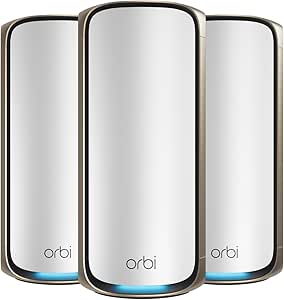
The best Netgear Orbi mesh routers balance whole-home coverage, backhaul capacity, and the features your devices can actually use. My best overall pick is the Orbi 770 Series WiFi 7 3-pack, which offers a current Wi-Fi generation and a three-unit layout without stepping up to the 970 Series’ most expansive hardware. The Orbi 970 Series RBE973S is the premium choice for large homes and demanding networks, while the RBK752 is a more restrained Wi-Fi 6 option for buyers who do not need Wi-Fi 7. The main tradeoffs are Wi-Fi generation, the number of router and satellite units, coverage needs, and how much wired capacity your internet plan and devices can use. Read on for the full breakdown of all 15 systems, plus guidance on choosing the right Orbi setup for your home.

Get the latest gadgets delivered free with Prime
- Fast, free delivery on millions of items
- Prime Video, Amazon Music and more included
- Member-only deals all year
Complete the kit



Key Takeaways
- Wi-Fi 7 splits into distinct tiers: the Orbi 370 and 360 families offer more accessible entry points, the 770 and RBE773 target stronger home networks, and the 970 systems sit at the premium end.
- More units are not automatically better: a three-piece system such as the RBK753 or Orbi 770 3-pack may suit a spread-out layout better than a powerful two-piece system, even if the latter has newer hardware.
- The 970 Series stands apart on capacity: the RBE973S lists quad-band Wi-Fi 7, a 10-gig internet port, coverage up to 10,000 square feet, and support for up to 200 devices; most buyers will not need every part of that specification.
- Wi-Fi 6 remains a sensible fit for many homes: models such as the RBK752, RBK753, and RBK763S can be a better match when existing devices and internet service do not call for Wi-Fi 7.
- Check the exact kit before comparing: several product names cover different unit counts or generations, including RBK752 versus RBK752P and RBK852 versus RBK853, so the included satellites and listed ports matter as much as the family name.




| Netgear Orbi mesh router | Coverage | Model | WiFi generation |
|---|---|---|---|
| NETGEAR Orbi RBK13 Whole Home | Up to 4,500 sq. ft. | RBK13 | — |
| NETGEAR Orbi RBK752P Tri-Band | Up to 5,000 sq. ft. | RBK752P | — |
| NETGEAR Orbi RBK853 Tri-Band W | Up to 7,500 sq. ft. | RBK853 | WiFi 6 (802.11ax) |
| NETGEAR Orbi RBK863S Tri-Band | Up to 8,000 sq. ft. | RBK863S | — |
| Orbi 970 Series Quad-Band WiFi | Up to 10,000 sq. ft. | RBE973S | — |
| NETGEAR Orbi 360 Series WiFi 7 | Up to 4,000 sq. ft. | — | WiFi 7 |
| NETGEAR Orbi 770 Series WiFi 7 | Up to 8,000 sq. ft. | — | WiFi 7 |
| NETGEAR Orbi RBK852 Tri-Band W | Up to 5,000 sq. ft. | RBK852 | WiFi 6 (802.11ax) |
| NETGEAR Orbi RBK763S Tri-Band | Up to 7,500 sq. ft. | RBK763S | WiFi 6 (802.11ax) |
| NETGEAR Orbi 970 Series WiFi 7 | — | — | — |
| NETGEAR Orbi 370 Series WiFi 7 | Up to 6,000 sq. ft. | — | WiFi 7 (802.11be) |
| NETGEAR Orbi RBKE963 Quad-Band | Up to 9,000 sq. ft. | RBKE963 | WiFi 6E |
| NETGEAR Orbi Tri-Band WiFi 7 M | — | RBE773 | — |
| NETGEAR Orbi RBK753 Tri-Band W | Up to 7,500 sq. ft. | RBK753-100NAS | WiFi 6 (802.11ax) |
| NETGEAR Orbi Whole Home Tri-Ba | — | — | — |
More Details on Our Top Picks
NETGEAR Orbi RBK13 Whole Home Mesh Wi-Fi System with Router and 2 Satellites
The RBK13 is the straightforward pick for households that want three mesh units and broad advertised coverage without moving up to WiFi 6. Its dual-band WiFi 5 design supports speeds up to 1.2 Gbps, making it a better fit for routine browsing, video calls, and streaming than for demanding, device-heavy homes. Unlike the RBK752P, it lacks WiFi 6 and tri-band capacity, but its router-plus-two-satellite bundle gives you more included nodes than that system’s router-and-one-satellite setup. A single network name supports roaming around the home, and the Orbi app handles setup and management. The tradeoffs are its older wireless generation and the need for a separate modem or gateway; some security and parental-control features are offered only as trials.
Pros:- Router and two satellites provide three mesh nodes in the box
- Advertised coverage reaches up to 4,500 sq. ft.
- One network name supports roaming between nodes
- App-based setup and a Gigabit Ethernet port
Cons:- WiFi 5 and dual-band design offer less capacity than the WiFi 6 tri-band systems here
- Requires a separate modem or gateway
- NETGEAR Armor and Smart Parental Controls trials last 30 days
Best for: Households with a separate modem that want a three-unit mesh for everyday browsing and streaming across a larger home.
Not ideal for: Homes with many active devices, demanding online gaming, or a need for current WiFi 6 performance; the RBK752P is better suited to those demands.
- Model:RBK13
- Wi-Fi generation:Wi-Fi 5 (802.11ac)
- Wireless speed:Up to 1.2 Gbps
- Coverage:Up to 4,500 sq. ft.
- System components:1 router and 2 satellites
- Frequency bands:Dual-band, 2.4 GHz and 5 GHz
- Ethernet:1 Gigabit Ethernet port
- Management:Orbi app
- Compatibility:Cable, satellite, fiber, and DSL; separate modem or gateway required
Our verdict“Choose the RBK13 for basic whole-home coverage with three included nodes, but pick the RBK752P if you need WiFi 6 and more capacity for busy households.”
NETGEAR Orbi RBK752P Tri-Band WiFi 6 Mesh System with Router and Satellite
The RBK752P is a balanced step up from the RBK13: it adds WiFi 6 and tri-band networking, with coverage rated for up to 5,000 sq. ft. and support for up to 75 devices. That combination suits homes with a mix of streaming, calls, and connected devices better than the RBK13’s older dual-band WiFi 5 setup. Its router and satellite both have Ethernet ports, so you can wire nearby equipment without relying on a wireless connection. The RBK853 is the stronger choice for larger properties or more devices, with two included satellites and higher stated capacity; the RBK752P keeps the system simpler with one satellite. That also limits its included reach, and adding another satellite means buying one separately. It is specified for U.S. use and internet service up to 1 Gbps.
Pros:- Tri-band WiFi 6 supports busy household networking better than the RBK13
- Coverage rated up to 5,000 sq. ft. and support for up to 75 devices
- Ethernet ports on both router and satellite
- WPA3 security and app-based management
Cons:- Includes only one satellite; extra coverage requires a separately sold satellite
- Internet service compatibility is specified up to 1 Gbps
- Made for use in the U.S. only
Best for: Households seeking WiFi 6 coverage for a mid-size home, with a moderate number of devices and a few wired connections.
Not ideal for: Owners of large or multi-level homes who need two satellites included, or households with internet service above 1 Gbps.
- Model:RBK752P
- WiFi standard:WiFi 6 (802.11ax)
- Maximum speed:AX5200, up to 5.2 Gbps
- Frequency band:Tri-band
- Coverage:Up to 5,000 sq. ft.
- Device capacity:Up to 75 devices
- Included components:Router and 1 satellite
- Ethernet ports:3 on router; 2 on satellite
- Security and region:WPA3; U.S. use only
Our verdict“Choose the RBK752P for a mid-size home that needs WiFi 6 and wired links, while larger homes are better served by the two-satellite RBK853.”
NETGEAR Orbi RBK853 Tri-Band WiFi 6 Mesh System with Router and 2 Satellites
For a large property that needs several mesh points, the RBK853 pairs a router with two satellites and rates coverage up to 7,500 sq. ft. Its tri-band WiFi 6 design and stated capacity of 100 devices make it a more capable fit for a busy household than the RBK752P, which includes only one satellite and supports up to 75 devices. Wired equipment also has room to connect: the router and each satellite include four Gigabit Ethernet ports, while a 2.5 Gigabit internet port provides a faster connection option at the gateway. The RBK863S reaches farther on paper and adds a 10 Gbps internet port, so it is the better match if you need those specific upgrades. The RBK853’s meaningful limits are its U.S.-only designation and the short NETGEAR Armor trial.
Pros:- Router and two satellites cover up to 7,500 sq. ft.
- Tri-band WiFi 6 supports up to 100 devices
- Four Gigabit Ethernet ports on the router and each satellite
- 2.5 Gigabit internet port
Cons:- Designed for use in the United States
- NETGEAR Armor is included as a 30-day trial
- The RBK863S offers greater stated coverage and a 10 Gbps internet port
Best for: Families in larger U.S. homes who need two satellites, capacity for many devices, and multiple Ethernet connections around the property.
Not ideal for: Buyers outside the U.S. or households seeking a 10 Gbps internet port and greater stated coverage; the RBK863S offers those upgrades.
- Model:RBK853
- WiFi generation:WiFi 6 (802.11ax)
- Maximum data rate:AX6000, up to 6 Gbps
- Coverage:Up to 7,500 sq. ft.
- Device capacity:Up to 100 devices
- Included components:1 router and 2 satellites
- Internet port:2.5 Gigabit Ethernet
- Ethernet ports:4 Gigabit Ethernet ports on router and each satellite
- Region and security:United States; NETGEAR Armor 30-day trial
Our verdict“Choose the RBK853 for extensive WiFi 6 coverage and wired connections across a large U.S. home, unless you need the RBK863S’s higher-speed internet port.”
NETGEAR Orbi RBK863S Tri-Band WiFi 6 Mesh System with Router and 2 Satellites
The RBK863S is the WiFi 6 pick for homes where coverage is the priority: its router and two satellites are rated for up to 8,000 sq. ft. and 100 connected devices. Compared with the RBK853, it extends the stated coverage and upgrades the internet port from 2.5 Gbps to 10 Gbps, a useful distinction for buyers with fast service or plans to upgrade. Both systems use tri-band WiFi 6 and include two satellites, so the RBK863S is not a generational jump in wireless standard; its appeal is the higher-capacity wired connection and broader coverage claim. It also includes a one-year NETGEAR Armor subscription rather than the RBK853’s 30-day trial. This is still a U.S.-only system, and households that do not need the extra port speed may find the RBK853 a closer fit.
Pros:- Coverage rated up to 8,000 sq. ft. from a router and two satellites
- 10 Gbps internet port supports high-speed wired service
- Supports up to 100 connected devices
- One-year NETGEAR Armor subscription included
Cons:- U.S. use only
- Still uses WiFi 6 rather than the newer WiFi 7 standard in the Orbi 970 Series
- The 10 Gbps port may go unused on slower internet plans
Best for: U.S. households with a very large floor plan, up to 100 connected devices, and a fast wired internet connection.
Not ideal for: Buyers outside the U.S. or homes with ordinary broadband that will not make use of a 10 Gbps internet port; compare the RBK853 for a lower-spec WiFi 6 setup.
- Model:RBK863S
- WiFi standard:WiFi 6 (802.11ax)
- Frequency band:Tri-band, 5 GHz
- Maximum data transfer rate:6 Gbps
- Coverage:Up to 8,000 sq. ft.
- Maximum connected devices:Up to 100
- System contents:Router and 2 satellite extenders
- Internet port:10 Gbps
- Security and subscription:WPA2-Enterprise, WPA3, WPA3-Enterprise; NETGEAR Armor for 1 year
Our verdict“Pick the RBK863S when a very large U.S. home and a 10 Gbps internet connection justify its upgrades over the RBK853.”
Orbi 970 Series Quad-Band WiFi 7 Mesh Network System (RBE973S), Router + 2 Satellite Extenders
The Orbi 970 Series RBE973S is the premium choice here for buyers who want WiFi 7, extensive coverage, and room for a large number of connected devices. Its quad-band architecture and dedicated backhaul are designed to keep communication between the router and satellites separate from ordinary client traffic, while the stated limits reach 27 Gbps, 10,000 sq. ft., and 200 devices. That is a substantial step beyond the WiFi 6 RBK863S, which lists up to 8,000 sq. ft. and 100 devices. The added capacity is most relevant in large, busy homes with compatible WiFi 7 devices; it is harder to justify for modest broadband or a small household. The system is U.S.-market focused, and its quad-band setup may be less approachable than the simpler RBK752P.
Pros:- WiFi 7 with stated speeds up to 27 Gbps
- Coverage rated up to 10,000 sq. ft.
- Supports up to 200 devices
- 10 Gbps LAN port bandwidth and one-year NETGEAR Armor subscription
Cons:- Designed for the U.S. market
- Quad-band configuration may be challenging for non-technical users
- Its advanced capacity may go unused in smaller homes or with slower internet service
Best for: Technically confident U.S. households with a large home, many connected devices, and WiFi 7 clients or plans for a fast internet upgrade.
Not ideal for: Small homes, modest broadband users, or buyers who want a simpler setup; the RBK752P is a less complex WiFi 6 alternative.
- Model:RBE973S
- WiFi standard:WiFi 7 (802.11be)
- Frequency band class:Quad-band
- Maximum speed:Up to 27 Gbps
- Coverage:Up to 10,000 sq. ft.
- Supported devices:Up to 200
- System contents:Router and 2 satellite extenders
- LAN port bandwidth:10 Gbps
- Security:WPA2/WPA3, Advanced Router Protection, and NETGEAR Armor for 1 year
Our verdict“Choose the RBE973S for a very large, device-dense home that can benefit from WiFi 7, and skip it if a simpler WiFi 6 system meets your needs.”
NETGEAR Orbi 360 Series WiFi 7 Mesh System, 2-Pack
The Orbi 360 2-pack brings WiFi 7 to buyers who want a straightforward router-and-satellite setup rather than a three-unit system. Its stated coverage of up to 4,000 sq. ft. and support for up to 70 devices suit a moderately sized home with a mix of newer and older WiFi clients. App-guided setup also makes it a simpler starting point than the more expansive Orbi 770 3-pack, which adds another satellite and reaches farther.
The tradeoff is its dual-band design: unlike the tri-band Orbi 770, it has less bandwidth capacity for demanding, simultaneous use across a large household. Its 5 Gbps maximum is also well below the Orbi 970’s headline speed. I’d choose this for a modest footprint, not as a premium high-capacity upgrade; coverage depends on the home and placement, and Armor requires a subscription after its 30-day trial.
Pros:- WiFi 7 support works alongside WiFi 6 and WiFi 5 devices.
- Router-and-satellite kit covers up to 4,000 sq. ft.
- Supports up to 70 connected devices.
- App-guided setup and management simplify installation.
Cons:- Dual-band design offers less capacity for busy networks than the tri-band Orbi 770.
- NETGEAR Armor requires a subscription after the 30-day trial.
- Coverage varies with home layout, building materials, and satellite placement.
Best for: Households wanting a WiFi 7 router and one satellite for a moderately sized home, with a mix of WiFi 7, WiFi 6, and WiFi 5 devices.
Not ideal for: Large homes or device-heavy households that need broader coverage and more capacity; the tri-band Orbi 770 3-pack is better suited to those demands.
- WiFi generation:WiFi 7
- Frequency band:Dual-band
- Maximum data transfer rate:Up to 5 Gbps
- Coverage:Up to 4,000 sq. ft.
- Supported devices:Up to 70
- LAN port bandwidth:2,500 Mbps
- Security protocols:WPA2, WPA3
- Package:Router and satellite, 2-pack
Our verdict“Choose the Orbi 360 2-pack for a smaller home seeking a simple WiFi 7 upgrade, but pick the Orbi 770 if you need more coverage and tri-band capacity.”
NETGEAR Orbi 770 Series WiFi 7 Mesh System, 3-Pack
The Orbi 770 3-pack is a strong middle ground for a large home: its router and two satellites are rated for up to 8,000 sq. ft., while tri-band WiFi 7 reaches up to 11 Gbps. That extra satellite and broader coverage make it a more natural fit for multi-floor layouts than the dual-band Orbi 360 2-pack. It also supports up to 100 devices and works with WiFi 6 and WiFi 5 gear, so a household does not need to replace its existing devices to benefit from the mesh system.
Compared with the Orbi 970, the 770 gives up peak speed, quad-band backhaul, and coverage headroom. That makes it less compelling for multi-gig internet plans or unusually demanding networks, but more proportionate for many large homes. It includes seven ports and app-guided management; Armor’s protection requires a subscription after the included 30-day trial.
Pros:- Three-unit system is rated to cover up to 8,000 sq. ft.
- Tri-band WiFi 7 supports speeds up to 11 Gbps.
- Supports up to 100 devices and older WiFi 6 and WiFi 5 clients.
- Seven ports and app-guided setup provide useful wired and management options.
Cons:- Falls short of the Orbi 970’s 27 Gbps maximum speed and quad-band backhaul.
- NETGEAR Armor requires a subscription after the 30-day trial.
- Coverage claims depend on home layout and satellite placement.
Best for: Families in large, multi-room or multi-floor homes who want WiFi 7 coverage and capacity for up to 100 devices without stepping up to the Orbi 970.
Not ideal for: Households with internet service up to 10 Gbps or a need for maximum backhaul capacity; the quad-band Orbi 970 is a better fit.
- WiFi generation:WiFi 7
- Frequency band:Tri-band
- Maximum data transfer rate:Up to 11 Gbps
- Coverage:Up to 8,000 sq. ft.
- Device capacity:Up to 100 devices
- Included units:Router and two satellites
- WAN/LAN bandwidth:Up to 2.5 Gbps
- Number of ports:7
- Internet compatibility:Cable and fiber
Our verdict“Pick the Orbi 770 for a large home needing three-unit WiFi 7 coverage, and reserve the Orbi 970 for faster internet plans or heavier network demands.”
NETGEAR Orbi RBK852 Tri-Band WiFi 6 Mesh System with Router and Satellite
The Orbi RBK852 is the wired-connectivity pick for buyers who do not need WiFi 7 but want a capable tri-band WiFi 6 system. The router and satellite each provide four Gigabit Ethernet ports, making it easier to connect desktops, consoles, televisions, or other fixed devices in two parts of the home. Its stated coverage reaches up to 5,000 sq. ft. and it supports up to 100 devices, a useful combination for busy homes that still rely on wired connections.
Its two-unit setup covers less ground than the three-unit RBK763S, which is rated for up to 7,500 sq. ft.; however, the RBK852 lists four ports on each unit, while the RBK763S data lists one port. The RBK852 is also WiFi 6, not WiFi 7, and its 6 Gbps maximum trails newer Orbi models. Choose it for ports and a wired-heavy layout, not for the newest wireless generation.
Pros:- Four Gigabit Ethernet ports on both the router and satellite.
- Tri-band WiFi 6 reaches up to 6 Gbps.
- Rated for coverage up to 5,000 sq. ft.
- Supports up to 100 devices and internet service up to 2.5 Gbps.
Cons:- WiFi 6 lacks the newer wireless generation found in the Orbi 360, 770, and 970.
- Only one satellite is included, and extra satellites are sold separately.
- Two-unit coverage is less than the three-unit RBK763S system.
Best for: WiFi 6 households with wired devices in more than one room that want a port-rich router and satellite system for a home up to 5,000 sq. ft.
Not ideal for: Buyers who need WiFi 7, a third included unit, or coverage beyond 5,000 sq. ft.; the Orbi 770 or RBK763S better addresses those needs.
- Model:RBK852
- WiFi generation:WiFi 6 (802.11ax)
- Frequency band:Tri-band
- Maximum data transfer rate:Up to 6 Gbps
- Coverage:Up to 5,000 sq. ft.
- Supported devices:Up to 100
- Included units:Router and 1 satellite
- Ethernet ports:4 on the router and 4 on the satellite
- Internet service compatibility:Up to 2.5 Gbps
Our verdict“Choose the RBK852 if multiple wired devices and four ports on each unit matter more than WiFi 7 or the wider reach of a three-unit mesh.”
NETGEAR Orbi RBK763S Tri-Band Wi-Fi 6 Mesh System with 2 Satellites
For buyers prioritizing reach over the latest WiFi generation, the RBK763S pairs a router with two satellites and is rated to cover up to 7,500 sq. ft. That three-unit layout can suit a spread-out or multi-floor home better than the two-unit RBK852, whose stated coverage is 5,000 sq. ft. It also supports up to 75 devices and uses tri-band WiFi 6, with a maximum listed rate of 5.4 Gbps.
The compromise is a lower device limit than the RBK852’s 100, along with older WiFi 6 rather than WiFi 7 like the Orbi 770. The supplied data lists one port and 1,000 Mbps LAN bandwidth, so buyers with many wired devices should compare it closely with the RBK852’s four ports on each unit. Its strengths are broad mesh coverage and included satellites, not a high port count or cutting-edge wireless speed.
Pros:- Router and two satellites are rated for coverage up to 7,500 sq. ft.
- Tri-band WiFi 6 has a listed maximum rate of 5.4 Gbps.
- Supports up to 75 connected devices.
- Supports WPA2 or WPA3 security.
Cons:- WiFi 6 is an older generation than the WiFi 7 Orbi 770.
- The supplied specifications list one port and 1,000 Mbps LAN bandwidth.
- Device capacity is lower than the RBK852’s listed limit of 100.
Best for: Households with a large or multi-floor home that want three-unit WiFi 6 coverage and do not need WiFi 7 or extensive wired connections.
Not ideal for: Buyers with many wired devices, more than 75 connected devices, or a requirement for WiFi 7; the RBK852 has more listed Ethernet ports, while the Orbi 770 offers WiFi 7.
- Model:RBK763S
- WiFi generation:WiFi 6 (802.11ax)
- Frequency band:Tri-band
- Maximum data transfer rate:Up to 5.4 Gbps
- Coverage:Up to 7,500 sq. ft.
- Supported devices:Up to 75
- Included units:1 router and 2 satellite extenders
- Security protocols:WPA2 or WPA3
- LAN port bandwidth:1,000 Mbps
Our verdict“Pick the RBK763S for expansive WiFi 6 coverage across three units, but choose the RBK852 for more Ethernet ports or the Orbi 770 for WiFi 7.”
NETGEAR Orbi 970 Series WiFi 7 Mesh System, 3-Pack
The Orbi 970 3-pack is the premium choice here for homes that need exceptional reach, capacity, and wired speed. Its router and two satellites are rated for up to 10,000 sq. ft. and 200 devices, while quad-band WiFi 7 and dedicated backhaul are designed to help the mesh maintain performance across multiple units. A 10 Gig internet port and support for plans up to 10 Gbps give it a clearer role than the Orbi 770 when multi-gig service and demanding connected households are part of the plan.
That extra headroom may be unnecessary in a smaller home or on a slower internet plan. The Orbi 770 is rated for up to 8,000 sq. ft. and 100 devices, so it may be a more proportionate match for many large homes. The 970 also includes a 30-day Armor trial, but continued service requires a subscription; real-world coverage and speeds vary with the home, devices, and internet plan.
Pros:- Three-unit system is rated for coverage up to 10,000 sq. ft.
- Quad-band WiFi 7 and dedicated backhaul support a high-capacity mesh.
- Supports up to 200 connected devices and speeds up to 27 Gbps.
- Includes a 10 Gig internet port and 10 Gig and 2.5 Gig LAN ports.
Cons:- The Orbi 770 offers a more proportionate option for homes that do not need this level of capacity.
- NETGEAR Armor requires a subscription after the 30-day trial.
- Actual coverage and speeds vary with home layout, devices, and internet plan.
Best for: Owners of very large homes with multi-gig cable or fiber service, many connected devices, and a need for extensive WiFi 7 mesh coverage.
Not ideal for: People in smaller homes or on standard-speed internet plans who are unlikely to use its 10 Gig port, 200-device capacity, or 10,000 sq. ft. coverage.
- WiFi standard:WiFi 7
- System configuration:Router and 2 satellites
- Bands:Quad-band
- Maximum speed:Up to 27 Gbps
- Maximum coverage:Up to 10,000 sq. ft.
- Maximum connected devices:Up to 200
- Internet port:10 Gig
- LAN ports:10 Gig and 2.5 Gig
- Internet plan support:Up to 10 Gbps
Our verdict“Choose the Orbi 970 for a very large, device-heavy home with multi-gig internet; for less demanding coverage needs, the Orbi 770 is the more sensible fit.”
NETGEAR Orbi 370 Series WiFi 7 Mesh System, 3-Pack, Up to 6,000 sq. ft.
I’d pick the Orbi 370 three-pack for buyers who want WiFi 7 and broad whole-home coverage without moving to a higher-capacity system. Its router and two satellites are rated for up to 6,000 sq. ft. and 70 devices, making it a practical fit for a busy family home with several rooms to cover. The 2.5 Gbps port also gives it a more modern wired connection than the RBK753, whose Ethernet ports are Gigabit. The tradeoff is that this is a dual-band system with a lower stated maximum speed and device limit than the tri-band RBE773. Actual coverage and throughput depend on the home and internet plan, and the Armor trial requires a subscription to continue. It is US-only.
Pros:- Router and two satellites provide up to 6,000 sq. ft. of rated coverage.
- WiFi 7 supports newer client devices while remaining compatible with WiFi 6 and WiFi 5 devices.
- 2.5 Gbps LAN port supports faster wired connections than the RBK753’s Gigabit ports.
- Orbi app handles setup, guest WiFi, and connected-device management.
Cons:- Dual-band design has less band capacity than the tri-band RBE773.
- Rated for up to 70 devices, fewer than the RBKE963’s 200-device capacity.
- NETGEAR Armor requires a separate subscription after its trial, and the system is for US use only.
Best for: Households upgrading to WiFi 7 that need three mesh units, up to 6,000 sq. ft. of rated coverage, and a 2.5 Gbps wired connection.
Not ideal for: Large homes with more than 70 connected devices or buyers seeking tri-band WiFi 7; the RBE773 is rated for greater coverage and device capacity.
- WiFi generation:WiFi 7 (802.11be)
- System type:Dual-band mesh WiFi
- Maximum data rate:Up to 5 Gbps
- Coverage:Up to 6,000 sq. ft.
- Supported devices:Up to 70
- Package contents:Router and two satellites
- WAN compatibility:Cable or fiber internet; plans up to 2.5 Gbps
- Security:WPA3, WPA2-PSK, and Advanced Router Protection
Our verdict“Choose the Orbi 370 three-pack for a straightforward WiFi 7 upgrade across a moderately large home, but look to the RBE773 for tri-band capacity.”
NETGEAR Orbi RBKE963 Quad-Band WiFi 6E Mesh System, Router and 2 Satellites
The RBKE963 is the WiFi 6E choice for buyers prioritizing extensive coverage and many simultaneous connections over adopting WiFi 7. Its quad-band design, including a dedicated 6 GHz band, can give compatible devices access to additional wireless capacity, while the router and two satellites are rated for up to 9,000 sq. ft. and 200 devices. That makes it a better fit for a large, heavily connected home than the Orbi 370, which supports up to 70 devices. It also has a 10 Gigabit internet port, a standout wired connection in this group. The main limitation is that the 6 GHz advantage depends on compatible clients, and this remains WiFi 6E rather than WiFi 7. Three units are part of the setup, so it is a lot of system for smaller homes.
Pros:- Quad-band WiFi 6E includes a dedicated 6 GHz band for compatible devices.
- Up to 9,000 sq. ft. of rated coverage from the included router and two satellites.
- Supports up to 200 connected devices.
- 10 Gigabit Ethernet internet port supports a high-speed wired WAN connection.
Cons:- 6 GHz capacity benefits only devices that support WiFi 6E.
- WiFi 6E is an older wireless generation than the WiFi 7 Orbi 370 and RBE773.
- The three-unit configuration may be more system than a smaller home needs.
Best for: Owners of large homes with many connected devices, WiFi 6E clients, and a need for a 10 Gigabit internet port.
Not ideal for: Buyers in smaller homes or those whose devices do not support WiFi 6E; the Orbi 370 is a simpler WiFi 7 option with lower capacity needs.
- Model:RBKE963
- WiFi generation:WiFi 6E
- Frequency band class:Quad-band
- Maximum data transfer rate:Up to 10.8 Gbps
- Coverage:Up to 9,000 sq. ft.
- Maximum connected devices:200
- Included components:Router and two satellite extenders
- Internet port:10 Gigabit Ethernet
- Number of ports:6
Our verdict“Choose the RBKE963 if your large home needs high device capacity and 6 GHz WiFi 6E, but skip it if you want a newer WiFi generation or only need modest coverage.”
NETGEAR Orbi Tri-Band WiFi 7 Mesh Network System (RBE773) – Router + 2 Satellite Extenders, Up to 11Gbps, Covers up to 8,000 sq ft, Supports 100 Devices, 2.5 Gig Internet Port
For a large home where WiFi 7 and a three-unit layout both matter, I’d put the RBE773 ahead of the dual-band Orbi 370. It combines tri-band WiFi 7 with rated coverage of up to 8,000 sq. ft. and support for up to 100 devices, giving it more stated headroom than the Orbi 370’s 6,000 sq. ft. and 70-device limits. A 2.5 Gigabit Ethernet port also suits multi-gig internet service, while WPA3 and automatic firmware updates add security features. Compared with the older RBK753, this is the newer WiFi 7 route, but the RBK753 offers broad coverage with WiFi 6. The RBE773’s listed speed is a maximum, not a guarantee throughout every home, and setup depends on the Orbi app. It is marketed for US use.
Pros:- Tri-band WiFi 7 pairs newer wireless technology with a three-unit mesh system.
- Rated to cover up to 8,000 sq. ft. and support up to 100 devices.
- 2.5 Gigabit Ethernet port accommodates multi-gig internet connections.
- Includes WPA3 security and automatic firmware updates.
Cons:- US-market positioning limits suitability for buyers in other regions.
- Orbi app is required for setup, which may be less convenient for buyers seeking a browser-led process.
- Maximum speeds and coverage depend on the home layout, client devices, and internet service.
Best for: US households with a large floor plan, WiFi 7 devices, multi-gig internet, and up to 100 devices to connect.
Not ideal for: Smaller homes or buyers who prefer a non-app setup; the three-unit coverage and app-led setup may be more than they need.
- Model:RBE773
- WiFi standard:WiFi 7 (listed as 802.11ax in product data)
- Bands:Tri-band
- Maximum speed:Up to 11 Gbps
- Coverage area:Up to 8,000 sq. ft.
- Supported devices:Up to 100
- Included components:Router and two satellite extenders
- Ethernet port:2.5 Gigabit
- Security:WPA3 and WPA2
Our verdict“Choose the RBE773 for a large home that needs tri-band WiFi 7 and more device capacity than the Orbi 370 provides.”
NETGEAR Orbi RBK753 Tri-Band WiFi 6 Mesh System with Router and Two Satellites
The RBK753 is the more grounded pick for buyers who want a three-unit Orbi system and broad coverage but do not need WiFi 7. Its tri-band WiFi 6 setup is rated for up to 7,500 sq. ft. and 40 or more devices, while the included Gigabit Ethernet ports let you wire devices near the router and satellites. Against the RBE773, it gives up WiFi 7 and the latter model’s 2.5 Gigabit port, but keeps a three-unit layout and substantial rated coverage. It also reaches farther on paper than the two-unit RBK752. The compromises are its older WiFi 6 generation, a stated service compatibility ceiling of 2 Gbps, and a NETGEAR Armor trial that requires a subscription to continue.
Pros:- Router and two satellites are rated for up to 7,500 sq. ft. of coverage.
- Tri-band WiFi 6 supports 40 or more connected devices.
- Router and satellites include Gigabit Ethernet ports for wired devices.
- Compatible with cable, satellite, fiber, and DSL service.
Cons:- WiFi 6 is an older generation than the WiFi 7 RBE773 and Orbi 370.
- Internet service compatibility is listed up to 2 Gbps.
- NETGEAR Armor requires a separate subscription after its 30-day trial.
Best for: Households with a broad floor plan that want three WiFi 6 mesh units, wired Ethernet connections, and support for 40 or more devices.
Not ideal for: Buyers with WiFi 7 clients or internet service above 2 Gbps; the RBE773 offers a newer WiFi generation and a 2.5 Gigabit port.
- Model:RBK753-100NAS
- WiFi generation:WiFi 6 (802.11ax)
- WiFi class:AX4200
- Frequency band:Tri-band
- Coverage:Up to 7,500 sq. ft.
- Device capacity:40 or more devices
- Included components:One router and two satellite extenders
- Ethernet ports:Three Gigabit ports on router; two on each satellite
- Internet service compatibility:Cable, satellite, fiber, and DSL; up to 2 Gbps
Our verdict“Choose the RBK753 if broad three-unit WiFi 6 coverage and wired Gigabit ports matter more than moving to WiFi 7.”
NETGEAR Orbi Whole Home Tri-Band Mesh WiFi 6 System (RBK752) – Router with 1 Satellite Extender
The RBK752 makes sense when a router plus one satellite can cover the home; it avoids the extra node included with the RBK753 while still offering tri-band WiFi 6. Its rated coverage is up to 5,000 sq. ft., with support for up to 40 devices and a maximum speed of 4.2 Gbps. That makes it a more compact starting point than the RBK753’s router-and-two-satellite layout, though the RBK753 is rated for greater coverage and 40 or more devices. Compared with the WiFi 7 Orbi 370, the RBK752 is an older-generation option, but its tri-band design may suit buyers whose devices and internet plan do not call for WiFi 7. Expansion requires buying another satellite, and the listed security protocol is WPA2-PSK.
Pros:- Router and one satellite are rated for up to 5,000 sq. ft. of coverage.
- Tri-band WiFi 6 supports a stated maximum speed of 4.2 Gbps.
- Supports up to 40 connected devices.
- Router and satellite provide Gigabit Ethernet ports for wired connections.
Cons:- Only one satellite is included, and added coverage requires a separately purchased unit.
- WiFi 6 is older than WiFi 7 systems such as the Orbi 370 and RBE773.
- Listed security protocol is WPA2-PSK rather than WPA3.
Best for: Households that need one router and one satellite for up to 5,000 sq. ft. and want tri-band WiFi 6 rather than a three-unit kit.
Not ideal for: Large homes that need more than two units out of the box, or buyers seeking WiFi 7 or WPA3; consider the RBK753 or Orbi 370 instead.
- WiFi standard:WiFi 6 (802.11ax)
- Frequency bands:Tri-band (2.4 GHz and 5 GHz bands)
- Maximum speed:Up to 4.2 Gbps
- Coverage area:Up to 5,000 sq. ft.
- Supported devices:Up to 40
- Included components:Router and one satellite extender
- Router Ethernet ports:Three Gigabit Ethernet
- Satellite Ethernet ports:Two Gigabit Ethernet
- Security protocol:WPA2-PSK
Our verdict“Choose the RBK752 for a two-unit WiFi 6 setup in a home within its rated coverage, but pick the RBK753 if you need a third mesh unit included.”

How We Picked
I compared these 15 Orbi systems by the factors that change the buying decision: Wi-Fi generation and band design, included router and satellite count, stated coverage and device capacity, wired-port details where provided, and suitability for different home sizes and workloads. I treated listed coverage figures as manufacturer estimates rather than a guarantee; wall materials, floor plans, placement, and interference can change real results. I also separated closely named kits rather than assuming that products in the same family have identical hardware or bundle contents.
The ranking favors systems with a compelling balance of capability and practical fit, not the largest specification alone. That puts the Orbi 770 3-pack ahead as the leading all-around Wi-Fi 7 direction, while the 970 Series ranks as a premium choice for buyers with unusually high capacity needs. Wi-Fi 6 kits remain relevant when they match a household’s devices and layout, but they rank below newer systems for buyers specifically seeking Wi-Fi 7. Entry-level systems make sense for simpler needs, though their more limited positioning makes them less versatile for demanding homes.
| Netgear Orbi mesh router | WiFi generation |
|---|---|
| NETGEAR Orbi RBK13 Whole Home | — |
| NETGEAR Orbi RBK752P Tri-Band | — |
| NETGEAR Orbi RBK853 Tri-Band W | WiFi 6 (802.11ax) |
| NETGEAR Orbi RBK863S Tri-Band | — |
| Orbi 970 Series Quad-Band WiFi | — |
| NETGEAR Orbi 360 Series WiFi 7 | WiFi 7 |
| NETGEAR Orbi 770 Series WiFi 7 | WiFi 7 |
| NETGEAR Orbi RBK852 Tri-Band W | WiFi 6 (802.11ax) |
| NETGEAR Orbi RBK763S Tri-Band | WiFi 6 (802.11ax) |
| NETGEAR Orbi 970 Series WiFi 7 | — |
| NETGEAR Orbi 370 Series WiFi 7 | WiFi 7 (802.11be) |
| NETGEAR Orbi RBKE963 Quad-Band | WiFi 6E |
| NETGEAR Orbi Tri-Band WiFi 7 M | — |
| NETGEAR Orbi RBK753 Tri-Band W | WiFi 6 (802.11ax) |
| NETGEAR Orbi Whole Home Tri-Ba | — |
Factors to Consider When Choosing Best Netgear Orbi Mesh Routers
Picking an Orbi system is less about choosing the newest label and more about matching the kit to your home, devices, and upgrade plans. I would start with the layout and how you connect devices, then decide whether Wi-Fi 7 or a larger bundle solves a real limitation.
Match the Wi-Fi Generation to Your Devices
Wi-Fi 7 can make sense when you already own compatible phones, computers, or other clients, or expect to add them over the life of the system. It does not make older devices operate as Wi-Fi 7 clients; they connect using the standards they support. If most of your household uses Wi-Fi 6 or earlier, a Wi-Fi 6 Orbi may provide the coverage you need without paying for unused capabilities. Also check your internet plan: a faster wireless link inside the home cannot raise the speed delivered by your broadband service. Choose a newer generation for an upgrade path or specific network demands, not just because its number is higher.
Choose Unit Count Around Your Floor Plan
Think about where the router can sit and how many floors, long hallways, or dense walls separate it from the rooms that need service. A three-piece kit can place a satellite closer to a dead zone, while a two-piece kit may be easier to position in a compact home. Adding units too close together can create overlap without fixing a weak link to the router. Manufacturer coverage estimates are useful for comparing families, but they do not account for every building material or layout. Before buying, sketch likely router and satellite locations and avoid assuming that a larger coverage claim guarantees strong service in every corner.
Understand Backhaul Before Chasing Speed
Mesh systems need a connection between the router and satellites, often called backhaul, and that link affects performance away from the main unit. Tri-band and quad-band designs can devote more wireless capacity to traffic between mesh nodes, which may help when satellites serve many active devices. A wired Ethernet connection between nodes can also be useful if your home already has suitable cabling. Do not equate a headline aggregate speed with the speed one laptop will see; the figure reflects combined system capacity, not a promise to each device. For a home with demanding traffic at distant satellites, give backhaul design more weight than a single maximum-speed number.
Buy for Device Load, Not Just Household Size
Device counts can include low-traffic items such as sensors and smart plugs, as well as high-demand devices such as gaming PCs and streaming televisions. A home with many connected devices may not need the same system as a smaller household with several simultaneous video calls, large downloads, and local network transfers. Look at how many devices are active at the same time and where they are used. Higher-capacity models such as the 970 Series are easier to justify when many users and demanding workloads share the network. For a modest number of active clients, a simpler Orbi kit may leave more of its capability unused.
Check Ports, Internet Speed, and Wired Equipment
Port specifications matter most when your modem, switch, NAS, or computer can use the available wired speed. The 970 Series RBE973S lists a 10-gig internet port, while the RBE773 lists a 2.5-gig internet port; those differences matter only if your broadband service or wired network can take advantage of them. Count the Ethernet connections you need before deciding, since a router with suitable WAN capability may still require a separate switch for several wired devices. Confirm whether the kit’s satellite units provide the connections you expect rather than relying on the router’s specifications alone. If your broadband service is below multi-gig speeds and you use few wired devices, port headroom may be less important than coverage and placement.
Plan for Setup, Security, and Long-Term Ownership
Mesh systems simplify coverage, but they still need a suitable first setup location, satellite placement, and occasional software maintenance. Check the maker’s current support details for security features, software updates, and any services tied to the features you want; product listings can change over time. Consider whether the system lets you manage guest access, connected devices, and parental controls in a way that suits your household. A larger or more advanced kit can bring extra settings and hardware that some buyers will never use. If you are replacing an older router, also plan for reconnecting smart-home devices that may need the new network name or password.
Frequently Asked Questions
Should I choose Wi-Fi 7 Orbi or a Wi-Fi 6 model?
Choose Wi-Fi 7 if you have compatible devices, want a longer upgrade runway, or need the capabilities of a newer system for demanding traffic. A Wi-Fi 6 kit such as the RBK752 or RBK753 can still suit homes where most devices use Wi-Fi 6 or older and broadband speeds are within that system’s practical range. Newer Wi-Fi does not automatically improve coverage through walls; unit placement and backhaul still matter. Compare the exact bundle and ports alongside the wireless generation. If your main goal is filling coverage gaps rather than upgrading client performance, a well-placed multi-unit kit may matter more than the Wi-Fi label.
Is the Orbi 970 Series worth choosing for a typical family home?
The 970 Series is best matched to buyers who can use its premium capacity, broad listed coverage, or 10-gig internet port. Many typical households will not need a system specified for up to 200 devices or coverage up to 10,000 square feet. The Orbi 770 or RBE773 may be a more proportionate Wi-Fi 7 choice if you want newer-generation hardware without targeting the 970’s highest-end specifications. A large house with many active users, fast broadband, and demanding wired equipment makes a stronger case for the 970. Check your service speed and layout before treating its headline figures as a reason to step up.
Do I need a three-pack, or will a two-pack cover my home?
Start with the layout, not a simple square-foot estimate. A two-pack can be enough when the router has a central position and one satellite can reach the areas that need help. A three-pack gives more placement options for multiple floors, long layouts, or separated rooms, but each satellite still needs a usable connection to the rest of the mesh. More units cannot reliably fix a poor router location or a difficult building structure on their own. If you are unsure, check the kit’s stated coverage and think through where each node can sit before choosing the bundle.
What is the difference between RBK752 and RBK752P?
They are separate product listings, so do not assume that the added “P” is only a naming variation. Compare the exact kit contents, hardware details, included security features, and support information for the specific version being sold. The RBK752 listing here is a Wi-Fi 6 router with one satellite, while the RBK752P listing describes a tri-band Wi-Fi 6 router and satellite. Names and bundles can vary across listings or regions, so use the model number and package contents to confirm what you will receive. This same check is useful for other closely named Orbi systems in the roundup.
Can I mix Orbi satellites from different generations?
Do not assume that a satellite from one Orbi family will work with every Orbi router. Compatibility can depend on the exact model and hardware generation, so check NETGEAR’s current compatibility information for both model numbers before buying an extra node. Even where a combination is supported, different generations may not provide the same performance or feature set across the mesh. Matching the router and satellites as a kit is the simpler path when you are replacing a system or expanding coverage. If you plan to add nodes later, verify compatible satellite models before choosing the starter bundle.
Conclusion
For most buyers seeking a current, flexible system, I would start with the Orbi 770 Series WiFi 7 3-pack as my best overall pick. The RBK752 is my best value-oriented choice for households that want Wi-Fi 6 and do not need Wi-Fi 7, while the Orbi 970 Series RBE973S is the best premium option for large homes, many active devices, and multi-gig networking. Beginners who want a straightforward step into mesh can look at the Orbi 370 Series 3-pack for its simpler Wi-Fi 7 positioning, while buyers with a smaller footprint may prefer a two-piece kit such as the Orbi 360 Series 2-pack. For particularly demanding coverage and capacity needs, prioritize the 970 Series; for broader placement flexibility without its highest-end hardware, compare the three-piece 770 and Wi-Fi 6 bundles. Before ordering, confirm the exact model, number of units, and ports so the kit matches your home rather than just its product-family name.
Halloween Picks
halloween
As an affiliate, we earn on qualifying purchases.