
TL;DR

Get the latest gadgets delivered free with Prime
- Fast, free delivery on millions of items
- Prime Video, Amazon Music and more included
- Member-only deals all year
A used Chromecast Audio can connect an existing stereo to supported Cast apps for around $15, far less than a new network streamer. Its audio connections and continued app compatibility are useful, but Google no longer maintains the hardware, and Wi-Fi and future compatibility are concerns.
A used Chromecast Audio can still add app-based music streaming to an existing stereo for about $15, according to an Oct. 28 XDA Developers article, offering a much cheaper alternative to new network streamers that start around $100. The small Google device remains useful with apps that support Cast, but it is discontinued and no longer receives routine hardware support, leaving buyers to weigh the savings against future compatibility and security risks.
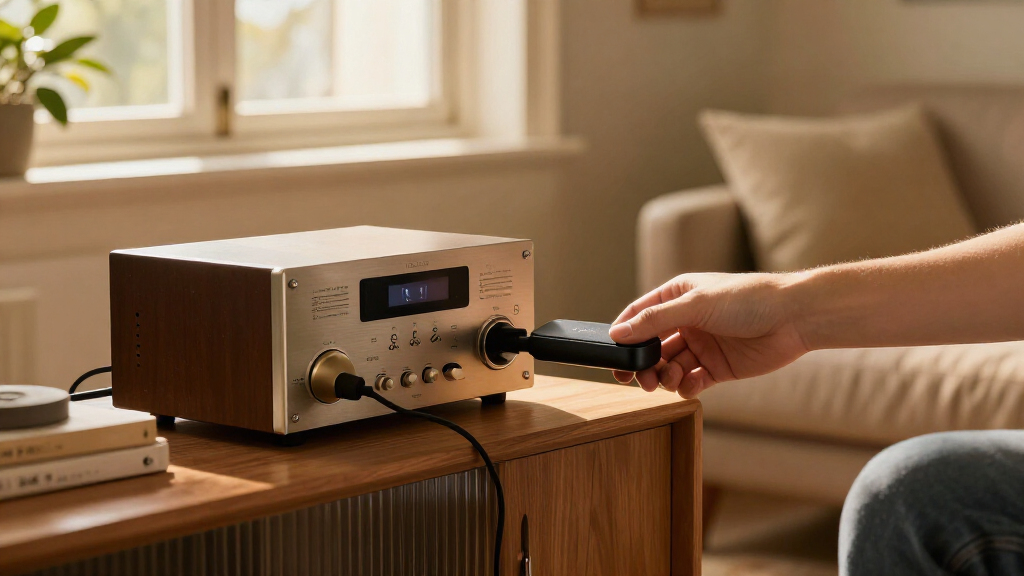
The puck connects to an amplifier or receiver through a 3.5mm analog output, which can use the device’s built-in DAC, or through a mini-TOSLINK optical connection that sends a digital signal to an amplifier with an optical input. XDA’s article identifies the built-in converter as an AKM AK4430, capable of handling up to 24-bit/96kHz audio. A suitable 3.5mm-to-RCA cable can connect it to common stereo inputs; an optical cable leaves digital-to-analog conversion to the amplifier.
For supported services, the phone acts as a controller rather than continuously transmitting audio over Bluetooth. The user selects the Cast icon in an app, and the Chromecast Audio retrieves the stream over Wi-Fi. The article says it has used the device with YouTube Music and Spotify, and lists Tidal, Plex and Jellyfin among services that can send audio to it when their apps support Cast. The relevant compatibility depends on the app, not on adding new features to the puck.
The article also describes workarounds for services and libraries without a direct Cast option. Its author uses AirCast in Home Assistant to make the device available as an AirPlay target, and runs Navidrome on a mini PC to serve local music. These are specific parts of the author’s setup, not built-in Chromecast Audio features; they add software and hardware beyond the roughly $15 device.
The budget stereo upgrade · October 28, 2026
Is a $15 Chromecast Audio Still Worth Plugging Into Your Stereo?
For about $15, this discontinued Google puck can bring app based Cast streaming to a stereo you already own. The price is compelling; Wi-Fi dependence, aging support, and uncertain future compatibility are part of the deal.
A small puck, a useful connection
Keep your amplifier and speakers. Add a network receiver that takes music requests from supported Cast apps.
Keep the stereo you like
A used unit may solve the single missing feature—streaming from your phone—at a fraction of the cost of a new streamer.
Your phone is the controller
With Cast, choose music in an app; the puck retrieves the stream over Wi-Fi. Your phone does not continuously send audio like Bluetooth.
Useful, but unsupported
Google no longer maintains the hardware or provides routine updates. Later security or app changes may leave the device behind.
Choose analog or optical
The single 3.5 mm output supports two connection types. Match the cable to an available input on your amplifier or receiver.
3.5 mm to RCA
Connect to a common stereo input such as AUX. The Chromecast Audio’s built in DAC handles digital to analog conversion. XDA identifies it as an AKM AK4430, capable of up to 24 bit / 96 kHz.
Mini-TOSLINK optical
Send a digital signal to an amplifier with an optical input. The amplifier performs digital to analog conversion instead.
Tap, cast, listen
Playback is handed to the network receiver after you select a Cast target in a compatible app.
Open a music app
Pick a service with Cast support.
Choose Cast
Select the Chromecast Audio as the target.
Stream over Wi-Fi
The device retrieves the music from the network.
Play through stereo
Your amplifier sends sound to the speakers.
The puck’s capabilities do not expand when an app changes. Compatibility depends on whether the music app offers Cast support.
Cast support lives in the apps
The source article reports use or support for these services. It does not guarantee every service, app version, or future update will work.
Need AirPlay? The article’s author uses AirCast in Home Assistant to make the puck available as an AirPlay target.
Playing a local library? The author runs Navidrome on a mini PC to serve music. These workarounds add software and hardware; they are not built in features of the Chromecast Audio.
What the savings buy—and what they don’t
The low price makes sense when you need basic Cast access and already have a working stereo setup.
| Consideration | Chromecast Audio | Newer streamer |
|---|---|---|
| Upfront cost | About $15 used | Higher; WiiM Mini cited from about $100 |
| Cast app access | Yes, when the app supports it | Depends on model and services |
| Routine hardware support | No longer maintained by Google | Check current manufacturer support |
| Ethernet | Not available | Varies by model |
| Long-term certainty | Future compatibility unknown | Often a better fit for ongoing support needs |
Small price, real uncertainty
Discontinued hardware still depends on software, certificates, apps, and a stable home Wi-Fi connection.
No Ethernet port. Results depend on the strength and reliability of your home network; the source reports no dropout measurements.
Google no longer maintains the device. A future security issue may not receive a fix; the article says no custom third party firmware is available.
No guarantee that current Cast apps will continue supporting this device indefinitely. The article gives no timeline for a change.
In March 2025, an expired intermediate certificate caused an “untrusted device” error. Google issued a firmware update; factory reset devices needed the latest Google Home app for setup.
“A used Chromecast Audio still has hardware worth keeping.”
XDA Developers article“Cast support lives in the apps, not the dongle.”
XDA Developers article“The downsides are real, but you can live with them.”
XDA Developers articleFour checks for a used unit
Confirm the seller’s details and your own setup needs before counting on the low price.
Check condition and returns
Ask whether the device works, inspect its condition, and review the return policy.
Confirm what’s included
Power adapter and cable availability can vary. Budget for any missing items.
Look for the Cast icon
Check the music apps you actually use. Account for extra software if you need AirPlay or local library support.
Test your real system
Use the latest Google Home app, connect to Wi-Fi, then test playback with your intended amplifier input.
Prioritize ongoing support?
If long term updates or newer networking features matter, a current streamer may fit better.
No announced support date
The source does not identify when, or whether, Google will make further updates.
Questions, answered
What does a used Chromecast Audio cost?
The article says about $15. It is an estimate, not a fixed retail price; condition and included accessories vary.
Can it connect to an older receiver?
Yes. Use 3.5 mm analog, often with a 3.5 mm to RCA cable, or mini-TOSLINK optical if the amplifier has an optical input.
Does my phone have to stay nearby?
With Cast, your phone selects and controls playback while the device retrieves the stream over Wi-Fi.
Does every music service work?
No. The app must offer Cast support. The source names YouTube Music, Spotify, Tidal, Plex, and Jellyfin, without promising universal or indefinite compatibility.
Why might I skip it?
It relies on Wi-Fi, has no Ethernet, and no longer gets routine Google support. Future security and compatibility problems may go unfixed.
Is it a replacement for every streamer?
No. Its appeal is inexpensive Cast access plus analog or optical output. Buyers seeking broader features or ongoing support should compare newer models.
A Low-Cost Route to Stereo Streaming
The price difference matters to people whose existing stereo already meets their needs. Buying a streamer such as the WiiM Mini, cited in the source article as starting around $100, may be unnecessary if the only missing feature is a way to play music from a phone. A used Chromecast Audio can supply that connection while letting the owner keep an amplifier and speakers already in place.
It is not a like-for-like substitute for newer streaming equipment, and the author explicitly distinguishes it from higher-end products such as the WiiM Ultra. Its appeal is narrower: low-cost Cast access and a choice of analog or optical connection. Buyers who need reliable long-term support, Ethernet, or features the device lacks may be better served by newer hardware.
The decision also involves support risk. A used device’s low purchase price may be attractive, but Google no longer maintains the hardware. A future service or software change could affect how it works, and the source does not establish how likely or soon such a change might be.
Products Worth Considering

DJI Mic 3 Wireless Microphone System (2 Transmitters, 1 Receiver, Charging Case)

LG UltraGear 27-Inch QHD OLED Gaming Monitor, 240Hz, 0.03ms, G-SYNC Compatible, FreeSync Premium Pro, HDMI 2.1

Samsung Galaxy Tab S10 FE 128GB Wi-Fi Android Tablet, Blue
As an affiliate, we earn on qualifying purchases.
What the Chromecast Audio Offers
Google discontinued the Chromecast Audio in 2019, but used units remain available, with the XDA article putting the price at about $15. It is a small network audio receiver, powered through micro USB, with one output that supports analog 3.5mm audio and mini-TOSLINK optical audio. Setup uses the Google Home app to connect it to Wi-Fi and assign a device name.
In March 2025, an expired intermediate certificate caused Chromecast (2nd Gen) and Chromecast Audio devices to show an “untrusted device” error, according to the source article. Google issued a firmware update for Chromecast Audio to move it to a new certificate authority. The article says devices factory-reset before the fix required the latest Google Home app for setup. That incident shows that discontinued hardware can still depend on software and certificate infrastructure, even when its basic audio connections continue to work.
““A used Chromecast Audio still has hardware worth keeping.””
— XDA Developers article
Compatibility and Support Risks
There is no assurance in the source that every current version of the listed music apps will continue to support the Chromecast Audio indefinitely. The article describes current use and app capabilities, but gives no schedule for future Cast changes or warning that a particular service plans to drop support.
Google no longer maintains the device or issues routine updates, according to the source. That means a later security flaw may go unpatched, and the article says there is no custom third-party firmware available as an alternative. It also has no Ethernet port, so performance depends on Wi-Fi strength; the source offers no measured dropout rate or test data for different networks.
The roughly $15 price is reported as a used-market estimate, not a guaranteed price or a survey of listings. The condition of individual units, whether their power adapter and cable are included, and whether a seller accepts returns will vary. Buyers should check those details rather than assume every listing is complete or functional.
Check the Unit Before Buying
There is no new product announcement or confirmed Google support change in the source article. For anyone considering a used unit, the practical next step is to check the listing, included accessories and return policy, then set up the device using the latest Google Home app. The buyer should also confirm that the music services they use display a Cast option, or account for the extra software needed for alternatives such as AirPlay or local libraries.
After setup, the key question is whether the device works reliably on the home Wi-Fi network and with the intended amplifier input. A buyer who depends on long-term updates or wants newer networking features may prefer a current streamer. The source does not identify a date for any further Google updates, so the device’s future support status remains uncertain.
Key Questions
What does a used Chromecast Audio cost?
The XDA Developers article says used units can be found for about $15. That is an approximate price, not a fixed retail price; condition and included accessories may differ by listing.
Can it connect to an older stereo receiver?
Yes. Its 3.5mm analog output can connect to an AUX input, often with a 3.5mm-to-RCA cable. Its mini-TOSLINK optical connection can feed an amplifier with an optical input.
Does the phone have to stay nearby while music plays?
With Cast, the phone selects the music and controls playback, while the Chromecast Audio retrieves the stream over Wi-Fi. This differs from Bluetooth playback, which depends on the phone remaining within range of the receiver.
Does it work with every music service?
No. Streaming depends on whether an app offers Cast support. The source article names YouTube Music, Spotify, Tidal, Plex and Jellyfin, but does not claim every service or app version is compatible.
What are the main reasons not to buy one?
The device has no Ethernet port, relies on Wi-Fi and no longer receives routine support from Google. The source also warns that future security or Cast compatibility problems may not be fixed, making a newer streamer a better fit for buyers who prioritize ongoing support.
Source: XDA Developers