
Choosing between 60 FPS and 144 FPS substantially impacts your gaming experience. Higher frame rates like 144 FPS deliver smoother visuals, reduce input lag, and give you a competitive edge in fast-paced games. When your FPS aligns with your monitor’s refresh rate, gameplay feels seamless. If you want to access the full potential of your hardware and improve responsiveness, understanding how these factors work together can make a big difference—keep going to learn more.

Get the latest gadgets delivered free — and shop member deals
- Fast, free delivery on millions of items
- Access to Prime Big Deal Days deals on October 6–7
- Prime Video, Amazon Music and more included
Key Takeaways
- Higher FPS like 144 provides smoother motion and reduces motion blur compared to 60 FPS.
- Matching FPS with a high-refresh-rate monitor (e.g., 144Hz) delivers more seamless and responsive gameplay.
- 60 FPS is sufficient for casual gaming, but competitive players benefit from 144 FPS for quicker reactions.
- Achieving optimal performance requires balancing hardware capabilities with desired FPS and monitor refresh rate.
- Consistent high FPS enhances player experience by minimizing stuttering and input lag during fast-paced action.
Understanding Frame Rate and Refresh Rate Basics

Understanding the basics of frame rate and refresh rate is essential for maximizing your gaming experience. Frame rate, measured in FPS, shows how many images your GPU generates each second. A higher FPS results in smoother gameplay and less motion blur. Common frame rates include 30, 60, 120, and 144 FPS, but your GPU’s performance and game settings limit these numbers. Refresh rate, measured in Hz, indicates how many times your monitor updates its image every second. Standard gaming monitors offer 60Hz, 120Hz, 144Hz, or higher. When your FPS matches your monitor’s refresh rate, gameplay appears smoother. If FPS surpasses refresh rate, you may encounter screen tearing, while lower FPS can cause stuttering. Understanding these basics helps you balance hardware and settings for ideal performance. Additionally, high refresh rates are especially beneficial for fast-paced games where quick reactions are crucial. Matching FPS and refresh rate can significantly enhance visual fluidity and responsiveness during gameplay, especially when considering the importance of synchronization techniques like V-Sync or G-Sync to improve the gaming experience.
How Frame Rate Affects Gameplay Smoothness

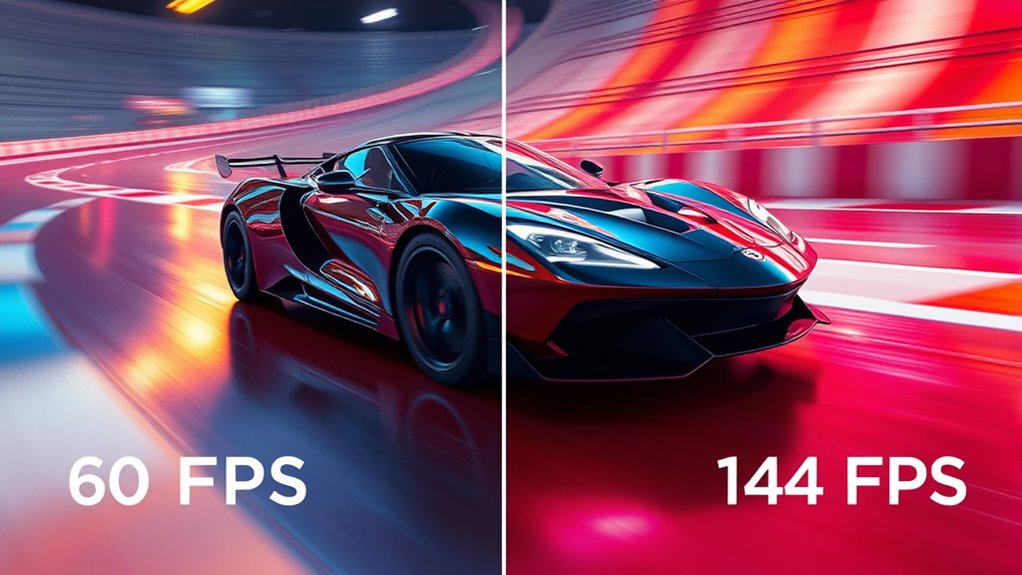
Frame rate directly influences how smooth your gameplay feels. When you play at higher FPS, movements appear more fluid, and fast actions look sharper. This reduces motion blur, making it easier to track fast-moving objects or enemies. If your FPS is low, your game can seem choppy or stuttery, which hampers your ability to react quickly. Higher frame rates also minimize input lag, so your commands translate faster on screen. For example, jumping from 60 FPS to 144 FPS results in noticeably smoother visuals, especially in action-packed scenes. This smoothness enhances your overall gaming experience, making gameplay feel more responsive and immersive. In competitive settings, high frame rates give you a vital edge by providing clearer, more consistent visuals.
The Significance of Refresh Rate in Visual Quality

The refresh rate of your monitor plays a crucial role in determining the clarity and smoothness of your visual experience. A higher refresh rate means your screen updates more frequently, making fast movements look sharper and more fluid. This reduces motion blur, so fast actions feel more precise. With a 60Hz monitor, your display updates 60 times per second, which can cause motion to appear choppy in fast-paced games. Upgrading to 120Hz or 144Hz delivers smoother visuals, giving you a competitive edge and a more immersive experience. It also minimizes eye strain during extended gaming sessions. Overall, a higher refresh rate enhances visual quality by providing crisper, more responsive images, making gameplay more enjoyable and easier to follow during rapid movements.
Matching Frame Rate With Refresh Rate for Optimal Performance

Achieving smooth gameplay hinges on aligning your GPU’s output with your monitor’s refresh rate. When your FPS matches your monitor’s Hz, gameplay feels seamless, with minimal tearing or stuttering. If your FPS exceeds the refresh rate, excess frames are discarded, which can cause tearing unless you use Vsync, but that may add input lag. Conversely, if FPS is lower than the refresh rate, you’ll notice stuttering or less fluid motion because fewer frames are displayed per second. To maximize performance, aim to keep your FPS close to your monitor’s refresh rate. This ensures you get the smoothest visuals and responsiveness. Adjust game settings or enable Vsync if needed, but remember that perfect synchronization is crucial for optimal performance. Understanding frame pacing can also help optimize how frames are delivered, further improving visual smoothness.
Hardware Considerations for Achieving Higher FPS and Refresh Rates

To reach higher FPS and refresh rates, your hardware components must work efficiently together. Your GPU is the core of this setup, and a powerful one ensures smoother gameplay and higher frame output. Pair it with a fast CPU to prevent bottlenecks that can limit FPS. Sufficient RAM helps manage game data quickly, reducing stutter. Your monitor’s capabilities matter too—choose a display that supports the desired refresh rate, like 144Hz. Additionally, keep your graphics drivers updated for peak performance. Storage speed can also influence load times, indirectly affecting gameplay fluidity. Overclocking your GPU or CPU can push performance further but requires careful cooling and stability checks. Ultimately, a balanced system aligned with your gaming goals is essential for achieving higher FPS and refresh rates.
Choosing the Right Settings for Different Gaming Scenarios

To get the best gaming experience, you need to match your settings to the game’s demands and your hardware’s capabilities. Prioritizing smooth gameplay often means balancing high FPS with your monitor’s refresh rate, while optimizing settings can help you achieve that. Remember, the key is to choose options that enhance your gameplay without sacrificing visual quality or responsiveness. Additionally, understanding digital asset management can help you tune your preferences to find a balance that feels right for you.
Match Game Demands
Matching your game settings to the demands of different gaming scenarios is essential for optimizing performance and visual quality. For fast-paced shooters or competitive games, prioritize high FPS and a high refresh rate monitor to ensure smooth gameplay and quick response times. Reducing graphics settings can help achieve the desired frame rate. In contrast, story-driven or visually stunning games benefit from higher graphics quality, even if it means sacrificing some FPS, as smoothness is less critical. For casual gaming, a balanced approach works well—aim for decent FPS with moderate settings. Always consider the game’s demands and your hardware capabilities. Matching your settings to these factors guarantees you get the best experience, whether you crave responsiveness, visual fidelity, or a mix of both.
Optimize Hardware Settings
Choosing the right hardware settings can substantially enhance your gaming experience by balancing performance and visual quality. Start by adjusting game graphics to match your GPU’s capabilities; lower settings in demanding titles to maintain higher FPS. Enable Vsync if you experience screen tearing, but be aware it may introduce input lag. For high refresh rate monitors, make certain your GPU can consistently deliver FPS near your monitor’s refresh rate to maximize smoothness. Overclocking your GPU can boost performance, but monitor temperatures to avoid overheating. Update your graphics drivers regularly for ideal compatibility and stability. Use in-game settings and third-party tools to fine-tune resolution, shadows, and textures. The goal is to find a sweet spot where your system runs smoothly without sacrificing too much visual fidelity.
Prioritize Gameplay Experience
Selecting the right gaming settings depends on your specific scenario and priorities. If you play fast-paced shooters or competitive games, prioritize high frame rates and refresh rates to maximize responsiveness and fluidity. A 144Hz monitor paired with high FPS ensures smoother visuals and quicker reactions, giving you an edge. For story-driven or visually stunning games, focus on balancing graphics quality with stable performance, even if that means lowering some settings to maintain consistent FPS. Casual players might prefer settings that enhance visual fidelity without sacrificing smoothness. Always consider your hardware’s capability and your personal comfort. Adjusting settings to match the game type and your experience level helps optimize enjoyment, responsiveness, and overall gameplay satisfaction.
Frequently Asked Questions
Can a 144HZ Monitor Improve Gaming Performance Even at 60 FPS?
Yes, a 144Hz monitor can improve your gaming experience even at 60 FPS. It offers lower input lag and smoother visuals compared to a 60Hz display, making your gameplay feel more responsive. While the monitor can’t display more frames than your GPU produces, the increased refresh rate reduces motion blur and makes fast movements clearer. This results in a more fluid, enjoyable experience, especially during quick, action-packed scenes.
How Does Vsync Impact FPS and Visual Quality in Gaming?
Imagine your game as a dance, and Vsync as the choreographer keeping everything in harmony. Vsync syncs your FPS with your monitor’s refresh rate, preventing screen tearing and ensuring smooth visuals. However, it can introduce input lag and limit your frame rate. For a seamless experience, especially in fast-paced games, weigh the trade-offs. Vsync helps create a visually cohesive performance but might slightly slow your reactions.
Are Higher Refresh Rates Beneficial for Casual Gamers or Only Competitive Players?
Higher refresh rates benefit both casual and competitive gamers by providing smoother visuals and reducing input lag. As a casual player, you’ll notice faster, more fluid gameplay, making your gaming experience more enjoyable. Even if you’re not competitive, a 144Hz monitor can enhance your enjoyment, especially in fast-paced games. Upgrading your monitor is a worthwhile investment for anyone wanting better responsiveness and visual clarity, regardless of your skill level.
Does Monitor Resolution Affect the Ability to Achieve High FPS on a 144HZ Display?
Yes, monitor resolution affects how easily you can achieve high FPS on a 144Hz display. Higher resolutions demand more from your GPU, making it harder to reach 144 FPS consistently, especially in demanding games. If you opt for a lower resolution, your GPU can push frames more easily, ensuring smoother gameplay. Balancing resolution and graphics settings helps you maximize your 144Hz monitor’s potential for a fluid gaming experience.
What Are the Best Hardware Upgrades to Increase Both FPS and Refresh Rate?
To boost both FPS and refresh rate, upgrade your GPU to a more powerful model that can handle demanding games at higher settings. Add more RAM to reduce bottlenecks, and consider a CPU with higher processing power for better performance. Invest in a high-quality, 144Hz monitor, and make certain your motherboard supports these specs. Finally, use fast storage like SSDs to improve load times and overall smoothness.
Conclusion
To truly elevate your gaming experience, understanding the dance between frame rate and refresh rate is essential. When you sync higher FPS with a matching refresh rate, you gain access to a level of fluidity that feels almost supernatural—like controlling time itself. Don’t settle for mediocrity; push your hardware to its limits. Master these settings, and you’ll transform every game into an epic, cinematic adventure where every frame is a masterpiece in motion.
Fall Picks
fall essentials
As an affiliate, we earn on qualifying purchases.