The best external hard drives depend on whether you value capacity, speed, portability, or rugged protection most. I rank the WD My Passport 5TB as the best overall for its portable design and generous storage, while the Samsung T7 stands out for fast SSD transfers and the Seagate Expansion Desktop 24TB for very large archives. The central tradeoff is straightforward: portable HDDs offer more room for less space on your desk, while SSDs are faster and more resistant to movement but provide less capacity per drive. Desktop models can hold much larger libraries, though they need a fixed setup and power connection. Read on for the full breakdown and help matching a drive to your files and routine.

Get the latest gadgets delivered free with Prime
- Fast, free delivery on millions of items
- Prime Video, Amazon Music and more included
- Member-only deals all year
Complete the kit



Key Takeaways
- WD My Passport 5TB takes the overall spot by balancing high portable capacity with a compact format; the 6TB model favors buyers who need still more room.
- Samsung T7 and SanDisk Extreme Portable SSD serve speed-first buyers, but their SSD format makes them a different choice from the higher-capacity HDDs.
- The roundup separates into portable drives for moving files and desktop drives such as the Seagate Expansion 24TB and WD My Book 18TB for large, mostly stationary archives.
- Ruggedness and connection flexibility distinguish niche picks: the LaCie Rugged USB-C is built for rougher travel, while the YOTUO lists both USB-A and USB-C connectivity.
- Several capacities appear in multiple product families, so buyers should choose based on the actual amount of data, backup routine, and portability needs—not just a familiar brand name.
| WD My Passport 5TB Portable External Hard Drive, Black |  | Best High-Capacity Portable HDD | Storage capacity: 5 TB | Drive form factor: 2.5 inches | Dimensions: 4.22 x 2.95 x 0.75 inches | VIEW LATEST PRICE | See Our Full Breakdown |
| Samsung T7 Portable SSD, 1TB, Titan Gray, USB 3.2 Gen 2 | 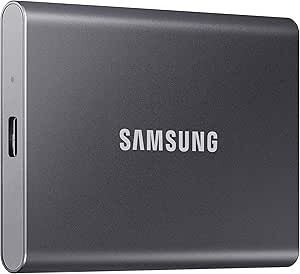 | Best for Fast Transfers | Storage capacity: 1 TB | Interface: USB 3.0 | Connectivity: USB | VIEW LATEST PRICE | See Our Full Breakdown |
| WD My Passport 1TB Portable External Hard Drive, Black |  | Best for Secure Everyday Backups | Storage capacity: 1 TB | Drive type: Mechanical hard disk | Form factor: 2.5 inches | VIEW LATEST PRICE | See Our Full Breakdown |
| UnionSine 1TB Ultra-Slim Portable External Hard Drive, USB 3.0, Black | 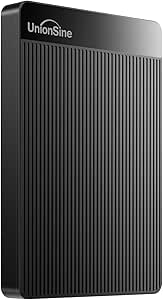 | Best Simple Plug-and-Play Pick | Storage capacity: 1 TB | Drive type: Mechanical hard disk | Form factor: 2.5 inches | VIEW LATEST PRICE | See Our Full Breakdown |
| WD 4TB My Passport Portable External Hard Drive – Black, Backup Software with Ransomware Defense and Password Protection, USB 3.1/USB 3.0 Compatible |  | Best Mid-Capacity Backup Drive | Storage capacity: 4 TB | Interface: USB 2.0/3.0; compatible with USB 3.1/USB 3.2 Gen 2 | Form factor: 2.5 inches | VIEW LATEST PRICE | See Our Full Breakdown |
| Seagate Expansion Desktop 4TB External Hard Drive, USB 3.0 |  | Best Simple Desktop Storage | Storage capacity: 4 TB | Drive type: Mechanical hard disk | Form factor: 3.5 inches | VIEW LATEST PRICE | See Our Full Breakdown |
| WD My Passport 6TB Portable External Hard Drive, Black |  | Best High-Capacity Portable Drive | Storage capacity: 6 TB | Drive type: Mechanical hard disk | Form factor: 2.5 inches | VIEW LATEST PRICE | See Our Full Breakdown |
| YOTUO 1TB Portable External Hard Drive with USB 3.0 and USB-C |  | Best for Console and Everyday Portability | Storage capacity: 1 TB | Drive type: External hard drive | Form factor: 2.5 inches | VIEW LATEST PRICE | See Our Full Breakdown |
| Seagate Portable 2TB External Hard Drive, USB 3.0 (STGX2000400) |  | Best Plug-and-Play Portable Value | Storage capacity: 2 TB | Drive type: Mechanical hard disk | Interface: USB 3.0 | VIEW LATEST PRICE | See Our Full Breakdown |
| WD My Book Desktop External Hard Drive 18TB USB 3.0 with Password Protection and Auto Backup Software |  | Best for Large Desktop Archives | Storage capacity: 18 TB | Interface: USB 3.0, backward compatible with USB 2.0 | Listed transfer rate: 600 MB/s | VIEW LATEST PRICE | See Our Full Breakdown |
| LaCie Rugged USB-C 5TB Portable External Hard Drive |  | Best for Rugged Field Storage | Storage capacity: 5 TB | Interface: USB 3.2 Gen 1 | Connectivity: USB-C; Thunderbolt 3 compatible | VIEW LATEST PRICE | See Our Full Breakdown |
| Seagate Expansion 24TB External Hard Drive |  | Best for Maximum Desktop Capacity | Storage capacity: 24 TB | Interface: USB 3.0 | Transfer rate: 5 Gbit/s | VIEW LATEST PRICE | See Our Full Breakdown |
| SanDisk Extreme Portable SSD, 1TB, Up to 2000MB/s |  | Best for Fast, Compact Transfers | Storage capacity: 1 TB | Connector: USB Type-C | Interface: USB 3.0 | VIEW LATEST PRICE | See Our Full Breakdown |
| Seagate Expansion 4TB Portable External Hard Drive |  | Best Value for Everyday Portable Storage | Storage capacity: 4 TB | Form factor: 2.5 inches | Interface: USB 3.0 | VIEW LATEST PRICE | See Our Full Breakdown |
| WD Elements 2TB Portable External Hard Drive | 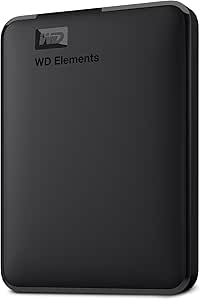 | Best for Simple, Lightweight Backups | Storage capacity: 2 TB | Interface: USB 2.0/3.0 | Data transfer rate: Up to 5 Gbit/s | VIEW LATEST PRICE | See Our Full Breakdown |
| external hard drife | Storage capacity | Interface | Form factor | Weight |
|---|---|---|---|---|
| WD My Passport 5TB Portable Ex | 5 TB | — | — | 7.4 ounces |
| Samsung T7 Portable SSD | 1 TB | USB 3.0 | — | — |
| WD My Passport 1TB Portable Ex | 1 TB | USB 2.0/3.0 | 2.5 inches | — |
| UnionSine 1TB Ultra-Slim Porta | 1 TB | USB 3.0; compatible with USB 2.0 | 2.5 inches | — |
| WD 4TB My Passport Portable Ex | 4 TB | USB 2.0/3.0; compatible with USB 3.1/USB 3.2 Gen 2 | 2.5 inches | — |
| Seagate Expansion Desktop 4TB | 4 TB | USB 2.0/3.0 | 3.5 inches | — |
| WD My Passport 6TB Portable Ex | 6 TB | — | 2.5 inches | — |
| YOTUO 1TB Portable External Ha | 1 TB | — | 2.5 inches | 0.16 kg |
| Seagate Portable 2TB External | 2 TB | USB 3.0 | Portable | — |
| WD My Book Desktop External Ha | 18 TB | USB 3.0, backward compatible with USB 2.0 | 3.5 inches | 2.8 pounds |
| LaCie Rugged USB-C 5TB Portabl | 5 TB | USB 3.2 Gen 1 | 2.5 inches | 400 g |
| Seagate Expansion 24TB Externa | 24 TB | USB 3.0 | 3.5 inches | 3 lb |
| SanDisk Extreme Portable SSD | 1 TB | USB 3.0 | — | 1.6 oz |
| Seagate Expansion 4TB Portable | 4 TB | USB 3.0 | 2.5 inches | 268 g |
| WD Elements 2TB Portable Exter | 2 TB | USB 2.0/3.0 | — | 4.64 oz |
More Details on Our Top Picks
WD My Passport 5TB Portable External Hard Drive, Black
The 5TB capacity makes this My Passport a strong fit for carrying a large photo library, project archive, or several device backups without stepping up to a desktop drive. It stays compact at 7.4 ounces and adds password protection, hardware encryption, and backup software with ransomware protection—security features the UnionSine 1TB does not list. Compared with the Samsung T7, it stores far more data in one device, but its mechanical drive is a much slower choice for frequent transfers of large files. Mac owners should also plan to reformat the drive before use, and the listed USB connections do not make it a high-speed SSD alternative. I rank it for capacity and backup features, not transfer speed.
Pros:- 5TB capacity fits large file libraries and backups
- Slim 2.5-inch design weighs 7.4 ounces
- Password protection and hardware encryption
- Backup software includes ransomware protection
Cons:- Mechanical hard drive is slower than the Samsung T7 SSD for large transfers
- Mac use requires reformatting
- USB 2.0 compatibility can limit transfer speeds on older connections
Best for: Laptop owners who need several terabytes of portable backup space and want password and encryption features.
Not ideal for: Mac users who want a ready-to-use drive without reformatting, or video editors who need SSD-class transfer speeds.
- Storage capacity:5 TB
- Drive form factor:2.5 inches
- Dimensions:4.22 x 2.95 x 0.75 inches
- Weight:7.4 ounces
- Connectivity:USB 2.0, USB 3.0, USB 3.2 Gen 2
- Security:Password protection and hardware encryption
- Included software:Device management and backup software
- Warranty:3-year limited warranty
Our verdict“Choose this My Passport if carrying 5TB with built-in security matters more than SSD-speed transfers.”
Samsung T7 Portable SSD, 1TB, Titan Gray, USB 3.2 Gen 2
The Samsung T7 is the speed-first choice here: listed read and write rates reach 1,050 MB/s and 1,000 MB/s, far beyond the mechanical WD My Passport and UnionSine drives. That difference matters when moving large video files or keeping active work files on an external drive. Its 1TB capacity is the tradeoff; buyers who need a deep archive will get more room from the WD My Passport 5TB, though at much lower transfer speeds. The aluminum body offers drop protection up to six feet, and the package includes both USB-C-to-C and USB-C-to-A cables. Maximum speed depends on a compatible USB 3.2 Gen 2 host, cable, and UASP mode, so older setups may not reach the listed figures.
Pros:- Read speeds up to 1,050 MB/s and write speeds up to 1,000 MB/s
- Compact aluminum body with drop protection up to 6 feet
- Includes USB-C-to-C and USB-C-to-A cables
- 256-bit AES hardware encryption
Cons:- 1TB capacity is far below the WD My Passport 5TB
- Maximum listed speeds require a compatible host, cable, and UASP mode
- Device and operating-system compatibility can vary
Best for: Photographers, video creators, and mobile professionals who move large files often and can use a compatible USB 3.2 Gen 2 connection.
Not ideal for: Backup-focused buyers who need several terabytes in one drive, or users whose computers cannot take advantage of its faster interface.
- Storage capacity:1 TB
- Interface:USB 3.0
- Connectivity:USB
- Read speed:Up to 1,050 MB/s
- Write speed:Up to 1,000 MB/s
- Encryption:256-bit AES hardware encryption
- Construction and drop protection:Aluminum unibody; protection up to 6 feet
- Included cables:USB Type-C to Type-C and USB Type-C to Type-A
Our verdict“Pick the T7 for frequent, fast file transfers, but choose a higher-capacity mechanical drive for a larger backup archive.”
WD My Passport 1TB Portable External Hard Drive, Black
This 1TB My Passport suits buyers who want a straightforward portable hard drive with backup and security software rather than the speed of an SSD. Its slim 2.5-inch design is easy to carry, while password protection and hardware encryption add safeguards for stored files. The included software also offers ransomware defense, giving it a clearer backup focus than the UnionSine 1TB, which emphasizes plug-and-play use and lists no comparable security tools. Capacity is the main limitation: the WD My Passport 4TB is a better match for larger photo or video collections, while the Samsung T7 is the better pick for moving files quickly. This is a mechanical drive, so it is best treated as a portable archive or backup rather than a fast working disk.
Pros:- Slim 2.5-inch portable design
- Backup software includes ransomware defense
- Password protection and hardware encryption
- Works with USB 2.0 and USB 3.0
Cons:- Mechanical drive is slower than the Samsung T7 SSD
- 1TB capacity is limited beside the WD My Passport 4TB and 5TB
- Requires a USB connection for use
Best for: Students and laptop owners who want a compact 1TB backup drive with password protection and included backup software.
Not ideal for: Creators with large media libraries or anyone who prioritizes fast transfers and SSD durability over backup features.
- Storage capacity:1 TB
- Drive type:Mechanical hard disk
- Form factor:2.5 inches
- Interface:USB 2.0/3.0
- Color:Black
- Security:Password protection and hardware encryption
- Included software:Device management and backup software with ransomware defense
- Warranty:3-year limited warranty
Our verdict“Choose this model for a compact, security-conscious everyday backup, not for high-speed work or a large archive.”
UnionSine 1TB Ultra-Slim Portable External Hard Drive, USB 3.0, Black
The UnionSine is a basic, compact 1TB mechanical drive for buyers who want plug-and-play storage without the added software and security package found on the WD My Passport 1TB. Its listed read and write speeds—up to 125 MB/s and 103 MB/s—make it suited to backups, documents, and occasional media transfers, not rapid editing workflows. USB 2.0 and 3.0 support helps it connect to a range of older and newer devices, including listed Xbox consoles. The striped casing is designed for grip and heat dissipation, and the drive is described as quiet in operation. Compared with the Samsung T7, it gives up a great deal of speed and uses a mechanical disk; buyers also get no listed hardware encryption or backup software. Its appeal is uncomplicated everyday storage.
Pros:- Compact 2.5-inch design intended for pocket portability
- Plug-and-play setup and quiet operation
- USB 3.0 and USB 2.0 compatibility
- Listed compatibility includes Xbox 360 and Xbox One
Cons:- Mechanical 5400 rpm drive is much slower than the Samsung T7 SSD
- Listed speeds peak at 125 MB/s read and 103 MB/s write
- No backup software or hardware encryption is listed
Best for: Console owners and everyday computer users seeking a simple 1TB drive for backups, documents, and stored media.
Not ideal for: Users handling large files frequently, or anyone who needs listed hardware encryption and backup software.
- Storage capacity:1 TB
- Drive type:Mechanical hard disk
- Form factor:2.5 inches
- Interface:USB 3.0; compatible with USB 2.0
- Read speed:Up to 125 MB/s
- Write speed:Up to 103 MB/s
- Rotational speed:5400 rpm
- Included accessories:USB 3.0 cable and user manual
- Warranty:Three-year manufacturer’s warranty
Our verdict“Pick the UnionSine for simple, quiet 1TB storage, but look to the WD My Passport for bundled security and backup tools.”
WD 4TB My Passport Portable External Hard Drive – Black, Backup Software with Ransomware Defense and Password Protection, USB 3.1/USB 3.0 Compatible
This 4TB My Passport hits a useful middle ground for buyers who want a sizeable portable archive without moving to the 5TB model. It pairs 4TB of storage with password protection, hardware encryption, and Acronis True Image backup software with ransomware defense—more security support than the UnionSine 1TB lists. Compared with the WD My Passport 5TB, it gives up a terabyte of room, so the larger model makes more sense for growing media collections. Its stated speed is 100 MB/s, and the USB 2.0/3.0 interface is no match for the Samsung T7 when frequent large transfers are part of the workflow. The tradeoff is clear: this is for carrying and protecting backups, not for fast editing or active project files.
Pros:- 4TB capacity in a portable 2.5-inch drive
- Hardware encryption and password protection
- Acronis True Image backup software with ransomware defense
- Compatible with USB 2.0, USB 3.0, USB 3.1, and USB 3.2 Gen 2
Cons:- Listed 100 MB/s speed is far below the Samsung T7 SSD
- Offers less room than the WD My Passport 5TB
- USB 2.0/3.0 connection can constrain transfers compared with newer high-speed options
Best for: Home users and photographers who want a portable 4TB backup drive with bundled backup software and file security.
Not ideal for: Video editors who need SSD-class transfer speeds, or buyers who want maximum capacity and can use the WD My Passport 5TB instead.
- Storage capacity:4 TB
- Interface:USB 2.0/3.0; compatible with USB 3.1/USB 3.2 Gen 2
- Form factor:2.5 inches
- Color:Black
- Speed:100 MB/s
- Encryption:Hardware encryption
- Backup software:Acronis True Image
- Warranty:3-year limited warranty
Our verdict“Choose this My Passport for a portable 4TB backup with security tools, and choose the T7 if transfer speed matters more than capacity.”
Seagate Expansion Desktop 4TB External Hard Drive, USB 3.0
The Seagate Expansion Desktop is a straightforward fit for buyers who want 4TB of extra space beside a computer without installing backup software. Its drag-and-drop setup works with Windows and Mac, while the included USB cable and power adapter make the desktop arrangement ready to connect. Compared with the portable Seagate Portable 2TB, this model doubles capacity but gives up easy travel: its 3.5-inch drive needs a separate power connection. It also offers less room than the WD My Book 18TB, which adds encryption and backup tools for much larger libraries. The Expansion’s simpler approach suits ordinary media and file storage, but Mac users who want Time Machine must reformat it first, and mechanical-drive speeds are better suited to routine transfers than demanding workloads.
Pros:- 4TB capacity for a substantial collection of files and media
- Drag-and-drop setup requires no extra software
- Works with Windows and Mac computers
- USB cable and power adapter are included
Cons:- Requires an external power adapter, limiting portability
- Must be reformatted for Apple Time Machine
- Mechanical storage is less suited to frequent high-speed work than an SSD
Best for: Desktop users who want a simple 4TB destination for photos, video, and general file storage
Not ideal for: Traveling users or Mac owners who want immediate Time Machine setup without reformatting
- Storage capacity:4 TB
- Drive type:Mechanical hard disk
- Form factor:3.5 inches
- Interface:USB 2.0/3.0
- Rotational speed:5400 rpm
- Listed read speed:120 MB/s
- Compatibility:Windows, Mac
- Included accessories:18-inch USB 3.0 cable and 18W power adapter
Our verdict“Choose this for uncomplicated, powered desktop storage; pick the Seagate Portable 2TB instead if you need a drive to carry around.”
WD My Passport 6TB Portable External Hard Drive, Black
The WD My Passport puts 6TB in a slim portable format, making it a strong match for people who need a large archive they can move between computers. Its included Acronis True Image for Western Digital software adds backup options, while password protection and hardware encryption help protect private files. That security package gives it an advantage over the simpler Seagate Portable 2TB, though the Seagate is a more modest choice for everyday file shuttling. The My Passport also holds more than the listed 5TB WD My Passport option in this roundup, but it remains a mechanical drive with a listed read speed of 110 MB/s. Buyers seeking fast scratch storage or a rugged, impact-focused design should look at an SSD or the LaCie Rugged instead.
Pros:- 6TB capacity in a portable 2.5-inch design
- Includes Acronis True Image for Western Digital backup software
- Password protection and hardware encryption add privacy safeguards
- USB connectivity supports older USB 2.0 and newer USB 3.0 connections
Cons:- Mechanical drive design is less suited to fast, intensive workflows than an SSD
- Listed read speed is 110 MB/s
- Backup and security features may add setup steps for buyers who only want basic storage
Best for: Photographers, students, and mobile professionals carrying a large archive who want built-in backup and file protection
Not ideal for: People editing large files directly from a drive who prioritize SSD-like speed or a ruggedized enclosure
- Storage capacity:6 TB
- Drive type:Mechanical hard disk
- Form factor:2.5 inches
- Connectivity:USB 2.0/3.0
- Data transfer rate:5 Gbps
- Listed read speed:110 MB/s
- Security:Password protection and hardware encryption
- Included software:Acronis True Image for Western Digital
Our verdict“Pick this when portable capacity and file protection matter more than SSD speed or a rugged build.”
YOTUO 1TB Portable External Hard Drive with USB 3.0 and USB-C
The YOTUO is a compact, light option for buyers who need basic 1TB storage on the move, with a silicone sleeve that offers some cushioning against everyday bumps. Its USB 3.0 and USB-C connections make it flexible for compatible devices, and plug-and-play setup keeps routine file transfers simple. Compared with the Seagate Portable 2TB, it has half the listed capacity but adds a protective sleeve and USB-C connectivity. The tradeoff is a thinner margin for large game libraries or media collections. Console compatibility also has an important limit: PS5 and Xbox Series X/S games cannot be stored or played directly from this drive. Product information gives conflicting read-speed figures, so buyers who depend on predictable transfer performance should favor a better-documented option.
Pros:- Compact 0.16 kg design is easy to carry
- Silicone sleeve helps cushion everyday knocks
- USB 3.0 and USB-C connectivity is listed
- Plug-and-play setup supports straightforward file storage
Cons:- 1TB capacity is limited beside the 2TB Seagate Portable and higher-capacity options
- PS5 and Xbox Series X/S games cannot be stored or played directly from it
- Product information gives conflicting read-speed figures
Best for: Console owners and laptop users who need a lightweight drive for backups, older-generation game storage, and file transfers
Not ideal for: PS5 or Xbox Series X/S owners seeking to play current-generation games from an external drive, or buyers needing dependable speed figures
- Storage capacity:1 TB
- Drive type:External hard drive
- Form factor:2.5 inches
- Connectivity:USB 3.0 and USB Type-C
- Transfer rate:Up to 5 Gbps
- Rotational speed:7200 rpm
- Weight:0.16 kg
- Listed compatibility:Windows, Mac, Linux, PS4, PS5, Xbox One, Xbox Series X/S
Our verdict“Choose this for light everyday storage and older-console use, but skip it if you need current-generation console games or clearly specified speeds.”
Seagate Portable 2TB External Hard Drive, USB 3.0 (STGX2000400)
For buyers who want a portable drive without a software setup, the Seagate Portable 2TB keeps things direct: connect the included 18-inch USB 3.0 cable and move files on Windows or Mac. Its 2TB capacity gives it more breathing room than the YOTUO 1TB for regular backups and media, while staying easier to carry than the powered Seagate Expansion Desktop 4TB. That convenience comes with familiar mechanical-drive limits: the listed read speed is 120 MB/s, and the product does not list built-in encryption or bundled backup software. It makes more sense as a simple file carrier than as protected archival storage or a fast editing drive. Buyers who want a larger portable library with security features can step up to the WD My Passport 6TB.
Pros:- Portable design works well for carrying files between locations
- 2TB capacity exceeds the YOTUO 1TB option
- Plug-and-play setup requires no additional software
- Includes an 18-inch USB 3.0 cable
Cons:- Mechanical storage is slower and more vulnerable to impact than an SSD
- No bundled backup software or encryption is listed
- Listed read speed is 120 MB/s
Best for: Students and everyday laptop users who want uncomplicated 2TB storage for backups and file transfers
Not ideal for: Buyers who need hardware encryption, bundled backup tools, high-capacity archives, or SSD-level performance
- Storage capacity:2 TB
- Drive type:Mechanical hard disk
- Interface:USB 3.0
- Form factor:Portable
- Rotational speed:7200 RPM
- Listed read speed:120 MB/s
- Compatibility:Windows, Mac, PC
- Included cable:18-inch USB 3.0 cable
Our verdict“Pick this for simple, portable 2TB storage; choose the WD My Passport 6TB if capacity and security tools matter more.”
WD My Book Desktop External Hard Drive 18TB USB 3.0 with Password Protection and Auto Backup Software
The WD My Book is built for a different scale of storage from the portable drives here: 18TB capacity gives media professionals and serious collectors room for extensive libraries and backups in one desktop enclosure. Its 256-bit AES hardware encryption and password-protected backup software add safeguards that the simpler Seagate Expansion Desktop 4TB does not list. The stated transfer rate of 600 MB/s is also faster on paper than the portable Seagate and WD options, though it remains a 3.5-inch desktop drive rather than a pocketable SSD. Size and power needs are the price of its capacity: the 2.8-pound unit requires an external adapter, and software installation or account registration may be part of setup. Choose it for a stationary archive, not a travel drive.
Pros:- 18TB capacity accommodates extensive media libraries and backups
- 256-bit AES hardware encryption protects sensitive files
- Includes password-protected backup software
- Listed transfer rate is 600 MB/s
Cons:- 3.5-inch desktop enclosure and 2.8-pound weight limit portability
- Requires an external power adapter
- Software installation and account registration may be required
Best for: Video creators, households, and small offices maintaining large desktop media libraries with protected backups
Not ideal for: Travelers, minimal-desk setups, or buyers who want storage without a power adapter or software registration steps
- Storage capacity:18 TB
- Interface:USB 3.0, backward compatible with USB 2.0
- Listed transfer rate:600 MB/s
- Hardware encryption:256-bit AES
- Form factor:3.5 inches
- Weight:2.8 pounds
- Dimensions:9 × 8 × 3.5 inches
- Backup and security:Password protection and bundled auto-backup software
Our verdict“Choose the My Book for a large, security-conscious desktop archive, not for portable storage or a software-free setup.”
LaCie Rugged USB-C 5TB Portable External Hard Drive
The LaCie Rugged USB-C pairs 5TB of portable capacity with protection against drops, shocks, dust, water, crushing, and rain. That makes it a stronger fit for photographers and other creators carrying files between locations than the Seagate Expansion 4TB Portable, which offers less capacity and no stated rugged protection. Its USB-C connection is Thunderbolt 3 compatible, and the included USB-C-to-USB-A cable helps with older computers.
The tradeoff is speed: this is a 5,400-rpm mechanical drive, with listed read and transfer speeds well below the SanDisk Extreme Portable SSD’s stated maximum. It is also heavier than a pocket SSD at 400 g. I’d choose it for protected bulk storage, not fast project editing. Rescue Data Recovery Services add another layer of support, but they do not make a mechanical drive immune to failure.
Pros:- 5TB capacity in a portable drive
- Protection against drops, shocks, dust, water, crushing, and rain
- USB-C connection with Thunderbolt 3 compatibility
- Includes USB-C and USB-C-to-USB-A cables plus Rescue Data Recovery Services
Cons:- Mechanical 5,400-rpm drive is much slower than the SanDisk Extreme Portable SSD
- At 400 g, it is heavier than pocket-sized SSD alternatives
- Rugged protection does not remove the failure risks of a mechanical drive
Best for: Photographers, field creators, and travelers who need several terabytes of portable storage with added protection from rough conditions.
Not ideal for: People editing large files directly from a drive or prioritizing the lightest, fastest option; its mechanical drive is slower and heavier than the SanDisk Extreme Portable SSD.
- Storage capacity:5 TB
- Interface:USB 3.2 Gen 1
- Connectivity:USB-C; Thunderbolt 3 compatible
- Form factor:2.5 inches
- Rotational speed:5,400 rpm
- Listed read speed:130 MB/s
- Weight:400 g
- Compatibility:Mac and PC
- Protection and recovery:Resists drops, shocks, dust, water, crushing, and rain; Rescue Data Recovery Services
Our verdict“Choose the LaCie for portable, higher-capacity storage in rough conditions, but pick the SanDisk Extreme Portable SSD for speed and lighter carry.”
Seagate Expansion 24TB External Hard Drive
With 24TB of storage, the Seagate Expansion is the clear choice here for buyers consolidating a large media library, archive, or backup collection on one desktop drive. It offers far more room than the portable LaCie Rugged USB-C 5TB or the WD Elements 2TB, making it a better fit when capacity matters more than carrying convenience. Drag-and-drop file storage keeps setup simple on Windows and Mac, and Rescue Data Recovery Services are included.
This is a desktop drive, not a travel companion: it weighs 3 lb and needs its 18W power adapter as well as a USB connection. Its 3.5-inch, 7,200-rpm mechanism and listed 140 MB/s read speed suit bulk storage better than high-speed work directly from the drive. Mac users who want Time Machine must reformat it first, so the LaCie is the more flexible pick for portable use.
Pros:- 24TB capacity for large archives and backup collections
- Drag-and-drop file transfers without required storage software
- Works with Windows and Mac computers
- Includes a power adapter and Rescue Data Recovery Services
Cons:- Needs an outlet and is not suited to portable use
- Time Machine use requires reformatting
- Mechanical drive speed is less suited to demanding direct-from-drive workflows than an SSD
Best for: Desktop users with extensive photo, video, game, or backup libraries who want to consolidate files onto one high-capacity drive.
Not ideal for: People who need storage on the move or a ready-to-use Time Machine drive; it requires external power and reformatting for Time Machine.
- Storage capacity:24 TB
- Interface:USB 3.0
- Transfer rate:5 Gbit/s
- Listed read speed:140 MB/s
- Rotational speed:7,200 rpm
- Form factor:3.5 inches
- Weight:3 lb
- Included accessories:18-inch USB 3.0 cable and 18W power adapter
- Compatibility and recovery:Windows and Mac; reformatting required for Time Machine; Rescue Data Recovery Services
Our verdict“Choose this Seagate when one desktop drive needs to hold a very large library; choose a portable model like the LaCie if you need to carry storage between locations.”
SanDisk Extreme Portable SSD, 1TB, Up to 2000MB/s
The SanDisk Extreme Portable SSD is the speed-first pick in this group: its stated read speed of up to 2,000 MB/s can make large project transfers and frequent file access feel far quicker than the mechanical Seagate Expansion 4TB Portable or WD Elements 2TB. At just 1.6 oz, it is also easy to carry, while IP65-rated dust and water resistance and drop protection up to 3 m suit commutes and travel better than an unprotected portable drive.
The main compromise is capacity. Its 1TB holds less than the LaCie Rugged USB-C 5TB, so it is a weaker choice for a large archive. The headline speed is a maximum read figure, not a guarantee of matching write performance in every workflow. Password protection with 256-bit AES encryption is available, but requires a software download and is limited to supported Windows and macOS versions.
Pros:- Up to 2,000 MB/s stated read speed for fast file access
- Pocket-sized 1.6 oz design
- IP65-rated dust and water resistance with drop protection up to 3 m
- Optional 256-bit AES password protection
Cons:- 1TB capacity is much lower than the LaCie Rugged USB-C 5TB
- Write speeds are lower than the stated maximum read speed
- Password protection requires a download and supported Windows 10+ or macOS 12+
Best for: Mobile editors and creators who move active projects between compatible computers, phones, or tablets and value speed and low carry weight over capacity.
Not ideal for: Buyers seeking several terabytes for a large archive or a drive that works at full speed with any setup; capacity is 1TB and password protection has operating-system requirements.
- Storage capacity:1 TB
- Connector:USB Type-C
- Interface:USB 3.0
- Maximum stated read speed:Up to 2,000 MB/s
- Dust and water resistance:IP65
- Drop protection:Up to 3 m
- Encryption:Optional 256-bit AES password protection
- Weight:1.6 oz
- Compatibility:Mac, PC, desktop, laptop, smartphone, tablet, and PlayStation 5
Our verdict“Pick the SanDisk for fast, light handling of active files; choose the LaCie or a Seagate portable hard drive when you need more storage capacity.”
Seagate Expansion 4TB Portable External Hard Drive
The Seagate Expansion 4TB Portable is a straightforward choice for everyday backups and file storage: it gives you four terabytes in a 268 g, 2.5-inch drive, without the separate power adapter required by the Seagate Expansion 24TB desktop model. Its plug-and-play setup and Windows and macOS compatibility suit buyers who want to add space without managing a more involved storage system. Rescue Data Recovery Services are also included.
Compared with the LaCie Rugged USB-C 5TB, this Seagate is lighter on capacity and lacks stated protection against dust, water, and drops. It is also a mechanical drive, so the SanDisk Extreme Portable SSD is a better fit for fast transfers or frequent work from stored files. The listed read speed is 120 MB/s; treat this as general-purpose storage rather than a high-speed editing drive. It needs a USB connection to operate.
Pros:- 4TB capacity in a compact 2.5-inch drive
- Portable 268 g design that does not require a separate power adapter
- Plug-and-play use with Windows and macOS
- Includes Rescue Data Recovery Services
Cons:- Mechanical drive is slower than the SanDisk Extreme Portable SSD
- No stated drop, water, or dust protection like the LaCie Rugged USB-C
- Requires a USB connection to access files
Best for: Students, home users, and laptop owners who need a simple, portable drive for documents, photos, and routine backups.
Not ideal for: Creators working directly from large files, travelers needing rugged protection, or anyone seeking the fastest transfers; this is a mechanical drive without stated rugged protection.
- Storage capacity:4 TB
- Form factor:2.5 inches
- Interface:USB 3.0
- Compatible connectivity:USB Type-C
- Listed read speed:120 MB/s
- Rotational speed:7,200 rpm
- Weight:268 g
- Compatibility:Windows and macOS
- Included items:External hard drive, USB cable, and quick start guide
Our verdict“Choose this Seagate for uncomplicated, portable 4TB storage, but pay attention to the LaCie for rugged use or the SanDisk for speed.”
WD Elements 2TB Portable External Hard Drive
The WD Elements 2TB keeps the job simple: it provides room for everyday documents, photos, music, and backups, with a USB cable and a plug-and-play setup for PCs and Macs. Its listed 4.64 oz weight makes it easier to carry than the 400 g LaCie Rugged USB-C, though the WD offers less capacity and no stated rugged protection. USB 2.0/3.0 compatibility is useful for connecting to older devices, while the 2-year limited warranty is longer than the Seagate Expansion 24TB’s listed one-year warranty.
Capacity is the key limitation. At 2TB, it falls short of the Seagate Expansion 4TB Portable and is better suited to routine backups than a growing media archive. It is also a mechanical drive, so buyers wanting quicker file access should look to the SanDisk Extreme Portable SSD. The listed dimensions and mechanical-drive description are worth checking against your available bag or desk space before buying.
Pros:- Light listed weight of 4.64 oz
- 2TB for everyday files and backups
- USB 2.0 and USB 3.0 compatibility
- Includes a USB 3.0 cable and a 2-year limited warranty
Cons:- Less capacity than the Seagate Expansion 4TB Portable
- Mechanical drive is slower than the SanDisk Extreme Portable SSD
- No stated rugged protection for travel or rough handling
Best for: PC and Mac users who want a lightweight, basic drive for documents, photos, and routine backups, with compatibility for USB 2.0 and USB 3.0 devices.
Not ideal for: People storing large video or game libraries, working from files on the drive, or needing rugged travel protection; its capacity is 2TB and it is a mechanical drive.
- Storage capacity:2 TB
- Interface:USB 2.0/3.0
- Data transfer rate:Up to 5 Gbit/s
- Drive type:Mechanical hard drive
- Rotational speed:5,400 rpm
- Weight:4.64 oz
- Dimensions:5.8 × 4.8 × 1.8 in
- Compatible devices:Desktop, laptop, and gaming console
- Warranty:2-year limited
Our verdict“Choose the WD Elements for lightweight, routine backups on a modestly sized drive, but step up to the Seagate Expansion 4TB Portable if your library needs more room.”
How We Picked
I compared the 15 drives by the jobs buyers are most likely to assign them: carrying work between locations, expanding a computer’s storage, speeding up transfers, or keeping a large backup library. Capacity and form factor shaped the first split in the ranking: portable HDDs earn credit for storage density and easy transport, SSDs for speed and resistance to everyday movement, and desktop drives for high-capacity stationary use. I also weighed connection options, stated protection features, backup software, and whether the product’s design fits its intended setting.
The order reflects usefulness across a wider range of buyers, not a claim that one drive is fastest or largest in every situation. The WD My Passport 5TB leads because it offers a strong balance of portable capacity and everyday practicality; SSDs rank higher for speed-focused tasks, while desktop models rise for large archives. Lower-ranked options still make sense for narrower needs, but their capacity, protection, or use case is less broadly compelling. I have not treated listed transfer figures as guarantees, since real speeds depend on the drive, port, cable, and workload.
| external hard drife | Interface |
|---|---|
| WD My Passport 5TB Portable Ex | — |
| Samsung T7 Portable SSD | USB 3.0 |
| WD My Passport 1TB Portable Ex | USB 2.0/3.0 |
| UnionSine 1TB Ultra-Slim Porta | USB 3.0; compatible with USB 2.0 |
| WD 4TB My Passport Portable Ex | USB 2.0/3.0; compatible with USB 3.1/USB 3.2 Gen 2 |
| Seagate Expansion Desktop 4TB | USB 2.0/3.0 |
| WD My Passport 6TB Portable Ex | — |
| YOTUO 1TB Portable External Ha | — |
| Seagate Portable 2TB External | USB 3.0 |
| WD My Book Desktop External Ha | USB 3.0, backward compatible with USB 2.0 |
| LaCie Rugged USB-C 5TB Portabl | USB 3.2 Gen 1 |
| Seagate Expansion 24TB Externa | USB 3.0 |
| SanDisk Extreme Portable SSD | USB 3.0 |
| Seagate Expansion 4TB Portable | USB 3.0 |
| WD Elements 2TB Portable Exter | USB 2.0/3.0 |
Factors to Consider When Choosing Best External Hard Drives
Choosing an external drive starts with the job it needs to do, not the largest capacity on the shelf. These tradeoffs can help you avoid paying for speed you will not use or buying a portable drive that cannot hold your growing archive.
Match the Drive Type to the Workload
Portable HDDs suit large collections of photos, video, and documents that do not need frequent rapid transfers. SSDs make more sense when you regularly move large project files or open them directly from the drive, since they are built for faster access and have no spinning disk. A desktop HDD is usually the better fit for a home or office archive that stays connected in one place. A common mistake is choosing an SSD solely because its headline speed is higher, even when the job is long-term storage and the computer’s port or workload limits that advantage. I would prioritize an SSD for active work and an HDD for bulk backup.
Estimate Capacity From Your Backup Plan
Start with the data you need to store, then leave room for new files and multiple backup versions. A drive that only fits today’s files can become awkward when a photo library, video archive, or computer backup grows. Large-capacity desktop options such as the 18TB and 24TB models in this lineup are designed for collections that would require several smaller drives. For a laptop bag, a 1TB or 2TB portable model may be easier to carry, but it can fill quickly if you keep media projects locally. Avoid buying capacity without a plan: one enormous drive is not a substitute for a second backup copy.
Check Ports, Cables, and Computer Compatibility
USB connector shape and USB generation affect setup and transfer performance, so check both the drive’s connection and the ports available on your computer. USB-C describes the connector, not a guaranteed speed; a USB-C cable can still connect at a slower standard depending on the drive and host. Some models in this roundup list USB-A compatibility, while the YOTUO also lists USB-C support, which may reduce adapter needs for mixed-device households. Do not assume a drive will reach its advertised maximum speed on every machine. Confirm the cable is included and that your computer supports the file system or can reformat the drive for its intended use.
Treat Protection Features as One Layer of Backup
Password protection and backup software can make a drive easier to manage, but they do not protect against every loss. Software features such as those listed for the WD My Passport 4TB and WD My Book can help automate routines or limit access, yet accidental deletion, theft, physical damage, and drive failure remain possible. Keep an additional copy of irreplaceable files on another device or in a separate location. If you choose encryption, keep the recovery key somewhere other than the drive; losing access details can make protected files unavailable. Think of bundled tools as useful aids, not a complete backup strategy.
Decide How Much Portability and Ruggedness Matter
A pocketable drive is convenient for commuting, but frequent travel raises the value of a design made to handle bumps and movement. The LaCie Rugged USB-C is the clearest rugged-focused option here, while the SanDisk Extreme and Samsung T7 are SSD alternatives for buyers who want compact storage without a spinning disk. Rugged styling does not make a drive indestructible, and water or drop protection depends on the model’s specific ratings and conditions. If the drive will stay on a desk, a larger desktop unit may offer more capacity without asking you to carry it. Choose protection around your actual travel routine rather than assuming every portable drive is equally suited to rough handling.
Pay for Speed Only When Your Workflow Benefits
Fast storage can save time when transferring large files or working directly from a drive, but it may not change routine document backups much. The Samsung T7 and SanDisk Extreme SSD are the speed-focused picks in this group; conventional portable and desktop HDDs prioritize capacity instead. Actual throughput depends on the computer, port, cable, file sizes, and whether the drive is nearly full. Small scattered files often do not transfer at the headline rate shown for sequential workloads. If your main task is scheduled backup, prioritize capacity, reliability practices, and a convenient routine over the fastest interface.
Frequently Asked Questions
Should I choose the WD My Passport 5TB or the 6TB version?
Choose the 5TB model if it already leaves enough room for your current files and expected growth; it is the roundup’s best all-around balance of portable capacity and convenience. The 6TB model is a better match when you keep a larger media library or want fewer capacity constraints in the same general portable-drive category. Neither capacity changes the core HDD tradeoff: these drives prioritize storage space over SSD-style transfer speed. If you need fast editing from the drive, compare the SSD options instead. Whichever you choose, keep a second copy of important files.
Is an SSD worth choosing over a portable hard drive for backup?
An SSD is worth the added focus on speed when you move large files often, work directly from the drive, or carry it between locations regularly. For a backup that runs occasionally and mainly stores photos, documents, or older projects, a portable HDD can provide more capacity in the same kind of role. SSDs have no spinning disk, but that does not make them a complete backup solution or immune to loss. Check whether your computer can take advantage of the SSD’s connection speed before paying for faster transfers. If your top priority is maximum archive space, a desktop HDD may be a better fit.
Do I need a desktop external drive, or will a portable model work?
A portable drive is the more convenient choice if you need to carry files or want a compact device that can connect directly to a laptop. A desktop drive makes more sense when you need a large archive, such as the 18TB WD My Book or 24TB Seagate Expansion, and can leave the unit in one place. Desktop models typically require a dedicated power connection, so they are less convenient for travel and temporary workspaces. Consider where the drive will sit and whether it needs to remain connected for scheduled backups. If desk space and power are scarce, a portable model may be easier to live with even at lower capacity.
Can I use one external drive for both Windows and Mac computers?
Often, but the drive may need to be reformatted or configured with a file system that both computers can read and write. Reformatting erases existing data, so copy files elsewhere before changing the drive’s format. Some formats work across systems with different limits or performance characteristics, while software bundled for one operating system may not work the same way on another. Check the manufacturer’s setup guidance and your computers’ requirements before storing your only copy of important files. If you plan to switch between systems frequently, test the setup with nonessential files first.
Is password protection enough to keep my backup safe?
Password protection can help restrict access if a drive is lost, but it does not protect against every risk. It will not replace a second copy if the drive fails, gets damaged, or is erased by mistake. Confirm whether the specific model’s protection feature encrypts the data or only controls access, and store any recovery key separately. A backup routine that keeps another copy in a different place offers stronger protection against theft or physical damage. Treat password features as one part of a broader storage plan.
Conclusion
For most buyers who want a portable drive with plenty of room, I recommend the WD My Passport 5TB as the best overall pick; choose the 6TB version if your archive needs more headroom. The Seagate Expansion 4TB Portable or WD Elements 2TB makes more sense for buyers seeking straightforward portable storage, while the Samsung T7 is my premium choice for faster transfers and active work. Beginners who want a familiar, compact backup option can start with a WD My Passport capacity suited to their files, keeping the setup simple and checking compatibility before use. For a large stationary archive, pick the Seagate Expansion 24TB or WD My Book 18TB; for travel where rugged design matters, look at the LaCie Rugged USB-C. Choose by workload and backup plan, then keep a second copy of anything you cannot replace.
Black Friday Picks

Kindle Paperwhite (12th Generation, 2024), 16 GB, 7-inch Display, Black
As an affiliate, we earn on qualifying purchases.