If you’re looking for the best secure external hard drives for 2026, I recommend options like Apricorn’s hardware-encrypted models, iStorage’s rugged diskAshur2, and WD’s My Passport series, which combine high-level encryption, compliance with security standards, and durability. Some drives offer software-free operation with embedded PINs, while others include ransomware protection and large capacities for backups. To find the perfect fit for your needs, explore the details further as I cover the top options and features next.
Key Takeaways
- Prioritize drives with hardware encryption standards like AES-256 and FIPS 140-2 certification for maximum security.
- Look for models offering embedded PIN or biometric authentication for seamless, software-free security.
- Consider rugged, durable drives with physical protection features for on-the-go security and tamper resistance.
- Choose drives with additional features like ransomware protection and device management for comprehensive data security.
- Ensure compatibility across multiple OS platforms and support for high-capacity storage options to meet diverse needs.
| Apricorn ASK3-NX 32GB USB 3.1 Encrypted Secure Drive (ASK3-NX-32GB) |  | Best Compact Security | Encryption Type: Hardware encryption (256-bit hardware encryption) | PIN/Password Protection: Embedded PIN authentication, PIN required | Capacity Range: 32GB | VIEW LATEST PRICE | See Our Full Breakdown |
| Apricorn 2TB Encrypted Portable External Hard Drive |  | Best High-Capacity Portable | Encryption Type: Hardware encryption (256-bit AES XTS) | PIN/Password Protection: PIN and administrator password | Capacity Range: 2TB | VIEW LATEST PRICE | See Our Full Breakdown |
| Seagate 2TB External Hard Drive with Encryption |  | Best Versatile Drive | Encryption Type: Hardware encryption (AES-256) | PIN/Password Protection: Password-activated (PIN/password) | Capacity Range: 2TB | VIEW LATEST PRICE | See Our Full Breakdown |
| WD 6TB My Passport External Hard Drive |  | Best Large Storage | Encryption Type: Hardware encryption (hardware encryption, unspecified) | PIN/Password Protection: Password protection, user-set password | Capacity Range: Up to 6TB | VIEW LATEST PRICE | See Our Full Breakdown |
| iStorage diskAshur2 1TB Secure Portable Hard Drive | 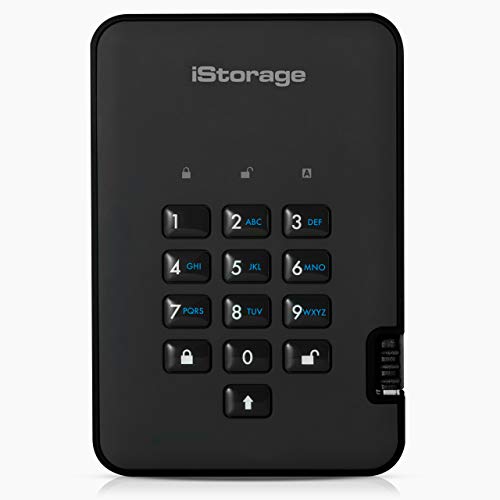 | Best Rugged Security | Encryption Type: Hardware encryption (AES-XTS 256-bit) | PIN/Password Protection: PIN and password protection | Capacity Range: 1TB | VIEW LATEST PRICE | See Our Full Breakdown |
| Apricorn Aegis Padlock 3.0 1TB USB 3.0 External Hard Drive Black | | Best Easy Use | Encryption Type: Hardware encryption (256-bit encryption) | PIN/Password Protection: Password-protected, 256-bit encryption | Capacity Range: 1TB | VIEW LATEST PRICE | See Our Full Breakdown |
| WD 2TB My Passport Portable External Hard Drive |  | Best Budget Security | Encryption Type: Hardware encryption (hardware encryption, unspecified) | PIN/Password Protection: Password protection, hardware encryption | Capacity Range: 2TB | VIEW LATEST PRICE | See Our Full Breakdown |
| Kingston IronKey Vault Privacy 80 960GB External SSD | 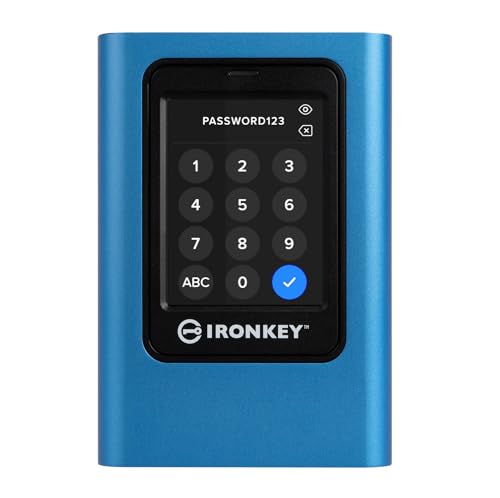 | Best Touchscreen Interface | Encryption Type: Hardware encryption (AES-256) | PIN/Password Protection: PIN, passphrase, multi-password options | Capacity Range: 960GB | VIEW LATEST PRICE | See Our Full Breakdown |
| LaCie Rugged 2TB External Hard Drive with Encryption | 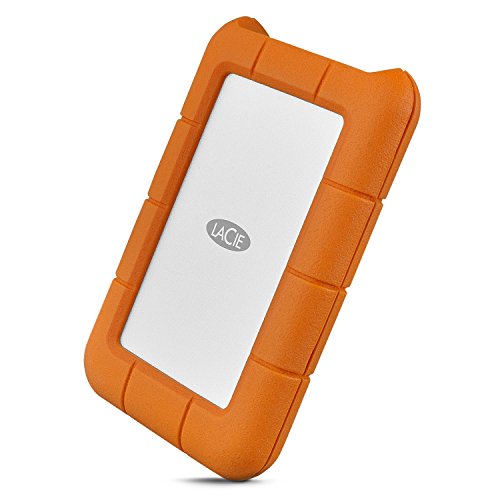 | Best All-Weather Durability | Encryption Type: Hardware encryption (AES-256) | PIN/Password Protection: Password protection, password required | Capacity Range: 2TB | VIEW LATEST PRICE | See Our Full Breakdown |
| WD 1TB My Passport External Hard Drive | | Best Reliable Backup | Encryption Type: Hardware encryption (hardware encryption, unspecified) | PIN/Password Protection: Password protection, hardware encryption | Capacity Range: 1TB | VIEW LATEST PRICE | See Our Full Breakdown |
| Apricorn 4TB FIPS 140-2 Encrypted Hard Drive |  | Best Certified Encryption | Encryption Type: Hardware encryption (AES-256 XTS) | PIN/Password Protection: PIN and admin/user passwords | Capacity Range: 4TB | VIEW LATEST PRICE | See Our Full Breakdown |
More Details on Our Top Picks
Apricorn ASK3-NX 32GB USB 3.1 Encrypted Secure Drive (ASK3-NX-32GB)
If you’re looking for a reliable way to protect sensitive data on the go, the Apricorn ASK3-NX 32GB USB 3.1 Encrypted Secure Drive is an excellent choice. It offers robust security with 256-bit hardware encryption and FIPS 140-2 Level 3 validation, ensuring your data stays safe. The embedded PIN authentication system is independent of your PC, with user and admin PINs, plus two read-only modes for added control. Its software-free design makes it easy to use across any operating system—Windows, Mac, or Linux—without extra setup. Compact and durable, it’s perfect for secure, portable data storage.
- Encryption Type:Hardware encryption (256-bit hardware encryption)
- PIN/Password Protection:Embedded PIN authentication, PIN required
- Capacity Range:32GB
- Compatibility:Windows, Mac, Linux
- Physical Durability:Compact, portable
- Software Requirements:No software needed
- Additional Feature:Hardware encryption only
- Additional Feature:No software needed
- Additional Feature:Independent user/admin PINs
Apricorn 2TB Encrypted Portable External Hard Drive
The Apricorn 2TB Encrypted Portable External Hard Drive is an excellent choice for anyone who needs robust security combined with fast, reliable data transfer. Its hardware encryption with 256-bit AES XTS, validated by FIPS PUB 197, guarantees top-tier data protection. The drive features simple PIN access and administrator password protection, along with a brute-force self-destruct mechanism for added security. Its USB 3.0 connection delivers speeds up to ten times faster than USB 2.0, and the bus-powered design means no external power is needed. Its compact, rugged build is sealed against physical damage, making it perfect for portable use without sacrificing security or performance.
- Encryption Type:Hardware encryption (256-bit AES XTS)
- PIN/Password Protection:PIN and administrator password
- Capacity Range:2TB
- Compatibility:Windows, Mac, Linux, Chrome OS
- Physical Durability:Rugged, sealed, epoxy coating
- Software Requirements:No software needed
- Additional Feature:256-bit AES encryption
- Additional Feature:Self-destruct feature
- Additional Feature:Rugged epoxy coating
Seagate 2TB External Hard Drive with Encryption
For anyone seeking reliable data security on the go, the Seagate 2TB External Hard Drive with Encryption offers robust protection through password-activated hardware encryption. Its sleek brushed metal enclosure combines style with durability, while USB 3.0 connectivity ensures fast data transfers. Compatible with PCs, Macs, Chromebooks, and notebooks (adapter may be needed for USB-C), it allows quick setup with plug-and-play backups or scheduled automatic backups. The drive includes a USB cable and comes with a one-year subscription to Mylio Create and four months of Adobe Creative Cloud Photography plan, adding extra value. Plus, its limited warranty and Rescue Data Recovery Services provide peace of mind for long-term data security.
- Encryption Type:Hardware encryption (AES-256)
- PIN/Password Protection:Password-activated (PIN/password)
- Capacity Range:2TB
- Compatibility:PC, Mac, Chromebook (reformat needed)
- Physical Durability:Portable, metal enclosure
- Software Requirements:No software needed
- Additional Feature:Includes photo management subscription
- Additional Feature:Compatible with multiple OS
- Additional Feature:Plug-and-play operation
WD 6TB My Passport External Hard Drive
The WD 6TB My Passport External Hard Drive stands out as an ideal choice for users seeking reliable portable storage with robust security features. Its slim, durable design makes it easy to carry and fits comfortably in my bag. With up to 6TB of capacity, I can store all my photos, videos, and documents without worry. It’s compatible with USB 3.1 and 3.0, ensuring fast, seamless connections. I appreciate the built-in device management software that helps me back up smarter. Plus, its hardware encryption and password protection give me peace of mind, knowing my data is protected against ransomware and unauthorized access.
- Encryption Type:Hardware encryption (hardware encryption, unspecified)
- PIN/Password Protection:Password protection, user-set password
- Capacity Range:Up to 6TB
- Compatibility:Windows, Mac, Linux
- Physical Durability:Slim, portable, durable
- Software Requirements:Device management software included
- Additional Feature:Ransomware protection
- Additional Feature:3-year warranty
- Additional Feature:Compact portable design
iStorage diskAshur2 1TB Secure Portable Hard Drive
If you’re seeking a portable hard drive that combines robust security with ease of use, the iStorage diskAshur2 1TB is an excellent choice. It features AES-XTS 256-bit hardware encryption and a 7-15 digit PIN, making unauthorized access nearly impossible. The device is certified with Common Criteria EAL 5+ security, ensuring high-level protection. Its rugged, IP56-rated design resists dust and water, perfect for on-the-go use. No software is needed—just connect via USB, enter your PIN, and start transferring files. With fast USB 3.2 speeds up to 160MB/s, it balances security and performance seamlessly for personal and professional data protection.
- Encryption Type:Hardware encryption (AES-XTS 256-bit)
- PIN/Password Protection:PIN and password protection
- Capacity Range:1TB
- Compatibility:Windows, Mac, Linux, Chrome OS, VMware, Citrix
- Physical Durability:Rugged, dust/water resistant IP56
- Software Requirements:No software needed
- Additional Feature:IP56 dust/waterproof
- Additional Feature:Real-time encryption
- Additional Feature:Multiple OS support
Apricorn Aegis Padlock 3.0 1TB USB 3.0 External Hard Drive Black
When prioritizing data security on the go, the Apricorn Aegis Padlock 3.0 offers robust protection with its built-in password system and 256-bit encryption, making it an ideal choice for anyone handling sensitive files. Its compact, portable design measures just 0.75H x 3.3W x 4.7D inches, fitting easily into a pocket or bag. Supporting both PC and Mac, it utilizes USB 3.0 for ultra-fast data transfer and remains compatible with USB 2.0 ports on older devices. With 1TB of storage, it’s perfect for secure backups, transfers, and on-the-move data protection, combining convenience and strong encryption seamlessly.
- Encryption Type:Hardware encryption (256-bit encryption)
- PIN/Password Protection:Password-protected, 256-bit encryption
- Capacity Range:1TB
- Compatibility:PC, Mac (USB 3.0/2.0)
- Physical Durability:Portable, compact
- Software Requirements:No software needed
- Additional Feature:256-bit hardware encryption
- Additional Feature:USB 3.0 transfer speed
- Additional Feature:Single-unit portability
WD 2TB My Passport Portable External Hard Drive
For anyone seeking reliable portable storage with robust security, the WD 2TB My Passport External Hard Drive stands out. Its slim, durable design makes it perfect for on-the-go use, while compatibility with USB 3.1 and 3.0 guarantees fast data transfer. With up to 6TB options, it offers ample space for photos, videos, and documents. Security features include password protection, hardware encryption, and ransomware protection, giving you peace of mind. Plus, the device management software simplifies backups. Backed by a 3-year warranty, this drive combines convenience, capacity, and strong security, making it an excellent choice for secure external storage in 2026.
- Encryption Type:Hardware encryption (hardware encryption, unspecified)
- PIN/Password Protection:Password protection, hardware encryption
- Capacity Range:2TB
- Compatibility:Windows, Mac
- Physical Durability:Slim, portable
- Software Requirements:Device management, no software needed
- Additional Feature:Ransomware defense software
- Additional Feature:3-year limited warranty
- Additional Feature:Sleek black design
Kingston IronKey Vault Privacy 80 960GB External SSD
The Kingston IronKey Vault Privacy 80 960GB External SSD stands out as an ideal choice for security-conscious users who need robust data protection on the go. Its FIPS 197 certification and XTS-AES 256-bit encryption guarantee your data remains secure against threats. The device features a user-friendly touch screen interface and supports multiple authentication methods, including PIN, passphrase, and multi-password options like Admin and User. With dual read-only modes for write protection, it effectively guards against malware and unauthorized modifications. Its 960GB capacity and external SSD design make it perfect for portable, high-security data storage.
- Encryption Type:Hardware encryption (AES-256)
- PIN/Password Protection:PIN, passphrase, multi-password options
- Capacity Range:960GB
- Compatibility:Windows, Mac, Linux, Android, Chrome OS
- Physical Durability:External SSD, rugged options
- Software Requirements:No software needed
- Additional Feature:Touch screen interface
- Additional Feature:Multi-Password options
- Additional Feature:FIPS 197 certification
LaCie Rugged 2TB External Hard Drive with Encryption
If you need a rugged external drive that keeps your sensitive data secure, the LaCie Rugged 2TB with encryption is an excellent choice. It offers a generous 2TB of storage, perfect for large projects, and boasts fast transfer speeds of up to 130MB/s. Security is exceptional, with AES-256 hardware encryption and password protection to safeguard your files. Built tough, it’s resistant to drops, crushes, dust, and rain, making it ideal for on-the-go use. Compatibility spans Thunderbolt 3, USB-C, and USB 3.0, fitting seamlessly with most devices. Plus, it includes a free one-month Adobe Creative Cloud membership, adding extra value.
- Encryption Type:Hardware encryption (AES-256)
- PIN/Password Protection:Password protection, password required
- Capacity Range:2TB
- Compatibility:Desktop, laptop (Thunderbolt, USB-C, USB 3.0)
- Physical Durability:Rugged design, drop/dust/rain resistant
- Software Requirements:No software needed
- Additional Feature:Includes Adobe Cloud trial
- Additional Feature:Drop and dust resistant
- Additional Feature:Thunderbolt 3 compatibility
WD 1TB My Passport External Hard Drive
The WD 1TB My Passport External Hard Drive stands out with its hardware encryption and password protection, making it an ideal choice for anyone prioritizing data security on the go. Its slim, durable design guarantees portability without sacrificing protection. Compatible with USB 3.1 and USB 3.0, it offers fast transfer speeds. The device management software includes ransomware defense and supports smarter backups, keeping your files safe from threats. Plus, with a 3-year limited warranty, you get peace of mind. Whether for personal or professional use, this drive is reliable for safeguarding important files while on the move.
- Encryption Type:Hardware encryption (hardware encryption, unspecified)
- PIN/Password Protection:Password protection, hardware encryption
- Capacity Range:1TB
- Compatibility:Windows, Mac
- Physical Durability:Slim, portable
- Software Requirements:Software included for backups
- Additional Feature:Ransomware defense
- Additional Feature:3-year warranty
- Additional Feature:Sleek portable design
Apricorn 4TB FIPS 140-2 Encrypted Hard Drive
For professionals handling sensitive data, the Apricorn 4TB FIPS 140-2 Encrypted Hard Drive stands out with its robust security features, including FIPS 140-2 Level 2 validation and 256-bit AES hardware encryption. It offers secure PIN access, separate admin and user modes, and data recovery PINs, guaranteeing tight control over access. Its self-destruct mechanism and brute-force attack prevention add extra layers of security. Built with a solid aluminum enclosure and compatible with any OS via Aegis Configurator, it’s TAA compliant and made in the USA. Plus, its SuperSpeed USB 3.0 ensures fast data transfer, making it a reliable choice for secure storage.
- Encryption Type:Hardware encryption (AES-256 XTS)
- PIN/Password Protection:PIN and admin/user passwords
- Capacity Range:4TB
- Compatibility:Any OS (compatible via configurator)
- Physical Durability:Solid aluminum, TAA compliant
- Software Requirements:Configurator software (for setup)
- Additional Feature:TAA compliant
- Additional Feature:Made in USA
- Additional Feature:Inside data recovery PINs
Factors to Consider When Choosing a Secure External Hard Drive Encrypted
When selecting a secure external hard drive, I focus on key factors like encryption standards and compatibility to guarantee my data stays protected across devices. I also consider physical durability and user authentication methods to prevent unauthorized access and withstand everyday wear. Additionally, I look at storage capacity and whether the drive operates software-free for simplicity and reliability.
Encryption Standards Compatibility
Choosing a secure external hard drive requires paying close attention to its encryption standards to make certain your data stays protected. I look for drives that use industry-standard protocols like AES-256 or XTS-AES 256-bit, ensuring robust encryption. I also verify whether the device complies with recognized standards such as FIPS 140-2 or FIPS 140-3, which are essential for government and enterprise security. Compatibility with my operating system—Windows, Mac, or Linux—is vital for seamless encryption management and access. I prefer drives with hardware-based encryption, offering independent security that remains active even if the drive is disconnected. Additionally, I check support for encryption key management features like separate admin and user pins, which add an extra layer of security flexibility.
Physical Durability Features
Secure external hard drives must withstand more than just cyber threats; their physical durability plays a crucial role in safeguarding data. Rugged construction, shock resistance, and sealed enclosures protect against drops, impacts, dust, and water ingress. Look for drives with high IP ratings like IP56 or IP67, which indicate strong resistance to dust and water, ensuring reliable operation in tough environments. Materials such as aluminum or epoxy coatings enhance a drive’s resilience to physical damage and tampering, adding an extra layer of security. Drop resistance is often tested at specific heights, like 1.2 meters, to guarantee the drive can survive accidental falls. Sealed designs and tamper-evident features further prevent environmental damage and unauthorized access, making durability a essential factor in selecting a secure external hard drive.
User Authentication Methods
Selecting the right user authentication method is essential to guarantee that only authorized individuals can access encrypted external hard drives. I look for options like embedded PINs, biometric verification, or password protection, which prevent unauthorized access. Combining hardware encryption with authentication methods such as PINs or passphrases adds an extra security layer, making data retrieval much harder for intruders. Multi-factor authentication, like requiring both a PIN and biometric input, further strengthens security by adding multiple verification steps. It’s also important that these methods work seamlessly across various operating systems, including Windows, Mac, Linux, and mobile platforms. Ultimately, the authentication method I choose impacts both security and ease of use, which are critical factors when selecting a secure external hard drive.
Storage Capacity Options
Storage capacity is a key factor when evaluating encrypted external hard drives, as it directly impacts how much data you can safely keep. These drives come in various sizes, typically from 960GB to over 6TB, to suit different needs. Larger capacities are ideal for storing videos, high-resolution images, and extensive backups, while smaller ones work well for documents and lighter data sets. When choosing, consider your current storage needs and future growth to avoid frequent upgrades. Some drives offer multiple capacity options, giving you flexibility based on your security requirements and budget. Keep in mind that bigger drives usually cost more but provide more extensive secure storage. Finding the right balance ensures you have enough space without overspending, keeping your data safe and accessible over time.
Software-Free Operation
Choosing a secure external hard drive with software-free operation can streamline your data protection process by eliminating the need for additional setup. With hardware-based encryption, you get consistent security across all devices and operating systems, making it versatile and reliable. Since there’s no software to install, the risk of malware or vulnerabilities from third-party applications drops markedly. These drives often feature embedded PIN authentication, providing straightforward yet secure access. The simplicity of not relying on software also makes compliance with security policies easier and reduces setup time. Overall, a software-free design offers a hassle-free, secure experience that ensures your data remains protected without complicated configurations or extra steps. It’s an efficient choice for anyone seeking reliable, easy-to-use encryption.
Frequently Asked Questions
How Do Encrypted External Hard Drives Handle Data Recovery?
Encrypted external hard drives handle data recovery carefully to protect your information. Usually, they require a password or recovery key to access the data after a reset or repair. If you forget your password, recovery options like backup keys or manufacturer support are vital. I recommend always keeping a secure backup of your recovery keys, because without them, data recovery can be impossible, even with technical expertise.
Are Encrypted Drives Compatible With All Operating Systems?
Yes, encrypted drives are generally compatible with most operating systems like Windows, macOS, and Linux, but it’s not always seamless. I recommend checking the drive’s specifications to verify it supports your OS natively or offers compatible software. Many encrypted drives come with cross-platform encryption tools, making your data accessible across different systems. Just remember, some encryption methods may require specific software or drivers for full compatibility.
What Is the Typical Lifespan of a Secure External Hard Drive?
Think of a secure external hard drive like a sturdy oak tree; its lifespan depends on how well you care for it. Typically, these drives last around 3 to 5 years with regular use, but with proper handling—avoiding drops, keeping it cool, and regular backups—you can prolong its life. Just like a tree, nurturing it ensures your data stays protected and accessible for years to come.
How Often Should Encrypted Drives Be Backed Up?
I recommend backing up your encrypted drives at least weekly to guarantee your data stays safe and current. If you handle sensitive or frequently changing information, consider daily backups. Regular backups help prevent data loss from hardware failure, theft, or corruption. Using automated backup tools can make this process seamless, giving you peace of mind knowing your encrypted data is protected and up-to-date whenever you need it.
Can Encryption Be Bypassed if the Drive Is Physically Damaged?
Yes, encryption can be bypassed if the drive is physically damaged, especially if the damage affects the data or encryption hardware. Skilled attackers might exploit vulnerabilities or use advanced techniques to recover data from damaged drives, but success isn’t guaranteed. To protect your data, I recommend regular backups and physical safeguards. Remember, encryption is a strong layer of security, but it’s not foolproof against physical damage or sophisticated attacks.
Conclusion
When choosing a secure external hard drive, it’s vital to prioritize encryption standards and durability. Did you know that over 60% of data breaches involve stolen or lost devices? That’s why investing in a reliable, encrypted drive isn’t just smart—it’s essential. With options like Apricorn, Seagate, and WD leading the way, you can confidently protect your sensitive data. Stay secure and choose a drive that keeps your information safe, no matter what.