
TL;DR

Get the latest gadgets delivered free with Prime
- Fast, free delivery on millions of items
- Prime Video, Amazon Music and more included
- Member-only deals all year
An XDA Developers contributor says he canceled his paid live TV subscription after adding an HDHomeRun network tuner and over-the-air antenna to Jellyfin. The setup also lets him build custom channels from media he already owns and keep recordings on his own server, though it requires setup work, storage and adequate reception.
An XDA Developers contributor says he canceled his paid live TV subscription after connecting a refurbished HDHomeRun network tuner and an antenna to his Jellyfin media server. The setup brings over-the-air broadcasts and custom channels made from his own media into one TV guide, while allowing him to keep recordings on his server rather than relying on a streaming service’s retention rules.
The contributor placed his antenna and tuner in a part of his rural Minnesota home with better reception, away from the main router. He connected the tuner to the home network through a nearby Wi-Fi extender with an Ethernet port. That approach worked because the extender supported Wi-Fi-to-Ethernet bridging; a port that only accepts a wired access point connection would not have served the same purpose. A wireless bridge or mesh node could also provide a network connection, provided the signal is strong enough for video streams.
After connecting the tuner, he updated its firmware and scanned for available channels. He added those channels to Jellyfin through its dashboard, then configured an XMLTV guide file and a script to keep the guide current. He says this required more manual work than Plex, which he says creates and updates a guide automatically. He scheduled the update script with Task Scheduler once the guide was working.
He also used Tunarr to create scheduled channels from his self-hosted library, including movie genres, documentaries, music videos and music files. These channels appear alongside the antenna channels in Jellyfin’s guide. The contributor says he can record broadcasts to his server and keep the files for as long as he chooses, subject to the storage available on his system.
Live TV on Jellyfin, Without the Monthly Bill
An XDA Developers contributor swapped a paid live TV subscription for antenna broadcasts, a refurbished HDHomeRun network tuner and Jellyfin. The result combines local channels, custom channels from his own media, and recordings stored on his server.
What the setup brings together
Jellyfin presents antenna channels and recordings in its TV interface. Tunarr adds scheduled channels assembled from media already in the contributor’s library.
Over-the-air TV
An antenna feeds local broadcasts to a network tuner. Which stations appear depends on local signals and antenna placement.
Jellyfin TV
Channels and recordings appear through the media server. The contributor configured XMLTV guide data and a script to refresh it.
Tunarr channels
Scheduled streams draw on owned media such as documentaries, movie genres, music videos and music files—not live broadcasts.
From antenna to TV guide
A practical sequence, with reception and network placement setting the foundation.
Find reception
Move the antenna to a spot with usable local signals; the contributor found a better location in his rural Minnesota home.
Connect the tuner
Place the HDHomeRun where it can reach the network. A Wi-Fi extender’s Ethernet port worked because it supported bridging.
Scan & configure
Update tuner firmware, scan channels, add them in Jellyfin, then configure XMLTV guide data and a refresh script.
Schedule & record
Schedule guide updates and record broadcasts to the server. Tunarr can add custom scheduled channels from the media library.
An Ethernet port on an extender is useful only if it supports Wi-Fi-to-Ethernet bridging. A wireless bridge or mesh node may also work, provided the signal can carry video streams reliably.
Control comes with upkeep
The arrangement can replace a subscription for this contributor, but it depends on a working home system.
Keep recordings local
Recorded files stay on the contributor’s server for as long as he chooses, limited in practice by available disk space and system capacity.
Maintain the chain
He handled tuner firmware, guide configuration and a scheduled refresh script. He described more manual guide work than with Plex.
“When I record shows with Jellyfin, they save to my server. I can keep them as long as I want.”
The XDA Developers contributor on keeping recordings
Where the trade-off lands
His channel needs and improved reception made the switch workable. Another home may have different signals, costs and viewing needs.
Potential advantages
Costs & limits
What the account does not establish: a tuner or antenna budget, measured monthly savings, channel count, reception data or long-term storage needs. The experience describes one household, not a universal cost comparison.
Check these before you switch
Confirm the practical pieces first so the system can serve the channels and recordings you want.
A Personal Alternative to Live TV
The account illustrates how a home media server can combine local broadcast TV with content a viewer already owns, potentially replacing a recurring live-TV bill for someone whose channel needs are limited. The contributor says he had been paying for streaming TV largely for local news, sports and NFL recordings, but found that his antenna reception now covered what he wanted to watch.
Its appeal depends on the household. The setup avoids a subscription for this contributor, but it is not a like-for-like replacement for a large cable lineup. Viewers need broadcast coverage, compatible equipment, a server and enough storage. They also take on configuration and maintenance that a paid service handles for its customers. The account is a personal experience, not evidence that the same arrangement will suit every home or reliably replace any particular service.
Recording control is a central part of the trade-off. The contributor says he prefers keeping recordings locally instead of having them disappear under a streaming service’s retention policy. That means managing disk space and files himself; it does not remove the costs of equipment, electricity, storage upgrades or the time needed to maintain the setup.
HDHomeRun network TV tuner for over the air antenna
As an affiliate, we earn on qualifying purchases.
As an affiliate, we earn on qualifying purchases.
How the Jellyfin Setup Works
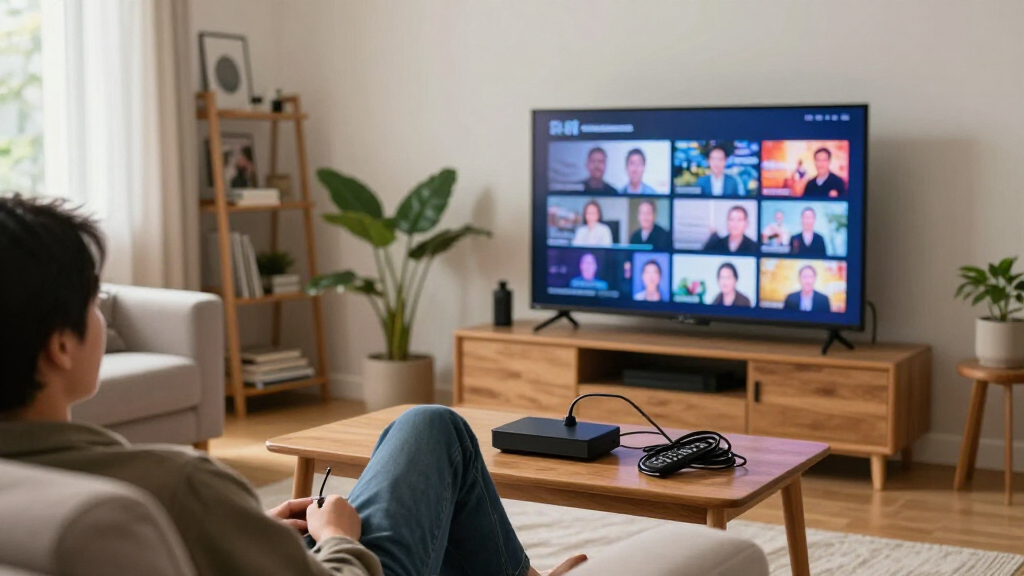
Jellyfin is the media server at the center of the described setup. A network tuner receives broadcasts from an antenna and makes them available over the home network, while Jellyfin presents the channels and recordings through its TV interface. Tunarr adds scheduled, internet-free-style channels assembled from the contributor’s existing media collection; these are distinct from live broadcasts received over the air.
Reception and channel availability are local. The contributor says he lives in a rural area and receives a limited selection, but enough channels for his needs. He previously relied on streaming TV for local news and sports because his earlier OTA reception was poor. Moving the antenna to a better location changed what he could receive. His experience therefore depends on antenna placement, nearby broadcast signals and a network that can carry the streams.
The setup also involves recurring upkeep even without a TV subscription. The contributor describes updating the tuner firmware, setting up the guide data and scheduling a script to refresh it. He does not provide a complete equipment budget or a measured comparison of total costs, so the report supports a description of his own arrangement rather than a general claim about savings.
““Cable and streaming TV services like Hulu Live and YouTube TV are monthly expenses I don’t need.””
— The XDA Developers contributor describing his decision
indoor HDTV antenna long range with coax cable
As an affiliate, we earn on qualifying purchases.
As an affiliate, we earn on qualifying purchases.
Reception, Costs and Service Limits
The account does not specify the tuner’s purchase price, the full cost of the antenna and server, or how much the contributor spends on storage and electricity. It also gives no channel count, measured reception data or detailed comparison of monthly expenses. The claim that the arrangement costs less is plausible for his circumstances, but the article does not establish a universal savings figure.
Availability will vary by location and antenna placement, and the report does not say whether the contributor’s channel lineup includes every local station or sports broadcast he previously watched. It also does not quantify how much storage his recordings use or describe the long-term maintenance burden. Viewers considering the same approach would need to check local reception, tuner compatibility, network performance and the guide-data options available to them.
The contributor’s statement that streaming services remove recordings within a set period describes his experience with a subscription and is not a detailed comparison of every provider or plan. The report does not establish the current recording-retention terms for all live-TV services. It likewise does not claim that self-hosted recordings eliminate any legal or technical restrictions; it describes how files are stored in his own setup.
Wi-Fi to Ethernet bridge wireless adapter
As an affiliate, we earn on qualifying purchases.
As an affiliate, we earn on qualifying purchases.
What Viewers Should Check First
The next steps for anyone considering a similar arrangement are practical: check which OTA channels reach the home, find an antenna location with usable reception, and confirm that the tuner can connect to the network from that spot. If using an extender’s Ethernet port, check that it supports the required bridging function and that the wireless connection can handle the video traffic.
Prospective users should also confirm that their tuner and Jellyfin setup support the channels and guide workflow they want. The contributor’s account indicates that guide data may need an XMLTV file and an update script, so users should account for that configuration and ongoing upkeep. They should estimate the storage needed for recordings and custom media channels before treating local retention as unlimited in practice.
No broader product announcement or service change is reported. The development here is an individual’s account of replacing a subscription with a locally maintained arrangement; whether it works for another household will depend on reception, equipment, channel needs, storage and willingness to manage the system.
external hard drive for media server DVR recordings
As an affiliate, we earn on qualifying purchases.
As an affiliate, we earn on qualifying purchases.
Key Questions
What equipment did the contributor use to add live TV to Jellyfin?
He used an antenna, a refurbished HDHomeRun network tuner, a Jellyfin server and a Wi-Fi extender with an Ethernet port that supported Wi-Fi-to-Ethernet bridging. He says a wireless bridge or mesh node could also work if the connection is strong enough.
Does Jellyfin automatically provide the TV guide?
In the contributor’s setup, adding a guide required an XMLTV file and a script to update it. He scheduled that script to run with Task Scheduler and said the process involved more configuration than the guide workflow he described for Plex.
Can Jellyfin channels include media from a personal library?
The contributor used Tunarr to make scheduled channels from his own films, documentaries, music videos and music files. These custom channels appeared alongside the over-the-air channels in his Jellyfin guide.
Does this setup mean recordings require no storage budget?
No. The contributor can retain recordings on his server for as long as he wants, but he notes that OTA recordings take up substantial storage. The report gives no estimate of recording sizes or total storage costs.
Is this a replacement for every paid live-TV service?
Not necessarily. The contributor says the limited channels he receives meet his needs, while acknowledging that OTA TV offers fewer top channels than streaming. The setup’s usefulness depends on local reception, desired programming and willingness to manage equipment and storage.
Source: XDA Developers
Halloween Picks
halloween
As an affiliate, we earn on qualifying purchases.